What Is AI Notification Automation? A 2026 Guide
2026-07-25

AI notification automation is the use of artificial intelligence to monitor events across your tools, enrich those events with context, and route the right alert to the right person at the right time, without anyone manually watching a dashboard. The industry term you'll encounter in technical documentation is "intelligent notification orchestration," though the concept maps directly to what most teams call automated notifications AI. At its core, it replaces the old if-this-then-that trigger model with a decision engine that actually thinks before it sends.
Table of Contents
- What is AI notification automation and how it works at a high level
- Key benefits that make AI notification management worth implementing
- How AI notification automation works under the hood
- Real-world use cases where automated notifications AI delivers results
- Best practices and pitfalls to avoid when setting up notification automation
- How Clawbase simplifies AI notification automation for your team
- Clawbase gives you always-on AI notification automation without the setup cost
- Key Takeaways
What is AI notification automation and how it works at a high level
AI notification automation uses artificial intelligence to handle three jobs that humans currently do manually: monitoring data streams across platforms, enriching raw events with contextual meaning, and routing alerts to the correct channel or person. Think of it as adding a brain between your tools and your inbox.
The core components are:
- Event monitoring: Continuous watching of forms, orders, calendars, CRM updates, and app activity across your entire tech stack
- Context enrichment: Applying natural language processing (NLP) and machine learning to add sentiment, priority scores, and relevant history to each raw event
- Intelligent routing: Delivering the enriched alert to the right channel (email, SMS, Slack, in-app push) based on urgency, recipient context, and organizational rules
- Content generation: Using large language models (LLMs) to write fresh, personalized message copy rather than pulling from static templates
Common delivery channels include email, chat platforms like Slack and Discord, SMS, and mobile push notifications. The practical payoff is faster response times, less manual monitoring, and alerts that people actually act on.
Key benefits that make AI notification management worth implementing
The most immediate gain is instant awareness. When an incident ticket opens, a lead submits a form, or an order status changes, the right person knows within seconds rather than minutes. That speed compounds across a team.
Beyond speed, the benefits stack up quickly:
- Proactive issue detection: AI scores events by urgency and surfaces problems before they escalate, rather than waiting for a human to notice something is wrong
- Reduced notification overload: Knowledge workers lose up to 3 hours daily to notification overload and context switching across many apps. AI triage cuts that by consolidating and prioritizing what actually needs attention
- Personalized relevance: Messages are tailored to the recipient's history and role, so a developer gets a different alert framing than a sales manager for the same underlying event
- Workflow efficiency: Eliminating manual checking and repetitive data entry frees teams to focus on higher-value work
Pro Tip: *Don't measure success only by how many notifications you send. Track how many get acted on. A drop in notification volume paired with a rise in response rate is the signal that your AI routing is working.*
How AI notification automation works under the hood

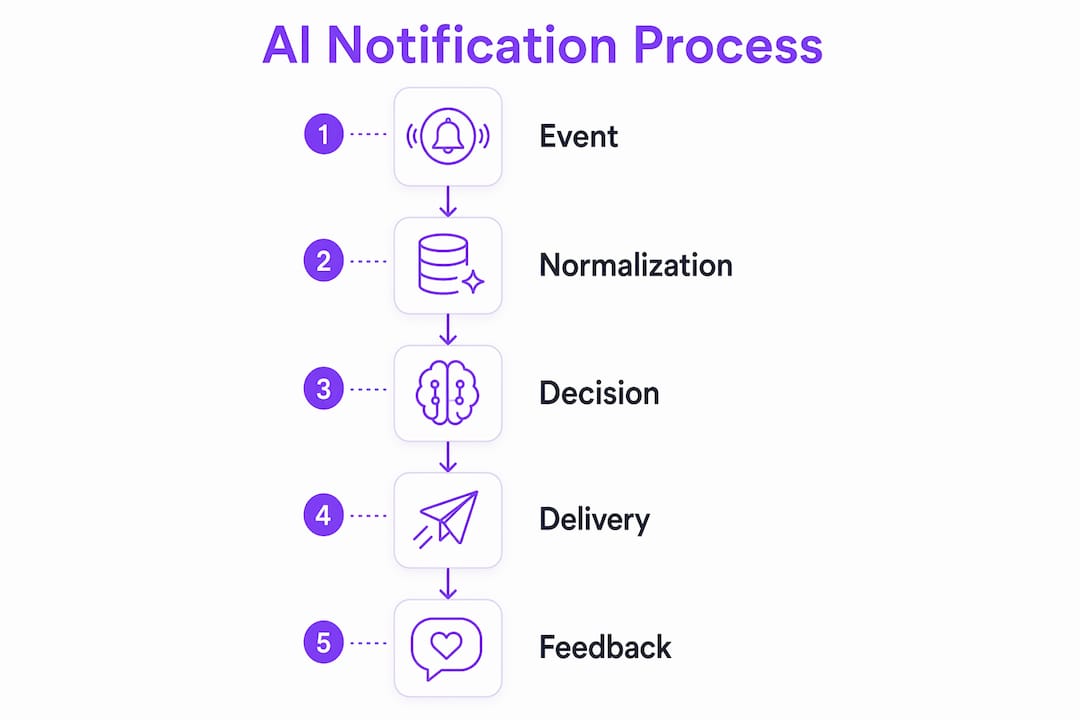
The architecture behind modern notification automation has moved well past simple rule trees. A decision pipeline scores every event on a 0–100 scale, assembles cross-team context from memory, and makes a real-time call: send now, defer to a digest, or skip entirely.
Here's how the four stages typically run:
- Pre-filter: Deduplication and daily caps catch obvious skips before any AI model is called. The same event type for the same person within a short window gets suppressed automatically
- Context assembly: The engine pulls governance rules (brand voice, quiet hours, frequency limits), the recipient's profile, semantic memory of past interactions, and a log of recently sent messages, all in parallel
- AI scoring: A single model call receives all assembled context and returns a score plus a human-readable reasoning field you can audit
- Deliver and learn: On a SEND decision, the channel fires the message. On DEFER, the event queues for a personalized digest. Either way, the outcome is written back to the recipient's profile, creating a feedback loop that improves future decisions
Hybrid architectures go a step further, using event normalization layers alongside LLM-powered decision engines to semantically analyze notification content before routing. The result is a system that gets smarter with every send.
| Stage | Technology involved | Output |
|---|---|---|
| Event monitoring | Webhooks, API polling, CRM connectors | Raw event payload |
| Context enrichment | NLP, embedding-based semantic search | Scored, contextualized event |
| AI decision | LLM scoring (0–100) | SEND / DEFER / SKIP |
| Delivery | Email, SMS, Slack, push, Discord | Personalized message |
| Learning | Feedback loop, memory update | Improved future scoring |

Pro Tip: *When evaluating notification engines, ask whether the decision reasoning is auditable. A system that can show you why it sent or skipped a specific alert is far easier to tune than one that behaves like a black box.*
Real-world use cases where automated notifications AI delivers results
The gap between theory and practice closes fast once you see how teams actually deploy these systems. A few concrete scenarios:
- Incident ticket summarization: An AI agent monitors your support queue, summarizes new tickets with severity context, and routes them to the on-call engineer via Slack before the ticket is even opened in the browser
- Real-time lead distribution: A form submission triggers enrichment (company size, intent signals, source channel) and routes the lead to the right sales rep with a pre-written context brief, not just a raw name and email
- Personalized customer updates: Order status changes, shipping delays, or account alerts generate unique message copy per recipient rather than a generic template, which tends to improve open rates and reduce support contacts
- Centralized notification inbox: Tools like AI notification managers pull Slack, Gmail, Outlook, and Asana into one intelligent hub, letting teams triage everything from a single feed
- Automated event workflows: Confirmations, reminders, and cancellations fire automatically with personalized copy, keeping participants informed without anyone manually drafting messages
- Daily AI briefings: Each morning, an AI agent compiles what happened overnight, what's urgent, and where each project stands across every connected app, delivered as a short audio or text summary
These use cases share a common thread: the AI handles the monitoring and drafting work, while the human handles the decision or action that follows.
Best practices and pitfalls to avoid when setting up notification automation
The biggest mistake teams make is treating automation as a volume play. Sending more notifications faster does not improve engagement. Excessive frequency leads to unsubscribes, spam flags, and the exact notification fatigue the system was supposed to solve.
Practices that actually work:
- Set frequency limits: Define a minimum gap between notifications per user (for example, no more than one alert per channel per 40 minutes for non-critical events)
- Use approval flows for new automation rules: Have a human review AI-suggested notification content before a new campaign or rule goes live, especially for customer-facing messages
- Align notifications with business goals: Every alert should map to an action the recipient can take. If there's no clear next step, the notification probably shouldn't send
- Monitor unsubscribe and spam rates: These are the clearest signals that your frequency or content quality has drifted
Pro Tip: *Build a feedback loop from day one. Log every SEND, DEFER, and SKIP decision alongside the outcome (was the alert acted on?). That data is what lets you tune scoring thresholds over time rather than guessing.*
The quality control checklist worth running before any automation goes live: Does the message have a clear call to action? Does the tone match your brand? Would a human have sent this manually? If the answer to any of those is no, the rule needs revision.
How Clawbase simplifies AI notification automation for your team
Clawbase makes the technical side of AI notification automation accessible without requiring a dedicated sysadmin or weeks of configuration. It deploys OpenClaw, a powerful open-source AI assistant, with one click on a dedicated server, and the agent is live with 99.9% uptime and persistent memory from the start.
For teams implementing notification automation, the practical advantages are:
- No infrastructure overhead: One-click deployment means no server configuration, no dependency management, and no maintenance cycles eating into your team's time
- Native communication platform integration: Clawbase connects directly to Telegram and Discord, two of the most common channels for real-time team alerts, without custom API work
- Persistent memory: The AI agent retains context across sessions, so it learns your team's notification preferences and routing patterns over time rather than starting fresh each day
- Access to over 50 AI models: Teams can select the model best suited to their notification use case, whether that's a fast model for high-volume triage or a more capable one for nuanced content generation
| Clawbase capability | Benefit for notification automation |
|---|---|
| One-click deployment | Live in minutes, no sysadmin required |
| 99.9% uptime | Always-on monitoring with no gaps |
| Telegram and Discord integration | Alerts reach teams where they already work |
| Persistent memory | Routing preferences improve automatically over time |
| 50+ AI models | Right model for each notification task |
Pro Tip: *Start with one high-signal notification workflow, such as incident alerts or lead routing, before expanding. Clawbase's persistent memory means the agent gets meaningfully better at that workflow before you add complexity.*
The AI tools available to business professionals in 2026 span a wide range of complexity and cost. Clawbase sits in a distinct position: it gives teams the power of a fully configured AI agent without the engineering overhead that usually comes with it.
Clawbase gives you always-on AI notification automation without the setup cost
Skip the months of infrastructure work. Clawbase deploys a private, always-on AI agent in one click, with direct integration into Telegram and Discord, persistent memory that learns your team's workflows, and access to over 50 AI models for every notification task from triage to content generation.

Teams that have been manually monitoring dashboards, forwarding alerts, or stitching together notification rules across five different tools will find that Clawbase handles all of it from a single agent. No maintenance. No downtime. No technical prerequisites. See exactly what it can do for your workflows at Clawbase's use cases page and get started from $16/month at clawbase.to.
Key Takeaways
AI notification automation replaces manual monitoring with an intelligent decision engine that scores, enriches, and routes alerts in real time, improving both response speed and message relevance across every channel your team uses.
| Point | Details |
|---|---|
| Core mechanism | AI monitors events, enriches them with context, and routes alerts using a scored decision pipeline. |
| Notification overload is measurable | Knowledge workers lose up to 3 hours daily to notification overload across 10+ apps. |
| Quality over volume | Frequency limits, approval flows, and feedback loops prevent spam and keep engagement high. |
| Decision engines beat rule trees | Scoring notifications 0–100 with memory and context produces smarter, auditable routing than static triggers. |
| Clawbase for teams | One-click deployment with 99.9% uptime, Telegram and Discord integration, and 50+ AI models removes setup barriers entirely. |