What Is an AI Assistant? A 2026 Explainer
2026-06-15

An AI assistant is software that uses artificial intelligence to interpret natural language and perform tasks on your behalf. Tools like Siri, Microsoft Copilot, and Google Assistant have made this technology familiar to millions, but the category has grown far beyond voice commands and calendar reminders. Today's AI assistants connect to real systems, execute multi-step workflows, and handle tasks that once required dedicated staff. This article breaks down how they work, what separates them from chatbots and AI agents, and what you should know before choosing one for personal or professional use.
How do AI assistants understand and execute tasks?
AI assistants combine NLP with orchestration of backend tools to execute actions, not just generate text. Understanding this distinction is the difference between a tool that answers questions and one that actually gets things done.
The process works in layers:
- Input parsing. The assistant receives your command in natural language. Natural language processing (NLP) breaks the sentence into intent, entities, and context. When you say "Schedule a meeting with Sarah for Thursday afternoon," the model identifies the action (schedule), the participant (Sarah), and the time constraint (Thursday afternoon).
- Reasoning and planning. A large language model (LLM) like GPT-4o or Claude 3.5 interprets the parsed input and decides what steps are needed. This is where the assistant moves beyond simple pattern matching into genuine reasoning.
- Tool calls. The model emits structured calls to external functions or APIs. Tool calls translate model output into real-world task execution over external systems. This is the step most people never see, and it is the one that makes the assistant genuinely useful rather than just conversational.
- Backend execution. The connected system, whether a calendar API, email client, or file manager, carries out the action and returns a result to the model.
- Response synthesis. The assistant reports back to you in natural language, confirming what was done or asking for clarification if needed.
This architecture explains why two assistants built on the same underlying model can perform very differently. The model is table stakes. The integration layer is where capability lives.
Pro Tip: *When evaluating any AI assistant, ask specifically which tool calls it supports. An assistant without tool integrations is a chatbot with better vocabulary. The function calling guide from Clawbase explains exactly how this mechanism works in plain terms.*

A practical example: an AI scheduling assistant does far more than book a slot. It coordinates complex calendar tasks with negotiation, follow-ups, and context tracking across multiple sessions. That requires persistent state, tool calls to calendar APIs, and the ability to handle back-and-forth with other parties. That is a fundamentally different capability than answering "What time is it in Tokyo?"
AI assistants vs. chatbots vs. AI agents: what's the difference?
These three terms get used interchangeably, and that creates real confusion about what you can actually expect from a tool. The distinctions matter.
| Category | Behavior | Autonomy Level | Example |
|---|---|---|---|
| **Chatbot** | Follows fixed scripts and decision trees | None | Rule-based customer service bot |
| **AI Assistant** | Interprets intent, responds contextually, executes tasks on request | Low to medium, user-prompted | Siri, Microsoft Copilot, Google Assistant |
| **AI Agent** | Executes multi-step workflows autonomously with minimal prompting | High, self-directed | AutoGPT, OpenClaw agent workflows |
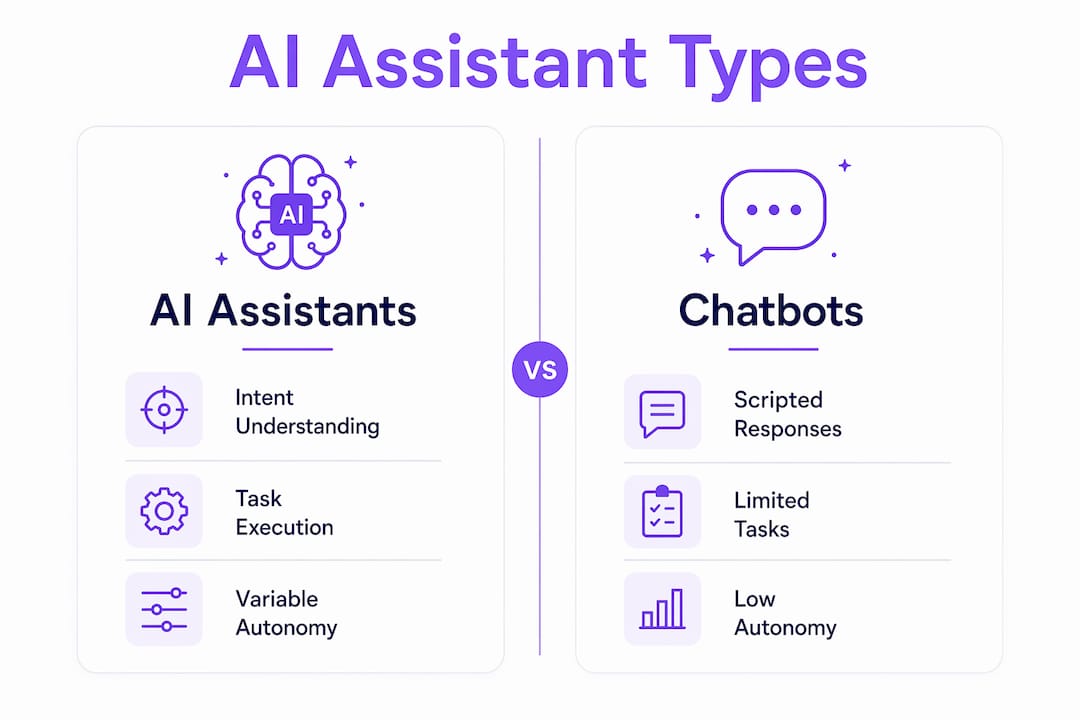
AI assistants differ from chatbots by interpreting intent rather than matching keywords, and from AI agents by being reactive rather than autonomous. A chatbot asks "Did you mean option A or option B?" An assistant understands what you meant and acts. An agent goes further: it breaks a goal into sub-tasks, executes them in sequence, and reports back when the job is complete.
The practical implication is this: if you need a tool that responds to your commands and handles discrete tasks, an AI assistant fits. If you need something that runs a workflow while you focus elsewhere, you are looking at agent territory. Most professionals start with assistants and graduate to agents as their comfort with AI grows.
What are the main types of AI assistants?
AI virtual assistant examples span a wide range of use cases, from consumer devices to enterprise software. Here is how the major categories break down and what they actually do:
- Personal assistants. Siri on iOS, Amazon Alexa on Echo devices, and Google Assistant on Android handle daily task automation: setting reminders, playing music, answering factual questions, and controlling smart home devices. These are the most widely used AI assistants in the world, and they operate primarily through voice commands.
- Productivity and business assistants. Microsoft Copilot integrates directly into Word, Excel, Outlook, and Teams. It drafts emails, summarizes documents, generates formulas, and pulls data from across your Microsoft 365 environment. This category delivers the most measurable no-code productivity gains for professionals who live inside office software.
- AI scheduling assistants. This is a specialized category worth calling out separately. Tools in this space manage multi-step calendar coordination, including sending availability, handling replies, rescheduling conflicts, and tracking follow-ups. The role of APIs in these tools is significant: they connect to Google Calendar, Outlook, and communication platforms to act on your behalf across systems.
- Developer and technical assistants. GitHub Copilot suggests code completions and explains functions inline. These assistants integrate directly into IDEs like VS Code and JetBrains, making them context-aware in a way that general-purpose assistants are not.
- Private and self-hosted assistants. A growing segment of users, particularly in regulated industries, runs AI assistants on dedicated infrastructure to keep data off public servers. This is what "private AI assistant" means in practice: the model runs in a controlled environment, and no third party logs or trains on your inputs.
The benefits of AI assistants across all these categories include time savings on repetitive tasks, reduced cognitive load on scheduling and communication, and fewer errors in structured workflows like data entry or document formatting.
What does "private AI assistant" actually mean?
Privacy in AI is defined by data boundaries, not marketing language. Private AI assistants keep user data within controlled environments to prevent third-party access. That definition has three concrete components: where data is stored, who can read it, and whether it is used to train future models.
Consumer assistants like Siri and Google Assistant send queries to cloud servers. Those servers may log your inputs, associate them with your account, and use aggregated data to improve the model. For personal use, that tradeoff is often acceptable. For enterprise use involving legal documents, financial data, or patient records, it is frequently not.
Enterprise and private AI assistants address this in two ways. First, on-premise or dedicated server deployment keeps data within your infrastructure. Second, logging AI prompts is a design and compliance decision that impacts security and privacy risks. Organizations subject to HIPAA, GDPR, or SOC 2 need to distinguish between logging action telemetry (what the assistant did) and logging raw prompt content (what the user said). These are separate concerns with different risk profiles.
Pro Tip: *Before deploying any AI assistant in a professional context, request the vendor's data processing agreement. Ask specifically: "Does prompt content leave my infrastructure?" and "Is my data used for model training?" Vague answers to those questions are a red flag. The agent communication security guide covers the technical side of this in detail.*
The shared AI assistant model, where a single assistant instance serves multiple users in an organization, introduces additional considerations around data isolation. Each user's context should be sandboxed so that one user's queries cannot surface another's data.
What trends are shaping AI assistants in 2026?
The AI assistant category is moving fast. Several trends are worth tracking if you are making decisions about which tools to adopt or build on.
| Trend | What It Means in Practice |
|---|---|
| **Persistent memory** | Assistants now maintain context across sessions, not just within a single conversation |
| **Agent-assistant blending** | The line between reactive assistants and autonomous agents is narrowing |
| **Smart tool routing** | Systems with many integrations use routing logic to select the right tool reliably |
| **Hybrid model selection** | Assistants route tasks to different LLMs based on cost, speed, and capability |
| **On-premise deployment** | Private AI deployments are growing in regulated industries |
Persistent context and memory are critical for assistants managing multi-session workflows. Without memory, an assistant treating every conversation as a blank slate cannot manage anything more complex than a single-turn request. Think of memory as layers in a stack: short-term context for the current session, medium-term memory for ongoing projects, and long-term storage for user preferences and history.
Assistants with many integrations require smart tool selection and routing to maintain reliability and performance. As the number of available tools grows, the assistant needs logic to pick the right one without hallucinating a tool call or selecting a slower path when a faster one exists. This is an active area of development in 2026, and it separates production-grade assistants from demos.
Key takeaways
AI assistants deliver real productivity gains only when they connect to external systems and execute actions, not just generate text responses.
| Point | Details |
|---|---|
| Core definition | An AI assistant interprets natural language and performs tasks using NLP, LLMs, and tool integrations. |
| Assistants vs. agents | Assistants are user-prompted and reactive; agents execute multi-step workflows autonomously. |
| Tool calls drive value | Productivity improvements come from tool integrations, not text generation alone. |
| Privacy requires specifics | Evaluate data policies by asking where prompts are stored and whether they train future models. |
| Memory enables complexity | Persistent context across sessions is what separates capable assistants from single-turn tools. |
The part most people skip when choosing an AI assistant
I have spent a significant amount of time testing AI assistants across personal and professional contexts, and the single most common mistake I see is treating them as interchangeable. People pick the most popular option, get frustrated when it cannot do what they expected, and conclude that AI assistants are overhyped. The tool was not the problem. The mismatch between capability and expectation was.
My honest recommendation: start with an integrated assistant before chasing agent features. Microsoft Copilot inside Outlook or Google Workspace's Gemini integration will deliver more immediate value to most professionals than a standalone agent that requires configuration. Once you understand what the assistant can and cannot do within a familiar environment, you are in a much better position to evaluate whether you need something more autonomous.
The privacy question also gets underestimated. I have seen teams deploy consumer-grade assistants for workflows involving sensitive client data, simply because no one asked the right questions at the procurement stage. The developer productivity tooling guide covers this well in the context of engineering teams, but the principle applies broadly: know your data boundaries before you start.
The other thing I would push back on is the idea that more autonomy is always better. Reactive assistants that wait for your command are easier to audit, easier to correct, and easier to trust. Autonomy is a feature you earn confidence in over time, not a default setting you turn on from day one.
> *— Iosif Peterfi*
Run a private AI assistant without the setup headache
If this article has you thinking about deploying a private, always-on AI assistant for your own workflows, Clawbase is worth a close look.

Clawbase provides managed OpenClaw hosting starting at $16 per month, with one-click deployment on a dedicated server. You get 99.9% uptime, persistent memory management, and access to over 50 AI models, with no sysadmin work required. OpenClaw integrates with Telegram, Discord, and other communication platforms out of the box. For professionals who want a private AI assistant that actually executes tasks rather than just answering questions, the OpenClaw use cases page shows exactly what is possible without writing a single line of infrastructure code.
FAQ
What is an AI assistant in simple terms?
An AI assistant is software that understands natural language commands and performs tasks on your behalf, using NLP and LLMs to interpret what you want and tool integrations to carry it out.
How does an AI scheduling assistant work?
An AI scheduling assistant connects to calendar APIs and communication tools to coordinate meetings, send availability, handle replies, and track follow-ups across multiple sessions with persistent context.
What is a private AI assistant?
A private AI assistant runs on dedicated or on-premise infrastructure so that your prompts and data stay within a controlled environment, with no third-party logging or model training on your inputs.
What is the difference between an AI assistant and an AI agent?
An AI assistant is reactive and executes tasks when prompted by a user. An AI agent operates more autonomously, breaking goals into sub-tasks and executing multi-step workflows with minimal ongoing input.
What are the main benefits of AI assistants for professionals?
The primary benefits include time savings on repetitive tasks, reduced errors in structured workflows, and the ability to delegate scheduling, drafting, and data retrieval to a system that operates faster than manual effort.