Reduce Manual Work with AI Agents in 2026
2026-07-08

Reducing manual work with an AI agent means deploying intelligent automation systems that handle repetitive tasks with minimal human input. The industry term for this is "agentic AI," referring to systems that plan, execute, and adapt across multi-step workflows without constant supervision. AI agentic systems collapse weeks of manual work into hours by automating complex, end-to-end processes like batch spreadsheet edits and sales pipeline reviews. Organizations using AI agents reduce operational errors by up to 80–90% compared to manual processes. That error reduction translates directly into lower rework costs and faster output cycles. For teams drowning in repetitive tasks, agentic AI is no longer experimental. It is production-ready infrastructure.
Which types of manual tasks can AI agents automate effectively?
AI agents are best suited for tasks that are high-frequency, rule-driven, or involve processing large volumes of unstructured data. The key distinction from older automation tools is adaptability. A traditional rule-based script breaks when the input format changes. An AI agent reads context and adjusts.
Common task categories that AI agents handle well include:
- Data entry and validation: Pulling data from emails, PDFs, or forms and populating databases without manual review.
- Scheduling and calendar management: Parsing natural language requests and booking meetings across time zones. Clawbase supports this through its always-on agent that integrates with communication platforms like Telegram and Discord.
- Email triage: Categorizing, prioritizing, and drafting replies to inbound messages based on intent and urgency.
- Reporting: Aggregating data from multiple sources and generating formatted summaries on a schedule.
- Customer support workflows: Routing tickets, pulling account history, and drafting first-response messages.
- Operational alerts: AI agents triage alerts, route work, and automate communication to reduce manual operational load while keeping humans in the loop for critical decisions.
The deeper advantage is that AI agents handle unstructured inputs and adapt decisions where rule-based automation fails. They operate on inconsistent inputs like varied customer support tickets or leads with missing fields. That flexibility is what separates agentic AI from a simple macro or script.
Pro Tip: *Start with your highest-frequency tasks. If your team spends more than two hours per day on a single repeating process, that task is your first automation target.*

What tools and platforms enable AI agent automation today?
The enterprise AI agent market now includes platforms built specifically for production-grade automation at scale. Understanding their pricing models and feature sets helps you choose the right fit before committing.
Microsoft Copilot Cowork uses usage-based billing starting at $0.01 per Copilot Credit, with pricing driven by model use, context retrieval, tool calls, and runtime. That model rewards efficiency. Agents that complete tasks quickly with fewer tool calls cost less to run. Amazon Quick Flows enables natural language creation of AI workflows to automate repetitive business processes without coding skills, with documented use cases including financial reporting and employee onboarding.
For teams that want a private, always-on agent without managing cloud infrastructure, Clawbase offers managed AI agent hosting starting at $16/month. It runs on a dedicated server with 99.9% uptime, persistent memory, and access to over 50 AI models, all without requiring sysadmin expertise.
| Feature category | Entry-level platforms | Enterprise platforms | Clawbase managed hosting |
|---|---|---|---|
| Workflow creation | Template-based | Natural language or low-code | Natural language via OpenClaw |
| Model access | Single model | Multi-model | 50+ AI models |
| Pricing model | Flat monthly fee | Usage-based (PayGo or volume) | Flat monthly from $16/mo |
| Integration depth | Basic app connectors | Deep API and business app integration | Telegram, Discord, file systems |
| Setup requirement | Low | Medium to high | None (one-click deploy) |
| Human oversight tools | Limited | Built-in monitoring | Persistent memory management |
Pro Tip: *Track runtime and tool call frequency from day one. Long-running workflows with repeated context retrieval are the primary cost driver on usage-based platforms.*
How to implement AI agents to reduce manual work: step-by-step workflow
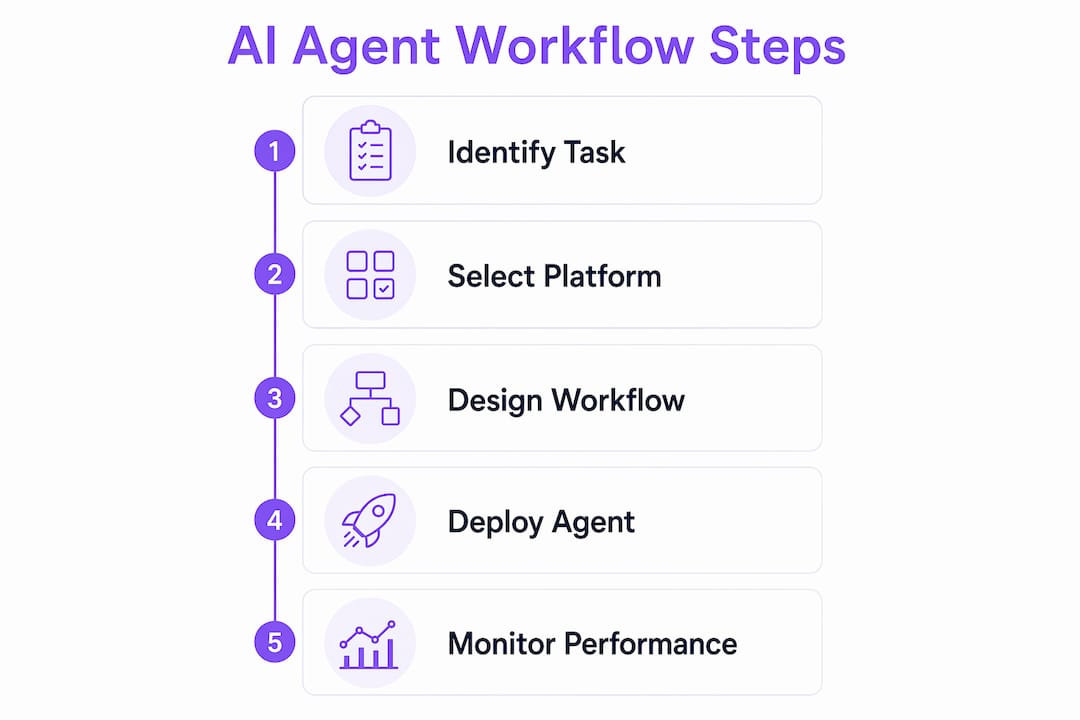
The transition to AI-driven automation typically follows a 5–7 step process that moves from isolated task automation to full workflow ownership. Skipping steps, especially testing and measurement, is the most common reason implementations stall.
- Identify repetitive and rule-based tasks. Map your team's daily workflows. Flag tasks that repeat daily or weekly, consume significant time, and follow a predictable pattern.
- Select an AI agent platform. Match platform capabilities to your integration needs. If your team uses Telegram or Discord, Clawbase connects natively. If you need deep enterprise app integration, evaluate platforms with API-first architecture. The role of APIs in AI integration is critical at this stage.
- Design workflows using natural language or low-code tools. Platforms like Amazon Quick Flows let you describe a workflow in plain English and generate the automation logic automatically. No coding required.
- Test accuracy and set oversight rules. Run the agent on a subset of real tasks. Measure output quality and define the conditions that trigger a human review. PagerDuty's approach emphasizes gradual automation with reliability checkpoints built in.
- Measure outcomes with specific metrics. Track time saved per task, error rate before and after, and how often the agent requires human intervention. These three metrics tell you whether the automation is working or drifting.
- Scale cross-functionally. Once a workflow proves reliable in one team, replicate the pattern in adjacent departments. Effective implementations shift from isolated tasks to full workflow ownership.
The table below shows how traditional rule-based automation compares to AI agent workflows across key dimensions:
| Dimension | Rule-based automation | AI agent workflow |
|---|---|---|
| Input type | Structured, predictable | Structured and unstructured |
| Decision-making | Fixed logic only | Adaptive, context-aware |
| Error handling | Fails on exceptions | Adjusts or escalates |
| Setup complexity | Low to medium | Medium (lower with managed platforms) |
| Maintenance burden | High (rules break with changes) | Lower (agent learns from context) |
| Best use case | Stable, repetitive processes | Variable, multi-step workflows |
For teams new to this process, the beginner AI assistant checklist from Clawbase covers each step in practical detail.
What are common challenges when using AI agents?
The biggest hidden cost in agentic AI is not the subscription fee. It is the compute cost from long-running, multi-tool workflows that retrieve context repeatedly and call external APIs at every step. Teams that deploy agents without monitoring often see usage bills spike within the first month.
The primary cost drivers to track are:
- Model selection: Larger models cost more per call. Use the smallest model that delivers acceptable output quality for each task type.
- Context retrieval frequency: Agents that pull from large knowledge bases on every step accumulate retrieval costs fast. Cache frequently used context where the platform allows.
- Tool call volume: Each external API call adds latency and cost. Design workflows to batch tool calls rather than trigger them individually.
- Runtime duration: Proactively monitoring AI agent workflows improves cost management because long-running workflows inflate usage bills. Set runtime limits and alert thresholds.
Workflow overreach is a separate problem. An agent given too much autonomy will occasionally make decisions that require correction, which costs more time than the original manual task. The fix is to define clear escalation rules: specify which outputs require human sign-off before the agent proceeds. PagerDuty's operational model treats human oversight not as a failure of automation but as a reliability feature built into the design.
Pro Tip: *Track ROI at the workflow level, not just API costs. A workflow that saves 10 hours per week is worth a higher compute bill than one that saves 30 minutes.*
Key Takeaways
AI agents deliver the greatest productivity gains when teams start with high-frequency tasks, monitor costs at the workflow level, and build human oversight into the design from the start.
| Point | Details |
|---|---|
| Start with high-frequency tasks | Target processes your team repeats daily before moving to complex workflows. |
| AI agents outperform rule-based tools | They handle unstructured inputs and adapt decisions where fixed scripts fail. |
| Monitor cost drivers actively | Track model use, context retrieval, tool calls, and runtime to prevent bill spikes. |
| Test before scaling | Measure error rate and intervention frequency on a small task set before expanding. |
| Managed platforms lower the barrier | Platforms like Clawbase remove setup complexity so teams focus on workflow design, not infrastructure. |
What I've learned from watching teams adopt agentic AI
Most teams approach AI agents the wrong way. They treat the agent like a faster version of their existing tools, assigning it small, isolated tasks and measuring success by whether it completes them correctly. That mindset misses the actual value.
Microsoft's 2026 guidance makes this explicit: users should assign complex, long-running tasks to AI agents for final, production-ready results rather than drafts. That is a real mindset shift. It means trusting the agent to own a workflow end-to-end, not just assist with one step.
What I have seen work consistently is starting with one workflow that has a clear, measurable output. Not "help with emails" but "triage all inbound support tickets, categorize by urgency, and draft a first response for any ticket flagged as high priority." That specificity gives you something to measure and something to improve.
The teams that struggle are the ones that automate broadly and measure loosely. They deploy agents across five workflows simultaneously, skip the testing phase, and then cannot diagnose which workflow is causing errors or inflating costs. Slow, deliberate scaling beats fast, broad deployment every time.
The future of agentic AI is not replacing human judgment. It is removing the cognitive load of repetitive decisions so human judgment gets applied where it actually matters. That balance, between autonomous operation and reliable oversight, is what separates a well-designed AI workflow from a liability.
> *— Iosif Peterfi*
AI agent automation made accessible with Clawbase
Deploying an AI agent should not require a dedicated IT team or weeks of configuration. Clawbase makes that a reality by offering managed OpenClaw hosting from $16/month, with one-click deployment on a dedicated server and zero maintenance overhead.

Clawbase runs a private, always-on AI agent with persistent memory, access to over 50 AI models, and native integration with Telegram and Discord. Whether you are automating file management, scheduling, or multi-step communication workflows, the platform handles the infrastructure so you can focus on designing the workflows that matter. The Clawbase use cases page shows practical examples of how teams are using AI agents to cut manual workload across real business processes.
FAQ
What does an AI agent actually do to reduce manual work?
An AI agent executes multi-step tasks autonomously, from data entry and email triage to reporting and alert routing, with minimal human input. Unlike simple scripts, AI agents adapt to unstructured inputs and handle exceptions without breaking.
How much can AI agents reduce operational errors?
Organizations using AI agents reduce operational errors by up to 80–90% compared to manual processes. That reduction comes from consistent execution logic and the elimination of human fatigue errors on repetitive tasks.
Do I need coding skills to set up an AI agent workflow?
No. Platforms like Amazon Quick Flows and Clawbase support no-code workflow creation through natural language input. You describe what you want the agent to do, and the platform generates the automation logic.
How do I control costs when using AI agents?
Monitor model selection, context retrieval frequency, tool call volume, and runtime duration. Usage-based platforms like Microsoft Copilot Cowork bill on all four dimensions, so optimizing each one directly reduces your monthly cost.
When should a human still be involved in an AI agent workflow?
Human oversight is necessary for high-stakes decisions, outputs that affect customers directly, and any step where an error would be costly to reverse. Build escalation rules into your workflow design from the start, not as an afterthought.