How to Use AI Without Technical Skills in 2026
2026-06-06

Using AI without technical skills means giving plain-language instructions to software that builds apps, automates tasks, and manages workflows on your behalf. This approach, formally called no-code AI development, has moved from niche experiment to mainstream practice in 2026. Tools like Google Gemini Spark, Lovable, and Bolt.new let you describe what you want in plain English and watch the system execute it. The practical payoff is real: automating repetitive tasks like email triage and scheduling can save 10 to 20 hours per week, which means more time spent on work that actually requires your judgment.
What do you need to start using AI without technical skills?
The single prerequisite for using AI as a non-technical user is not a computer science degree. It is the ability to describe a problem clearly. Problem clarity outweighs coding skills as the primary competitive advantage for non-technical AI users, according to practitioners who build with these tools daily. That reframes the whole challenge: you are not learning to code, you are learning to communicate precisely.
Before you open any tool, it helps to debunk a few persistent myths:
- You need to understand machine learning math. False. Modern AI platforms abstract all of that behind a chat interface or drag-and-drop builder.
- You need API keys and server access. Not anymore. Managed platforms like Clawbase handle infrastructure entirely, so you never touch a terminal.
- AI tools are only for developers. The fastest-growing user segment for tools like Lovable and Bolt.new is non-technical founders and operations professionals.
- You need expensive hardware. A standard laptop and a reliable internet connection are sufficient for every tool covered in this article.
The mindset shift that matters most is treating AI as a collaborator rather than a vending machine. You give it context, it produces output, you refine. That iterative loop is the entire workflow. You do not need to understand how a large language model works internally any more than you need to understand combustion to drive a car.
Pro Tip: *Before touching any AI tool, write a two-sentence description of the specific problem you want to solve. Vague inputs produce vague outputs. Specific inputs produce usable results.*

One concept worth knowing is "vibe coding," the industry term for building apps through natural language commands with no manual coding. Platforms like Lovable and Bolt.new charge $15 to $25 per month and let you describe a full application, including its database, user interface, and logic, and generate it automatically. This is not a toy feature. It is the mechanism that makes AI genuinely accessible to non-technical users.
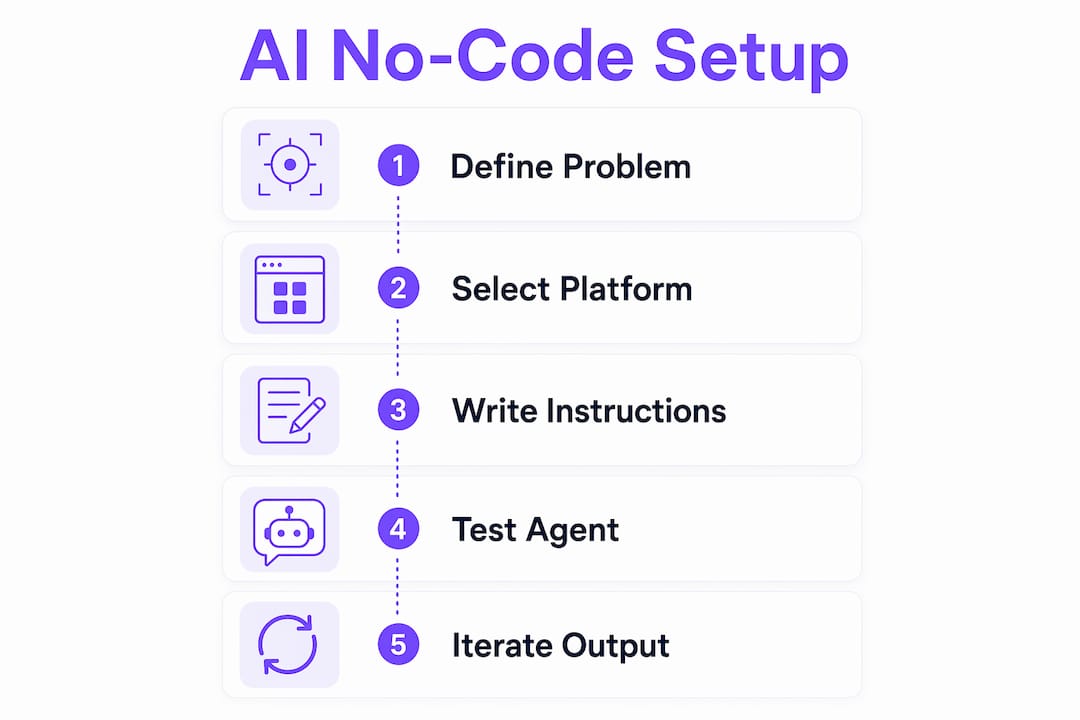
How to set up your first AI agent with no code
Most non-technical users start with AI as a chatbot and stop there. That is the lowest-value use case. Persistent AI agents running in familiar channels deliver the real productivity gains, because they work continuously without requiring you to initiate every interaction.
Here is a practical setup sequence that works for beginners:
- Define one specific goal. Pick a single, bounded task: summarize my daily emails, qualify inbound leads, or draft first-pass responses to support tickets. One task, not five.
- Select one tool or action. Identify what the agent needs to do mechanically. Read an inbox, search a document, or post a message. Keep the scope narrow.
- Choose a trigger and a channel. Connecting agents to Slack or Telegram reduces behavioral friction and increases adoption, because the output lands where you already spend time.
- Configure permissions carefully. The biggest concern for non-technical users is AI making unauthorized changes. Tools like Google Gemini Spark address this directly: Gemini Spark requests permission before taking sensitive actions, keeping a human in the loop at every critical step.
- Apply the 7-day rule. Once your agent is live, let it run for one week without making changes. This gives you enough behavioral data to evaluate performance without breaking its logic through premature tinkering.
The infrastructure question is where most beginners stall. Setting up an open-source AI agent independently requires server configuration, API key management, and ongoing maintenance. Managed hosting services like Clawbase bundle infrastructure, AI credits, and updates into a single subscription, removing every one of those friction points. You skip straight to the part where the agent does useful work.
Pro Tip: *Avoid multi-task creep. The most common beginner mistake is adding a second and third job to an agent before the first one is working reliably. Nail one task, then expand.*
What are the best no-code AI platforms for beginners?
The no-code AI space has matured enough that meaningful distinctions exist between platforms. The right choice depends on whether you want to build an application, automate a workflow, or deploy a persistent AI agent.
| Platform | Best for | Pricing | Key feature |
|---|---|---|---|
| Lovable | App building via natural language | From $20/mo | Full-stack generation from text prompts |
| Bolt.new | Rapid prototyping | From $15/mo | Instant preview and deploy |
| Google Gemini Spark | Workspace automation | Included with Google One AI | Deep Google Workspace integration |
| Clawbase (OpenClaw) | Persistent AI agents | From $16/mo | 50+ models, Telegram/Discord, 99.9% uptime |
| Workshop.ai | Team workflow automation | Custom pricing | Multi-step workflow builder |
Google Gemini Spark deserves specific attention as an AI agent built for non-technical users. It runs entirely in the cloud, integrates with Gmail, Google Docs, and Google Calendar without any configuration, and handles complex multi-step tasks through natural language requests. For anyone already inside the Google ecosystem, it is the lowest-friction starting point available.
Vibe coding platforms like Lovable and Bolt.new occupy a different category. They are not agents that run autonomously. They are builders that translate your descriptions into functional software. The distinction matters: if you want something that acts on your behalf continuously, you need an agent platform. If you want to create a tool or application, a vibe coding platform is the right fit. Complex customizations still require iteration, so experienced users add features one at a time and test after each step rather than trying to specify everything upfront.
For users who want a persistent, private AI agent with memory and multi-channel support, Clawbase provides managed OpenClaw hosting that removes every infrastructure decision from the equation. You get access to over 50 AI models, persistent memory management, and integrations with Telegram and Discord, all through a one-click deployment process.
How to maximize AI effectiveness and avoid common mistakes
Getting an AI agent running is the easy part. Getting it to produce consistently useful output requires deliberate setup and a few discipline habits.
The most impactful practice is feeding the agent rich context upfront. Supplying past emails or example files gives the AI a reference for your tone, terminology, and workflow, which prevents the generic, off-brand outputs that frustrate new users. Think of it as onboarding a new colleague: the more context you provide at the start, the less correction you need later.
A second critical practice is choosing platforms that expose their outputs for inspection. Prioritizing tools with visible, editable outputs over black-box chat-only systems keeps you in control of what the AI produces. When you can see and modify the generated components, you build understanding of how the system works and catch errors before they compound.
> "The agent is only as good as the instructions it starts with. Garbage in, garbage out applies here more than anywhere else in software."
Additional habits that separate effective non-technical AI users from frustrated ones:
- Start with one integration. Connect your agent to the single app you use most. Adoption follows convenience.
- Review outputs daily for the first two weeks. Patterns in errors reveal gaps in your initial instructions.
- Iterate in writing. When you refine a prompt or instruction, write down what you changed and why. This creates a log you can reference when something breaks.
- Respect permission boundaries. Never grant an agent write access to systems it only needs to read. Minimum necessary permissions reduce risk without limiting usefulness.
Pro Tip: *When an agent produces a wrong output, do not just correct the output. Correct the instruction that caused it. Fixing symptoms without fixing the source means the same error recurs.*
Key takeaways
Effective AI use for non-technical users depends on problem clarity, the right platform choice, and disciplined iteration rather than any coding knowledge.
| Point | Details |
|---|---|
| Problem clarity is the core skill | Describing your workflow precisely matters more than any technical knowledge. |
| Start with one task and one channel | Narrow scope produces reliable agents; expand only after the first task works consistently. |
| Apply the 7-day rule | Run your agent unchanged for a week before modifying it to gather real behavioral data. |
| Choose visible-output platforms | Tools that show editable results keep you in control and accelerate learning. |
| Managed hosting removes infrastructure friction | Services like Clawbase handle servers, updates, and API management so you focus on outcomes. |
Why problem clarity is the real unlock, not the tools
I spent a long time believing the barrier to AI was technical. After testing dozens of platforms and watching non-technical colleagues build genuinely useful agents, I changed my mind. The barrier is almost always psychological, and it shows up as vague instructions.
The users I have seen get the most out of AI are not the ones who picked the most sophisticated platform. They are the ones who sat down and wrote out exactly what they wanted the AI to do, in what order, with what constraints. That document, sometimes just a paragraph, does more work than any configuration setting.
My honest recommendation is to resist the urge to explore every tool at once. Pick one problem, one platform, and commit to a two-week experiment. The AI scheduling and task automation space alone has enough depth to keep you occupied and productive for months. Breadth comes later. Depth comes first.
The psychological barrier is real. Most people assume they will break something or configure something wrong. That fear is understandable, but modern no-code platforms are designed with exactly this user in mind. The worst outcome is usually a prompt that produces a mediocre result, which you then refine. That is not failure. That is the process.
> *— Iosif Peterfi*
Deploy your first AI agent today with Clawbase
If you have been waiting for a setup that requires no server knowledge, no API key management, and no ongoing maintenance, Clawbase is built for that exact situation.

Clawbase provides managed OpenClaw hosting starting at $16 per month, giving you a private, always-on AI agent with access to over 50 AI models, persistent memory, and integrations with Telegram and Discord. One-click deployment means your agent is live in minutes, not days. You can explore the full range of agent use cases to find the workflow that fits your situation before you commit to anything. No infrastructure decisions, no technical prerequisites, just a working AI agent.
FAQ
Can I really use AI without any programming knowledge?
Yes. No-code AI platforms like Google Gemini Spark, Lovable, and Clawbase are designed specifically for users with no programming background. The only skill required is the ability to describe what you want clearly.
What is vibe coding and how does it help non-technical users?
Vibe coding is the practice of building software by describing desired functions in plain language, with no manual coding required. Platforms like Lovable and Bolt.new use this approach to generate full applications from text descriptions, typically for $15 to $25 per month.
How long does it take to set up a basic AI agent?
A basic AI agent connected to a single channel like Telegram or Slack can be configured in under an hour using a managed platform. The 7-day rule then applies: let it run unchanged for one week before evaluating or adjusting.
What is the difference between a chatbot and a persistent AI agent?
A chatbot responds only when you initiate a conversation. A persistent AI agent runs continuously, monitors triggers, and takes actions on your behalf without requiring you to start each interaction. Persistent agents deliver significantly more practical value for everyday task automation.
Is my data safe when using no-code AI platforms?
Safety depends on the platform. Tools like Clawbase offer private, dedicated deployments where your data stays on your own server. For shared cloud platforms, review the privacy policy and grant only the minimum permissions the agent needs to function.