Personal AI Agent Daily Use: Your 2026 Guide
2026-06-16

A personal AI agent is an autonomous digital assistant that manages your email, calendar, and recurring tasks without waiting to be asked. The industry term for this category is "agentic AI," and it represents a significant step beyond the reactive chatbots most people used just two years ago. Where a chatbot answers questions, a personal AI agent for daily use takes action: it reads your inbox overnight, drafts replies in your voice, schedules meetings, and delivers a morning briefing before you open your laptop. Tools like Arahi's Rahi assistant and the open-source Aitne agent already do exactly this, and the gap between early adopters and everyone else is widening fast.
What does personal AI agent daily use actually look like?
The clearest way to understand daily AI usage is to trace a single workday. Your agent wakes before you do. It reads Gmail, Slack, and your calendar overnight, then surfaces a prioritized summary: three emails need replies, one meeting requires prep, and a commitment from last Tuesday still has no follow-up. You review the summary in two minutes instead of spending thirty minutes triaging manually.
By midday, the agent has already drafted two replies in your tone and proposed three meeting slots to an external contact. Arahi's Rahi assistant remembers context and writing style, delivering drafts that sound like you after a few weeks of learning. That is not a minor convenience. It is the difference between an inbox that controls your day and one you control.

At day's end, agents like Aitne draft a one-page daily plan each morning and journal the day's outcomes each evening. That closing journal captures what got done, what slipped, and what needs attention tomorrow. Most professionals lose that context entirely and rebuild it from scratch every morning.
How do you set up integrations for your AI agent?
The setup phase determines how useful your agent becomes. Start with the four core integrations: email (Gmail or Outlook), calendar (Google Calendar or Microsoft 365), a messaging platform (Slack, Telegram, or Discord), and one task or project management tool (Notion, Todoist, or Linear). These cover roughly 80% of the daily surface area where an agent adds value.
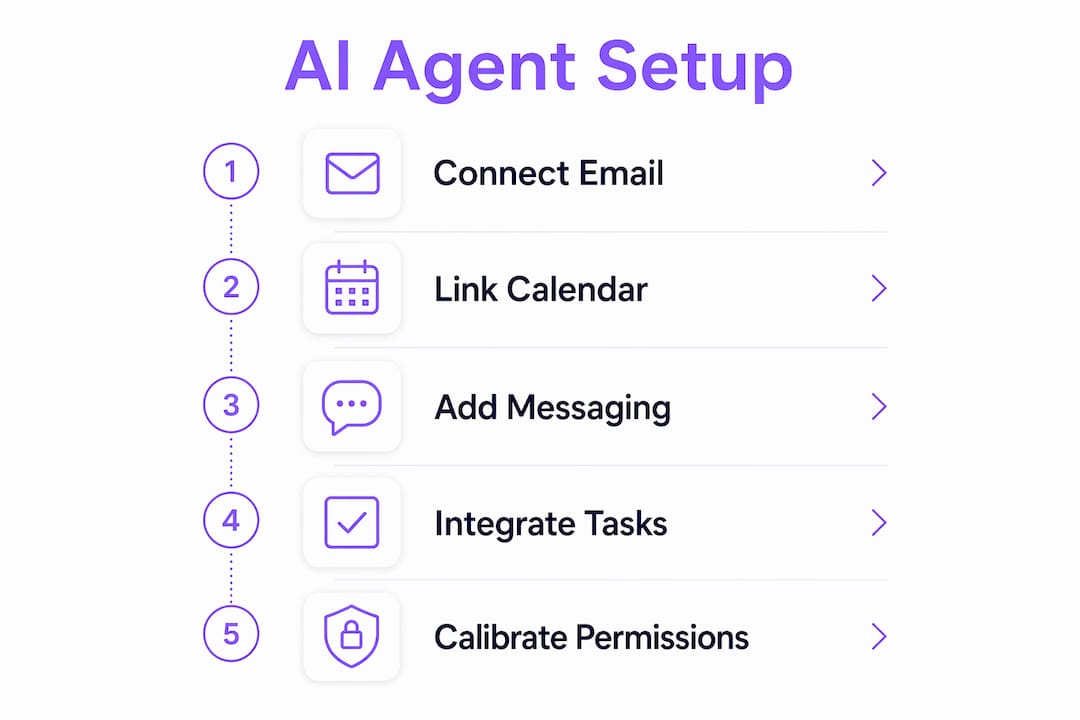
Connecting these tools no longer requires writing code. Most modern agent platforms offer no-code OAuth connections, and APIs in AI integration have become standardized enough that a non-technical user can link Gmail to an agent in under five minutes. What you do need is an API key for any service that does not offer a native connector. Store those keys in a secrets manager, not in plain text inside a config file.
The table below compares common integration categories by scope and setup difficulty:
| Integration | Scope | Setup Difficulty |
|---|---|---|
| Gmail / Outlook | Email read, draft, send | Low (OAuth) |
| Google Calendar / M365 | Schedule, invite, block time | Low (OAuth) |
| Slack / Telegram / Discord | Notifications, summaries, commands | Low to Medium |
| Notion / Todoist / Linear | Task creation, status updates | Medium (API key) |
| GitHub / Jira | Code activity, issue tracking | Medium to High |
| CRM (HubSpot, Salesforce) | Contact updates, pipeline notes | High (custom connector) |
Pro Tip: *Start with email and calendar only. Run those for two weeks before adding messaging or task tools. Each new integration multiplies the agent's context, but it also multiplies the surface area for errors. Build confidence in the core loop first.*
How do you deploy an AI agent for daily tasks step by step?
Deployment is where most first-time users stall. The process feels open-ended because there is no single "start" button. Here is the sequence that actually works:
- Connect your core integrations using OAuth or API keys as described above.
- Define your preferences in plain language: your working hours, your communication tone, your VIP contacts, and your recurring commitments.
- Set your first automation around one specific pain point. If email triage costs you the most time, start there. Build one rule: flag emails from VIPs, draft a reply, hold for approval.
- Configure your morning briefing to include prioritized emails, the day's meetings with prep notes, and any open commitments. Agents like Aitne connect to user tools early morning and send summaries via messaging platforms automatically.
- Add an evening review that captures completed tasks and flags anything unresolved.
- Run a weekly prompt review to refine how the agent phrases things and which tasks it handles without asking.
Common mistakes at this stage are worth naming directly. First, granting the agent send permissions before you trust its drafts. Let it draft and hold for at least two weeks before enabling auto-send. Second, skipping the preferences setup. An agent without context about your tone and priorities will produce generic output. Third, connecting too many tools at once. Email scheduling workflows work best when the agent proposes 2–3 realistic meeting slots, waits for your confirmation, and then sends. That confirmation step is not optional at the start.
Pro Tip: *Treat your first month as a calibration period. Every time the agent gets something wrong, log it in a plain text file with a note on what the correct output should have been. Review that file weekly and update your preferences accordingly. This is the fastest path to a well-tuned agent.*
What are the privacy and security risks of daily AI agents?
Privacy is the most underestimated challenge in personal AI agent daily use. The risks are not theoretical. Memory isolation can reduce cross-session leakage by up to 60%, but that still leaves meaningful exposure if you rely on isolation alone. Layered mitigations are required.
The three most common failure modes are: unintended retention of sensitive data across sessions, indirect prompt injection (where a malicious email tricks the agent into taking an unauthorized action), and cross-session propagation of private context to unrelated tasks. Each requires a different control.
Here are the security practices every user should apply from day one:
- Scope permissions tightly. Grant read access before write access. Grant write access before send or delete access. Never give an agent broader permissions than the specific task requires.
- Treat all external content as untrusted. An email from an unknown sender could contain instructions designed to manipulate your agent. Indirect prompt injection risks require runtime isolation and pruning of sensitive context between tool calls.
- Require explicit approval for irreversible actions. Sending an email, booking a meeting, or deleting a file should never happen without a confirmation step. Best practice design requires agents to propose deferred actions first and obtain user approval before executing.
- Enable audit logging. Every action your agent takes should be logged with a timestamp and the reasoning behind it. This is not just for debugging. It is your evidence trail if something goes wrong.
- Review memory periodically. Check what your agent has stored about you every two to four weeks. Delete anything that is outdated or sensitive.
> "Agentic AI privacy must be addressed with layered mitigations rather than relying on a single control." — Frontiers in Computer Science, 2026
For professional deployments, the NIST AI Risk Management Framework provides a structured lifecycle approach covering governance, context mapping, measurement, and risk management. It is voluntary and sector-agnostic, which makes it practical for individual professionals and small teams alike.
How do you optimize your AI agent over time?
An agent that works well in week one will work significantly better in month three, but only if you actively refine it. The optimization layer is where most users leave value on the table.
The most effective technique is building a personal knowledge graph. Rather than relying on simple prompt instructions, a structured knowledge graph preserves your preferences, relationships, and commitments across days. Structured knowledge graphs improve agent accuracy by maintaining the relationships between people, projects, and deadlines rather than treating each session as isolated. Think of it as the difference between an assistant who reads your notes before every meeting versus one who actually remembers what happened last time.
The table below compares common optimization approaches:
| Optimization Method | Benefit | Effort Required |
|---|---|---|
| Weekly prompt review | Catches recurring errors, sharpens tone | Low (15 min/week) |
| Personal knowledge graph | Improves context accuracy across sessions | Medium (initial setup) |
| Calendar buffer automation | Reduces back-to-back meeting fatigue | Low (one-time config) |
| Recurring task templates | Eliminates repetitive setup for weekly tasks | Low (one-time config) |
| Memory audit | Removes stale or sensitive stored context | Low (monthly) |
Automating calendar buffers is one of the highest-return optimizations most people skip. Instruct your agent to block 15 minutes before any meeting over 30 minutes and 10 minutes after. That buffer time becomes prep and debrief time automatically. Over a five-day week, this recovers roughly 90 minutes of focused transition time that would otherwise disappear.
Pro Tip: *Do not automate everything at once. Keep at least one daily review step where you manually scan what the agent did. This keeps you calibrated to its behavior and catches edge cases before they become habits. Full automation without oversight is how small errors compound into real problems.*
Key takeaways
A personal AI agent delivers the most value when it combines persistent memory, scoped permissions, and a staged deployment that starts narrow and expands deliberately.
| Point | Details |
|---|---|
| Start with core integrations | Connect email and calendar first; add messaging and task tools only after the core loop is stable. |
| Require approval for irreversible actions | Never enable auto-send or auto-delete until you have verified the agent's judgment over weeks. |
| Apply layered privacy controls | Memory isolation alone is insufficient; combine scoped permissions, audit logging, and untrusted-input rules. |
| Build a personal knowledge graph | Structured context storage improves accuracy far more than refining prompts alone. |
| Run weekly optimization reviews | Fifteen minutes per week reviewing agent outputs compounds into significantly better performance over months. |
What i've learned after running AI agents daily for months
The shift from reactive chatbot to always-on autonomous assistant is more disorienting than most people expect. I started testing personal AI agents expecting a productivity tool. What I found was closer to a workflow audit. The agent exposed every place in my day where I was doing something repetitive without realizing it.
The privacy concerns are real, and I say that as someone who leans toward optimism about AI. The first time I noticed an agent had retained a piece of sensitive context from a previous session and surfaced it in an unrelated task, I immediately tightened every permission scope I had. The cross-session leakage research is not alarmist. It reflects something I observed firsthand.
My practical advice: do a staged rollout. Week one is read-only. Week two is draft-and-hold. Week three is limited send with your explicit approval. By week four, you will know exactly which tasks you trust the agent with and which ones you want to keep in your own hands. That clarity is worth more than any feature the platform offers.
The framing I keep coming back to is this: a personal AI agent is not a replacement for your judgment. It is a multiplier for your attention. The better you configure it, the more of your attention it frees up for the work that actually requires you.
> *— Iosif Peterfi*
How Clawbase powers reliable personal AI agents
Getting a personal AI agent running reliably is one challenge. Keeping it running, private, and connected to your tools 24 hours a day is another. Clawbase solves the second problem by hosting OpenClaw on a dedicated server with one-click deployment, 99.9% uptime, and persistent memory management built in. You get access to over 50 AI models, native integrations with Telegram and Discord, and no sysadmin work required.

If you want to see what a well-configured agent actually does across real daily workflows, the OpenClaw use cases page covers practical examples from email triage to file management. Hosting plans start at $16/mo. For professionals who want a private, always-on AI agent without the infrastructure overhead, Clawbase managed hosting is the direct path from reading this article to running your own agent today.
FAQ
What is a personal AI agent?
A personal AI agent is an autonomous software system that connects to your tools, executes tasks on your behalf, and maintains memory of your preferences across sessions. Unlike a chatbot, it acts proactively without waiting for each prompt.
How much time can a daily AI assistant save?
Time savings depend on configuration, but agents that handle email triage, meeting scheduling, and daily briefings typically recover 60–90 minutes per workday for active users. The gains compound as the agent learns your preferences over weeks.
Is it safe to give an AI agent access to my email?
It is safe when you apply scoped permissions, require approval for send actions, and enable audit logging. Memory isolation and scoped context reduce leakage substantially, but no single control eliminates risk entirely.
What is the best way to start using AI for everyday tasks?
Start with one painful task, such as email triage or meeting scheduling, and run the agent in read-only or draft-and-hold mode for two weeks before granting any send permissions. Expand integrations only after the core workflow is stable.
Do i need technical skills to run a personal AI agent?
Not with managed platforms. Services like Clawbase offer no-code AI assistant deployment that requires no server configuration or coding knowledge, making personal AI agents accessible to non-technical users.