Delegate Research Tasks to AI: Workflow for Teams
2026-08-02

You can reliably delegate research tasks to AI when you define a clear objective with measurable acceptance criteria, route the request through a research-capable agent or multi-agent pipeline, and verify every output against traceable sources. That's the whole model. The three-step rule of thumb: specify what "done" looks like before the agent starts, use a dedicated research agent (not a general chat interface) for anything requiring multi-step reasoning, and require inline citations on every claim the agent returns.
Quick-start checklist:
- What to delegate: literature scans, citation discovery, structured data extraction, market monitoring, and hypothesis generation
- Architecture choice: use a Model Context Protocol (MCP) coordination layer for parallel or team-scale workloads; a single research agent suffices for individual tasks
- Verification step: ask the agent to return the original URL, quoted passage, and access timestamp for every source it cites
***
Table of Contents
- Which research tasks should you hand off to AI?
- How do you structure a research request an AI agent can execute?
- Chat vs. dedicated research agents: which architecture fits your task?
- Copyable workflow: plan, approve, run, verify, deliver
- How do you verify sources and make AI research auditable?
- Security, privacy, and compliance for U.S. teams
- What goes wrong with AI research and how do you fix it?
- Quick start: deploy a private research agent with Clawbase and OpenClaw
- Key Takeaways
- What I've learned building team research agents
- Private research agents without the infrastructure headache
- Useful sources and references
Which research tasks should you hand off to AI?
AI handles volume and pattern recognition well. Tasks that are repetitive, structured, or require scanning large corpora are the natural candidates for AI research delegation.
Good candidates to delegate:
- Systematic literature scans and citation trail following (tools like Elicit automate search, screening, and data extraction for systematic reviews)
- Structured data extraction from reports, PDFs, or web sources
- Competitive monitoring and alerting on new publications or filings
- Summarizing and tagging large document sets
- Hypothesis generation from existing literature
Keep these human-led:
- Interpreting ambiguous findings where domain judgment is required
- Accepting novel theoretical claims that lack peer validation
- Final legal, regulatory, or compliance decisions
- Ethical assessments and value-laden trade-offs
Before delegating, run four quick checks: Is the task ambiguous enough that a misread objective would waste hours? Does it involve confidential data requiring access controls? Does the output need a defensible audit trail? Is the timeline tight enough that a timeout or incomplete run would cause real damage? If you answer yes to any of these, either tighten the spec first or keep a human in the loop throughout.
Pro Tip: *For competitive research tasks, set a scope boundary in the prompt — name the specific market, date range, and source types. Unbounded competitive scans produce noisy, hard-to-verify outputs.*
***
How do you structure a research request an AI agent can execute?
Vague prompts produce vague outputs. The fix is a research-request template that maps every input the agent needs before it starts.

| Field | Example: Market Scan | Example: Literature Review |
|---|---|---|
| **Objective** | Map top 5 competitors in U.S. B2B SaaS project management | Summarize RCT evidence on mindfulness for workplace stress |
| **Deliverables** | Structured table: company, pricing tier, key differentiator | Annotated bibliography, 10–15 papers, with effect sizes |
| **Sub-tasks** | Web search → extract pricing → compare features → rank | Database search → screen abstracts → extract data → synthesize |
| **Acceptance criteria** | Every row has a source URL; companies must meet recent criteria | Each paper cited with DOI; effect sizes reported with confidence intervals |
| **Timeline** | 30 minutes background execution | 60–90 minutes; checkpoint after screening phase |
The acceptance criteria column is where most teams underinvest. A market scan acceptance criterion might read: *"Each competitor entry must include a live URL, a pricing page link, and a feature comparison verified against the vendor's own site."* For a literature review: *"Each included study must report sample size, intervention type, and a primary outcome measure; exclude grey literature unless no peer-reviewed equivalent exists."*
Write the objective as a single declarative sentence. Measurable criteria prevent the agent from returning a plausible-sounding but unverifiable summary, which is the most common failure mode in AI-assisted research.
***
Chat vs. dedicated research agents: which architecture fits your task?
The primary difference between standard chat and a dedicated research agent is depth versus speed. Chat interfaces are fast and good for quick factual lookups. Deep research agents use iterative reasoning loops, break complex queries into sub-tasks, and produce traceable multi-source reports — but they take minutes, sometimes longer.
| Dimension | Standard chat | Dedicated research agent |
|---|---|---|
| **Speed** | Seconds | Minutes to hours |
| **Reasoning depth** | Single-pass | Multi-step iterative |
| **Source traceability** | Limited | Inline citations, URLs |
| **Best for** | Quick lookups, drafting | Systematic reviews, auditable outputs |
| **Failure mode** | Confident but shallow | Timeout on synchronous requests |
Multi-agent pipelines go further. Projects like ARIA demonstrate domain-scoped agents (Reader, Hypothesis, Experiment, Report) passing structured context downstream, while the Sibyl AutoResearch System splits pipeline stages — literature review, hypothesis generation, experiment planning, peer review — into specialized sub-agents with staged iterative optimization.
MCP (Model Context Protocol) sits above individual agents as a coordination and task-queue layer. It separates agent identity from task queues, enabling non-blocking parallel work: one sub-agent scans literature while another extracts data, without either blocking the other. For teams running multiple concurrent research threads, an MCP-style architecture is the practical choice. For a solo researcher running one task at a time, a single hosted research agent is sufficient.
***
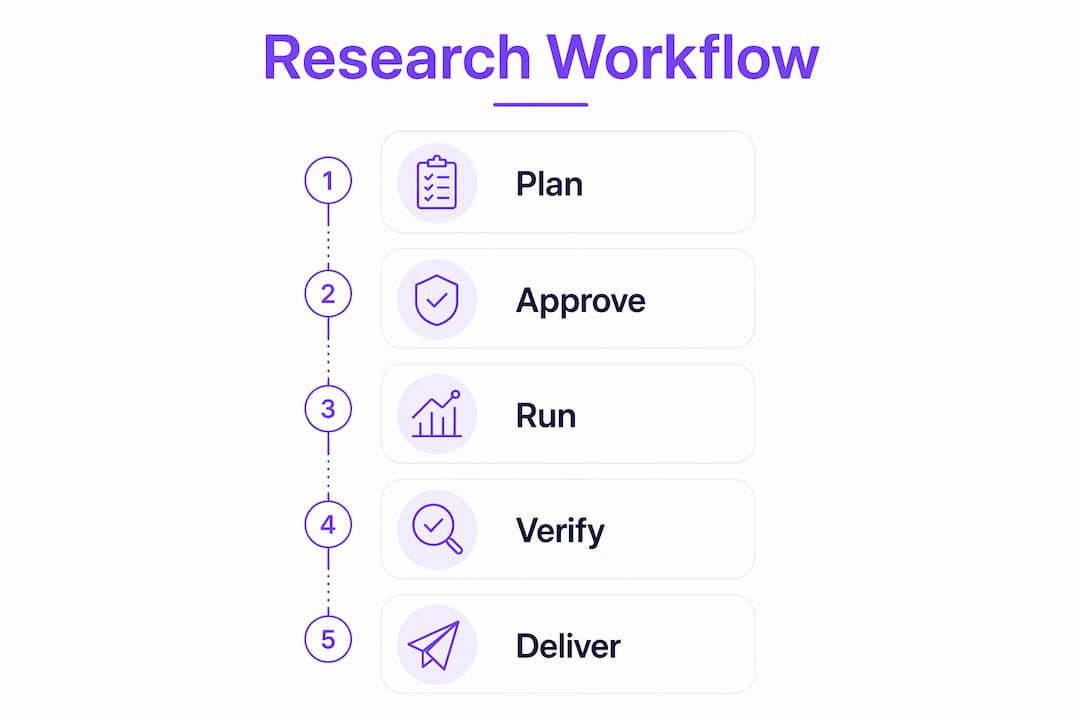
Copyable workflow: plan, approve, run, verify, deliver
This five-phase workflow gives every team member a clear owner and a defined handoff point.
- Plan *(Planner)* — Fill the research-request template. Write the objective, sub-tasks, acceptance criteria, and timeline. Prompt: *"Draft a research plan for [objective]. List sub-tasks, expected sources, and what a complete output looks like."*
- Approve *(Approver)* — Review the plan before execution. Modern deep research agents surface a proposed plan for user approval before running. Use this gate. Adjust scope or criteria if the plan drifts from intent.
- Run *(Agent)* — Execute in background mode. Configure for longer timeouts; iterative reasoning loops can take minutes and will fail on synchronous requests. Use MCP task queues for parallel sub-tasks.
- Verify *(Verifier)* — Check every source claim. Prompt: *"For each finding, return the original URL, the exact quoted passage, and the access date."*
- Deliver *(Deliverer)* — Package the verified output with a provenance log. Flag any claims that failed verification for human review.
Iteration policy: set a maximum of three reasoning rounds before escalating to a human. Stopping criteria: all acceptance criteria met, or the agent returns the same sources across two consecutive rounds (a signal it has exhausted the available corpus). Escalate when the agent cannot locate a primary source for a key claim.
For content and research operations, free workflow tools can help you template and track these phases without building custom infrastructure.
***
How do you verify sources and make AI research auditable?
Traceability is what separates a defensible research output from a plausible-sounding one. Build verification into the workflow, not as an afterthought.
Provenance checklist:
- Every claim maps to an inline citation with a live URL
- Snapshots or access timestamps recorded for time-sensitive sources
- Quoted passages match the original text verbatim (no paraphrase presented as a quote)
- Source credibility assessed: peer-reviewed, primary, or grey literature clearly labeled
Sample verification prompts:
- *"Show the original excerpt, the source URL, and the page number or section heading for this claim."*
- *"Which of your sources are peer-reviewed? List them separately from web sources."*
- *"Flag any claim where you could not locate a primary source."*
Require human double-checks on any output that will inform a legal filing, a published report, or a financial decision. Log every verification step: who checked it, when, and what they confirmed. Tools like Elicit expose the full research pipeline for human review, which makes this logging straightforward for systematic reviews.
***
Security, privacy, and compliance for U.S. teams
Running research agents on sensitive data requires deliberate controls. The checklist below covers the baseline for U.S.-based teams.
- Data classification first: label data before it touches an agent. Confidential, proprietary, or regulated data (HIPAA, ITAR, CUI) needs stricter controls than public-domain research.
- Encryption in transit and at rest: all agent communications over TLS; stored outputs and memory encrypted at rest.
- Access controls: role-based permissions on who can submit tasks, view outputs, and export results.
- Secrets management: API keys and credentials stored in a secrets manager, never in prompt text or logs.
- Secure log retention: audit logs retained per your organization's data retention policy; logs must not contain raw sensitive data.
- Contract and NDA review: confirm your AI provider's data processing agreement covers your use case; check export control obligations if research involves controlled technical data.
Private hosting simplifies several of these controls. A dedicated AI server keeps data within your environment, eliminating third-party data-sharing risk. Managed options like Clawbase deploy OpenClaw on encrypted, dedicated cloud infrastructure with daily encrypted backups, which reduces the operational burden of maintaining these controls yourself.
*This section is general operational guidance, not legal advice. Confirm your specific compliance obligations with qualified legal counsel.*
***
What goes wrong with AI research and how do you fix it?
| Symptom | Likely cause | Immediate fix | Long-term fix |
|---|---|---|---|
| Hallucinated sources | Model confabulation | Require URL + quoted passage for every cite | Use a research agent with native web access |
| Shallow synthesis | Prompt too broad | Split into sub-tasks with specific scope | Add acceptance criteria per sub-task |
| Timeout / incomplete run | Synchronous execution | Switch to background execution | Configure longer timeouts; use MCP queues |
| Duplicate results | No deduplication step | Add a dedup instruction to the final synthesis prompt | Build a dedup stage into the pipeline |
| Missing primary sources | Agent stopped at secondary | Prompt: "Trace this claim to its primary source" | Require primary-source links in acceptance criteria |
Most failures trace back to one of two root causes: an underspecified prompt or a synchronous execution setup that times out before the reasoning loop completes. Fix the spec first, then the infrastructure.
***
Quick start: deploy a private research agent with Clawbase and OpenClaw
Getting a private research agent running on Clawbase takes less than ten minutes for a non-technical user.
- Sign up at clawbase.to and start the 7-day free trial on the entry plan.
- One-click deploy OpenClaw on your dedicated, encrypted cloud server — no sysadmin work required.
- Select your model(s) from the 50+ available options; for deep research tasks, choose a model with a large context window and web-access capability.
- Configure memory: set a persistent memory policy so the agent retains context across research sessions. Example:
memory_policy: retain_session + cross_session_summary. - Connect your channels: link Slack, Telegram, Discord, or WhatsApp so research outputs land where your team already works.
- Set access controls: assign role-based permissions before running any task involving non-public data.
- Run a pilot task: use the research-request template from Section 3. Start with a bounded market scan or a 10-paper literature review.
- Enable background execution: for deep research tasks, configure the agent for async operation so iterative reasoning loops complete without timeout.
- Scale to multi-agent: once the single-agent pilot is stable, add MCP-style task routing to run parallel sub-agents for larger research pipelines.
Daily encrypted backups and automated updates run without any action on your part. When you're ready to scale, Clawbase's AI agent use cases page maps specific research scenarios to the right configuration.
Pro Tip: *Run your first pilot on a task where you already know the answer. That way you can evaluate the agent's output quality and source traceability against a known benchmark before trusting it on novel research.*
***
Key Takeaways
Reliably delegating research to AI requires a structured request template, a research-capable agent architecture, and a verification step that traces every claim to a primary source.
| Point | Details |
|---|---|
| Structure before you delegate | Write objective, sub-tasks, and acceptance criteria before the agent starts — vague prompts produce unverifiable outputs. |
| Match agent type to task depth | Use standard chat for quick lookups; use dedicated research agents with iterative reasoning for auditable, multi-source outputs. |
| MCP for team-scale workloads | A Model Context Protocol coordination layer enables non-blocking parallel research across multiple sub-agents. |
| Verify every source | Require inline URLs, quoted passages, and access timestamps; human double-check any output used in legal, financial, or published work. |
| Clawbase as your quick start | One-click OpenClaw deployment on a private encrypted server gives teams a research agent with 99.9% uptime and no setup overhead. |
***
What I've learned building team research agents
The gap between a demo and a production research workflow is almost always the verification layer. Teams get excited when an agent returns a plausible 10-page synthesis in four minutes. The friction starts when someone asks, "Where did this come from?" and the agent can't show its work.
The teams that scale AI research delegation successfully share one habit: they invest in the prompt template and the acceptance criteria before they invest in the infrastructure. A well-specified research plan, with explicit stopping criteria and a required source format, does more for output quality than switching to a more powerful model. The Sibyl AutoResearch System's approach of recording lessons across iterations and updating agent prompts automatically is the right direction — but most teams need to get the manual version right first.
Realistic timelines: a bounded market scan with five to ten sources takes 5–15 minutes on a well-configured research agent. A systematic literature review across 50–100 papers takes 60–90 minutes, sometimes longer. Deep research is not instant, and teams that treat it as such end up with incomplete runs and frustrated researchers. Build the timeline into the workflow template, not as an afterthought.
MCP-style non-blocking workflows are worth the setup cost for any team running more than two or three concurrent research threads. The productivity gain comes not from faster individual tasks but from the fact that implementation work continues while research runs in the background.
***
Private research agents without the infrastructure headache
Setting up a private research agent from scratch means managing servers, configuring encryption, handling model updates, and debugging timeouts — before you run a single research task. Clawbase removes that entire layer.

With one-click OpenClaw deployment on a dedicated encrypted server, Clawbase gives your team a private, always-on research agent with 99.9% uptime, access to 50+ AI models, daily encrypted backups, and connectors to Slack, Telegram, Discord, and WhatsApp. There's no sysadmin work, no maintenance queue, and no shared infrastructure. Your research data stays in your environment.
If you're ready to run your first pilot, start a 7-day free trial on the entry plan. If you want to match your use case to the right configuration first, the OpenClaw use cases page maps specific research scenarios to the setup that fits.
***
Useful sources and references
- Deep Research — Gemini API docs: technical reference for iterative reasoning loops, background execution, and async task management. Use during the *Run* and *Verify* phases.
- Deep Research — OpenAI Help Center: explains the chat vs. deep research distinction and traceable reporting. Use when choosing your agent type.
- Parallel research delegation — Delega: covers MCP coordination layers and non-blocking task queues. Use during architecture planning.
- Sibyl AutoResearch System — GitHub: multi-agent pipeline with staged iterative optimization and self-improving prompt updates. Use as a reference for scaling to multi-agent workflows.
- ARIA Research Agent — GitHub: domain-scoped agent pipeline example (Reader, Hypothesis, Experiment, Report). Use when designing sub-agent roles.
- Elicit — The AI Research Assistant: automates systematic review steps with an exposed pipeline for human review. Use for literature-review workflows and verification logging.