The Role of AI in Team Collaboration: 2026 Guide
2026-07-18

The role of AI in team collaboration is to amplify human teamwork by expanding creativity, improving communication, and bridging functional silos across organizations. This is not a theoretical promise. A 2026 field experiment published in *Organization Science* found that generative AI bridges functional silos, enabling individuals using AI to match the output quality of full teams. That finding reframes how team leaders should think about AI. It is not a productivity shortcut. It is a structural shift in how knowledge work gets done. The critical variable is not access to AI. It is how deliberately your team defines AI's role, sets shared norms, and preserves human judgment at key decision points.
How does AI improve team performance and creativity?
AI improves team performance by expanding the range of ideas a team can generate while preserving the human judgment needed to evaluate them. A 2026 field experiment showed that AI shifts creative output quality upward by helping individuals produce more balanced, cross-disciplinary solutions. That means a product manager working with AI can generate ideas that blend commercial insight with technical depth, a combination that previously required a mixed team.
The mechanism is straightforward. AI models trained on diverse knowledge domains can surface connections that a specialist would miss. A marketing strategist using a generative AI assistant can pull in engineering constraints, regulatory considerations, and user behavior patterns simultaneously. The output is broader and more grounded than what a single-discipline thinker produces alone.
Three performance patterns stand out in recent research:
- Idea range expansion. AI generates a wider spread of options, reducing the anchoring effect where teams converge too quickly on familiar solutions.
- Cross-functional integration. AI-assisted individuals produce outputs that blend commercial and technical expertise, reducing the need for constant cross-team handoffs.
- Evaluative role preservation. Human judgment remains the deciding factor. AI generates; humans select, refine, and validate.
The third point matters more than most teams realize. AI shifts the innovation bottleneck from idea production to idea selection and validation. Your team's competitive advantage no longer lives in generating options. It lives in the quality of your evaluation process.
Pro Tip: *Build a structured validation routine before deploying AI in any ideation workflow. Define who reviews AI outputs, what criteria they use, and how final decisions get documented. Without this, AI-generated content accumulates without ever becoming a decision.*
A global survey of 500 executives predicts that active AI use in meetings will triple within three years. That projection signals a near-term inflection point. Teams that build evaluation discipline now will outperform those that treat AI as a passive note-taker or idea generator.

What roles can AI occupy in collaborative teams?
AI occupies two fundamentally different roles in teams, and confusing them is one of the most common integration mistakes. Research published in *Management Decision* draws a clear line between AI as a supportive tool versus an interdependent teammate. The distinction shapes everything from task assignment to accountability structures.
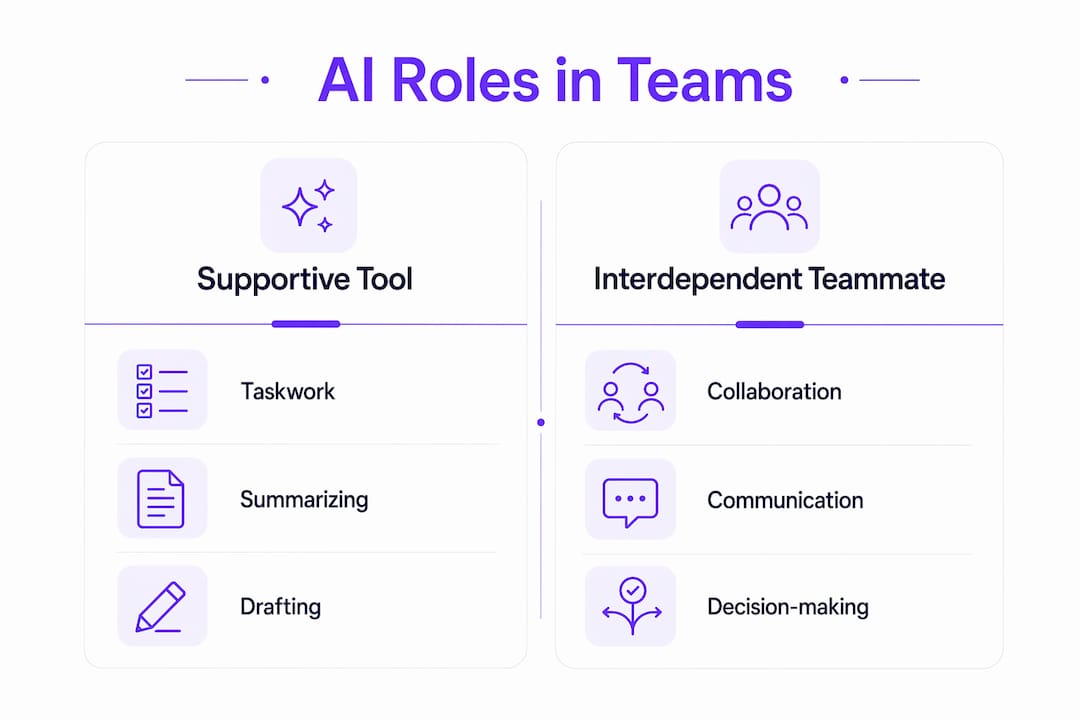
Supportive tool vs. interdependent teammate
A supportive tool handles taskwork. It completes discrete, bounded tasks: summarizing a document, drafting a proposal, translating a report. The human remains the primary agent. The AI is a capable assistant with no stake in the outcome.
An interdependent teammate participates in teamwork. It contributes to shared goals, communicates across the team, and influences how other members think and decide. This role requires explicit design. You cannot drop an AI agent into a team meeting and expect it to function as a teammate without defining its responsibilities, its communication boundaries, and its accountability to the group.
| Role type | Primary function | Accountability | Team impact |
|---|---|---|---|
| Supportive tool | Taskwork execution | Individual user | Increases personal output |
| Interdependent teammate | Teamwork participation | Shared with team | Influences group dynamics |
Teams that explicitly define AI roles outperform teams that use AI on an ad-hoc basis. The reason is structural. Clear roles create shared goals and mutual accountability. Those two factors drive team performance more than AI access alone.
Four elements determine whether an AI role definition actually works:
- Taskwork scope. Which tasks does the AI own, and which does it support?
- Teamwork boundaries. Does the AI communicate with the full team, or only with individual members?
- Shared goals. Does the team treat AI outputs as collective work product or individual contributions?
- Feedback loops. How does the team evaluate AI performance and adjust its role over time?
Teams that answer these questions before deploying AI report higher engagement and stronger motivation. The act of defining AI's role forces the team to clarify its own goals and working norms, which benefits collaboration independent of the AI itself. For practical examples of how this plays out across platforms, the Clawbase guide on AI integration for teams covers several real-world configurations.
What challenges arise when integrating AI in teams?
The most dangerous misconception in AI adoption is that access equals improvement. Improper AI integration increases isolation and fragments team discussions. Without intentional design, AI shifts ownership of work away from the team and toward individual contributors, which breaks the shared accountability that makes teams effective.
Three specific risks appear consistently in poorly managed AI rollouts:
- Narrower participation. When one team member uses AI to produce a first draft, others disengage. The draft anchors the conversation, and the team stops generating alternatives.
- Workflow fragmentation. AI tools used independently by different team members produce outputs in different formats, with different assumptions, that do not integrate cleanly.
- Social dehumanization. Teams that rely on AI for communication tasks, such as meeting summaries or status updates, report reduced interpersonal connection over time.
The Harvard Business Review identified three practices that counter these risks. First, establish shared AI norms before the first use. Second, run a structured AI onboarding session where the team agrees on which tasks AI handles and which remain human. Third, build feedback loops that let the team assess AI's contribution and adjust its role.
Pro Tip: *Treat your first AI onboarding session as a team charter exercise. Ask each member to name one task they want AI to handle and one task they want to keep human. The conversation itself surfaces assumptions and builds shared ownership of the integration.*
AI also functions as a social and motivational partner when engaged intentionally. Research shows that AI's language-based interface promotes positive emotions in team settings. That effect disappears when AI is used passively or without acknowledgment of its social role. Teams that treat AI as a silent background process miss the motivational benefit entirely.
If you are unsure whether your team is ready for managed AI, the Clawbase article on signs you need managed AI offers a practical diagnostic.
How can teams implement AI-enhanced collaboration workflows?
Effective AI integration follows a four-stage pathway. Each stage builds on the previous one and prevents the fragmentation that derails ad-hoc adoption.
Stage 1: Define ends before tools. Identify the specific collaboration problem you want AI to address. Is it slow ideation? Poor cross-functional communication? Manual reporting overhead? The answer determines which AI capabilities you need and how you configure them.
Stage 2: Assign roles explicitly. Use the supportive tool versus interdependent teammate framework to assign AI a defined role for each workflow. Document this in a team working agreement. Ambiguity here is the primary cause of fragmented discussions.
Stage 3: Build validation routines. Since AI shifts the bottleneck to selection, every AI-assisted workflow needs a human review checkpoint. Define who reviews, what criteria apply, and how decisions get recorded.
Stage 4: Run structured feedback cycles. Schedule a monthly review of AI's contribution to each workflow. Ask whether the role definition still fits, whether outputs are meeting quality standards, and whether team engagement has changed.
Enterprise-grade AI platforms like Microsoft 365 Copilot Cowork demonstrate what this looks like at scale. Copilot Cowork reduces weeks of manual work to hours by executing multi-tool tasks end to end. That kind of automation is only useful when the team has already defined what "done" looks like and who validates the output.
For teams without enterprise budgets, the same principles apply at smaller scale. An always-on AI assistant handling meeting summaries, file organization, and status updates can free significant time for higher-order collaboration. The Clawbase guide on reducing manual work with AI agents covers practical configurations for teams at different maturity levels.
The key shift to internalize: AI-enhanced collaboration workflows move human effort from production to judgment. Your team spends less time generating and more time deciding. That is a fundamentally different skill set, and teams that train for it explicitly outperform those that assume the shift happens naturally.
Key Takeaways
AI improves team collaboration when teams define AI's role explicitly, build validation routines, and treat human judgment as the primary decision-making layer.
| Point | Details |
|---|---|
| AI bridges functional silos | Individuals using AI can match full-team output quality by generating cross-disciplinary ideas. |
| Role clarity drives performance | Teams that define AI as a tool or teammate outperform those using AI without structure. |
| Validation is the new bottleneck | AI shifts innovation effort from idea generation to idea selection, requiring explicit review processes. |
| Improper integration fragments teams | Without onboarding and shared norms, AI increases isolation and reduces group participation. |
| Human judgment remains central | AI generates options; humans evaluate, select, and decide. That division must be designed, not assumed. |
AI amplifies what is already there: a perspective worth sitting with
I have watched teams adopt AI with genuine enthusiasm and come away disappointed. The pattern is almost always the same. They give everyone access, run a few demos, and wait for productivity to climb. It does not. What they missed is that generative AI amplifies existing team dynamics. A high-functioning team gets faster and more creative. A dysfunctional team gets more of the same dysfunction, just at higher speed.
That observation should change how you approach AI integration. The first question is not "which AI tool should we use?" It is "how well does our team already collaborate?" If shared goals are unclear, if accountability is diffuse, if feedback is avoided, AI will not fix any of that. It will accelerate the confusion.
What I have found actually works is treating AI onboarding as a team health exercise. The process of defining AI's role forces conversations that teams have been avoiding. Who owns which decisions? What does good output look like? How do we give each other feedback? Those conversations are valuable independent of the AI.
The other thing I keep coming back to is the social dimension. AI is not just a task engine. When engaged intentionally, it functions as a motivational partner. Teams that acknowledge this and build it into their working norms report stronger engagement than teams that treat AI as a silent background process. That is not a soft observation. It shows up in output quality and in how people talk about their work.
My practical advice: start with one workflow, define AI's role precisely, and run a 30-day feedback cycle before expanding. The teams that do this build durable AI habits. The teams that roll out AI broadly and hope for the best spend the next six months untangling fragmented workflows.
> *— Iosif Peterfi*
How Clawbase supports structured AI integration for teams
Teams that want the performance benefits of AI without the setup complexity have a direct path forward with Clawbase. Clawbase provides managed OpenClaw hosting starting at $16/month, with one-click deployment on a dedicated server, 99.9% uptime, and access to over 50 AI models. No sysadmin skills required.

For team leaders, the practical value is in Clawbase's AI agent capabilities. The platform supports workflow automation, file management, and integration with communication platforms including Telegram and Discord. Those integrations map directly to the structured collaboration workflows described in this article. Professionals can explore the full range of AI agent use cases to see how specific team workflows translate into deployable configurations. Clawbase removes the technical barrier so your team can focus on the role definition and validation work that actually drives results.
FAQ
What is the role of AI in team collaboration?
AI's role in team collaboration is to expand ideation, bridge functional silos, and automate routine tasks while human team members retain responsibility for evaluation and decision-making. Research shows AI-enabled individuals can match full-team output quality when AI is integrated with clear role definitions and shared norms.
How does AI affect team creativity?
AI expands the range of ideas a team can generate by drawing on cross-disciplinary knowledge, which reduces anchoring on familiar solutions. The innovation bottleneck shifts from generating ideas to selecting and validating them, which places greater demand on human judgment.
What are the biggest risks of using AI in teams?
Improper AI integration increases isolation, fragments discussions, and shifts ownership away from the group. These risks are preventable through structured onboarding, explicit role definitions, and regular feedback cycles before and after AI deployment.
Do teams need technical skills to use AI effectively?
Teams do not need deep technical skills to benefit from AI collaboration tools. Platforms designed for non-technical users, including managed AI hosting services, allow team leaders to deploy and configure AI agents without coding or server management experience.
How should teams define AI's role before deployment?
Teams should decide whether AI functions as a supportive tool handling discrete tasks or as an interdependent teammate with shared goals and accountability. Documenting this distinction in a team working agreement before first use prevents the ambiguity that leads to fragmented workflows.