AI Workflow Automation: A Practical Guide for 2026
2026-07-31

AI workflow automation connects triggers, AI models, and actions to execute repeatable tasks without manual intervention. For a personal AI assistant like OpenClaw, that means your assistant can triage notifications, tag files, prep meeting briefs, and push summaries to Slack or Telegram, all while you focus on work that actually requires your judgment. The fastest path to running this kind of assistant is managed hosting, and Clawbase makes that a one-click deployment.
- Core pipeline: trigger → model inference → decision → action → feedback
- Primary benefit: 24/7 automation of routine tasks with native integrations to Telegram, Discord, Slack, and WhatsApp
- Recommended route: Clawbase managed OpenClaw hosting eliminates sysadmin overhead entirely
Table of Contents
- What is AI workflow automation, and how does the pipeline work?
- What are the core technical components you need?
- What are the real benefits, and where does AI automation fall short?
- What do practical AI assistant workflows actually look like?
- Self-host, cloud platform, or managed hosting: which fits your situation?
- How do you choose the right managed hosting provider?
- What security and privacy controls matter for U.S. users?
- What does deployment actually cost, and how long does it take?
- Common misconceptions about AI process automation
- How Clawbase solves deployment friction for OpenClaw
- How do you keep an AI workflow system healthy over time?
- Key Takeaways
- The gap between what automation promises and what actually ships
- Skip the ops work with Clawbase managed OpenClaw hosting
- Useful sources and further reading
What is AI workflow automation, and how does the pipeline work?
AI workflow automation handles unstructured data and learns over time, which is what separates it from rigid rule-based systems that break the moment input format changes. A rule-based bot fails when an email arrives in an unexpected format. An AI-driven workflow reads intent, classifies it, and routes it correctly anyway.
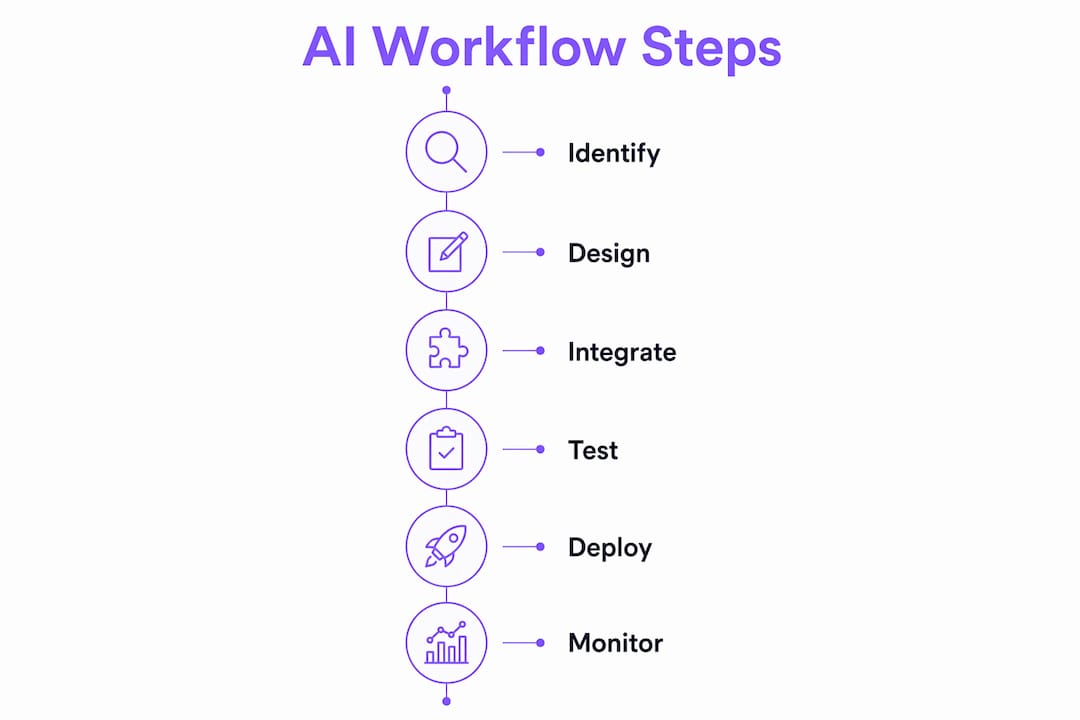
The pipeline has six stages:
- Trigger — a webhook, scheduled job, or message event fires (e.g., a new email, a calendar update, a Discord message)
- Ingestion/preprocessing — raw input is cleaned, chunked, and formatted for the model
- Model inference — an LLM or multimodal model interprets the input and produces a structured output
- Decision/orchestration — the orchestration layer routes the output, manages state, and decides which action to invoke
- Action/integration — the assistant posts a summary to Slack, archives a file, creates a ticket, or sends a Telegram alert
- Feedback/learning — outcomes feed back into the system to improve future routing and classification
Pro Tip: *Treat orchestration as a first-class architectural component, not an afterthought. Point-to-point chains between triggers and actions are brittle. A dedicated orchestration layer manages retries, error handling, and state, which is the difference between a fragile prototype and a production assistant.*
What are the core technical components you need?
Process orchestration platforms combine AI models, connectors, and workflow engines to run end-to-end automated processes. For a personal AI assistant, the component list is more focused but equally important:
- Models — LLMs for text reasoning, multimodal models for images or audio, with multi-model routing to pick the right model per task
- Orchestrator/agent layer — manages state, retries, branching logic, and API call sequencing
- Triggers — webhooks, cron jobs, message events from Slack, Telegram, Discord, or WhatsApp
- Connectors/APIs — pre-built integrations to communication platforms, cloud storage, and productivity tools
- Data store and memory management — persistent memory lets the assistant recall prior context across sessions, like layers in a working memory stack
- Secrets and key management — secure storage for API keys and credentials
- Monitoring and logging — observability into every step so failures are traceable
- Governance controls — audit logs, role-based access, and human-in-the-loop checkpoints for high-stakes decisions
> Architecture note: Event-driven, stateful flows outperform stateless chains for personal assistants because context from prior interactions directly improves response quality. Providers offering persistent memory management and 50+ supported models give you the flexibility to route tasks to the best-fit model without rebuilding your stack.
What are the real benefits, and where does AI automation fall short?
AI workflow automation buys you time, consistency, and coverage. The concrete gains for a personal assistant include faster triage, 24/7 availability, reduced manual data entry, and near-instant response times on routine requests. Generative and predictive AI combine to sort, classify, and create data in ways that cut human intervention on complex, multi-step tasks.
The limits are just as real. Harvard Business School professor Karim Lakhani frames the core tension clearly:
> "When we introduce AI into a process, we face a critical design question: Should the AI replace human judgment, or support it? That's the core distinction between automation and augmentation."
>
> *— Karim Lakhani, Harvard Business School Online*
High-frequency, low-value tasks are strong candidates for full automation. Decisions involving risk, ethics, or nuanced customer relationships need augmentation, where the AI surfaces options and a human decides. Beyond that strategic limit, watch for model hallucinations on ambiguous inputs, edge-case failures when data falls outside training distribution, and integration complexity that grows with every new connector you add.
What do practical AI assistant workflows actually look like?
These five workflows cover the most common personal assistant use cases. Each maps a trigger to a desired action, with notes on which parts benefit most from managed hosting.
- Notification triage: New email arrives → assistant classifies priority and intent → posts a one-line summary to Slack or Telegram. Persistent memory lets the assistant learn your priority rules over time. See AI notification automation for detailed trigger templates.
- File management: File uploaded to cloud storage → assistant tags, renames, and archives by project → logs the action. Pre-built cloud storage connectors make this a configuration task, not a coding task. Explore AI file management workflows for step-by-step templates.
- Meeting prep: Calendar event detected → assistant pulls agenda, prior notes, and action items → delivers a brief 15 minutes before the meeting starts
- Multi-channel alerting: Discord message matches a keyword pattern → assistant sends a direct message and creates a support ticket in your project tracker
- Automated follow-ups: CRM contact reaches a time threshold → assistant drafts a follow-up message and queues it for review
The model access, connector availability, and persistent memory components are the hardest parts to self-host reliably. A managed provider bundles all three.
Self-host, cloud platform, or managed hosting: which fits your situation?
For most users who want a working personal assistant quickly, a managed hosting provider lowers time-to-value more than any other choice. That said, the right approach depends on your priorities.
- Self-hosting gives you full control over data residency and model selection. The trade-off is real: you need sysadmin skills, you own patching and uptime, and connector engineering falls entirely on you. Cost can be lower at small scale, but ops time is a hidden expense.
- Cloud-managed platforms scale well and abstract infrastructure. Variable vendor lock-in and per-seat pricing can make costs unpredictable as usage grows.
- Managed hosting (e.g., Clawbase for OpenClaw) offers one-click deployment, bundled integrations, uptime SLAs, and automated updates. No sysadmin skills required. The trade-off is less raw infrastructure control, which rarely matters for personal assistant use cases.
Pre-built integration libraries reduce engineering effort and long-term maintenance. Building custom bridges for Slack, Telegram, or Discord from scratch creates avoidable technical debt. Managed hosting sidesteps that entirely. If you're weighing the options, signs you need managed AI is a useful decision checklist.
How do you choose the right managed hosting provider?

Prioritize uptime SLA, integrations, persistent memory, model access, automated backups, and transparent pricing. Here's the practical checklist:
Must-haves:
- 99.9% uptime SLA with documented enforcement
- Daily encrypted backups with clear retention policy
- Access to 50+ models with multi-model routing
- Native connectors for Telegram, Slack, Discord, and WhatsApp
- Persistent memory management across sessions
- Browser relay integration for web-based workflows
- Private skillset marketplace for extending assistant capabilities
- 7-day trial with no credit card friction
Red flags:
- Opaque pricing or no published plan tiers
- No backup policy or encryption at rest
- Single-model access with no routing options
- Hard-coded integrations requiring custom engineering to extend
- No audit logs or monitoring dashboard
You can test connector coverage quickly using an API workbench before committing to a provider.
What security and privacy controls matter for U.S. users?
Prioritize encryption, access control, and auditability when running a hosted assistant in the U.S. The practical controls to verify:
- TLS encryption in transit and AES-256 (or equivalent) encryption at rest
- Daily encrypted backups with documented key management
- Role-based access controls and session isolation
- Audit logs covering every model call and action taken
- Automated security patching and dependency updates
U.S.-specific considerations: if your assistant handles any health-related data, HIPAA compliance requirements apply to your hosting provider. If it processes personal data about California residents, CCPA obligations are in scope. For either case, involve your legal or compliance team before production rollout. Prefer providers that offer private instances with persistent memory isolation so your data never shares infrastructure with other tenants. The AI compliance guidance from Clawbase covers the practical controls in more detail.
What does deployment actually cost, and how long does it take?
Most teams deploying a personal AI assistant for the first time complete a working pilot in two to four weeks. Cost drivers fall into a few clear categories:
- Model inference — usage-based, scales with request volume
- Hosting instance — fixed monthly cost, varies by provider tier
- Storage and backups — typically bundled with managed plans
- Connector engineering — near-zero with pre-built connectors, significant with custom builds
- Managed provider subscription — Clawbase entry plans start at $16/month with a 7-day free trial
A typical rollout timeline: one to two days for discovery and workflow mapping, two to three days for prototype with a managed host, three to five days for integration testing, then a one-week pilot before production. Managed hosting compresses the ops phases because infrastructure, updates, and connector setup are already handled.
Common misconceptions about AI process automation
The biggest myth: automation means ripping out your existing tools. Modern AI platforms act as an intelligence layer over existing RPA and BPM investments, handling exceptions and unstructured data that legacy tools cannot process.
- "AI replaces everything" — Reality: AI automates high-frequency, low-value tasks and augments high-stakes decisions. Governance and human oversight remain necessary.
- "ROI is immediate" — Reality: the first workflow delivers value quickly; scaling requires iteration, monitoring, and refinement.
- "Models replace governance" — Reality: governance and auditability are operational requirements, not optional add-ons, especially when automating decisions with downstream consequences.
- "You need custom connectors" — Reality: pre-built connector libraries cover the vast majority of use cases and eliminate long-term maintenance burden.
Pro Tip: *Start with one workflow, validate it in a two-week pilot, then expand. Incremental rollouts surface integration gaps early and keep technical debt manageable. Avoid common automation mistakes by resisting the urge to automate everything at once.*
How Clawbase solves deployment friction for OpenClaw
Clawbase reduces ops burden by providing one-click OpenClaw deployment with all integrations bundled. No server configuration, no dependency management, no connector engineering.
| Feature | Clawbase specification |
|---|---|
| Uptime SLA | 99.9% |
| Supported AI models | 50+ with multi-model routing |
| Backup frequency | Daily encrypted backups |
| Free trial | 7 days |
| Starting price | $16/month |
| Connectors | Telegram, Discord, Slack, WhatsApp |
| Memory | Persistent across sessions |
The private skillset marketplace lets you extend your assistant's capabilities without writing custom integrations. Automated updates mean your instance stays current without manual patching. For teams evaluating no-code AI assistant approaches, Clawbase removes the last technical barrier between you and a production-ready personal assistant.
How do you keep an AI workflow system healthy over time?
Monitoring and maintenance are where most deployments quietly degrade. A workflow that works on day one can drift as upstream APIs change, model behavior shifts, or data patterns evolve. The practical maintenance checklist:
- Structured logging on every pipeline step: trigger received, model called, action taken, latency, error codes
- Alerting thresholds for failure rates, latency spikes, and unexpected output patterns
- Regular prompt and routing audits — model outputs should be spot-checked weekly during the first month, then monthly
- Dependency and connector version tracking — upstream API changes break integrations silently without version pinning
- Rollback procedures — every workflow change should be versioned so you can revert within minutes
- Human review checkpoints for any workflow touching financial data, personal information, or customer-facing outputs
Managed hosting providers that include automated updates and monitoring dashboards handle the infrastructure layer. The application-level monitoring, prompt audits, and governance checkpoints remain your responsibility regardless of hosting model.
Key Takeaways
AI workflow automation delivers the most value when orchestration is treated as a first-class component, integrations are pre-built, and deployment starts with a single validated workflow before scaling.
| Point | Details |
|---|---|
| Orchestration is the core | Managing state, retries, and routing matters more than model selection for multi-step workflows. |
| Managed hosting speeds deployment | One-click providers like Clawbase eliminate sysadmin overhead and bundle connectors, cutting pilot time to days. |
| Security controls are non-negotiable | Verify encryption at rest, daily backups, audit logs, and private instance isolation before production. |
| Start with one workflow | A two-week pilot on a single use case surfaces integration gaps before they compound. |
| Clawbase entry plan | Starts at $16/month with a 7-day trial, 50+ models, and native Telegram/Discord/Slack/WhatsApp connectors. |
The gap between what automation promises and what actually ships
Most teams underestimate how much of the work lives in orchestration and connector reliability, not in the model itself. Picking a better LLM rarely fixes a broken workflow. What fixes it is a clean state machine, reliable retries, and integrations that don't require custom maintenance every time an upstream API updates.
The augmentation framing from Karim Lakhani is the right mental model here. Automate the high-frequency, low-judgment tasks aggressively. Keep humans in the loop for anything with real downstream risk. The teams that get this balance right early avoid the painful rebuild cycle that comes from automating too broadly too fast.
For U.S. teams specifically: the compliance surface area is real. HIPAA and CCPA are not edge cases if your assistant touches health or personal data. Verify your provider's security posture before you move beyond a pilot, not after.
Skip the ops work with Clawbase managed OpenClaw hosting
Running a personal AI assistant with full workflow automation, persistent memory, and multi-channel integrations normally requires days of server configuration, connector setup, and ongoing maintenance. Clawbase removes all of that.

With Clawbase, OpenClaw deploys in one click on a private, dedicated server. You get 99.9% uptime, daily encrypted backups, access to 50+ AI models with multi-model routing, and native connections to Telegram, Discord, Slack, and WhatsApp, all without writing a line of infrastructure code. Automated updates keep your instance current. The private skillset marketplace lets you extend capabilities as your workflows grow.
The 7-day free trial on the entry plan lets you validate your first workflow before committing. Start your trial at Clawbase and have a production-ready OpenClaw assistant running today.
Useful sources and further reading
- AI Workflow Automation: How to Improve Workplace Efficiency — Atlassian: practical framing on AI vs rule-based automation and incremental adoption
- AI Workflow Orchestration and Challenges — IBM Think: deep technical coverage of orchestration, state management, and multi-step process design
- What Is AI Automation? — AWS: enterprise-to-personal assistant growth path and generative AI integration patterns
- AI Process Automation — Camunda: orchestration plus connectors architecture and governance considerations
- AI-Powered Business Process Automation: When to Automate vs. Augment — Harvard Business School Online: Karim Lakhani's automation vs augmentation framework
- AI Deployment Pipeline Guide — Clawbase: CI/CD and deployment considerations for hosted AI assistants
- Reduce Manual Work with AI Agents — Clawbase: workflow design patterns and agent-based automation guidance