What Is AI Brainstorming, Explained for Developers
2026-08-03

AI brainstorming is the practice of using large language models to generate high-volume divergent ideas, then relying on humans to curate, stress-test, and prioritize the output. Think of it as techno-catalysis: the AI supplies raw creative material at scale, and you supply judgment. A lab experiment published on SSRN (N=168) found that hybrid human-AI groups outperform both purely human interactive groups and nominal groups on brainstorming productivity and creativity. For teams running private, persistent assistant setups, Clawbase's managed OpenClaw hosting is built precisely for this workflow.
Table of Contents
- What does an AI brainstorming session actually look like?
- Which frameworks and prompt templates actually produce results?
- What do humans need to do during and after AI output?
- How do you move from AI output to an actual decision?
- What privacy and tooling tradeoffs should your team understand?
- How does Clawbase fit a professional brainstorming setup?
- Key Takeaways
- The part most teams skip
- Private, persistent AI brainstorming with Clawbase
- Useful sources for further reading
What does an AI brainstorming session actually look like?
A session has a clear shape. You start with a tight problem sentence, hand it to the model, and get back a cluster of ideas in seconds. The human work begins immediately after.
A typical 20-minute fast session runs like this:
- Minutes 0–3: Write a one-sentence problem statement with explicit constraints (audience, budget, timeline).
- Minutes 3–8: Submit to the model; receive an idea dump of 10–20 options.
- Minutes 8–13: Filter the output. Mark ideas as "keep," "combine," or "discard." Discard anything generic or factually suspect.
- Minutes 13–18: Run a second prompt on your "keep" pile, asking the model to expand or stress-test each idea.
- Minutes 18–20: Write a human-authored synthesis note capturing the top 3 ideas and why.
A typical AI output cluster for "new onboarding flow for a developer API" might include: progressive disclosure of endpoints, an interactive sandbox on first login, a guided "hello world" sequence, and a Slack-bot that surfaces docs contextually. Some of those are obvious; one or two usually aren't. That signal-to-noise ratio is the point. For longer, multi-pass sessions, plan 45–60 minutes and add a dedicated evaluation round between passes.
Which frameworks and prompt templates actually produce results?
Blank prompts yield weak results; structured frameworks consistently produce higher-quality output. Here are the five worth knowing.

What-If Explosion pushes the model to invert assumptions. Use it when you're stuck in incremental thinking. Prompt skeleton: *"What if [core constraint] were removed entirely? List 10 product directions that only become possible in that world."*
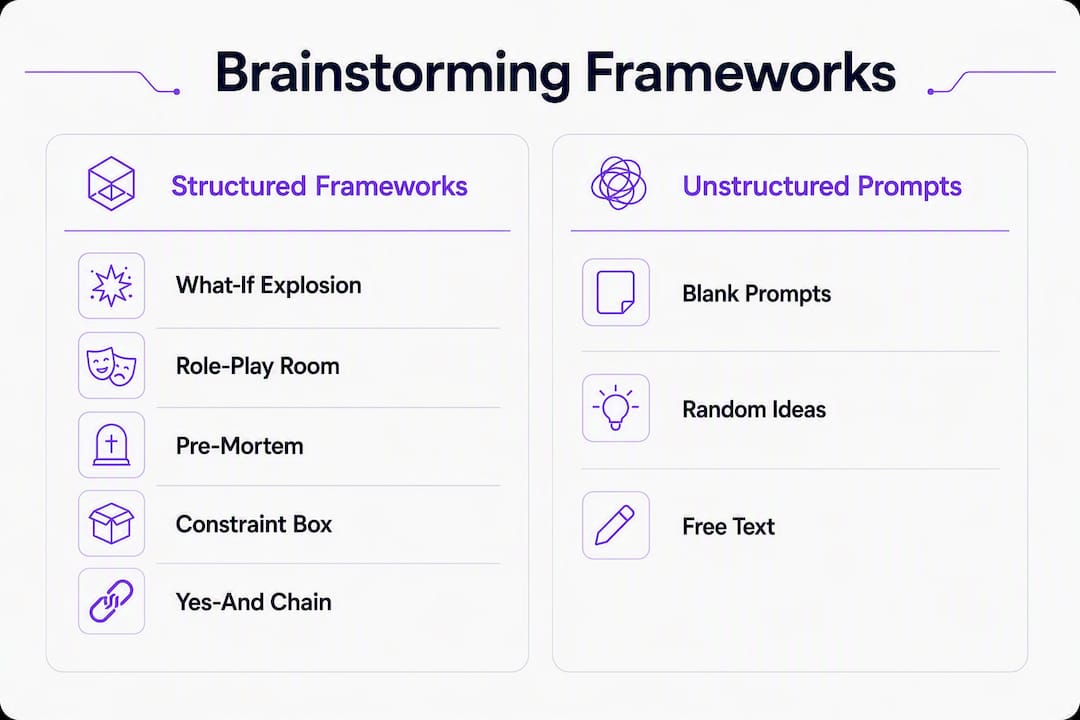
Role-Play Room assigns the model a specific persona, which forces perspective contrast. Prompt skeleton: *"You are a skeptical enterprise security officer reviewing this feature. List every objection you'd raise in a procurement meeting."* This is especially useful for surfacing objections before a real stakeholder meeting.
Pre-Mortem / Devil's Advocate asks the model to simulate failure modes before you commit resources. Prompt skeleton: *"Assume this project failed after 90 days. List the 8 most likely causes, ranked by probability."*
Constraint Box tightens the idea space deliberately. Prompt skeleton: *"Generate 10 solutions that cost under $500, require no new hires, and ship within 30 days."* Tight constraints produce more actionable output than open-ended asks.
Yes-And Chain builds on each prior idea iteratively. Prompt skeleton: *"Take idea #3 from the previous list and extend it: yes, and what if we also added [X]? Repeat for three iterations."*
For multi-agent runs, parallel distinct AI personas reduce thematic overlap and produce broader idea coverage than any single-prompt attempt. Pair a pure chain-of-thought agent (lateral, unconstrained) with a web-grounded agent (market-aware, factual) and curate from both outputs.
Pro Tip: *Every strong brainstorming prompt has three components: context (what the product/team/user is), constraint (what limits apply), and evaluation criteria (what "good" looks like). Missing any one of these collapses output quality fast.*
What do humans need to do during and after AI output?
AI handles volume. Humans handle everything that matters after that. A study on human-GLM brainstorming found that while AI assistance improves idea fluency and novelty, it can increase cognitive load and invite social loafing unless explicit mitigations are in place. Understanding AI critical thinking support helps teams structure that human layer effectively.
Human roles at each stage:
- Curator: Reads every idea and applies domain knowledge. Flags ideas that are technically infeasible, legally risky, or already tried.
- Judge: Scores surviving ideas against explicit criteria (novelty, cost, time-to-MVP). Doesn't delegate this to the model.
- Synthesizer: Writes a human-authored summary of the session's top findings. This step directly counters social loafing by requiring individual accountability.
- Implementer: Assigns ownership and next actions before the session closes.
To mitigate social loafing, assign explicit reviewer roles before the session starts and require each participant to submit a written synthesis note independently. For bias and hallucination guardrails, run a fast validation pass on any factual claim the model makes: check named statistics, product names, and regulatory references against primary sources before they enter a decision document.
Pro Tip: *Run a separate devil's advocate pass after your main session. Ask the model: "Assume our top idea fails. What are the three most likely reasons?" This turns the AI's tireless output into a risk-detection tool rather than just an idea generator.*
How do you move from AI output to an actual decision?
Scoring ideas consistently is what separates productive sessions from idea graveyards. Use this rubric:
| Dimension | Score 1 | Score 3 (Medium) | Score 5 |
|---|---|---|---|
| Cost to prototype | >$10K or 3+ months | — | — |
| Audience fit | Unclear who benefits | Fits a secondary segment | Directly solves primary user pain |
| Novelty | Already exists in market | Incremental improvement | Genuinely differentiated |
| Technical risk | Requires unproven stack | Known stack, some unknowns | Fully within current capabilities |
| Strategic alignment | Conflicts with roadmap | Neutral | Directly advances roadmap goals |
After scoring, pick the top two or three ideas by total score. For each, log: the original prompt that generated it, the score breakdown, the owner, and the next concrete action (prototype, user interview, spike). That traceability record is what makes AI-assisted sessions auditable and repeatable.
What privacy and tooling tradeoffs should your team understand?
Public cloud LLMs are fast and capable, but every prompt you send is a potential data exposure event. For professional teams, the risk register looks like this:
- Data retention: Most public APIs retain prompt data for abuse monitoring. Check the provider's data processing agreement before sending proprietary product specs or customer data.
- Model routing: Different tasks need different models. Divergent ideation benefits from high-temperature, creative models; factual grounding needs a retrieval-augmented or web-connected model. Hardcoding one model for both is a common AI automation mistake.
- Persistent memory: Public sessions are stateless by default. If your brainstorming sessions need to build on prior context (prior sprint decisions, product history), you need a persistent memory layer.
- Connector integration: Teams using Slack, Discord, or Telegram for async brainstorming need a model that connects natively to those surfaces. Bolting on integrations post-hoc adds latency and failure points. See communication platform AI integration patterns for practical connector examples.
- Compliance scope: If your team operates under HIPAA, SOC 2, or similar frameworks, a shared public endpoint is rarely compliant. A dedicated, encrypted server is the minimum viable architecture.
For the dual-agent pattern, run a creative chain-of-thought agent alongside a web-grounded agent in parallel, then curate from both. This approach produces a higher "surprise rate" while keeping final outputs factually grounded, according to multi-agent experiments. The multi-agent architecture behind this pattern is worth understanding before you build it into a production workflow.
How does Clawbase fit a professional brainstorming setup?
Clawbase provides managed OpenClaw hosting with one-click deployment on a dedicated, encrypted server. No sysadmin work required. For brainstorming specifically, the relevant capabilities are:
| Capability | Brainstorming Relevance |
|---|---|
| multiple AI models with multi-model routing | Run creative and grounded agents in parallel without switching platforms |
| Persistent memory management | Sessions build on prior context; no re-briefing the model each time |
| Telegram, Discord, Slack, WhatsApp connectors | Async brainstorming directly inside team communication tools |
| Daily encrypted backups | Session logs and idea records are preserved and auditable |
| high uptime | No dropped sessions during time-boxed sprints |
| Private dedicated server | Proprietary prompts and outputs never touch a shared endpoint |
Automated updates and a private skillset marketplace reduce operational overhead for developer teams. The role of AI in team collaboration guide covers governance patterns that map directly onto this kind of managed setup.
Key Takeaways
AI brainstorming works when AI handles divergent idea generation and humans own curation, scoring, and synthesis — skipping either half produces low-signal outputs.
| Point | Details |
|---|---|
| AI as techno-catalyst | AI generates volume and variety; humans curate, judge, and synthesize every session. |
| Structured frameworks win | What-If Explosion, Role-Play Room, and Pre-Mortem prompts consistently outperform blank asks. |
| Mitigate social loafing | Assign explicit reviewer roles and require individual written synthesis before closing a session. |
| Private hosting for sensitive work | Choose a dedicated, encrypted server when prompts contain proprietary or regulated data. |
| Clawbase for managed setups | Clawbase's OpenClaw hosting provides persistent memory, multiple models, and team connectors with no sysadmin overhead. |
The part most teams skip
Most teams treat AI brainstorming as a novelty sprint and then wonder why the output never makes it into a roadmap. The problem isn't the model. It's the missing human infrastructure around it.
The techno-catalysis framing is useful precisely because it assigns responsibility clearly: the AI is a tireless raw-material supplier, and the human is the architect. When teams skip the synthesis note, skip the scoring rubric, or skip assigning an owner before the session ends, they're not doing AI brainstorming. They're doing AI entertainment.
The other thing worth saying plainly: privacy is not a secondary concern for professional teams. Sending competitive product specs or customer data through a shared public endpoint because it's convenient is a risk that compounds quietly. A private, persistent assistant running on a dedicated server isn't a luxury configuration. For teams doing serious work, it's the baseline.
Private, persistent AI brainstorming with Clawbase
Running a serious brainstorming workflow on a shared public endpoint means your prompts, your ideas, and your session history are all outside your control. Clawbase gives you a private OpenClaw server with persistent memory, so sessions actually build on each other, and multi-model routing, so you can run creative and grounded agents in parallel without stitching together separate tools.

Native connectors for Slack, Discord, Telegram, and WhatsApp mean your team can run async brainstorming sessions directly inside the tools you already use. Daily encrypted backups keep your idea records auditable. Automated updates mean zero maintenance overhead. No sysadmin skills required to get started.
Explore OpenClaw use cases or start a 7-day free trial at clawbase.to to run your first private brainstorming session today.
Useful sources for further reading
- Brainstorming with AI: Unlock Creativity & Generate Ideas Faster — Grammarly's practical overview of AI brainstorming benefits, the techno-catalysis framing, and session structure basics.
- How To Brainstorm Better With AI — With Prompt Examples — The most actionable source in this article: framework breakdowns, prompt skeletons, and the 20-minute session structure.
- Brainstorming with a Generative Language Model — Springer academic study on cognitive load, idea fluency, and social loafing in human-GLM brainstorming sessions.
- AI-Augmented Brainstorming: How Humans and AI Beat Humans Alone — SSRN lab experiment (N=168) comparing nominal, interactive, hybrid, and AI-only groups; foundational evidence for hybrid superiority.
- How AI Can Transform Brainstorming — Psychology Today piece on production blocking reduction and group dynamics in AI-assisted sessions.
- Diverse Ideas Experiments (multi-agent approach) — Practitioner experiments on parallel agent runs, thematic diversity, and the creative vs. grounded dual-agent pattern.
- How To Brainstorm with AI (Forbes) — Forbes practical guide covering prompt specificity, hallucination oversight, and structured session management.
- The Role of AI in Invention Development — Partner article on how AI expands idea ranges for technical innovation and prototyping workflows.
- Clawbase: AI in Team Collaboration Guide — Governance and adoption patterns for teams integrating AI assistants; directly relevant to session orchestration.
- Clawbase: AI Agent Architecture Guide — Multi-agent architecture patterns for production brainstorming workflows. Validate model licensing before deploying in production; consult your vendor's documentation for live deployment specifics.