Skip Sysadmin: Open-Source AI Assistants for Nontechnical Users
2026-08-30
If you want a private AI assistant without touching a terminal, managed hosting is your fastest path, and ClawBase is built for exactly that. If you're comfortable with Docker and want full control, self-hosting OpenClaw or a similar project on your own VPS gets you there in an afternoon. If you're building custom agentic workflows, start with a developer framework like the OpenAI Agents SDK and skip pre-built assistants entirely.
***
> TL;DR:
>
> - Managed hosting offers a quick, reliable way to deploy private open-source assistants with minimal setup, starting at $16 per month.
> - Self-hosting provides full control over data and models but requires technical skills, time, and ongoing server maintenance.
> - Open-source assistants involve handling security, memory, and integrations carefully, with attention to credential isolation and backup security.
> - Testing assistant memory, credential scope, and integration reliability before full deployment prevents common setup pitfalls.
> - Building custom workflows with developer frameworks is better suited for experienced coders aiming to design unique agentic systems.
***
Table of Contents
- What Are Open-Source AI Assistants, Exactly?
- Local-First Apps, Frameworks, or Managed Hosting: Which Category Fits?
- What Should You Test Before Committing to a Project?
- How Long Does Setup Actually Take?
- How Do You Keep Credentials and Memory Secure?
- Which Integrations Actually Hold Up in Production?
- How Does ClawBase Remove the Sysadmin Burden?
- What's the Right Move for Your Situation?
- Ready to Skip the Sysadmin Work Entirely?
- Where to Go Deeper on Agents and Setup
- Sources
What Are Open-Source AI Assistants, Exactly?
An open-source AI personal assistant is software that takes real actions on your behalf: sending messages, managing your calendar, moving files, triggering automations, and holding a conversation with memory of what happened yesterday. That's the distinction that matters. A chatbot answers questions. An assistant does things.
"Open-source" means the code is publicly auditable and you can run it yourself instead of trusting a closed API. That unlocks three things: you can inspect exactly what the software does with your data, you can self-host it on hardware you control, and you can extend it with plugins or custom skills nobody had to approve. Projects in this space have proliferated fast. The Stanford HAI AI Index tracks the surge in agentic systems research and deployment over the past two years, and open-source assistants are a direct beneficiary of that momentum.
The trade-off is real, though. Self-hosting means you own uptime, security patches, backups, and API costs. Even managed options require you to think about which integrations you trust with your credentials. Openness gives you visibility and control. It doesn't give you a free pass on maintenance.
Local-First Apps, Frameworks, or Managed Hosting: Which Category Fits?
Most confusion in this space comes from treating four very different categories as if they were interchangeable. They're not, and picking the wrong one wastes a weekend.
- Local-first assistants run entirely on your machine, often paired with local models through Ollama or similar runners. Nothing leaves your device by default, which makes this the strongest privacy posture. The cost is limited compute and a rougher setup experience.
- Model runners and document-chat tools let you query a local model against your files quickly. They're excellent for private research and drafting, but they're not full assistants. Most can't send a Telegram message or manage your calendar.
- Developer frameworks and agent SDKs, like the OpenAI Agents SDK, give you building blocks for custom agentic systems. You write the orchestration logic yourself. This is the right layer if you're building something nobody has built yet, not if you want a working assistant by dinner.
- Managed hosting deploys an open-source assistant like OpenClaw on a dedicated server for you, handling uptime, updates, and backups while you configure integrations and API keys. This is the practical middle ground between raw self-hosting and a fully closed product.
Confusing these categories is one of the most common mistakes newcomers make. A local-first desktop app and an agent framework solve different problems, and comparing them head to head misses the point entirely.
Here's a simple filter: if privacy is your absolute priority and you're willing to trade convenience for it, go local-first. If you want to build something custom, use a framework. If you want a private, always-on assistant without becoming its system administrator, managed hosting is the pragmatic choice.
What Should You Test Before Committing to a Project?
Before you commit hours (or a subscription) to any assistant project, run it through a short checklist. Skipping this step is how people end up locked into a setup that can't do what they actually need.
- Security and credential isolation. Does the assistant separate the model process from anything holding raw API keys or passwords?
- Persistence and memory controls. Can you inspect, export, or delete what the assistant remembers? Memory that behaves like a black box is a liability, not a feature.
- Integration and channel support. Does it connect natively to the platforms you actually use, like Telegram, Discord, Slack, or WhatsApp, or does it require custom gateway code?
- Model provider flexibility. Can you route sensitive tasks to a local model and heavier reasoning to a cloud provider, or are you locked to one vendor?
- Operational cost and required skills. Will this need ongoing sysadmin attention, or is it truly hands-off?
- Extensibility and community health. Is there an active plugin ecosystem, recent commits, and a forum where questions get answered?
Pro Tip: *Test memory persistence first, before integrations. An assistant that forgets context between sessions will frustrate you long before a missing Slack connector does.*
Most people evaluate integrations first because they're the most visible feature. Security and memory behavior matter more long-term, and they're the two criteria people skip.
How Long Does Setup Actually Take?
Time-to-value is the single biggest difference between self-hosting and managed hosting, and it's worth being honest about the numbers.
Self-hosting typically means:
- Provisioning a VPS (2 to 4 vCPUs and 4GB+ RAM is a reasonable baseline for most assistant workloads, more if you're running local models that need GPU acceleration)
- Installing Docker and pulling the assistant's container images
- Configuring DNS and TLS certificates so webhooks and integrations work reliably
- Setting up scheduled backups before you connect anything sensitive
- Wiring up API keys for your chosen model providers and messaging channels
A technically comfortable person can get a working assistant running in an afternoon. Getting it production-hardened, with proper backups, monitoring, and credential isolation, usually takes a full weekend spread across a few sessions.
Managed hosting flips the ratio. The provider handles updates, backups, uptime, and server maintenance. You handle configuration: connecting your Telegram or Discord account, entering API keys for the models you want, and setting your automation rules. ClawBase's setup guide walks through this exact flow, and most users are messaging their assistant within minutes rather than days.
Whichever route you choose, harden these basics in the first 24 to 72 hours:
- Rotate any default or trial API keys before connecting production accounts
- Restrict integration tokens to the minimum scopes they need
- Confirm backups are actually running, not just scheduled
- Test what happens when the assistant loses connectivity mid-task
How Do You Keep Credentials and Memory Secure?
Assistants that hold API keys, messaging tokens, and persistent memory of your conversations are a different security surface than a typical web app. A leaked key here doesn't just expose data. It can let someone impersonate your assistant across every channel it's connected to.
The strongest pattern gaining traction across assistant projects is running credential handling in a separate executor process so the model itself never touches raw keys directly. If the model process is compromised or misbehaves, the credentials stay isolated in a different layer entirely.
Beyond that architecture choice, a few habits go a long way:
- Encrypt backups at rest, not just in transit
- Rotate API keys on a schedule, not just after an incident
- Keep an audit log of every tool invocation so you can trace what the assistant actually did, and when
- Use scoped tokens with least-privilege access for every integration, never a master key with full account access
- Route sensitive data to local models when possible, and reserve cloud routing for tasks that need heavier reasoning
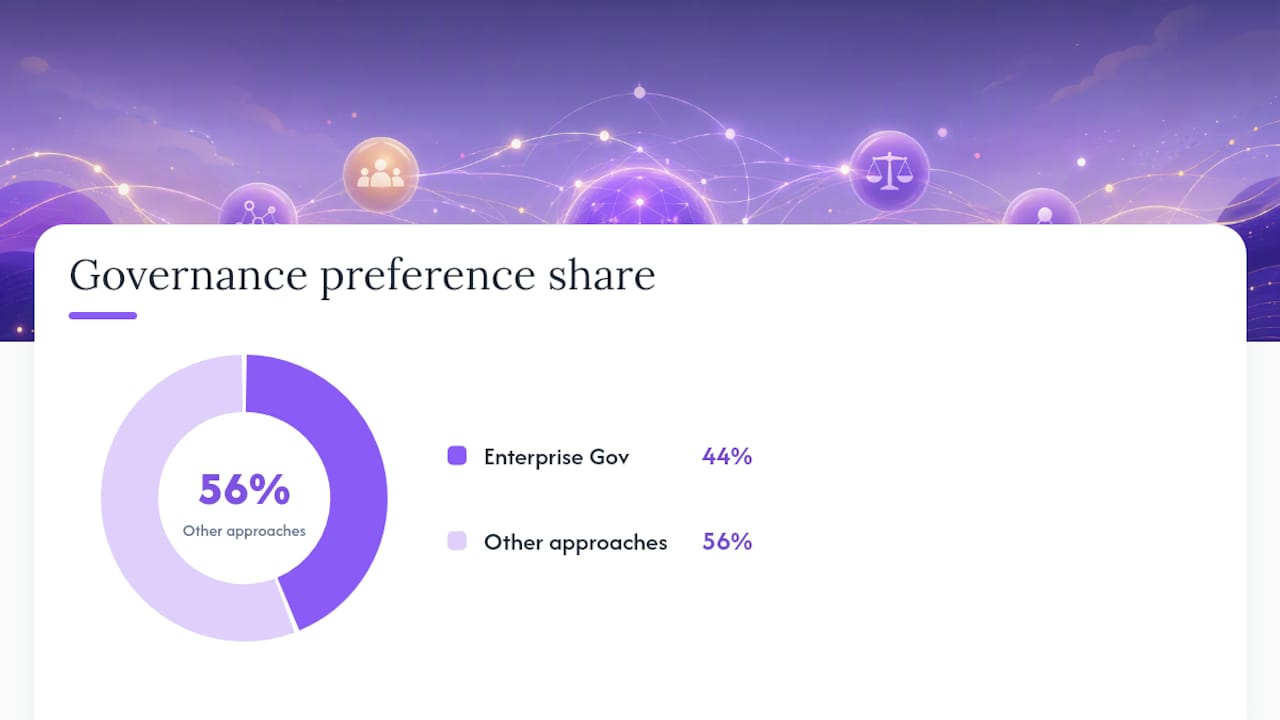
Roughly 44% of the market currently favors enterprise governance frameworks as the standard for managing agent risk in production environments, a sign that credential and audit discipline is moving from best practice to expectation. Treat it as one of your first setup decisions, not an afterthought once something breaks.
Which Integrations Actually Hold Up in Production?
Assistants earn their keep through the automations they run reliably, not the demo they show on day one. Connection methods generally fall into three buckets: direct API integrations, webhook-based gateways, and emerging standards like MCP (Model Context Protocol) for tool access.
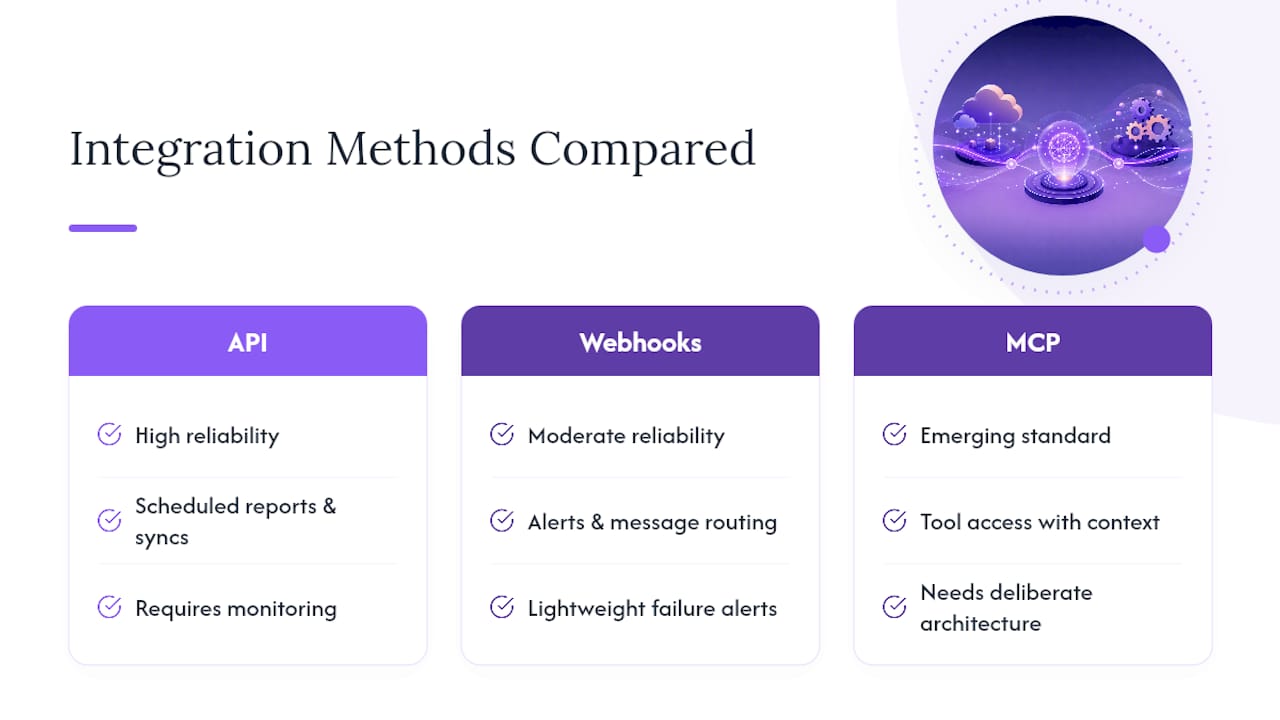
Some automations are genuinely dependable: scheduled reports, message routing between channels, calendar syncing, and file organization tasks. Others are brittle by nature, especially high-frequency web scraping or anything built on fragile UI automation that breaks the moment a website redesigns its layout.
Persistent memory is what makes cross-channel continuity possible. If you message your assistant on Telegram in the morning and follow up on Discord that evening, memory is what lets it remember the context instead of starting over. This is where a lot of DIY setups fall short, since maintaining that continuity requires deliberate architecture, not just a database.
For production automations, build in monitoring from the start. A lightweight webhook that alerts you when a scheduled task fails is far cheaper than discovering a broken automation three days later. Developer guides on connecting assistants to Telegram and team communication integrations cover the practical wiring for these patterns in more depth.
How Does ClawBase Remove the Sysadmin Burden?
OpenClaw is a capable open-source assistant, but configuring it independently demands real sysadmin skill: server provisioning, Docker orchestration, TLS setup, and ongoing patching. ClawBase exists to remove that barrier without removing the control.
- One-click deployment puts OpenClaw on a dedicated server in minutes, following the same setup flow documented in ClawBase's no-code guide
- 99.9% uptime means the assistant is available when your automations depend on it, without you monitoring a server
- Persistent memory management across sessions and channels, so context carries over instead of resetting
- Access to over 50 AI models with multi-model routing, letting you match the right model to the right task
- A Beginner AI Assistant Checklist walks new users through securing integrations and choosing initial automations step by step
For readers who want the privacy benefits of an open-source assistant without becoming its full-time maintainer, this is the practical middle path between raw self-hosting and a closed, proprietary product.
What's the Right Move for Your Situation?
If you're non-technical, don't start with a self-hosting tutorial. You'll spend a weekend on server configuration before you send a single automated message, and most people abandon the project right there. Managed hosting gets you to a working, private assistant in minutes, and a short trial period is enough to know whether the automations you had in mind actually work as expected.
If you're technical, self-hosting gives you full control over data flow and model choice, and a Docker quickstart can have something running the same day. Just budget real time for hardening it properly.
If you're a developer building something novel, skip pre-built assistants entirely and start with a framework. You'll spend your time on orchestration logic instead of fighting someone else's architecture decisions.
> *— Iosif Peterfi*
Ready to Skip the Sysadmin Work Entirely?
Self-hosting OpenClaw gives you full control, but it also means you're the one patching servers, renewing TLS certificates, and troubleshooting backups at midnight. ClawBase gives you the same private, open-source assistant without any of that: one-click deployment on a dedicated, encrypted server, 99.9% uptime, persistent memory that actually carries across sessions, and native connections to Telegram, Discord, Slack, and WhatsApp.

Daily encrypted backups run automatically, updates roll out without your involvement, and you get access to more than 50 AI models with multi-model routing built in. Plans start at $16 a month, and the entry tier includes a 7-day free trial, so you can test the exact automations you had in mind before committing. If the setup steps in this guide sounded like more sysadmin work than you want to take on, start your ClawBase trial and have a working assistant running before the coffee gets cold.
Where to Go Deeper on Agents and Setup
For broader context on where agentic systems are headed, the Stanford HAI AI Index tracks research and deployment trends across the industry. Developers building custom agentic workflows should go straight to the OpenAI Agents SDK documentation for provider-agnostic tooling and realtime agent patterns.
For hands-on setup, ClawBase's no-code assistant guide and Beginner AI Assistant Checklist cover the practical steps for getting a private assistant running fast, regardless of your technical background.