5 Buyer Checks for Always On AI Reliability
2026-09-21

The fastest route to genuine always-on AI reliability is managed deployment on dedicated infrastructure, paired with persistent memory and automated recovery. That combination should come with an explicit uptime SLA (usually 99.9%), documented backup cadence, and telemetry you can actually see. Anything less is a hobby project pretending to be a production service. The rest of this guide breaks down the measurable standards behind that claim and the operational steps that make it real.
***
> TL;DR:
>
> - Managed deployment on dedicated servers with persistent memory and automated recovery is essential to achieve true AI reliability, not just marketing claims.
> - Improving uptime beyond 99.9% requires monitoring of recovery times, tail latency, and memory durability, with documented SLAs and incident logs.
> - Shared VPS environments can cause latency spikes and memory issues, making dedicated hardware necessary for revenue-critical, in-memory AI assistants.
> - Continuous telemetry, frequent encrypted backups, and automated remediation protocols are vital for day-to-day reliability of an always-on agent.
> - Managed hosting offers faster, lower-maintenance deployment suitable for most teams, while self-hosting demands extensive setup and ongoing operational effort.
***
Table of Contents
- What Does Always-On AI Reliability Actually Mean?
- Dedicated Server, VPS, or Managed Hosting: Which Wins on Reliability?
- How Do You Keep an Always-On Agent Reliable Day to Day?
- Managed Deployment vs DIY: What's the Real Cost?
- What Proof Points Should You Demand From a Managed AI Host?
- What Should You Actually Prioritize First?
- Getting the Reliability Checklist Without Building It Yourself
- Sources
- FAQ
What Does Always-On AI Reliability Actually Mean?
"Reliability" gets thrown around loosely in AI marketing, so it helps to pin down what it actually measures for a private, persistent assistant: infrastructure uptime, memory durability, and recovery speed. Not output accuracy, not hallucination rates. Just whether the system you depend on stays up, keeps its memory intact, and comes back fast when something breaks.
A 99.9% uptime figure sounds close to perfect until you translate it into real time: it allows less than an hour of downtime per month, which may be critical for customer support or time-sensitive workflows. Compare that to 99.99% (about 4.3 minutes a month) and you see how much the third decimal point matters if your agent runs customer support or handles time-sensitive workflows.
Beyond raw uptime, a few numbers tell you whether an always-on agent will actually behave like one:
- MTTR (mean time to recovery): how long it takes to restore service after a failure. Anything measured in hours, not minutes, signals a thin operations team.
- p95/p99 latency: the response time for the slowest 5% or 1% of requests. Averages hide the pain; tail latency is where users notice a "stuck" assistant.
- Memory durability: whether persistent memory survives a restart, migration, or crash, or whether the model resets and forgets context.
- Backup restore time: not just whether backups exist, but how fast and reliably they restore.
Before trusting any vendor claim, ask for the SLA text itself, recent incident logs, and the written backup policy. If a provider cannot produce those three documents, the uptime number on their homepage is just marketing.
Dedicated Server, VPS, or Managed Hosting: Which Wins on Reliability?
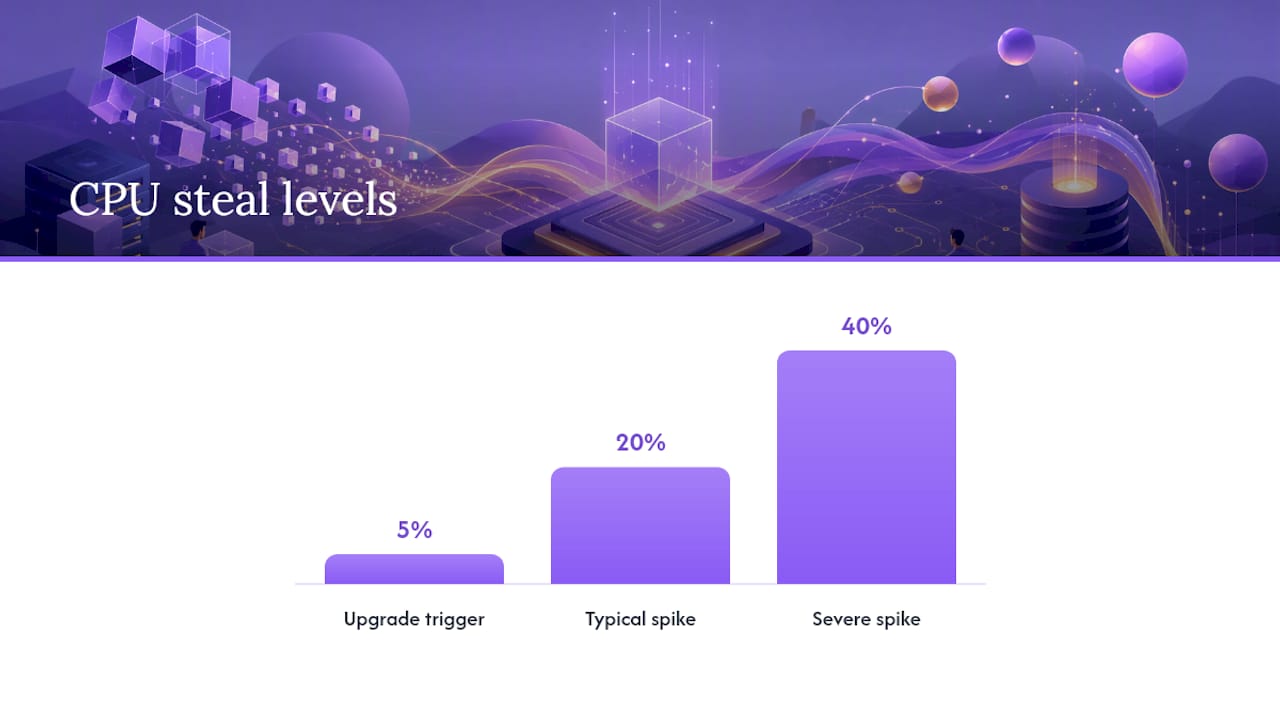
Infrastructure choice is where most reliability problems start, long before anyone writes a line of agent code. The core issue is the "noisy neighbor" effect: on a shared VPS, other tenants' workloads can spike CPU steal time and memory contention, causing latency variance that has nothing to do with your own traffic. Dedicated servers eliminate that variability by giving your agent exclusive access to CPU, RAM, and I/O, which matters enormously for an assistant holding large in-memory state across a full day.
Here's how to think about the three options in practice:
- VPS hosting works fine for development, testing, or low-traffic personal projects. It becomes a liability once your agent is customer-facing or revenue-generating.
- Watch for upgrade triggers. If CPU steal time exceeds 5% on a sustained basis, or you see latency variance more than double your baseline, that's your signal to move off shared infrastructure.
- Dedicated hardware removes the guesswork. Shared environments can see CPU steal spikes of 20 to 40%, which is disastrous for a memory-heavy always-on process.
- Managed hosting should operationalize what dedicated hardware makes possible: patching, monitoring, backups, and incident response, all handled without you touching a terminal.
Validating a managed vendor's claims means asking pointed questions: What's the patch cadence? Who gets paged during an incident, and how fast? Can you see a monitoring dashboard, or do you just get a status page that says "operational" no matter what? A dedicated server is the foundation; managed operations is what keeps that foundation from cracking under real use.
How Do You Keep an Always-On Agent Reliable Day to Day?
Infrastructure gets you a stable foundation. Operational practice is what turns that foundation into a service you can actually trust at 3 AM on a Sunday.
Telemetry worth collecting:
- Uptime checks at regular intervals, not just once an hour
- p95/p99 latency, tracked continuously rather than sampled
- CPU, memory, and steal time (the
vmstat"st" column is a practical way to check this directly) - Disk I/O and error rates
- Synthetic transactions that simulate real user requests end to end
Persistent memory needs its own backup discipline, separate from server backups. That means frequent encrypted snapshots, defined retention windows, and, critically, periodic restore tests. A backup nobody has ever restored is a hope, not a plan.
Automated remediation is what separates a mature system from a fragile one: health-check-driven restarts that catch a hung process before a human notices, graceful failover to a standby instance, and circuit breakers that stop cascading failures rather than let one broken component take down the whole agent. Written runbooks make sure the response is consistent even when the person on call has never seen that specific failure before.
Pro Tip: *Schedule failover drills and backup restores on a calendar, not "when we get to it." Reliability practices that only get tested during a real outage tend to fail exactly when you need them most.*
Post-incident reviews should be blameless and specific: what broke, why the monitoring didn't catch it sooner, and what changes next. Good logging practices make that review possible instead of speculative.
Managed Deployment vs DIY: What's the Real Cost?
The choice between one-click managed deployment and building it yourself comes down to time, not just money.
- A proper managed deployment should include dedicated server provisioning out of the box, encrypted backups configured by default, monitoring already wired up, and ready-made connectors for the messaging platforms your team actually uses.
- DIY self-hosting requires you to assemble your own hardware or VPS, a container runtime, a monitoring stack, backup automation, and a named person responsible for incident response. Self-hosting can run as little as $0 to $4 a month in raw hosting cost, but it typically demands one to four hours of maintenance every month, and that estimate assumes nothing goes wrong.
- Time cost matters more than sticker price. Managed hosting can put an agent into production within days, where DIY setup often stretches into weeks once you account for debugging the monitoring stack alone.
- Verify before you commit either way: run a synthetic transaction end to end, test an actual backup restore, get the SLA language in writing, and confirm who has access-control privileges on the system.
What Proof Points Should You Demand From a Managed AI Host?
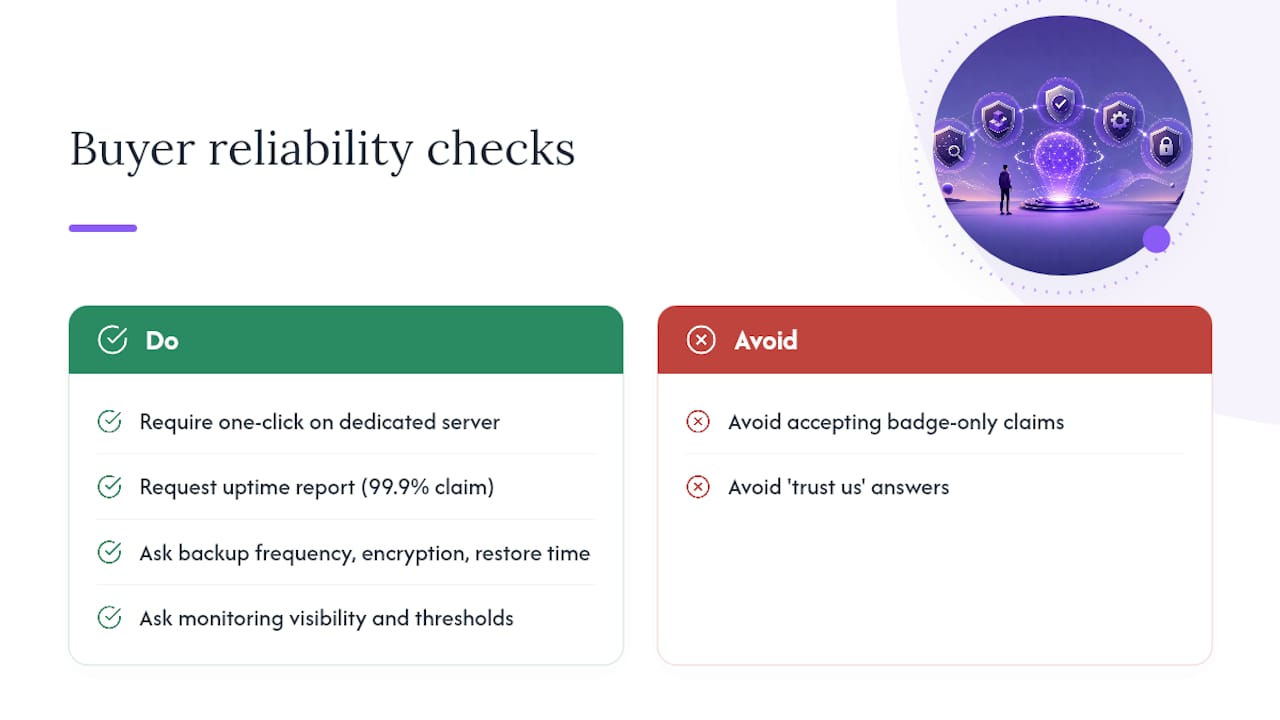
Clawbase's own reliability claims give you a template for what to demand from any vendor: one-click deployment on a dedicated server, a 99.9% uptime target, persistent memory management, access to more than 50 AI models, and native connectors for Telegram, Discord, Slack, and WhatsApp.
Turn each claim into a buyer check. Ask for the actual uptime report, not just the marketing number. Ask exactly how often backups run, whether they're encrypted at rest, and how long a restore takes. Ask whether you get any visibility into monitoring and alert thresholds, or whether you're simply told "trust us." A vendor confident in its own reliability should hand over incident history and setup documentation without hesitation, not just a badge on a landing page.
What Should You Actually Prioritize First?
Start managed if your agent touches revenue or customer workflows, and reserve self-hosting for teams with real operations capacity to spare. The most common mistakes are skipping telemetry, never verifying a backup restore, and underestimating how much memory a genuinely useful assistant accumulates. Small teams should default to managed hosting; engineering-first teams can self-host, but only if someone owns incident response by name.
> *— Iosif Peterfi*
Getting the Reliability Checklist Without Building It Yourself
Clawbase is built around the exact checklist this article just walked through, not as an afterthought but as the starting point: dedicated servers instead of shared VPS, a 99.9% uptime target, persistent memory that survives restarts, access to more than 50 AI models, and connectors into Telegram, Discord, Slack, and WhatsApp, all backed by daily encrypted backups.

Where most self-hosted AI assistant setups demand real sysadmin skills just to get running, some managed services offer one-click deployment and require no ongoing maintenance from the user. If you're technical and curious, that's still worth trying. If you'd rather not spend a weekend debugging a container runtime, that's exactly the gap Clawbase closes.
Plans start at a low monthly rate on the LITE tier, running up to higher monthly pricing on MAX, with annual pricing available on every tier. Check the full plan breakdown to see which tier fits your workflow, or head to the Clawbase homepage to start a trial and see the uptime and backup dashboard for yourself before committing to anything.
Sources
- Self-Hosting vs. Managed: Choosing Your AI Infrastructure Model | NimbleBrain
- Self-Host Your AI Agent or Have It Run for You? (2026) | Cognio Labs
- Dedicated Server vs VPS for AI Agents | osModa
FAQ
What Uptime Should an Always-On AI Assistant Guarantee?
Clawbase builds its managed hosting around this exact target using dedicated servers rather than shared VPS resources.
How Often Should Persistent Memory Be Backed Up?
Persistent memory needs frequent, encrypted backups with a clear retention window, and those backups only count if they've actually been restore-tested. Daily encrypted backups are the baseline you should expect from any managed provider handling memory-heavy agents.
Is a Dedicated Server Really Necessary for an AI Agent?
Not for testing or low-traffic development work, but yes for anything customer-facing or revenue-critical. Shared VPS environments can see CPU steal spikes of 20 to 40%, which causes latency variance that a dedicated server avoids entirely.
What Monitoring Signals Indicate a Reliability Problem?
Watch p95/p99 latency, CPU and memory steal time, error rates, and synthetic transaction failures.
How Long Does Managed Onboarding Take Compared to DIY?
Managed hosting can get an agent into production within days, while DIY self-hosting often stretches into weeks once monitoring and backup automation are factored in. One-click deployment removes most of that setup time entirely; current prices are on the pricing page.