What Is AI Model Selection? A 2026 Guide
2026-06-30

AI model selection is the systematic process of identifying and choosing the best AI model for a specific workflow based on task requirements and operational constraints. The industry term for this practice is *machine learning model selection*, though practitioners increasingly use both phrases interchangeably. Getting this decision right determines whether your AI system delivers reliable results or burns through budget on the wrong tool. The core insight: model choice is a five-dimensional problem balancing task fit, latency, cost, context window size, and controllability. No single model wins on all five dimensions, which makes the selection process a genuine engineering decision, not a popularity contest.
What is AI model selection and why does it matter?
AI model selection is defined as the process of evaluating and choosing among candidate AI models to find the one that best fits a defined task, workflow, and set of operational constraints. The decision affects real-world performance, cost, and reliability at every stage of a project.
The stakes are higher than most students and professionals expect. Focusing only on the model without considering the surrounding system reduces reliability and increases both cost and risk. A model that scores well on a public leaderboard can fail badly when applied to your specific data, edge cases, or latency requirements. That gap between benchmark performance and production performance is where most AI projects run into trouble.

AI model selection also matters because the field moves fast. A model that was the best choice six months ago may now be outperformed by a smaller, cheaper alternative. Treating selection as a one-time decision rather than an ongoing practice is one of the most common and costly mistakes in AI project management.
What criteria and constraints guide AI model selection?
Model selection involves five core dimensions: task fit, latency, cost, context requirements, and controllability. Each dimension pulls in a different direction, and trade-offs are unavoidable.
Here is what each dimension means in practice:
- Task fit: Does the model's training and capability profile match the job? A model trained heavily on code generation may underperform on nuanced legal summarization, even if its overall benchmark score is high.
- Latency: How fast does the model need to respond? A customer-facing chatbot requires sub-second responses. A nightly batch analysis job can tolerate minutes of processing time.
- Cost: Evaluate cost as cost-per-task, not cost-per-token. A more powerful model may complete a task in one well-structured call, while a cheaper model requires five retries, making it more expensive overall.
- Context and memory: Some workflows require processing long documents or maintaining conversation history. Models with larger context windows handle these tasks without chunking workarounds.
- Controllability: How predictably does the model behave under adversarial inputs or unusual edge cases? High-stakes workflows need models that fail gracefully, not ones that hallucinate confidently.
Pro Tip: *Document your trade-off decisions in a shared log and review them quarterly. Model capabilities and pricing change frequently, and a decision that was correct in january may need revisiting by april.*
How do practitioners evaluate and compare AI models effectively?
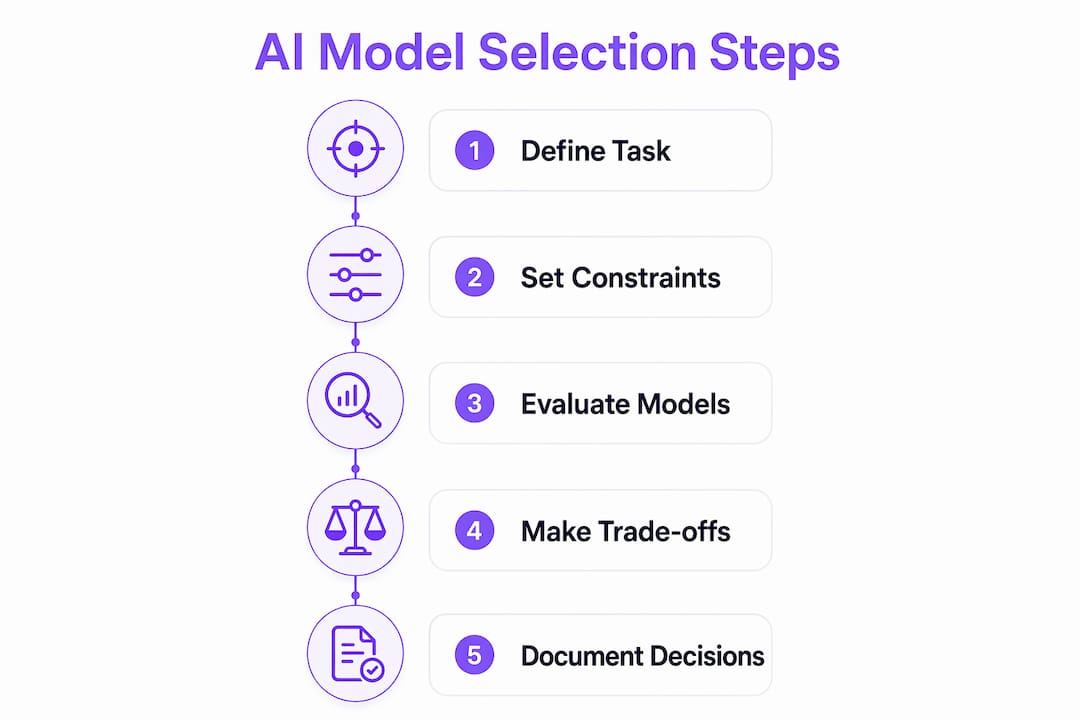
Effective AI model comparison requires a custom evaluation set built from your actual workflow, not from academic benchmarks. Experts recommend building 10–20 real-world examples drawn directly from the tasks your system will handle. This is the single most reliable way to predict production performance.
The evaluation process follows a clear sequence:
- Define the job. Write a one-sentence description of what the model must accomplish. Vague definitions produce vague evaluations.
- Identify your constraints. List your hard limits on latency, cost, and context length before testing begins.
- Build your evaluation set. Collect 10–20 representative examples from your real workflow, including edge cases and failure-prone inputs.
- Test at least two candidate models. Run every candidate on the same evaluation set under identical conditions.
- Score on a 1–5 rubric. Score each model consistently across accuracy, format adherence, latency, and cost per task. Aggregate scores reveal patterns that gut feel misses.
> "Public leaderboards are useful for general capability comparisons but don't reliably predict production success. Validation on proprietary data with custom evaluation sets is critical."
The rubric approach removes subjectivity from the process. When two team members score the same output independently and compare results, disagreements surface assumptions that would otherwise stay hidden. That calibration step alone improves decision quality significantly.
Pro Tip: *Include at least two adversarial or edge-case examples in your evaluation set. Models that handle normal inputs well often diverge sharply on unusual ones, and that divergence reveals true reliability.*
What types of AI models exist and how do they affect selection?
Understanding the major categories of AI models helps you match the right tool to each task. The categories differ in capability, cost, speed, and privacy profile.
| Model type | Strengths | Best for |
|---|---|---|
| Frontier / general-purpose | Deep reasoning, synthesis, broad knowledge | Complex planning, research, multi-step tasks |
| Small fine-tuned models | Fast, cheap, highly specialized | Classification, extraction, simple lookups |
| Locally hosted open models | Private, no API costs, fully controllable | Sensitive data, offline environments |
| Multi-model router systems | Optimized cost and latency per request | Mixed-complexity workflows at scale |
Frontier models handle tasks that require complex reasoning, synthesis across large bodies of information, or nuanced judgment. They cost more per call and respond more slowly, but they handle ambiguity better than smaller alternatives.
Small, fine-tuned models excel at narrow, well-defined tasks. A model fine-tuned on customer support tickets will outperform a general-purpose frontier model on that specific job, at a fraction of the cost. The trade-off is brittleness: take it outside its training distribution and quality drops sharply.
Multi-model router patterns use intent classifiers to assign each incoming request to the most appropriate model dynamically. Simple requests go to fast, cheap models. Complex or high-stakes requests route to frontier models. This approach, sometimes called LLM routing, is the architecture behind many production AI systems that need to balance speed, cost, and quality simultaneously. You can read more about multi-model AI support and how it applies to real deployments.
Locally hosted open models add a privacy dimension to the selection decision. When your workflow involves sensitive personal data, proprietary documents, or regulated information, sending inputs to a third-party API introduces compliance risk. A locally hosted model eliminates that risk entirely, though it requires more infrastructure planning. The open-source AI scalability challenges involved in self-hosting are real and worth understanding before committing to that path.
What best practices help avoid common AI model selection mistakes?
The most common mistake in AI model selection is defaulting to the most popular or most talked-about model without testing it against your actual workflow. Choosing based on brand popularity rather than task fit consistently produces suboptimal outcomes. Popularity reflects marketing and general capability, not fit for your specific job.
Avoid these pitfalls:
- Benchmark chasing without real-task validation. MMLU and HumanEval scores measure academic capability. They do not measure how well a model handles your invoice extraction pipeline or your support ticket classifier.
- Over-engineering the model choice while under-engineering the system. AI models function as part of a system that includes retrieval, prompting, validation, and human review. A mediocre model in a well-designed system outperforms a frontier model in a poorly designed one.
- Ignoring cost-per-task math. A model priced at $0.002 per token that requires ten calls to complete a task costs more than a model at $0.01 per token that completes it in one. Run the full-task cost calculation before drawing conclusions.
- Treating selection as permanent. Model capabilities, pricing, and availability change constantly. Effective AI product managers update their trade-off documentation quarterly and revisit model choices on a regular schedule.
Pro Tip: *Set a calendar reminder every 90 days to re-run your top two evaluation tasks against newly released models. The field moves fast enough that a better option often appears within a quarter.*
Key Takeaways
Effective AI model selection is a systems engineering decision that requires task-specific testing, documented trade-offs, and regular review, not a one-time brand-based choice.
| Point | Details |
|---|---|
| Selection is multidimensional | Evaluate task fit, latency, cost, context, and controllability together, not in isolation. |
| Custom evaluation sets win | Build 10–20 real-workflow examples to test candidates; public benchmarks do not predict production performance. |
| Cost-per-task beats cost-per-token | Calculate the full cost of completing a task, including retries, before comparing model pricing. |
| Multi-model routing optimizes at scale | Route simple tasks to fast, cheap models and complex tasks to frontier models dynamically. |
| Revisit decisions quarterly | Model capabilities and pricing shift fast enough that last quarter's best choice may not be this quarter's. |
What I've learned from getting model selection wrong
My honest experience with AI model selection is that the hardest lesson came from skipping the evaluation set step. Early in a workflow automation project, I picked a frontier model because it topped the leaderboard that month. The outputs looked impressive in demos. In production, it hallucinated on edge cases that appeared in roughly one in twelve real requests. That failure rate was invisible until we had real traffic.
The fix was not switching to a different model. It was building a proper evaluation set from actual workflow examples, scoring two candidates systematically, and then choosing. The winning model was not the one I had originally picked. It was a smaller, fine-tuned alternative that handled the edge cases more predictably and cost less per task.
The second lesson was about system design. I had spent weeks comparing models and almost no time on the retrieval and validation layers around them. Once I treated the whole stack as the unit of design, outcomes improved more than any single model swap had achieved. The role of AI models in responses is real, but it is one layer in a larger architecture.
The practical takeaway: document your trade-offs, test on real examples, and schedule a quarterly review. Those three habits will save you more time and money than any amount of benchmark research.
> *— Iosif Peterfi*
How Clawbase makes model selection practical
Choosing the right AI model is only half the challenge. Deploying it, switching between models as your needs evolve, and keeping the system running reliably is where most teams hit friction.

Clawbase solves that friction with managed OpenClaw hosting that gives you access to over 50 AI models on a dedicated server with 99.9% uptime and no maintenance overhead. You can switch AI models without coding, which means your evaluation findings translate directly into deployment changes without a sysadmin in the loop. Clawbase also supports multi-model workflows, persistent memory, and integrations with Telegram and Discord, making it a practical platform for both students testing ideas and professionals running production workflows. If you want to see what AI agents can actually do across real use cases, the Clawbase use cases page is a good starting point.
FAQ
What is AI model selection in simple terms?
AI model selection is the process of choosing the best AI model for a specific task by testing candidates against real workflow examples and scoring them on criteria like accuracy, cost, and latency.
Why can't I just use the top-ranked model on a leaderboard?
Public leaderboard scores measure general academic capability and do not predict performance on your specific data or workflow. Custom evaluation on real tasks is the only reliable method.
How many models should I test before choosing?
Test at least two candidate models on the same evaluation set of 10–20 real-workflow examples. Scoring both on a consistent rubric gives you evidence-based grounds for the final decision.
What is a multi-model router and when should I use it?
A multi-model router uses an intent classifier to send each request to the most appropriate model, routing simple tasks to fast, cheap models and complex tasks to frontier models. Use it when your workflow contains requests of mixed complexity and you need to control cost and latency at scale.
How often should I revisit my AI model selection?
Review your model choices at least quarterly. Model capabilities, pricing, and availability change frequently enough that a decision made three months ago may already have a better alternative available.