How to Switch AI Models Without Coding in 2026
2026-06-21

Switching AI models without coding is fully achievable today using multi-model platforms and no-code workspaces that let you change AI engines in seconds while keeping your full conversation history intact. The standard industry term for this capability is "model-agnostic AI access," and it has moved from a developer-only feature to a practical tool for writers, researchers, project managers, and anyone who uses AI daily. Platforms like Nova AI, izzedo chat, and AgentsRoom now give non-technical users access to dozens of models through a single interface, no terminal required. This guide covers the best tools, a step-by-step walkthrough, and the most common mistakes to avoid.
What tools let you switch AI models without coding?
No-code AI model switching is the practice of changing the underlying AI model in your workflow through a visual interface, without writing or modifying any code. All-in-one AI platforms give users access to 30–500+ different models through a single workspace, cutting tab clutter and eliminating the need for multiple subscriptions. That single-dashboard approach is the fastest path to model freedom for non-technical users.
The most widely used platforms in this category include:
- Nova AI: Provides access to 30+ models including ChatGPT, Claude, Gemini, Grok, and DeepSeek from one dashboard. Users switch models instantly without managing separate accounts.
- izzedo chat: Bundles ChatGPT, Claude, Gemini, and DeepSeek in one workspace with a model selector visible in every conversation.
- AgentsRoom: An AI coding IDE that supports 7 AI providers including Claude, Codex, Gemini CLI, and Mistral, with full context handoff and no session restart required.
- magicdoor.ai: A multi-model assistant focused on workflow efficiency, with live cost monitoring built into the interface.
For professionals who work inside existing software tools, OpenAI-compatible API gateways offer a different path. These gateways let you swap AI providers by updating a single connection string, preserving your entire software setup without downtime. You change a base URL or API key in a settings panel, and the switch is done. No code rewrite, no tool restart.
| Platform | Models available | Context preserved | Pricing model | Best for |
|---|---|---|---|---|
| Nova AI | 30+ | Yes | Subscription | General professionals |
| izzedo chat | 30+ | Yes | Subscription | Writers and researchers |
| AgentsRoom | 7 providers | Yes | Subscription | Developers and coders |
| magicdoor.ai | Multiple | Yes | Usage-based | Cost-conscious teams |

The right choice depends on your primary task. For writing and research, Nova AI or izzedo chat cover most needs. For code-heavy work, AgentsRoom is the stronger pick.
How to switch AI models mid-conversation without losing context
Mid-conversation model switching is the ability to change your active AI model during an ongoing session while the new model picks up the full conversation history. Modern AI platforms support this with instant provider changes across Anthropic, OpenAI, and Google with zero downtime. The practical value is significant: you can start a draft with a fast, low-cost model, then switch to a stronger reasoning model the moment your task gets complex.
Here is the step-by-step process for switching models mid-conversation on most multi-model platforms:
- Start your session. Open your platform of choice (Nova AI, izzedo chat, or AgentsRoom) and begin your conversation or task as normal.
- Locate the model selector. Most platforms display a model dropdown or provider selector at the top or bottom of the chat window. On AgentsRoom, this appears as a provider toggle in the IDE toolbar.
- Choose your new model. Select the model that fits your next task. Switch from a drafting model to a reasoning model for analysis, or to a code interpreter for programming tasks.
- Confirm context is preserved. The platform should carry your full conversation history into the new model's context window. Scroll up to verify your previous messages are visible.
- Continue your work. The new model now responds with full awareness of everything discussed before the switch.
One scenario where this matters: you are writing a market research report. You start with a fast model to outline the structure, then switch to a reasoning model to analyze data, then switch again to a writing-focused model to polish the final draft. All of this happens in one session, with no copy-pasting between tabs.
Pro Tip: *Before switching models mid-conversation, check model compatibility for your current file types and context window size. Not all models support the same file formats or memory length, and switching to an incompatible model can truncate your history or drop uploaded files entirely.*
The most common error is switching to a model with a shorter context window than your current conversation length. If your chat history is 20,000 tokens and your new model only supports 8,000, the model will silently cut off the earlier parts of your conversation. Always check the context window spec before switching on long sessions.
How to select the right AI model for each task without coding
Model specialization is the single biggest reason to change AI models easily rather than sticking with one. Different models are built for different jobs, and using the wrong model for a task wastes both money and time. A practical workflow guide from magicdoor.ai makes this explicit: vision models handle screenshots, reasoning models handle research, and code interpreters handle programming. Each model type has a distinct strength.
Here is a task-to-model mapping for common professional uses:
- Writing and editing: Use a general-purpose model like GPT-4o or Claude 3.5 Sonnet. These models produce fluent, well-structured prose and handle tone adjustments well.
- Research and analysis: Use a reasoning model like o3 or Claude 3.7 Sonnet. These models are built to work through multi-step problems and evaluate evidence.
- Code generation and debugging: Use a code-specialized model like Codex or Gemini CLI. AgentsRoom is built specifically for this workflow.
- Image analysis and visual tasks: Use a vision model like GPT-4o with vision or Gemini 1.5 Pro. These models process screenshots, charts, and diagrams directly.
- Image creation: Use a dedicated image generation model like DALL-E 3 or Stable Diffusion through a platform that supports it.
- Routine drafts and summaries: Use a fast, low-cost model like GPT-4o mini or Gemini Flash. Save the frontier models for tasks that actually need them.
The cost argument here is real. Users who rely on frontier models for simple tasks like summarizing emails or generating first drafts spend significantly more than users who match model tier to task complexity. A tiered approach, using a base model for routine work and a specialized model only when needed, cuts AI spend without sacrificing output quality.
Understanding multi-model AI support in depth helps you build this kind of tiered workflow from the start, rather than discovering it after months of overspending on a single frontier model.
Step-by-step guide: switching AI models without writing code
The prerequisites for no-code AI model switching are minimal. You need an account on a multi-model platform like Nova AI, izzedo chat, or AgentsRoom, or access to an OpenAI-compatible API gateway through a settings panel in your existing tool. No terminal, no configuration files, no programming knowledge required.
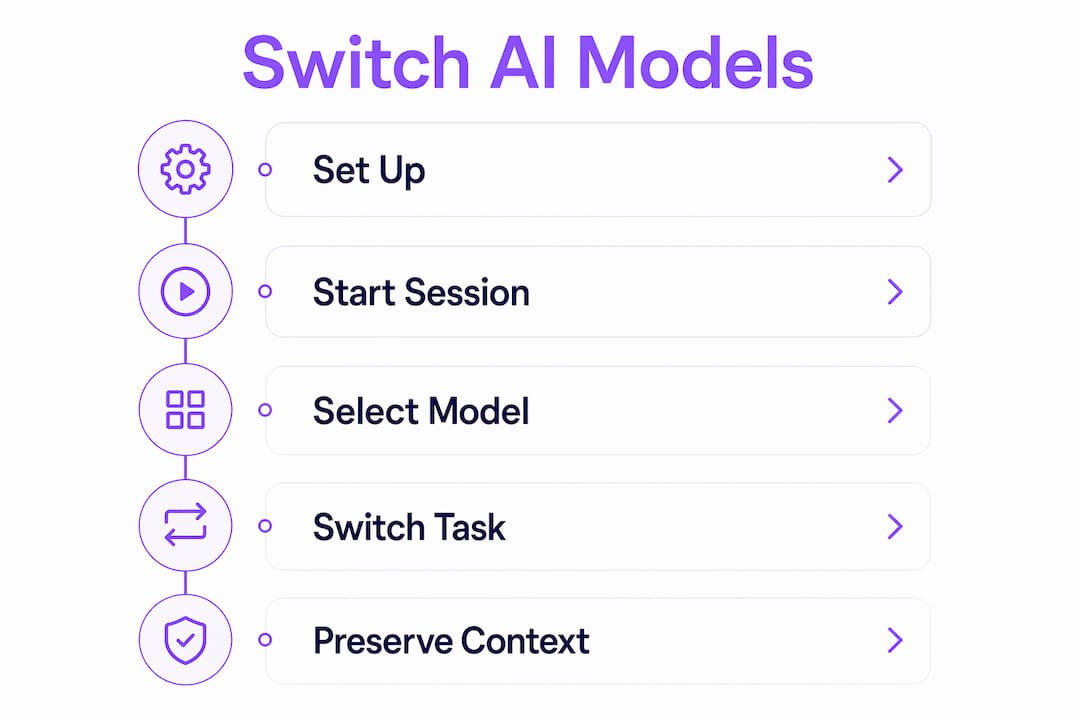
Step 1: Set up your account and choose a platform.
Create an account on your chosen platform. Nova AI and izzedo chat both offer free tiers with access to multiple models. AgentsRoom targets developers but requires no coding to switch models once the IDE is running.
Step 2: Open the platform dashboard and start a session.
Log in and open a new conversation or project. The dashboard on most platforms shows your active model in a visible label near the input field.
Step 3: Locate the model switcher or provider selector.
Find the model dropdown. On Nova AI, it sits at the top of the chat window. On izzedo chat, it appears as a selector next to the send button. On AgentsRoom, it is a provider toggle in the toolbar.
Step 4: Select the model that fits your current task.
Choose based on the task-to-model mapping above. If you are starting a draft, pick a fast general model. If you are moving into analysis, switch to a reasoning model.
Step 5: Continue your session with preserved context.
The platform carries your conversation history forward. Verify this by checking that previous messages are visible to the new model before you continue.
Step 6: Compare outputs side by side when needed.
Some platforms let you run the same prompt through two models simultaneously. Use this feature when you are unsure which model handles a specific task better. The output difference is often immediately obvious.
Common mistakes to avoid:
- Switching to a model without checking its context window limit on long sessions
- Using a frontier model for a task a base model handles equally well
- Forgetting to verify file format compatibility before switching on document-heavy tasks
- Skipping the output check after a switch, assuming the new model has full context
Troubleshooting your no-code AI model switching workflow
Context loss is the most reported problem in AI model management without coding. It happens when you switch to a model with a shorter context window than your current session length, or when you switch to a model that does not support the file type you uploaded. Not all models support the same file types or memory, so checking compatibility before switching is a non-negotiable step on longer sessions.
The fastest way to diagnose a context problem is to ask the new model to summarize the conversation so far. If the summary is incomplete or missing early details, the model has truncated your history. The fix is to either switch back to a model with a larger context window or manually paste a summary of the key points before continuing.
Cost overruns are the second most common issue. Platforms like magicdoor.ai include live cost monitoring in the interface, which shows you the per-message cost of your active model in real time. That visibility changes behavior fast.
Pro Tip: *Set a "base" model as your default for all routine tasks and only switch to specialized or frontier models for specific steps. This single habit, combined with live cost monitoring, keeps your AI spend predictable without limiting what you can do.*
Additional optimization steps:
- Review your platform's model specs page before starting a complex session
- Use the platform's usage dashboard weekly to spot which models you are overusing
- Test a new model on a short, low-stakes task before relying on it for critical work
- Check whether your platform supports no-code AI assistant features that automate model selection based on task type
Key Takeaways
Switching AI models without coding is most effective when you match each model to a specific task type and use a multi-model platform that preserves conversation context across switches.
| Point | Details |
|---|---|
| Use multi-model platforms | Nova AI, izzedo chat, and AgentsRoom give access to 30+ models from one dashboard. |
| Preserve context on every switch | Verify the new model's context window before switching on long sessions. |
| Match model to task | Use base models for drafts and reasoning or vision models for complex analysis. |
| Control costs with a tiered approach | Reserve frontier models for tasks that genuinely need them to reduce AI spend. |
| Troubleshoot with a summary check | Ask the new model to summarize the session to confirm full context was transferred. |
Why model freedom matters more than model loyalty
I spent a long time defaulting to a single frontier model for everything. It felt safer, more consistent. Then I started tracking what I actually used each model for, and the pattern was hard to ignore: roughly two-thirds of my daily tasks were things a base model handled just as well at a fraction of the cost.
The shift to no-code model switching changed how I think about AI entirely. It is not about finding the best model. It is about building a workflow where the right model shows up for the right job, automatically or with one click. The professionals I see getting the most out of AI are not the ones with the most expensive subscriptions. They are the ones who treat their model stack the way a good craftsperson treats a toolbox: specific tools for specific jobs, nothing wasted.
The platforms are catching up to this mindset fast. AgentsRoom's full context handoff and magicdoor.ai's live cost monitoring are early signs of where the category is heading. Within the next year or two, I expect model selection to become semi-automatic on most platforms, with the interface suggesting a switch based on what you are trying to do. The users who build the habit of using AI without technical skills now will be the ones who adapt fastest when that shift arrives.
The one limitation worth naming honestly: context window management is still a manual skill. No platform fully automates the check for you. Until that changes, the summary-check habit I described above is your best defense against silent context loss.
> *— Iosif Peterfi*
Try Clawbase for managed multi-model AI access
If you want multi-model AI access without managing servers, subscriptions, or configuration files, Clawbase is built for exactly that.

Clawbase offers managed OpenClaw hosting from $16/mo, with one-click deployment, 99.9% uptime, and access to over 50 AI models from a single private agent. You get persistent memory, workflow automation, and integrations with Telegram and Discord, all without touching a command line. For non-technical users and professionals who want the full power of a multi-model AI stack without the setup overhead, Clawbase removes every barrier between you and the models you need. Explore the practical AI agent use cases to see how teams are putting it to work today.
FAQ
What does it mean to switch AI models without coding?
Switching AI models without coding means changing the active AI model in your workflow through a visual interface or settings panel, with no programming required. Platforms like Nova AI and izzedo chat make this a one-click action inside a standard chat window.
Do I lose my conversation history when I switch models?
Most modern multi-model platforms preserve full conversation history across model switches. The exception is when the new model has a shorter context window than your session length, which can cause earlier messages to be truncated silently.
Which platforms support no-code AI model switching?
Nova AI, izzedo chat, AgentsRoom, and magicdoor.ai all support no-code model switching with context preservation. Nova AI provides access to 30+ models including ChatGPT, Claude, Gemini, Grok, and DeepSeek from a single dashboard.
How do I avoid overspending when switching AI models?
Use a base model for routine tasks like drafts and summaries, and switch to frontier or specialized models only for complex research, code generation, or image analysis. Platforms like magicdoor.ai include live cost monitoring to help you track spend per message.
Can non-technical users manage AI model switching on their own?
Yes. Multi-model platforms are designed for non-technical users and require no setup beyond creating an account. The model selector is a standard UI element, similar to choosing a font or a language in any web application.