Best Lapu.ai Alternatives for Desktop Workflow Automation
2026-08-08

If you need a private, always-on desktop AI agent that handles real workflow automation without a sysadmin on call, the shortlist is short: Clawbase (managed OpenClaw hosting) is the recommended pick for users who want zero-setup deployment with persistent memory and high uptime reliability. Behind it, Claude Desktop and Microsoft Copilot cover cloud-connected copilot needs, while Open Interpreter and goose serve developers comfortable with self-hosted open-source agents. Manus, AskUI, Bytebot, ChatGPT Agent (OpenAI Operator), and Perplexity round out the field for specialized or cloud-first use cases.
The right choice depends on three things: whether you need local processing, how much setup complexity you can tolerate, and what integrations your workflows actually require. Clawbase fits users who want OpenClaw's power without the configuration overhead. Open-source alternatives like goose or Open Interpreter fit developers who prefer full control and don't mind terminal work. Cloud copilots like Claude Desktop or Microsoft Copilot fit teams already inside those ecosystems.
The feature matrix and per-tool reviews below cover ten dimensions: deployment model, automation depth, integrations, privacy, persistent memory, model support, ease of setup, pricing, platform compatibility, and support quality.
***
Table of Contents
- How do these Lapu.ai alternatives compare at a glance?
- Detailed mini-reviews: how each option compares to Lapu.ai
- How to choose the right Lapu.ai alternative for your workflows
- How we compared these tools
- Why Clawbase is the managed alternative worth trying first
- Key Takeaways
- When managed OpenClaw is the smarter call
- Useful sources and further reading
How do these Lapu.ai alternatives compare at a glance?
LapuAi is a desktop AI agent built around local tools, permission-based execution, and a built-in scheduler. Its alternatives split cleanly into four categories, each with a different trade-off profile.
| Category | Representative Option | Deployment | Free Tier | Local Processing |
|---|---|---|---|---|
| Managed OpenClaw | Clawbase | Dedicated cloud server, one-click | 7-day trial | Private server, not your machine |
| Open-source desktop agent | Open Interpreter, goose | Self-hosted, local | Free (self-host) | Yes, fully local |
| Cloud copilot with desktop client | Claude Desktop, Microsoft Copilot | Cloud-processed, desktop app | Free tier available | No |
| Multi-model agent platform | Manus, ChatGPT Agent, Perplexity | Cloud | Limited free | No |
| Desktop UI automation | AskUI, Bytebot | Self-hosted or cloud | Limited | Partial |
Category summaries:
- Managed OpenClaw (Clawbase): — The only option that gives you a private, always-on agent with no setup work. Persistent memory, browser relay, Telegram/Discord/Slack/WhatsApp integrations, and over 50 AI models out of the box.
The aiagentsdirectory alternatives table uses "best for," "pricing," and "access" columns as its primary triage filters, which mirrors how most buyers actually narrow the field.
***
Detailed mini-reviews: how each option compares to Lapu.ai
Clawbase (managed OpenClaw)
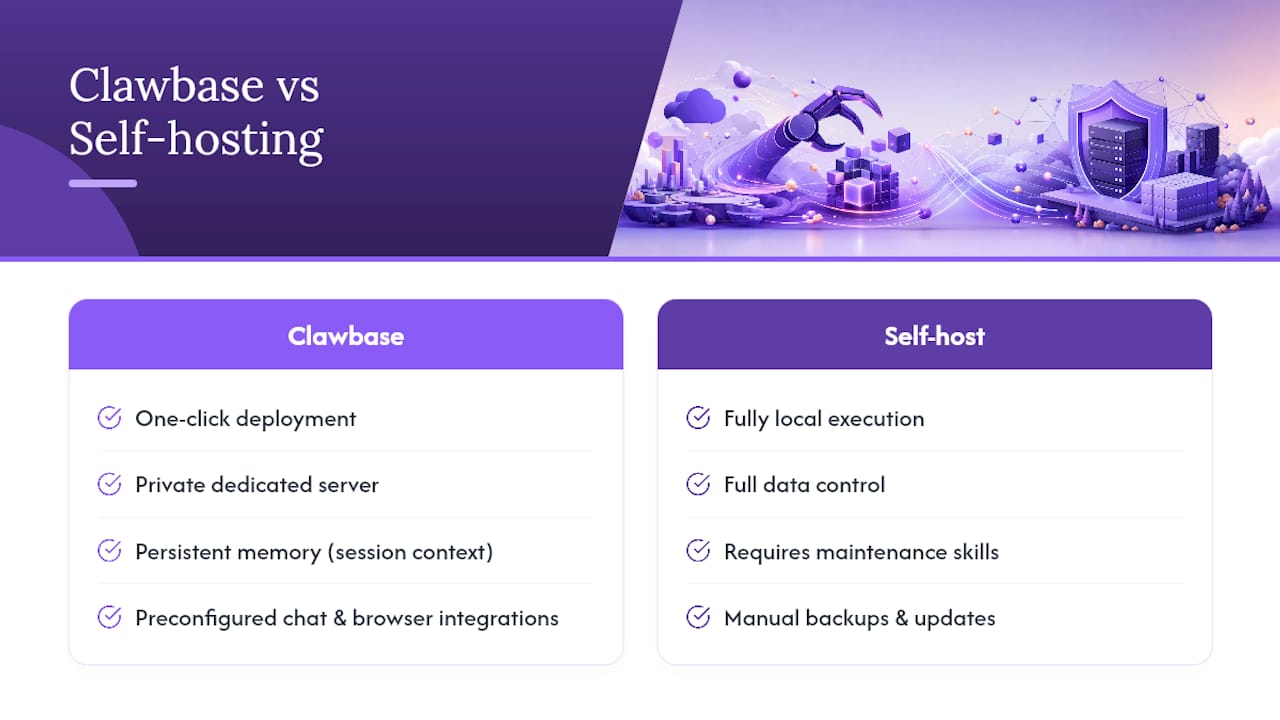
OpenClaw is a powerful open-source personal AI assistant. Clawbase wraps it in a managed hosting layer so you get a private, dedicated cloud server with one-click deployment, no terminal work required. Where Lapu.ai runs as a local desktop agent on your own machine, Clawbase runs on a dedicated server that's always on, even when your laptop is closed.
Pros:
- One-click deployment, no sysadmin skills needed
- Persistent memory management across sessions
- Over 50 AI models with multi-model routing
- Browser relay, Telegram, Discord, Slack, and WhatsApp integrations
- Daily encrypted backups and automated updates
- high uptime reliability SLA
Cons:
- Requires a paid subscription (7-day free trial on entry plan)
- Not fully local, runs on a dedicated cloud server rather than your own hardware
Best for: Developers and non-technical professionals who want OpenClaw's depth without the configuration overhead. Also strong for small teams that need always-on automation and can't afford downtime from a self-managed setup.
How it differs from Lapu.ai: Lapu.ai is a local desktop agent with a scheduler and permission-based execution. Clawbase is a managed, always-on agent that persists independently of your desktop session, with richer integration options and a private server model. See the OpenClaw use cases catalog for a breakdown of specific automation scenarios.
Pricing: Subscription plans available, with a free trial period. Payment via credit card or cryptocurrency.
Open-source desktop agents: Open Interpreter and goose
Open Interpreter lets an LLM run code, manage files, and control your desktop through a local Python environment. goose is an open-source desktop agent from Block that runs locally and supports extensible skills. Both give you genuine local execution and full control over which models you use.
Pros:
Cons:
- Setup requires Python, terminal comfort, and manual API key configuration
- No managed backups, no uptime SLA, no persistent memory without custom configuration
- Community support only; no guaranteed response time
Best for: Developers who want maximum control and are comfortable maintaining their own environment. Not practical for non-technical users or teams that need reliability guarantees.
How they differ from Lapu.ai: Lapu.ai offers a packaged desktop experience with a built-in scheduler. Open Interpreter and goose are more raw, requiring you to build the workflow layer yourself. The AI workflow automation guide covers how these automation patterns compare in practice.
Claude Desktop (Anthropic)
Claude Desktop is Anthropic's native desktop application for macOS and Windows. It brings Claude's reasoning capabilities to a desktop client with cross-platform compatibility and a polished interface. SaaSHub lists it as one of the closest alternatives to Lapu.ai in the desktop AI assistant category.
Pros:
- Clean, user-friendly interface with fast onboarding
- Strong reasoning and writing capabilities
- Free tier available
Cons:
- All processing routes through Anthropic's cloud infrastructure
- Limited native automation and scheduling compared to Lapu.ai
- No persistent memory in the free tier; no local execution
Best for: Users who primarily need a capable AI assistant for writing, analysis, and research, and are comfortable with cloud processing.
Microsoft Copilot
Microsoft Copilot integrates deeply with Microsoft 365 and Windows, making it the natural choice for teams already in that ecosystem. Its desktop agent features include task assistance across Word, Excel, Teams, and Outlook.
Pros:
- Native integration with Microsoft 365 suite
- Strong enterprise support and compliance posture
- Available across desktop and mobile
Cons:
- Tightly coupled to Microsoft's ecosystem; limited value outside it
- No local processing; all data routes through Microsoft's cloud
- Automation depth is narrower than a dedicated agent platform
Best for: Teams running Microsoft 365 who want AI assistance embedded in their existing tools without adopting a separate platform.
ChatGPT Agent / OpenAI Operator
OpenAI's agent-mode products (ChatGPT Agent and Operator) handle multi-step web tasks and can interact with browser-based interfaces. They're cloud-first and strong for research-heavy or web-automation workflows.
Pros:
- Strong multi-step reasoning and web task execution
- Broad model capability (GPT-4o and above)
- Improving tool-use and browser interaction
Cons:
- Cloud-only; no local execution
- Limited desktop control outside the browser
- Pricing scales with usage
Best for: Users who need a capable cloud agent for web research, form-filling, and multi-step browser tasks.
Manus
Manus is a multi-model agent platform that routes tasks across different AI models based on task type. It's built for complex, multi-step workflows that benefit from model diversity.
Pros:
- Multi-model routing for task optimization
- Strong for complex, multi-step agent workflows
Cons:
- Cloud-only; no local or private-server option
- Limited native desktop control
Best for: Power users who want to orchestrate multiple AI models across a single workflow without managing infrastructure.
AskUI and Bytebot
Both AskUI and Bytebot focus on desktop UI automation, controlling applications through screen interaction rather than API calls. AskUI uses computer vision to interact with any UI element; Bytebot specializes in browser automation.
Pros:
- Can automate any desktop or browser UI, including apps without APIs
- Useful for legacy software automation
Cons:
- Narrower scope than a full AI assistant
- Setup complexity varies; enterprise pricing for AskUI
Best for: Teams that need to automate specific UI interactions in legacy or API-less applications.
Perplexity
Perplexity is primarily a research and answer engine with agent-like features for web search and summarization. It's not a workflow automation tool in the Lapu.ai sense, but it fits users who need a fast, citation-backed research assistant.
Pros:
- Excellent for real-time web research with cited sources
- Clean interface, fast responses
Cons:
- Not a workflow automation or desktop control tool
- No persistent memory or scheduler
Best for: Researchers and knowledge workers who need fast, sourced answers rather than automated task execution.
Pro Tip: *Check community signals on directories like aiagentsdirectory before committing to a paid plan. View counts and upvotes are rough triage signals, not verdicts, but they surface which tools have active user bases worth validating in a real trial.*
***
How to choose the right Lapu.ai alternative for your workflows
The decision framework comes down to five questions. Answer them in order and the right category becomes obvious.
- Do you need local processing or a private server? If yes, choose a self-hosted open-source agent (Open Interpreter, goose) or a managed private server (Clawbase). Cloud copilots and multi-model platforms route your data through vendor infrastructure.
- How much setup complexity can you absorb? Non-technical users and small teams without IT support should default to Clawbase or a cloud copilot. Self-hosted agents require terminal work, environment management, and ongoing maintenance.
- What integrations does your workflow require? Map your actual tools: Slack, Telegram, Discord, browser relay, specific APIs. Verify each candidate supports them natively before trialing.
- Do you need persistent memory and audit logs? For multi-day task management and compliance-sensitive workflows, persistent memory and logging are not optional. Check whether the tool provides them out of the box or requires custom configuration.
- What is your 12-month total cost of ownership (TCO)? Subscription cost is only part of the picture. Add hosting fees (for self-hosted options), admin time for setup and maintenance, and the cost of downtime if the tool lacks an uptime SLA.
Red flags to watch for:
- No local execution option when your workflows touch sensitive data
- Opaque data routing with no privacy documentation
- No automation scheduler or multi-step workflow support
- No backup or memory controls
- Community-only support with no SLA for a production workflow
Three-step trial plan:
- Test a simple automation end-to-end. Pick one real daily task (file organization, a scheduled report, a Telegram notification) and run it without manual intervention for 48 hours.
- Verify logs, memory, and reliability. Check that the tool recorded what it did, retained context across sessions, and completed the task consistently.
- Measure reliability over 7 days. Track failures, latency, and any manual interventions required. A tool that needs babysitting in week one will need it in month three.
Pro Tip: *For always-on agent scenarios, the biggest hidden cost is the time you spend restarting, reconfiguring, or debugging a self-hosted setup. Factor that into your TCO estimate before choosing the "free" option.*
***
How we compared these tools
Methodology:
- Product documentation and feature pages reviewed for each tool (June 2026)
- Directory listings cross-referenced: SaaSHub and aiagentsdirectory
- Community signals (views, upvotes, user reviews) used as triage signals, not primary evidence
- Pricing checked against each vendor's public pricing page
- Trial installed and tested where a free tier or trial was available
- Clawbase feature data sourced directly from the Clawbase platform and product documentation
Scope limits: This comparison covers the categories and tools listed above. It does not evaluate enterprise SLA contracting, bespoke API integrations beyond standard documented APIs, or tools without a publicly accessible trial or free tier. Mobile-only tools were excluded; all tools listed have a desktop or server-based deployment path.
Last verified: June 2026. Pricing and feature availability change frequently; verify current details directly with each vendor before purchasing.
Clawbase's position as a managed OpenClaw host gives the editorial team direct access to first-hand product data, feature behavior, and deployment architecture, which informs the comparison dimensions above. For a deeper look at how AI agents scale in enterprise environments, the BRDGIT team covers operational trade-offs worth reading before committing to a platform.
***
Why Clawbase is the managed alternative worth trying first
Most Lapu.ai alternatives ask you to make a trade-off: either accept cloud routing and lose data control, or self-host and absorb the setup and maintenance burden. Clawbase removes that trade-off.

With one-click deployment on a private, dedicated server, you get a fully operational OpenClaw instance without touching a terminal. Persistent memory means your agent remembers context across sessions. Browser relay, Telegram, Discord, Slack, and WhatsApp integrations are configured out of the box. Daily encrypted backups and automated updates run without any action on your part. Over 50 AI models are available with multi-model routing, so you're not locked into a single vendor's pricing or capability ceiling.
The high uptime reliability SLA matters for production workflows. A self-hosted agent that goes down when your machine sleeps or your Docker environment breaks is a liability, not an asset.
Who should choose Clawbase: Developers and non-technical professionals who want OpenClaw's depth without the configuration overhead, small teams that need always-on reliability, and anyone whose workflows require private data handling without full on-premise infrastructure.
Who should self-host instead: Developers who need fully local execution on their own hardware, have the technical skills to maintain the environment, and have no requirement for managed uptime or support.
Start your 7-day free trial at Clawbase on the entry plan and run the three-step trial checklist above. No sysadmin required.
***
Key Takeaways
Clawbase is the strongest managed alternative to Lapu.ai for users who need private, always-on desktop automation without the setup and maintenance overhead of self-hosted open-source agents.
| Point | Details |
|---|---|
| Access model is the first filter | Choose managed, self-hosted, or cloud before evaluating any other feature. |
| Persistent memory separates agents from chatbots | Without it, multi-day task management workflows restart cold every session. |
| Self-hosted agents have hidden TCO | Add setup time, maintenance, and downtime cost before calling open-source "free." |
| Cloud copilots fit existing ecosystems | Claude Desktop and Microsoft Copilot are strongest when you're already in their stack. |
| Clawbase for managed OpenClaw | One-click deployment, 50+ models, high uptime reliability, and a 7-day free trial from $16/month. |
***
When managed OpenClaw is the smarter call
The conventional wisdom in the desktop AI agent space is that self-hosting is always the privacy-first choice. That's only half right. Self-hosting gives you local execution, but it also gives you every configuration failure, every dependency conflict, and every unplanned outage. For most professionals, the real privacy risk isn't "my data is on a dedicated private server." It's "my agent is down because I haven't had time to debug the environment, so I'm back to doing the task manually."
The more interesting question isn't managed versus self-hosted. It's whether your automation is reliable enough to actually run without you watching it. Small, well-defined automations with clear inputs and outputs are far more durable than elaborate multi-step flows that depend on five external services staying in sync. Start with one automation that runs cleanly for a week before adding complexity. That discipline matters more than which tool you pick.
When a team grows past two or three people, the calculus shifts again. A self-hosted agent that one person maintains becomes a single point of failure. That's when a managed platform with an SLA and automated updates stops being a convenience and starts being an operational requirement.
***
Useful sources and further reading
Primary sources used in this comparison:
- LapuAi Alternatives & Competitors on SaaSHub — Lists desktop AI assistant alternatives with feature summaries for Claude Desktop, Microsoft Copilot, and OpenClaw. Useful for cross-referencing feature claims and identifying the competitive set. *Last verified: June 2026.*
- Top LapuAi Alternatives & Competitors on aiagentsdirectory — Compact "alternatives at a glance" table with "best for," "pricing," and "access" columns. Strong triage resource before hands-on testing. *Last verified: June 2026.*
Further reading:
- Reduce manual work with AI agents — Practical desktop automation examples mapped to business outcomes; useful when designing your trial automation.
- AI agents and n8n workflow integration — Covers how agents integrate with workflow platforms and the operational trade-offs involved; relevant if you're evaluating integration depth.
- Automate AI workflows with prompt management — Practical guide on prompt-driven automation patterns; useful for validating automation feature differences during trials.
- Clawbase managed OpenClaw hosting — For readers who want a fast managed path: full feature list, pricing, and trial sign-up.
*This article is general informational content, not professional or legal advice. Verify current pricing, feature availability, and data-handling practices directly with each vendor before making a purchasing decision.*