How AI Helps with Problem Solving: A Practical Guide
2026-08-14

AI accelerates problem solving by compressing the time between question and answer, surfacing patterns in data that humans miss at scale, and generating candidate solutions faster than any individual working alone. The core qualification: AI cannot make value-laden or transformative decisions for you, and its outputs are only as trustworthy as the prompts, data, and verification practices you bring to the process.
At a glance, AI contributes across five core modes:
- Idea generation — producing diverse candidate solutions from a structured prompt
- Pattern detection and data analysis — finding signals in large, noisy datasets
- Simulation and scenario planning — modeling outcomes before committing resources
- Optimization and decision support — narrowing choices using defined constraints
- Automation — removing repetitive verification and routing tasks from your workflow
***
Key Takeaways
AI raises the floor on problem-solving performance for well-defined tasks, but the ceiling is still set by the human who frames the problem, evaluates the output, and decides what to do with it.
| Point | Details |
|---|---|
| Five core modes | AI contributes through idea generation, pattern detection, simulation, optimization, and automation. |
| Literacy determines quality | Clear prompts, critical evaluation, and iterative testing convert AI outputs from noise into reliable support. |
| Transformative choices stay human | AI cannot make decisions where the values involved are personal and not derivable from data. |
| Optimization gains are measurable | ML-tailored solvers can accelerate MILP tasks by 30–70% on specific problem sets per MIT research. |
| Clawbase for persistent AI workflows | Clawbase provides managed OpenClaw hosting with one-click deployment and over 50 AI models for teams ready to build repeatable AI-assisted problem-solving workflows. |
***
Table of Contents
- How does AI help with problem solving across different modes?
- What skills make AI assistance actually useful?
- When does AI fail or become the wrong tool?
- How to apply AI to a real problem: a step-by-step workflow
- AI problem-solving in practice: examples across four domains
- What does the research actually show about AI and problem solving?
- The part most guides skip
- Put this guide to work with a hosted AI agent
- Sources
How does AI help with problem solving across different modes?
Idea generation
AI generates a wide range of candidate ideas quickly, giving you a starting inventory to filter rather than a blank page to fill. A creative director drafting a campaign brief can ask ChatGPT to produce multiple angle variations in under a minute, then apply human judgment to select the three worth developing. HBS research finds that humans tend to produce more novel ideas while generative AI produces more feasible, implementable ones — the best outcomes come from iterative collaboration, not from treating either source as sufficient on its own.
Pattern detection and data analysis
Machine learning models scan large datasets and flag correlations that would take a human analyst much longer to find manually. A sales team feeding CRM data into an AI forecasting tool can surface which deal attributes most reliably predict close, then redirect outreach accordingly. IBM watsonx, for instance, applies this kind of embedding-based semantic search and structured data analysis to enterprise decision pipelines.
Simulation and scenario planning
Before committing budget or headcount, AI lets you run "what if" models against historical data. A supply chain manager can simulate the cost impact of a supplier price increase across several sourcing scenarios in the time it once took to build a single spreadsheet model.
Optimization and decision support
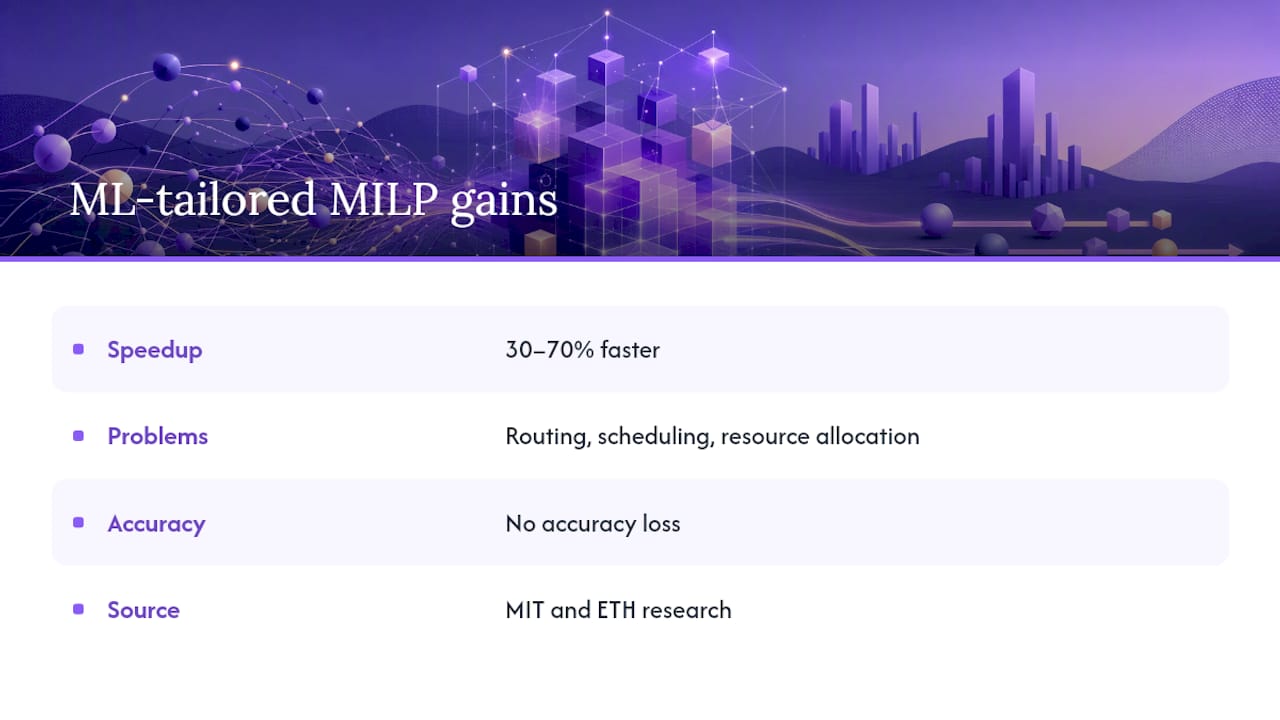
For constrained problems — routing, scheduling, resource allocation — AI-driven optimization narrows the solution space using defined rules and objectives. MIT and ETH research shows that tailoring machine-learning techniques to specific solver components can speed up mixed-integer linear programming (MILP) tasks by 30–70% without losing accuracy, a meaningful gain for logistics and operations teams.
Automation of routine tasks
AI handles repetitive verification, classification, and routing so your attention stays on higher-order judgment. A legal team can automate first-pass contract clause extraction; a developer can use ChatGPT to generate boilerplate test scaffolding before writing the logic that actually needs review.
Collaboration and knowledge capture
AI agents can summarize meeting transcripts, extract action items, and index institutional knowledge into a searchable format. Teams working across time zones use this to reduce the "who decided what and why" friction that slows distributed problem solving.
Pro Tip: *Chain modes deliberately. Start with idea generation to build a candidate set, then use optimization or simulation to score and filter. Treating each mode as a discrete step — rather than asking one prompt to do everything — produces cleaner, more auditable outputs.*
***
What skills make AI assistance actually useful?
AI literacy is the gap between getting noise and getting signal. The tool matters less than the operator's ability to frame problems clearly, evaluate outputs critically, and iterate with purpose.
Essential skills
- Clear prompting — specifying the problem, the constraints, the format, and the audience in a single structured prompt
- Critical evaluation — checking AI outputs against known facts, source documents, or domain expertise before acting
- Iterative testing — treating the first output as a draft, not a final answer, and probing edge cases
- Data hygiene — understanding what data the model has access to and whether it is current, complete, and unbiased
- Domain framing — translating a domain-specific problem into terms the model can process without losing the nuance that makes the problem hard
A pre-task readiness checklist
Before you ask AI for help on a real problem, run through these five questions:
- Have you written down the outcome you want and the constraints that bound it?
- Do you have the relevant data or context to include in the prompt?
- Can you evaluate the output, or do you need a domain expert to review it?
- Is the problem type one where AI has demonstrated reliability (pattern matching, summarization, optimization) or one where values and judgment dominate?
- Do you have a verification step planned before you act on the output?
Checking these AI critical thinking practices before you start, saves more time than any prompt trick.
Pro Tip: *When you need more original outputs, add an explicit novelty constraint to your prompt: "Generate ten ideas, each meaningfully different from the previous one, and flag any that resemble common solutions." This forces the model out of its highest-probability completions and into less-traveled territory.*
Reviewing AI learning tools that teach prompting and evaluation as paired skills is a faster path to competence than learning either in isolation.
***
When does AI fail or become the wrong tool?
AI fails in predictable ways, and recognizing the pattern early is the difference between a correctable mistake and a costly one.
Common failure modes
- Hallucinations — the model states plausible-sounding but unverifiable details; observable sign: a citation, statistic, or product name you cannot confirm in a primary source
- Bias in training data — outputs reflect historical patterns that may be discriminatory or outdated; observable sign: recommendations that systematically favor one demographic or time period
- Overreliance — users accept AI outputs without verification, eroding their own domain judgment over time; observable sign: you can no longer explain why the AI's answer is right or wrong
- Data quality problems — garbage in, garbage out; observable sign: confident outputs that contradict known facts about your specific context
- Privacy exposure — sensitive data entered into a public model may be retained or logged; observable sign: no data-processing agreement or on-premise deployment option
The transformative choice limit
Scholarly analysis published in Synthese draws a useful three-way distinction: AI improves efficiency and accuracy for "easy" choices (well-defined, data-rich), can help create new justifications for "hard" choices (ambiguous, competing values), but cannot enable rational decision-making for "transformative" choices where the values themselves are personal and not derivable from any dataset. Deciding whether to change careers, end a relationship, or restructure an organization's mission are transformative choices. No amount of AI-generated scenario modeling substitutes for the self-knowledge those decisions require.
Mitigation practices
- Verify any specific fact, statistic, or citation against a primary source before using it
- Define human override privileges and escalation paths before deploying AI in a workflow, not after
- Audit AI autonomy periodically: Deloitte recommends treating decision-making as a discrete capability and explicitly designing human–AI decision relationships
- For sensitive data, use on-premise or private-cloud deployments with clear data-retention policies
Avoiding common automation mistakes is as important as knowing which modes to apply.
***
How to apply AI to a real problem: a step-by-step workflow
This six-step process works across domains. Run it sequentially the first time; once you know the pattern, you will compress steps 1–3 into a single structured prompt.
- Define the outcome and constraints. Write one sentence stating what a successful solution looks like and two or three hard constraints (budget, timeline, data available, stakeholders affected).
- Collect relevant context. Gather the data, documents, or background the model needs. Paste only what is directly relevant; excess context dilutes focus.
- Craft an initial prompt. Use this ideation template as a starting point:
For analysis tasks, use this template instead:
- Iterate and probe. Ask follow-up questions. Push back on weak reasoning. Request alternatives. The first output is rarely the best one.
- Validate outputs. Before acting, check: Can you verify every factual claim? Does the recommendation hold under your specific constraints? Has a domain expert reviewed anything high-stakes?
- Integrate or automate. Once an output type proves reliable, build it into a repeatable workflow — a prompt library, a scheduled agent task, or a structured review process.
Validation checklist before acting on AI output:
- Every cited fact confirmed against a primary source
- Output tested against at least one edge case or counterexample
- A human with domain knowledge has reviewed high-stakes recommendations
- Data used in the prompt was current and complete
- Privacy and data-handling requirements were met
***
AI problem-solving in practice: examples across four domains
The modes described above play out differently depending on the domain. Here is how each looks in practice.
Creative
- A copywriter uses ChatGPT to generate thirty headline variations for a product launch, then applies a novelty filter prompt ("which of these are genuinely different from standard SaaS marketing copy?") to surface the three worth testing.
- A game designer uses iterative prompting to stress-test narrative branches, asking the model to identify logical contradictions before the script goes to production.
Educational
- An instructor feeds a set of student short-answer responses to an AI model and asks it to categorize misconceptions by frequency, then uses that output to redesign the next lesson's focus.
- A student uses simulation prompts to model how different study-schedule allocations would affect coverage of a syllabus before an exam, treating the AI output as a planning scaffold rather than a guarantee.
Professional
- A strategy team uses IBM watsonx to run scenario forecasts across three market conditions, then presents the probability-weighted outcomes to leadership as a decision-support dashboard rather than a single recommendation.
- A project manager automates meeting summarization and action-item extraction, reducing post-meeting overhead and creating a searchable knowledge base for distributed teams. AI in competitive analysis follows a similar pattern: structured prompts plus domain framing produce outputs that accelerate research without replacing analyst judgment.
Technical
- A developer uses ChatGPT to generate unit test scaffolding for a new API endpoint, then writes the actual test logic against that scaffold, cutting setup time significantly.
- An operations researcher applies task-specific ML techniques to a MILP scheduling problem, achieving the 30–70% speedup MIT research documents by training the model on historical problem instances rather than using a generic solver.
- A documentation team builds a retrieval-augmented generation (RAG) pipeline so engineers can query internal docs in natural language, reducing the time spent hunting through wikis.
***
What does the research actually show about AI and problem solving?
The empirical picture is more nuanced than either the hype or the skepticism suggests. Here is what the strongest findings actually say.
- LLMs on insight problems: A Frontiers study found ChatGPT's performance on selected verbal insight problems matched the mean rate of human participants on those tested sets. The researchers note this does not generalize to all problem types and call for further research before drawing broad conclusions.
- Optimization acceleration: MIT and ETH research demonstrated that tailoring ML techniques to MILP solver components produces 30–70% speedups on specific problem sets without accuracy loss — a concrete, measurable gain for technical optimization work.
- Decision support by choice type: Analysis published in Synthese classifies AI's usefulness by choice type: high for easy choices, partial for hard choices, and inapplicable for transformative ones. This is the most practically useful framework for deciding when to use AI in decision making.
- Executive adoption: Deloitte's 2026 Global Human Capital Trends reports that about 60% of executives now use AI to support decisions, and recommends that organizations treat decision-making as an explicit capability with defined human–AI decision rights.
- Governance and hybrid workflows: A multidisciplinary review in ScienceDirect highlights generative AI's expanding role across disciplines while calling for governance frameworks, ethical oversight, and hybrid human–AI workflows as prerequisites for safe deployment.
The consistent thread across these findings: AI raises the floor on problem-solving performance for well-defined tasks, but the ceiling on outcomes is still set by the human who frames the problem, evaluates the output, and decides what to do with it.
***
The part most guides skip
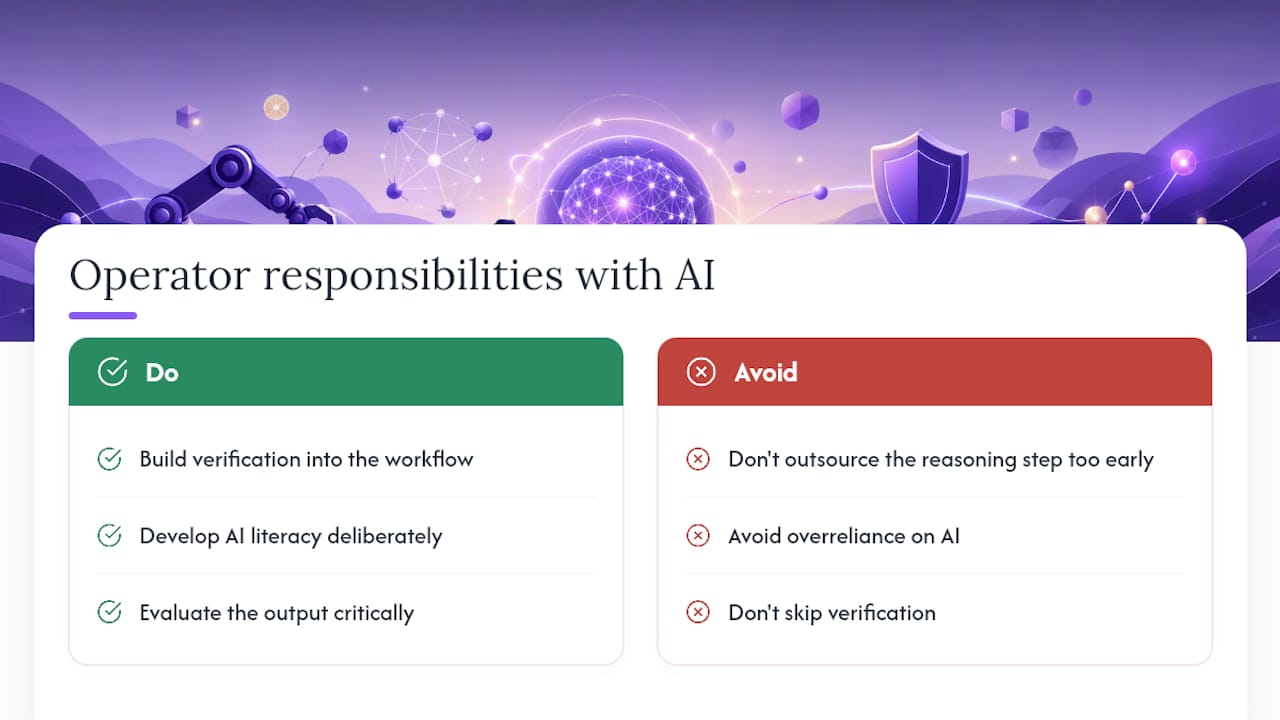
Most writing on how AI helps with problem solving focuses on the tool and skips the operator. That is the wrong emphasis. The research is clear: AI raises the floor on performance for well-defined, data-rich problems. But the ceiling on outcomes is still set by the human who frames the question, evaluates the output critically, and decides when to stop delegating.
What I find consistently underestimated is the cost of overreliance. When you outsource the reasoning step too early, you lose the ability to spot when the model is confidently wrong. That is not a hypothetical risk. It shows up as hallucinated citations in reports, biased recommendations in hiring pipelines, and optimization outputs that look mathematically correct but violate a constraint the model never knew about. The mitigation is not to use AI less. It is to build verification into the workflow before you need it, not after something goes wrong.
The practical implication: treat AI literacy as a skill you develop deliberately, not a feature you turn on. Prompting, critical evaluation, and domain framing are learnable. Teams that invest in them get compounding returns. Teams that skip them get compounding errors.
***
Put this guide to work with a hosted AI agent
The workflow in this guide, from structured prompting through iterative validation to automated task routing, works best when your AI agent is always available, maintains context across sessions, and connects to the tools your team already uses.

Clawbase provides managed OpenClaw hosting with one-click deployment on a dedicated, encrypted server. No sysadmin work, no configuration overhead. You get persistent memory management, access to over 50 AI models with multi-model routing, and native integrations with Telegram, Discord, Slack, and WhatsApp — so the agent fits into your existing workflow rather than requiring a new one. The OpenClaw use cases page shows exactly how teams apply these capabilities to the kinds of problems this guide covers. A 7-day free trial is available on the entry plan; start there and run the six-step workflow from this guide on a real problem before committing.
Sources
- Decision-making with AI | Deloitte Insights
- Can AI match human ingenuity in creative problem-solving? | Working Knowledge (HBS)
- AI-assisted rational decision-making | Synthese (Springer)
- Evaluating ChatGPT on insight problems | Frontiers in AI
- AI accelerates problem-solving in complex scenarios | MIT News
- Generative AI for decision-making: A multidisciplinary perspective | ScienceDirect
***