From Prototype to Production: Custom AI Workflow Automation Code
2026-08-23
The fastest reliable route to production is a graph based StateGraph workflow: containerized, observable, and durable across failures. If you would rather skip the infrastructure work entirely, managed OpenClaw hosting through Clawbase gets you a persistent AI agent running in minutes instead of weeks.
Here's the practical path. Prototype locally in an IDE using graph or visual tools, wire up your nodes and validators, then containerize the result and expose it as a REST or MCP service so other agents and systems can call it. Three things separate a demo from something you can trust with real business processes:
- Durable state. Every step needs to survive a crash, a timeout, or a retry without losing context.
- Observability. You need trace IDs and structured logs, not console output you squint at after something breaks.
- Persistent memory. The workflow should remember what it did yesterday, not just what happened in this run.
Skip any one of these, and your "automation" is really just a script that occasionally works, based on the LangGraph documentation on production durability patterns.
Key Takeaways
The most reliable path to production AI automation combines graph-based durable execution with observable, containerized infrastructure, or managed hosting that provides the same guarantees without the operational overhead.
| Point | Details |
|---|---|
| Choose graph over linear scripts | Use StateGraph patterns when your task needs branching, parallelism, or resumability, not simple sequential steps. |
| Build durable state from day one | Database-backed checkpoints and retry policies prevent crashes from forcing full restarts. |
| Stream logs to an observability pipeline | Structured logs and trace IDs sent to tools like Datadog make failures debuggable instead of mysterious. |
| Scope tools per node | Give agentic nodes narrow, scoped tool registries instead of full system access. |
| Consider managed hosting for speed | Clawbase deploys OpenClaw with one-click setup, 99.9% uptime, and persistent memory, skipping the infrastructure build entirely. |
Table of Contents
- When Custom AI Workflow Automation Code Actually Pays Off
- What Architecture Actually Prevents Failures in Production?
- How Do You Build and Ship a Custom Workflow?
- Where Should You Deploy Your AI Workflow?
- What Mistakes Break AI Workflows in Production?
- How Clawbase Gets You to Production Faster
- What Most Teams Get Wrong About Building These Workflows
- Get a Persistent AI Agent Running Without the Infrastructure Work
- Frequently Asked Questions
- Sources
When Custom AI Workflow Automation Code Actually Pays Off
Not every task needs a graph. If your job is "summarize this email, send that summary somewhere," a linear script or a no-code tool will outperform custom code on every metric that matters: time to build, maintenance burden, cost. Custom AI workflow automation code earns its complexity when the job is non-linear: it needs to branch, retry, wait for human approval, or pick up exactly where it left off after a failure.
Good candidates look like this:
- Multi-step document processing where a missing field should pause the flow, not silently corrupt the output.
- Engineering pipelines with parallel validation steps that need to fan out and reconverge.
- Resumable audits that might run for hours and can't afford to restart from zero after an interruption.
- Multi-model routing, where different steps call different AI models depending on cost, latency, or capability.
The goal is never "build an elaborate graph." It's "get the invoice chased," or "get the audit finished," with a system durable enough that you trust it unattended. If a simpler tool ships that outcome faster, use the simpler tool.
What Architecture Actually Prevents Failures in Production?
The core primitive worth understanding is the StateGraph: a directed graph where nodes represent steps, edges represent transitions, and a shared state object flows through the whole thing. Unlike a linear script, a StateGraph supports routing, parallel execution, and conditional logic, which means you can build workflows that branch based on what actually happened at the previous step rather than what you assumed would happen.
A few primitives you'll want in almost every serious workflow:
- Validator nodes that check output against a schema before letting it proceed.
- Human gates that pause execution and wait for approval on anything consequential.
- Retrying edges that handle transient failures without you writing custom retry logic for every node.
- Fan-out steps that run independent tasks in parallel and reconverge cleanly.
The ai-workflows project on GitHub demonstrates this well: a declarative orchestration layer built on top of LangGraph StateGraphs, with exactly these primitives (ValidatorNode, HumanGate, RetryingEdge) baked in, plus an MCP server surface so agents can call the workflow as a tool. Langflow takes a related but different approach, letting you prototype visually and export the same logic as a Docker or REST service, per IBM's Langflow documentation.
One decision you'll make repeatedly: agentic node or deterministic node? Deterministic nodes run fixed code and are cheap, fast, and predictable. Agentic nodes let a model reason and choose tools, which is powerful but harder to audit. Scope each agentic node to a narrow ToolRegistry rather than handing it your entire toolset.
Pro Tip: *Give every agentic node its own scoped tool registry instead of one global one. A node that only needs to read a database should never have access to the function that sends emails.*
How Do You Build and Ship a Custom Workflow?
The build sequence that keeps teams from drowning in complexity has four stages, each with its own checkpoint.
- Design the outcome first. Write down the business result in one sentence, then break it into typed jobs or functions. If you can't state the outcome plainly, you're not ready to write code yet.
- Author the modular pieces. Implement each job as a small, typed function, register it as a callable tool, and add human gates or validators anywhere a bad output would cause real damage. Restack's documentation on building custom tools shows a clean pattern for structuring functions this way, exposing each as a callable surface an agent or another system can invoke.
- Test before you trust it. Unit test individual nodes, then run simulated end-to-end executions. Test resumability specifically: kill the process mid-run and confirm it picks up where it stopped. Include a human-in-the-loop verification pass on any workflow touching customer data or money.
- Package for portability. Containerize with Docker, expose the workflow as REST or MCP, and set up CI/CD that runs automated smoke tests on every deploy.
A few things worth checking off before you call something production ready:
- Does the workflow survive a mid-run crash without losing state?
- Can a coding agent discover and call this workflow as a tool without custom integration work?
- Is there a CI step that fails the build if a smoke test breaks?
- Did you register the workflow with typed inputs and outputs, not loose dictionaries?
Langflow's hybrid model is worth mentioning here: you can prototype visually, then export the flow and deploy it as a Docker or REST service, according to IBM's product documentation. That gives teams a middle path between "written entirely by hand" and "locked into a visual tool forever."
Where Should You Deploy Your AI Workflow?
Three deployment paths cover most real teams: a containerized REST service you manage yourself, a serverless function for lighter, event-driven jobs, or a managed runtime that handles the infrastructure for you, as detailed in AI workflow wins for MSP clients. Containers give you full control at the cost of ongoing operations work. Serverless is cheap for spiky, low-latency workloads but awkward for long-running, stateful graphs. Managed runtimes trade some control for speed to production.
Whichever path you pick, three safeguards separate a workflow that survives contact with real traffic from one that quietly fails:
- Durable execution. Database-backed checkpoints and defined retry policies so a failed step resumes instead of restarting the whole run, a pattern LangGraph's overview treats as foundational rather than optional.
- Observability. Structured logs with trace IDs, streamed to a pipeline like Datadog or Splunk, so a failure at 2 a.m. is debuggable at 9 a.m. instead of a mystery.
- Model routing and BYOM. Build an abstraction layer between your workflow and the model provider so you can swap models without rewriting your nodes.
Reliability tends to hinge more on the data pipeline and the observability layer than on which model you picked, a point Datadog's observability pipeline guidance backs up directly. Teams that skip this step debug blind.
What Mistakes Break AI Workflows in Production?
Most production failures trace back to the same handful of decisions made early and never revisited.
- Skipping observability because the prototype worked fine without it. It won't stay fine once you're running hundreds of executions a day.
- No durable state, which means any crash mid-run forces a full restart, or worse, a silent partial completion nobody notices.
- Overtrusting free-form agent output without a validator checking it against a schema before it reaches the next step.
- Building directly on proprietary infrastructure with no container or REST abstraction, which locks you into one vendor's roadmap.
Safeguards that cost little upfront and save you enormously later: scope each node's tool registry narrowly, put a human gate in front of anything irreversible, and track cost per workflow run so a runaway agentic loop doesn't surprise you on the bill. Leeway's approach to per-node scoping and turn budgets is a useful reference for keeping agent-driven steps auditable rather than open-ended.
On governance: vault your credentials rather than hardcoding them into nodes, restrict what actions each tool can take, and log every action an agent takes with enough detail to reconstruct what happened after the fact.
Pro Tip: *Add a cost ceiling per workflow run before you ship anything agentic. An unbounded loop that calls a model 400 times in a runaway retry is a bill, not a bug report.*
How Clawbase Gets You to Production Faster
Building all of the above from scratch, the state graph, the containerization, the observability pipeline, the persistent memory layer, is real engineering work, and for many teams it's the right investment. But if your priority is getting a private, always-on AI agent running this week rather than this quarter, Clawbase offers a managed path that keeps the production guarantees intact.
Clawbase deploys OpenClaw, an open-source personal AI assistant, on a dedicated server with one click. No sysadmin work, no Kubernetes manifests to debug at midnight. You get:
- 99.9% uptime on a dedicated, encrypted server.
- Persistent memory management built in, so your agent doesn't forget context between sessions.
- Access to 50+ AI models with routing, avoiding the vendor lock-in problem custom code has to solve manually.
- Integrations with Telegram, Discord, Slack, and WhatsApp out of the box.
- Daily encrypted backups and automated updates handled for you.
The tradeoff is honest: self-managed custom code gives you maximum control over every node and edge in your graph. Managed hosting gives you speed and durability guarantees without owning the operations burden. If you want outcome-driven automation without staffing an infrastructure team, that tradeoff usually favors managed.
> A workflow that never ships because the team is still debugging its retry logic delivers zero business value, no matter how elegant the graph.
Pro Tip: *If you're evaluating managed hosting against a build-it-yourself approach, time-box a two-week trial of each before committing. The infrastructure cost of custom code rarely shows up until month two.*
What Most Teams Get Wrong About Building These Workflows
The conventional advice treats custom AI workflow automation code as primarily a modeling problem: pick the right model, write the right prompt, done. That's backward. The teams that get stuck in prototype purgatory almost always have a fine model and a broken execution layer. They have no durable state, so a timeout means starting over. They have no observability, so a wrong output is a mystery instead of a five-minute trace lookup.
The overlooked truth is that a mediocre model wrapped in a durable, observable graph will outperform a brilliant model running in an unmonitored script, every time reliability is measured over weeks instead of demo minutes. Prioritize the execution layer first. Get retries, checkpoints, and logging working with the simplest model you can find, then upgrade the model once the scaffolding holds.
Where readers should start: don't build the whole graph before you've shipped one node to production. Ship the smallest durable, observable slice of the workflow first, then expand it. That's also why managed paths like OpenClaw hosting appeal to teams who'd rather inherit those guarantees than build them from scratch.
Get a Persistent AI Agent Running Without the Infrastructure Work
If everything above sounds like the right architecture but more engineering time than your team has this quarter, Clawbase gives you the durability and observability guarantees without writing a line of infrastructure code.

Clawbase hosts OpenClaw, an open-source personal AI assistant, on a dedicated encrypted server with one-click deployment. You skip the container setup, the retry logic, and the state management work described above, because it's already built into the platform: 99.9% uptime, persistent memory that survives across sessions, and routing across 50+ AI models so you're never locked into one provider. It connects directly to Telegram, Discord, Slack, and WhatsApp, so your agent lives where your team already works.
This suits developers who want to skip weeks of orchestration setup and non-technical teams who need a working automation without hiring for it. If you've been weighing custom AI workflow automation code against a managed alternative, start a trial on Clawbase and see how fast a persistent agent gets running on your own workflows.
Frequently Asked Questions
What is custom AI workflow automation code?
It's code that orchestrates multi-step AI-driven tasks using graph structures rather than linear scripts, allowing branching, retries, and parallel execution based on conditions detected during the run.
Do I need LangGraph specifically, or will any framework work?
LangGraph is one strong option for durable, graph-based execution, but the underlying pattern (state, checkpoints, retries) matters more than the specific library. Langflow and ai-workflows implement similar concepts differently.
How is this different from simple automate-tasks-with-AI scripts?
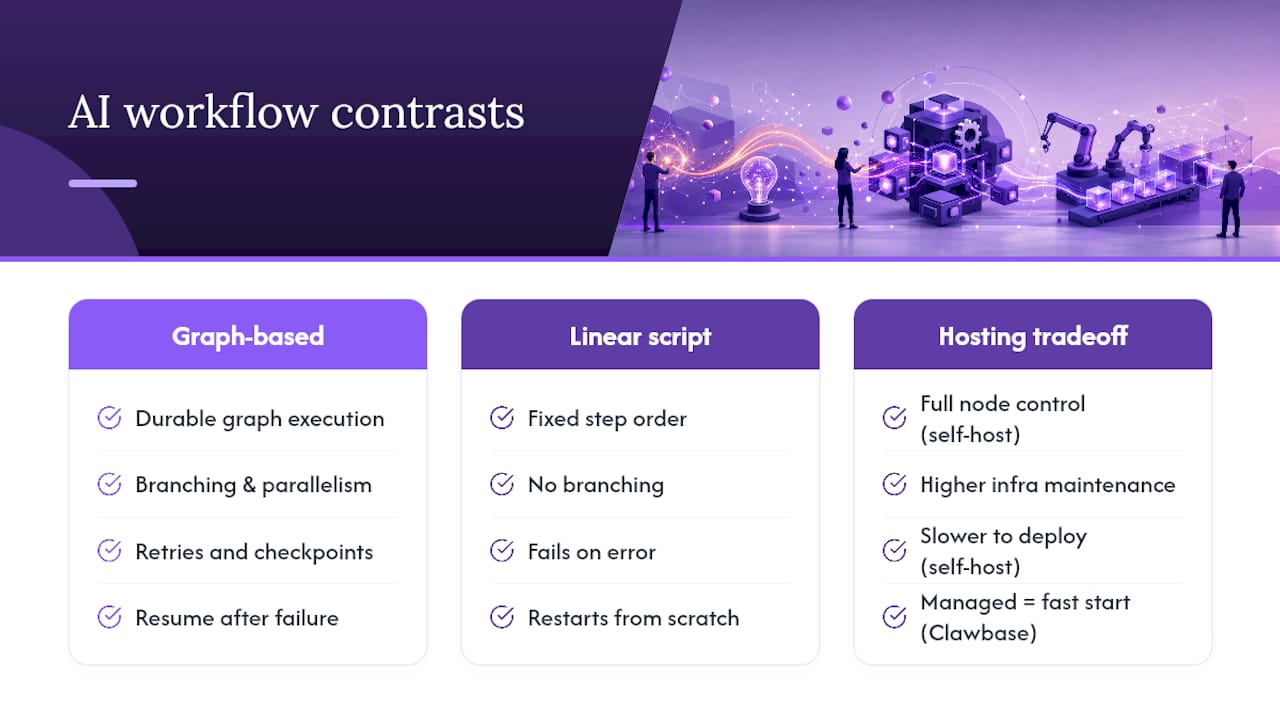
A script runs steps in a fixed order and typically fails completely on an error. A graph-based workflow can branch, retry a single failed step, and resume from a checkpoint instead of restarting.
Should I self-host or use managed hosting like Clawbase?
Self-hosting gives you full control over every node but requires ongoing infrastructure work. Managed hosting through Clawbase gets a durable, persistent agent running immediately, which suits teams prioritizing speed over infrastructure ownership.
What's the biggest security risk in custom AI workflows?
Overly broad tool access on agentic nodes. Scope each node's permissions narrowly, vault credentials instead of hardcoding them, and log every action for audit purposes.
Sources
- ai-workflows — GitHub repository and docs (2026)
- LangGraph overview (LangChain docs)
- IBM Langflow product documentation