90 Day Test: Best Model Routing Tools for Engineering Teams
2026-09-01

For most engineering teams, the right starting point is a managed, agent-aware routing setup that already has evaluation hooks built in, rather than stitching together a bespoke proxy. It balances cost against quality without demanding a dedicated infrastructure hire, and it gives you governance controls from day one. Run a two-week pilot against your own traffic before committing further. Teams that skip that step almost always overpay for capacity they don't need or underpay for quality they can't afford to lose.
***
> TL;DR:
>
> - Running a two-week pilot with real traffic is essential to accurately assess cost, quality, latency, and fallback behavior before full deployment.
> - Quality evaluation should include online scoring, latency measurement at P95 and P99, and testing failover handling to avoid disruptions and hidden costs.
> - Embedded routing inside the agent, such as with ClawBase, offers advantages for multi-turn workflows by preserving context and reducing operational complexity.
> - Select a routing approach based on workload needs: cost-sensitive teams favor rule-based gateways, while those with complex workflows may require agent-embedded or self-hosted solutions.
> - A staged 90-day rollout with real-data measurement and manual override protocols minimizes risk and helps optimize routing performance.
***
Table of Contents
- Best Model Routing Tools: Matching Approach to Team Profile
- What to Test Before You Commit to a Routing Tool
- Which Routing Approach Fits Your Production Workload?
- Building a Production-Ready Routing Deployment
- Why ClawBase Fits Teams That Want Routing Without the Ops Load
- A 90-Day Plan for Rolling Out Model Routing
- Editorial Perspective on Model Routing Adoption
- Try ClawBase Before You Build a Routing Stack From Scratch
- Sources
Best Model Routing Tools: Matching Approach to Team Profile
Not every team needs the same routing setup, and the biggest mistake I see is engineering leaders copying whatever architecture a blog post praised last quarter. The right choice depends on your traffic volume, your compliance obligations, and how much operational overhead you're willing to carry.
Here's how team profiles typically map to routing approaches, based on what actually works in production rather than what looks impressive in a pitch deck:
- Cost-sensitive startups: A price-first gateway with simple rule-based routing gets you 80% of the benefit with a fraction of the setup time. Expect a working integration in a day or two, with cost savings visible within the first billing cycle.
- Platform teams building internal tooling: Self-hosted proxies (think LiteLLM-style frameworks) give you full control over virtual keys, budgets, and caching behavior. Expect one to two weeks of setup and ongoing ownership of the stack.
- Enterprises with governance requirements: You need routing tied to audit logs, role-based access, and ideally SOC 2 coverage from whichever vendor sits in the request path. This usually means a managed platform with enterprise contracts, not a homegrown proxy.
- Product teams running agentic workflows: Routing decisions need to happen inside the agent runtime itself, where context and memory persist across turns. This is where managed, agent-aware hosting like ClawBase fits, since multi-model routing is already wired into the same layer that manages memory and integrations.
The trade-off pattern repeats across all four profiles: lower setup effort correlates with less granular control, and higher control correlates with more ops burden somebody has to own. ClawBase sits in an interesting spot for the fourth profile specifically, because it handles multi-model routing across more than 50 models inside a private, always-on agent without asking you to run your own proxy layer or manage failover logic by hand.
What to Test Before You Commit to a Routing Tool
A demo will never tell you whether a router works for your workload. Vendors optimize demos for the cases where their product looks best, and cost-per-token benchmarks published on a landing page rarely survive contact with your actual traffic mix. Run these checks instead, in roughly this order of priority.
- Quality and eval support. Does the tool let you attach online scoring or run experiments against live traffic, or are you stuck eyeballing outputs? Research on ML-trained routers like RouteLLM has shown high retention of top-model performance on certain benchmarks at a fraction of the cost, but this claim should be validated against your own prompts and use cases. Treat any vendor's quality claim as a hypothesis, not a fact, until your own eval pipeline confirms it.
- Latency overhead. Every routing decision adds milliseconds. Measure P95 and P99 latency with the router in the path versus a direct API call, not just the average, since averages hide the tail-latency spikes that actually break user experience.
- Provider breadth. Count how many providers and models the tool actually routes across in production, not on its marketing page. Azure's model router, for example, supports Balanced, Cost, and Quality modes across a broad selection of models, which is a useful baseline for what "broad" should mean.
- Failover behavior. Kill a provider's API key mid-test and watch what happens. Does the router degrade gracefully to a fallback model, or does it just throw an error upstream?
- Budgets and billing controls. Can you set per-project or per-user spend caps, and do they actually enforce in real time rather than reporting spend after the fact?
- Tracing and observability. You need to see which model handled which request and why, ideally with enough metadata to replay a decision later.
- Security posture. Ask directly about VPC deployment options, key isolation between projects, and whether the vendor holds SOC 2 or equivalent certification.
None of these are optional for production traffic. Latency overhead and failover behavior are the two that most teams underweight, and they're the two that cause 2 AM pages.
Pro Tip: *Run your failover test with a provider that's actually rate-limiting you, not one you've manually disabled. Rate-limit responses behave differently than outright outages, and a router that handles one gracefully sometimes chokes on the other.*
Which Routing Approach Fits Your Production Workload?
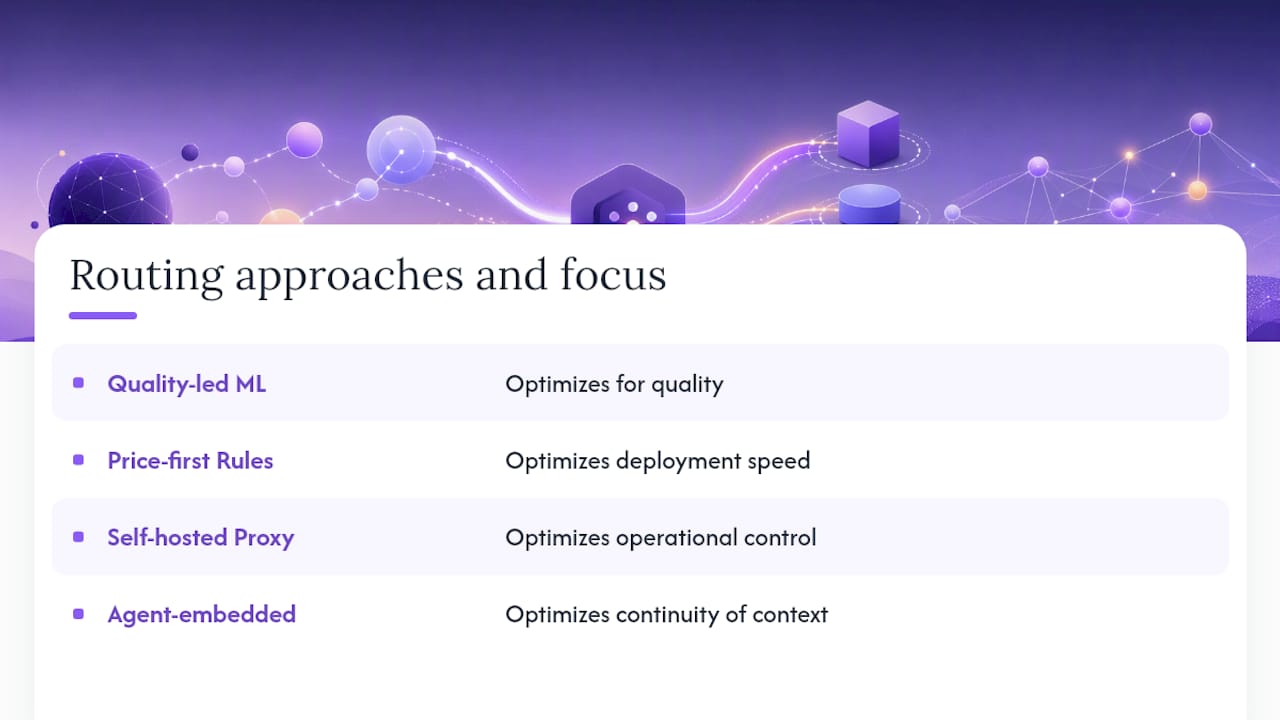
Four architectural patterns dominate the current landscape, and each one optimizes for a different variable: quality, speed of deployment, control, or continuity of context. Picking the wrong one for your workload is the single most common routing mistake engineering teams make.
Quality-led ML routers
These routers, exemplified by research like RouteLLM, use a trained classifier to predict which model will produce an acceptable answer for a given prompt, then send cheap requests to smaller models and hard ones to frontier models. They win when your traffic has a wide difficulty spread, meaning a large share of requests are genuinely simple. The catch is that this approach requires eval infrastructure you probably don't have yet. Without a scoring pipeline, you can't validate that the classifier is making good calls, and a bad classifier silently degrades output quality in ways that don't show up until a customer complains.
Price-first, rule-based gateways
These are the fastest tools to deploy: you define static rules ("send code generation to Model A, send summarization to Model B") and the gateway enforces them. Vendor comparisons of tools in this category show they integrate quickly and offer broad provider access, but eval integration tends to be shallow or absent. You're trading routing sophistication for speed of shipping, which is a reasonable trade for teams still validating product-market fit.
Self-hosted proxies
Open-source frameworks cataloged in lists like awesome-model-routing give you virtual keys, per-project budgets, caching hooks, and full visibility into the routing logic itself. The trade-off is operational: you now own uptime, scaling, and security patching for a piece of critical infrastructure. Platform teams with existing SRE capacity often prefer this because it removes vendor lock-in entirely, but teams without that capacity tend to underestimate the maintenance tax until it's already accumulated.
Agent-embedded routing
This is routing that lives inside the agent runtime rather than in front of it, where the router has access to persistent memory and conversation state when it makes a decision. This matters specifically for workflows where context and verification gates carry across turns, because switching models mid-session has hidden costs tied to context and cache state that a stateless gateway simply can't see. If your workload involves multi-step agentic tasks (file management, scheduled automations, ongoing conversations across days), embedded routing tends to outperform a router that treats each request as isolated.
To figure out which of these fits your case, run three concrete experiments before you commit to an architecture:
- Cost-per-quality curves. Plot output quality (via your eval scores) against cost per request for each routing strategy, and look for the knee in the curve where cost rises faster than quality improves.
- Latency overhead measurement. Compare P95/P99 latency with and without the router across a representative sample of at least a few thousand requests.
- Cache-eviction cost estimation. If your workload uses semantic caching, estimate how often switching models forces a cache miss, and multiply that by the token cost of the miss to see whether the "cheaper" model is actually cheaper in practice.
Building a Production-Ready Routing Deployment
Getting a router past a proof of concept and into production reveals problems that never show up in a sandbox. Four categories tend to bite teams hardest: latency budgets, cache behavior, scaling patterns, and observability.
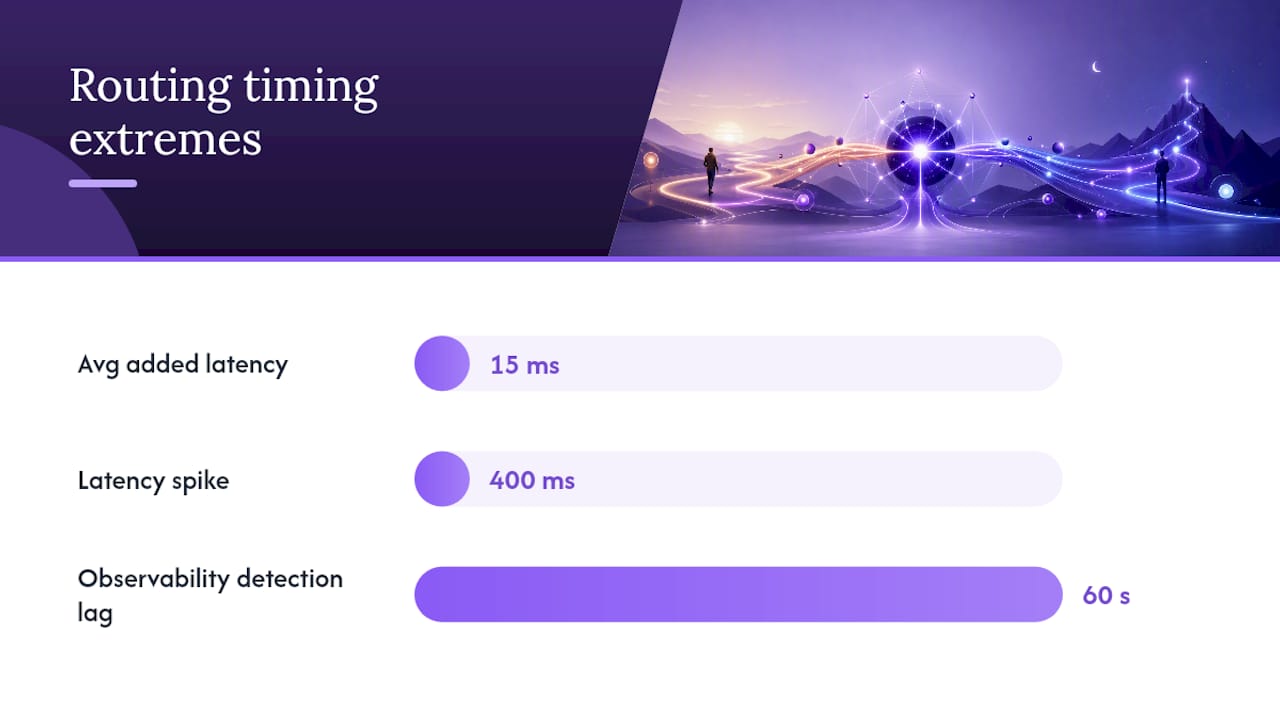
Latency overhead needs a hard budget, not a vague goal. Decide upfront how many milliseconds of P95 latency you're willing to spend on routing logic, and instrument the router so you can see when it blows past that number. A router that adds 15ms on average but spikes to 400ms under load will quietly wreck your SLA even though the average looks fine on a dashboard.
Cache-aware routing deserves more attention than most teams give it. Semantic caching can meaningfully cut costs, but switching models between turns invalidates cache entries built around a specific model's embeddings or response patterns. If your router optimizes purely for per-request cost without accounting for cache hit rate, you can end up paying more in cache misses than you saved by routing to a cheaper model.
Scaling patterns diverge sharply between managed and self-hosted setups. Managed gateways typically handle rate-limiting and multi-region failover for you, which matters once you're serving traffic across time zones with different peak hours. Self-hosted proxies push that responsibility onto your team, and multi-region deployment of a stateful routing layer is not a weekend project.
Observability is where most routing failures actually get diagnosed after the fact, so it needs to exist before the failure happens. At minimum, your setup should:
- Log which model handled each request, along with the routing decision's reasoning or score.
- Tie routing decisions back to your eval pipeline so you can correlate specific routing choices with downstream quality outcomes.
- Expose request-level metadata (latency, cost, provider, fallback triggered or not) through a metrics endpoint your monitoring stack can consume.
- Alert on anomalies in fallback rate, since a spike usually means an upstream provider is degrading before their own status page admits it.
Security and governance controls round out the list, and they're non-negotiable the moment you're handling anything regulated. Look for project-scoped API keys so a leaked key doesn't expose your entire provider account, VPC deployment options if your compliance team requires network isolation, audit logs that capture who changed routing rules and when, and SOC 2 coverage from any vendor sitting in your request path.
Pro Tip: *Before going live, deliberately throttle one provider's key to simulate a rate limit, then watch your dashboards. If you can't tell within 60 seconds that a fallback triggered, your observability isn't ready for production traffic.*
A multi-model auditing tool can help here too, since checking outputs across providers side by side surfaces quality drift that a single-model eval pipeline sometimes misses.
Why ClawBase Fits Teams That Want Routing Without the Ops Load
Most of the checklist above assumes you're willing to assemble and operate several separate pieces: a gateway, an eval pipeline, an observability stack, and a security layer, each from a different vendor or open-source project. ClawBase collapses that stack into one managed deployment built around OpenClaw, an open-source personal AI agent, and it does so in a way that maps directly onto the evaluation criteria engineering teams actually care about.
The core offering is one-click deployment of a private, always-on OpenClaw agent on a dedicated, encrypted cloud server, with no sysadmin work required on your end. That agent comes with access to more than 50 AI models, which covers the provider-breadth criterion most teams struggle to hit with a single vendor. Because routing happens inside the same runtime that manages the agent's persistent memory, model switches don't lose conversational context the way a stateless external gateway can.
A few specifics worth knowing if you're evaluating this against a self-hosted alternative:
- Uptime is contractual, not aspirational. ClawBase runs on a 99.9% uptime guarantee, which matters if you're comparing it against a self-hosted proxy where uptime depends entirely on your own on-call rotation.
- Integration points already exist. The agent connects to Telegram, Discord, Slack, and WhatsApp out of the box, so routing decisions plug directly into wherever your team or your users already work, without a custom integration layer.
- Key handling and updates are managed. Automated updates and encrypted daily backups remove two of the recurring maintenance tasks that make self-hosted proxies expensive to keep running over time.
- Developer ergonomics stay intact. Engineers who want to switch models without rewriting integration code can do so through the same interface, which shortens the pilot cycle described earlier in this guide.
None of this replaces the eval work you still need to do on your own workload. But it does remove the infrastructure tax that usually delays teams from starting that eval work in the first place, and it's worth reading the tutorial before deciding whether a fully self-hosted stack is worth the extra ownership burden it demands.
A 90-Day Plan for Rolling Out Model Routing
The teams that get routing right treat it as a staged rollout, not a one-time architecture decision. A 90-day plan gives you enough time to gather real signal without letting an unproven system anywhere near your full production load.
Pick two or three metrics you'll actually watch daily: cost per request, a quality score from your eval pipeline, and P95 latency. Keep the sample isolated enough that a bad routing decision doesn't cascade into customer-facing incidents.
Days 15 to 45: measurement and tuning. This is where the cost-per-quality curve work pays off. Compare the pilot's numbers against your baseline weekly, not daily, since routing decisions need volume to show a stable pattern. Set a decision gate here: if quality drops below an agreed threshold, or if latency overhead exceeds your budget, the pilot pauses for tuning rather than continuing on hope.
Days 46 to 90: staged expansion. Increase traffic share in increments, maybe doubling every two weeks, while keeping the same metrics visible. Operational guardrails matter most here: keep a manual override that can route everything back to the previous path within minutes, not hours, and make sure whoever's on call knows how to trigger it.
The mistake I see most often isn't a bad routing choice. It's skipping the isolated pilot phase entirely because a vendor's benchmark looked convincing enough to trust blind. Benchmarks describe someone else's traffic. Your production traffic is the only dataset that actually matters, and the 90 days above exist specifically to generate it before you bet your SLA on an unproven assumption.
Editorial Perspective on Model Routing Adoption
The conventional wisdom around model routing treats it as a solved problem: pick a router, point your traffic at it, save money. That framing undersells how much routing decisions depend on context most gateways never see. A stateless proxy can pick the cheapest model that will probably work for a given prompt, but it has no idea whether that prompt is turn six of a conversation where the first five turns already established constraints the model needs to remember.
That's the gap conventional routing advice tends to skip over, and it's the reason agent-embedded routing deserves more attention than it usually gets in comparison articles that treat every router as interchangeable. When memory and context live outside the routing decision, you're optimizing cost in a vacuum. When they live inside it, the router can make a genuinely better trade, because it knows what's actually at stake in that specific exchange.
I'd also push back gently on how much weight teams put on published benchmark numbers, including the ones cited earlier in this piece. The only benchmark that should change your architecture is the one you run on your own traffic, with your own eval criteria, over a pilot long enough to see the tail cases that a demo never surfaces.
What actually works, based on everything the evidence above points toward, is starting simple: pick an approach that matches your team's operational capacity honestly, not aspirationally, and expand only after the numbers from your own pilot say you should.
> *— Iosif Peterfi*
Try ClawBase Before You Build a Routing Stack From Scratch
ClawBase is the direct route to production multi-model routing without the weeks of proxy setup, key management, and observability tooling the self-hosted path demands. Instead of assembling a gateway, an eval pipeline, and a security layer separately, you get all of it inside one managed OpenClaw deployment, with access to more than 50 models and a 7-day trial on the entry plan starting at $16 a month.

The trial gives you enough runway to run the isolated pilot described earlier in this guide: point a slice of real requests at your ClawBase agent, watch cost and quality side by side, and see whether persistent memory changes how routing decisions play out across multi-turn tasks. Most teams know within the first week whether the managed path covers what they were planning to build themselves. Start the trial on the ClawBase landing page and walk through the setup tutorial to get your agent connected to Telegram, Discord, or Slack before your pilot's first measurement checkpoint.
Sources
- Learn
- arXiv — RouteLLM / ML-trained routers (2406.18665)
- GitHub — awesome-model-routing
- DigitalApplied — LLM model routing 2026 guide