AI Document Management Workflow Examples That Scale
2026-08-20
Practical AI document management workflows use a modular Split–Extract–Route pipeline to automate ingestion, extraction, validation, and routing. This is the architecture behind Intelligent Document Processing (IDP), and it's why a maritime shipping firm cut document handling time by roughly 85% while processing 25% more volume with the same headcount. Five workflows come up constantly once teams adopt this pattern:
- Invoice and accounts payable automation
- Contract ingestion and obligation extraction
- HR onboarding packages (forms plus IDs)
- Support ticket and knowledge capture
- Mixed-document healthcare patient intake
We'll walk through each one, show how ClawBase fits into the orchestration layer, and give you a recipe you can prototype in under two weeks.
Key Takeaways
The Split–Extract–Route architecture works because it separates ingestion, extraction, validation, and routing into independently updatable layers that scale without becoming a monolith.
| Point | Details |
|---|---|
| Use modular architecture | Split ingestion, extraction, and routing into separate layers you can update independently. |
| Start with templates | No-code tools like Power Automate cut prototyping time before you invest in custom models. |
| Gate on confidence | Route low-confidence extractions to human review instead of straight into ERP or CRM systems. |
| Match tool to complexity | Use code-first extraction for variable layouts, no-code for structured, repeatable documents. |
| Scale with private agents | ClawBase hosts a persistent OpenClaw agent for orchestrating multi-document workflows once volume justifies it. |
Table of Contents
- What Is the Split–Extract–Route Architecture?
- Five Document Workflow Templates You Can Copy
- No-Code, Code-First, or Agent-Hosted: Which Fits Your Team?
- How Do You Prototype a Workflow in Two Weeks?
- What Security Controls Does a Production Workflow Need?
- Frequently Asked Questions
- Sources
What Is the Split–Extract–Route Architecture?
Every durable IDP system separates into four layers: ingestion, atomization (splitting), extraction, and routing. Ingestion is the trigger, an inbox, a scanner, an SFTP drop. Atomization breaks a batch into individual document units, since a single PDF might contain an invoice, a packing slip, and a certificate of origin stapled together. Extraction pulls structured fields using OCR, NLP, or large language models. Routing sends validated data to the right destination, whether that's an ERP, a CRM, or a SharePoint library.
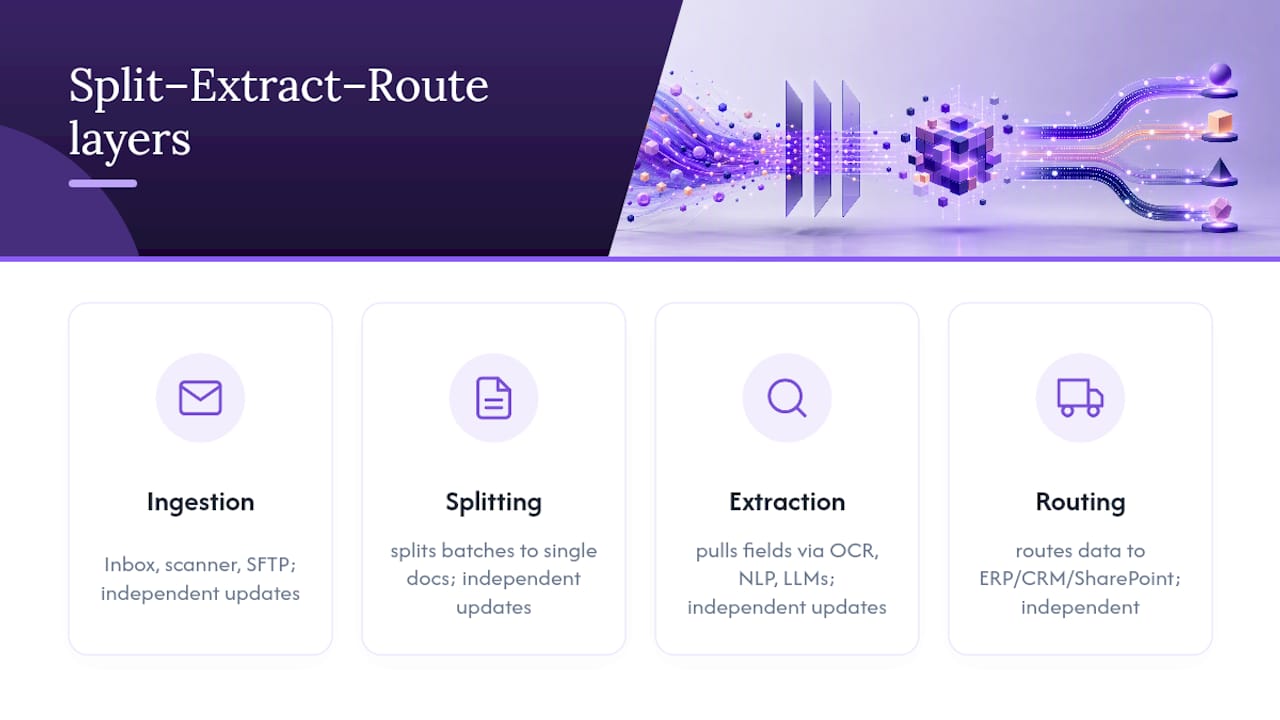
This separation is deliberate, and AWS's architecture guidance on intelligent document pipelines treats it as the baseline pattern for a reason: each layer can be updated, scaled, or debugged independently. Swap your extraction model without touching how documents get split. Add a new routing destination without rebuilding ingestion. Each layer also gets its own error handling and audit trail, so when something breaks, you know exactly which stage failed instead of untangling one giant script.
Picture it as a factory line: intake dock, sorting station, inspection bay, shipping dock. Each station has its own crew and its own quality checks.
Pro Tip: *Start ingestion with deterministic subfolder rules, not AI-only classification. A self-built document management system that routes files by the subfolder they land in before AI ever sees them tends to outperform pure AI sorting, especially in the first months when your extraction model hasn't seen enough of your document mix.*
> The modular pattern lets teams iterate on extraction models or routing logic independently, which is exactly what keeps a document pipeline from becoming a monolith nobody wants to touch.
Five Document Workflow Templates You Can Copy
Each template below follows the same skeleton: trigger, split, extract, validate, route. Adapt the field lists and tool choices to your stack.
Invoice and AP automation. Trigger: shared inbox or vendor portal. Split: one invoice per document, even inside multi-page PDFs. Extract: vendor name, invoice number, line items, totals, due date. Validate: three-way match against purchase orders, human review below a confidence threshold. Route: ERP for payment scheduling. Microsoft Syntex and Power Automate with AI Builder handle this well for finance teams without engineering support. An n8n-based routing template shows the quarantine pattern in action, escalating high-value invoices while flagging low-confidence ones for review.
Contract ingestion and obligation extraction. Trigger: legal team's document repository. Split: separate the master agreement from amendments and exhibits. Extract: renewal dates, payment terms, liability clauses, governing law. Validate: legal counsel signs off on flagged clauses. Route: contract management system with calendar reminders for obligations. Azure Form Recognizer handles the unpredictable formatting here better than no-code tools, since contract layouts vary wildly between vendors.
HR onboarding packages. Trigger: new-hire form submission. Split: separate ID documents, tax forms, and signed offer letters. Extract: name matching across documents, ID expiration dates, tax withholding elections. Validate: HR reviews any mismatch between documents. Route: HRIS and payroll systems. Multi-page scans of passports or driver's licenses need explicit page-boundary detection, or you'll extract garbage from a scanned cover sheet.

Support and knowledge capture. Trigger: support inbox or ticketing system. Split: separate the email body from attachments. Extract: issue category, product mentioned, sentiment, attached screenshots. Validate: spot-check low-confidence categorizations weekly. Route: knowledge base and CRM for trend analysis.
Mixed-document healthcare intake. Trigger: patient portal upload or fax gateway. Split: insurance card, intake form, and prior records each get separate handling. Extract: patient demographics, insurance ID, referring physician. Validate: mandatory human review, no exceptions, given the PHI stakes. Route: EHR with strict access logging. This is where model-led orchestration shines: Amazon Bedrock's tool-use pattern with Anthropic Claude lets one orchestrating model classify pages and call the right extraction tool for each document type inside a single package. This is far cleaner than chaining separate scripts. For teams that want a persistent private agent managing this kind of multi-step orchestration around the clock, ClawBase provides that hosting layer without the setup overhead.
No-Code, Code-First, or Agent-Hosted: Which Fits Your Team?
The right deployment model depends less on document complexity and more on who's building it and how much customization you actually need.
| Dimension | No-code/low-code | Code-first | Agent-hosted orchestration |
|---|---|---|---|
| Target persona | Business users, citizen developers | Developers, data engineers | Ops teams wanting a private, always-on agent |
| Best-for documents | Structured, semi-structured | Complex or highly variable layouts | Unstructured, mixed packages |
| Human-in-loop support | Built-in (Power Automate approvals) | Custom-built | Configurable per workflow |
| Integrations | SharePoint, Dynamics, Teams | Any API via SDK | Telegram, Discord, Slack, custom connectors |
| Speed vs. accuracy | Fast to launch, moderate accuracy | Slower to build, highest accuracy ceiling | Fast to deploy, accuracy depends on model choice |
Pick no-code tools like Microsoft Syntex or Power Automate with AI Builder for fast pilots where a business analyst, not an engineer, owns the workflow. Choose code-first Azure Form Recognizer when document layouts are too inconsistent for templates to hold up. Reach for agent-hosted orchestration when you need a persistent agent juggling multiple models and integrations across finance, legal, and operations without a dedicated dev team maintaining it.
How Do You Prototype a Workflow in Two Weeks?
- Pick one trigger source (email inbox is easiest to start).
- Map the five to eight fields you actually need extracted.
- Choose a tool: Power Automate for speed, Form Recognizer for accuracy.
- Build the splitting logic for multi-document batches.
- Set a confidence threshold, anything below 85% routes to a human.
- Route validated output to a sandbox ERP or spreadsheet first.
- Monitor for two weeks, then adjust the threshold.
Acceptance criteria worth setting up front:
- Extraction accuracy above your chosen threshold on a test batch of real documents
- Processing time under a few minutes per document
- Complete audit logs showing every routing decision
IT typically owns the trigger and integration setup, finance ops owns field mapping and thresholds, and compliance signs off on retention and access rules before go-live.
What Security Controls Does a Production Workflow Need?
Document automation touches sensitive data by default, so governance can't be an afterthought. Build in encryption at rest and in transit, role-based access tied to job function, and immutable audit logs that record every extraction and routing decision. PII and PHI redaction needs to happen before data ever reaches a downstream system, not after.
For healthcare intake specifically, any workflow touching patient records needs HIPAA-aligned handling: access logging, encryption, and a documented retention policy, not just a general privacy note. Confidence-threshold gating matters here too: anything below your accuracy bar should quarantine for review rather than auto-route into an EHR or CRM. The maritime case study that reported 85% faster handling also credited improved auditability as a direct business benefit, not just a compliance checkbox.
- Encrypt data at rest and in transit
- Enforce role-based access by function, not by team
- Log every extraction and routing decision immutably
- Redact PII/PHI before data leaves the extraction layer
- Quarantine low-confidence outputs instead of auto-routing them
Author perspective: when to use templates vs custom models
Most teams overinvest in custom models before they've proven the workflow matters. Start with a no-code template, measure real accuracy and time saved on your own documents, then justify a code-first rebuild only once volume or layout complexity actually demands it. A private agent stack like OpenClaw on ClawBase earns its place once you're juggling multiple document types across departments, not before.
Short CTA: ClawBase for private agent orchestration
Once your workflow spans multiple document types and departments, a no-code tool alone starts to strain. Clawbase gives you a private, always-on OpenClaw agent that can orchestrate extraction, validation, and routing across the tools you already use, without asking your team to babysit a server.

Three things worth knowing before you set one up:
- One-click deployment: no sysadmin skills needed to get OpenClaw running on a dedicated server
- Persistent memory: your agent remembers context across sessions instead of starting cold every time
- Built-in integrations: connects to Telegram, Discord, Slack, and WhatsApp for routing alerts and approvals
If you're ready to see what a private agent can automate in your own document workflow, check the OpenClaw use cases page or start with the step-by-step tutorial to get your first agent live.
Frequently Asked Questions
What is an AI document management workflow example in practice?
It's a defined pipeline, such as invoice processing or contract review, that uses the Split–Extract–Route pattern to move a document from intake to a validated, routed record automatically, with human review only for exceptions.
Do I need coding skills to build one?
Not necessarily. Tools like Microsoft Syntex and Power Automate with AI Builder support no-code workflows for structured documents. Complex or highly variable layouts usually need code-first tools like Azure Form Recognizer.
How accurate does extraction need to be before automating fully?
Most production teams set a confidence threshold, often around 85 to 90%, below which items route to human review rather than straight into a downstream system. The right number depends on the cost of an error in your specific workflow.
Can one workflow handle multiple document types at once?
Yes. Model-led orchestration, like Amazon Bedrock's tool-use pattern with Anthropic Claude, lets one system classify each document in a mixed package and call the right extraction tool for it, which is common in healthcare intake.
When does it make sense to move from a template to a custom build?
Once document volume, layout variability, or integration complexity outgrows what a no-code tool handles cleanly, usually signaled by rising manual review rates despite tuning your thresholds.
Sources
For deeper implementation detail, these sources back the architecture and case studies referenced throughout:
- From PDFs to insights: Architecting an intelligent document processing pipeline with AWS generative AI services
- Intelligent Document Processing
- AI Document Processing for Maritime Shipping | Crunch-IS
> Real-world deployments consistently show that modular pipelines outperform monolithic scripts once document volume and variety grow past a handful of formats.