Avoid LLM Overages: 5 Tier AI Web Scraping Agent for Developers
2026-09-18

An AI web scraping agent is an LLM-driven system that plans, interacts with, and extracts typed data from web pages, adapting automatically when a site's layout changes. Its main advantage over a traditional scraper is resilience: instead of breaking when a selector shifts, it reasons about the page and adjusts. Pick this approach for dynamic, JavaScript-heavy sites, multi-step workflows like logins or pagination, or any pipeline that needs schema-validated output ready for an LLM.
***
> TL;DR:
>
> - Most scraping tasks should escalate only to full agent-tier (T4) when lower tiers fail, such as when pages require complex interactions or DOM unpredictability.
> - Tiered execution, from simple HTTP requests to full LLM-driven browsers, helps control costs and avoid unnecessary overhead, with caching and deterministic replay optimizing repeated runs.
> - Structured output formats like typed JSON and Markdown are key to reducing token costs and simplifying downstream processing, with schemas defined upfront for validation.
> - Managing failure involves distinguishing transient errors, which warrant retries, from structural issues like schema mismatches that require schema updates or escalations.
> - Using managed hosting platforms like ClawBase reduces infrastructure burden, offering persistent memory, multi-model routing, and integrations suitable for teams needing reliable automation without server maintenance.
***
Table of Contents
- What Does an AI Web Scraping Agent Do?
- How Do Execution Tiers and Anti-Bot Escalation Work?
- How Do You Connect an Agent to Your LLM Stack?
- Should You Self-Host or Use a Managed Platform?
- Building a Production Agent: A Practical Recipe
- Handling Scale Without Blowing Your Budget
- Comparing AI Web Scraping Approaches by Category
- What's the Right Way to Handle Errors and Retries?
- What Security Risks Come with Automated Scraping?
- Best Practices Most Teams Learn the Hard Way
- ClawBase: Skip the Infrastructure, Keep the Agent
- Where to Go Deeper on AI Web Scraping Agents
- Sources
- FAQ
What Does an AI Web Scraping Agent Do?
Traditional scrapers follow a script: fetch this URL, grab this selector, repeat. An AI web scraping agent runs a loop instead. It reasons about what it's looking at, decides on an action, executes it, and checks whether that action got closer to the goal. That loop, often described as plan, act, observe, is what lets an agent click through a cookie banner, scroll a lazy-loaded feed, or fill in a search box without a human writing a rule for each of those steps ahead of time.
The self-healing part matters more than it sounds. When a site redesigns its product grid or renames a CSS class, a selector-based scraper returns empty results or garbage. An agent notices the expected data didn't show up, re-examines the DOM, and tries a different path. Some frameworks go further and write down what worked. A self-healing agent framework can persist a "playbook" per site, a small file documenting detection signals, working selectors, and login flows, so the next run skips the reconnaissance entirely and starts from a known-good strategy.
Output format is where these agents earn their keep for developer workflows. Rather than handing back raw HTML for you to parse, a capable agent returns:
- Typed JSON matching a schema you define, validated before it ever reaches your application code
- Clean Markdown stripped of navigation, ads, and boilerplate, ready to feed into a RAG pipeline
- Screenshots for visual verification or when a layout element can't be reliably described in text
- Provenance metadata, including timestamps, source URLs, and the action trace that produced the result
The API surface tends to cluster around four verbs. scrape pulls one page. interact performs a sequence of actions, like logging in or clicking through a filter panel, before extracting. crawl follows links across a site according to rules you set. watch reruns a target on a schedule and reports what changed. Together they cover most of what a production automation pipeline needs without stitching together four separate tools.
How Do Execution Tiers and Anti-Bot Escalation Work?
Running every request through a full browser with an LLM in the loop is slow and expensive. Well-built agents avoid that by escalating only when a lighter method fails. The pattern shows up consistently across open-source agent libraries, which structure execution into distinct tiers rather than treating every page the same way.
The tiered router in Scrapo's architecture defines several escalation levels, from a bare HTTP fetch up to full LLM-driven browser control, with action caching and deterministic replay built in at every level so a repeat run doesn't have to redo work it already solved.
The tiers typically look like this:
- T0, plain HTTP: A simple GET request. Fast, cheap, works for static pages and public APIs.
- T1, sessioned HTTP: Adds cookies, headers, and session persistence for sites that need login state but no JavaScript rendering.
- T2, browser: A real browser engine like Playwright renders JavaScript, handles infinite scroll, and executes client-side logic.
- T3, browser with stealth: Adds fingerprint masking, timing randomization, and other techniques to get past basic bot detection.
- T4, agent: An LLM drives the browser directly, reasoning about each step when the page structure is unpredictable or requires judgment calls a fixed script can't make.
A well-configured pipeline tries T0 first and only escalates when the response signals a problem, an empty body, a CAPTCHA challenge, or a 403 that suggests fingerprint detection. That escalation logic lives in what's usually called a tier router, sitting alongside an extractor that shapes raw content into your target schema, a replay store that archives every run, and a policy gate that checks requests against robots.txt rules, blocks server-side request forgery attempts, and screens for personal data before it leaves the pipeline.
Deterministic replay is the piece developers underestimate until they've been burned once. Because the replay store keeps raw HTML, response headers, screenshots, and the resulting typed extraction, you can reprocess a page without hitting the live site or spending another LLM call, provided the content hasn't changed. Conditional requests using If-None-Match or If-Modified-Since headers let you rebuild the same typed output from an archived snapshot at zero marginal cost. That's not just a debugging convenience. It's how teams keep monthly LLM spend predictable when a watch job checks the same hundred pages every hour.

Budget safeguards close the loop. Setting max_tier, max_llm_calls, and max_cost_usd per job prevents a single stubborn page from silently escalating to T4 and burning through your token budget while you're not watching.
How Do You Connect an Agent to Your LLM Stack?
The Model Context Protocol, generally shortened to MCP, has become the common language for wiring tools like scraping agents into LLM applications. Instead of your model calling a scraper through a bespoke integration, MCP exposes the agent's capabilities, scrape, crawl, interact, as standardized tool calls the model can invoke directly. That matters because typed outputs reduce token cost significantly compared to dumping raw HTML into a context window; a page that's 50KB of markup might compress to a few hundred tokens of structured JSON once you strip the noise a browser needs but a language model doesn't.
A typical SDK, whether you're working in Python, Node, or from the command line, follows a predictable shape:
- Define your schema. Whether that's a Zod schema in TypeScript or a Pydantic model in Python, you describe the shape of data you want back before you make the call.
- Call
scrape(url, schema). The agent handles navigation, rendering, and extraction, returning data validated against that schema rather than a blob you have to parse yourself. - Handle the response. A well-designed SDK returns either valid typed data or a clear error, not a partial result you have to guess about.
- Cache the action trace. Session tokens, cookies, and successful action sequences get reused on subsequent calls to the same domain, cutting both latency and cost.
- Wire up streaming or webhooks for long jobs. A
crawlacross a thousand pages shouldn't block your application; stream results as they complete or register a webhook for job completion. - Choose your output format per use case. JSON schema for structured data pipelines, Markdown for RAG ingestion, raw HTML when you need it for archival, screenshots for visual QA.
Passing a JSON schema directly to a /scrape endpoint and getting back data matching that exact shape eliminates a chunk of post-processing code that used to live in every scraping project: the regex cleanup, the manual field mapping, the null-checking. Platforms built around this pattern, including context APIs designed for agent integration, lean specifically into returning Markdown or typed JSON because that's what keeps LLM input costs down and developer-side parsing to a minimum.
Should You Self-Host or Use a Managed Platform?
This is the decision that shapes everything else about your pipeline, and there's no universally right answer, only trade-offs that matter more or less depending on your team.
Self-hosted open-source agents give you full control over data, logic, and cost ceilings. You own the code, you can inspect every decision the agent makes, and nothing leaves your infrastructure unless you send it. The catch is infrastructure burden: someone has to manage proxy rotation, keep browser binaries updated, handle CAPTCHA solving integration, and build the observability tooling to know when something silently broke. For a small team, that overhead competes directly with time spent on the actual product.
Managed platforms flip that trade-off. AI-native scraping APIs handle JavaScript rendering, proxy management, and session persistence so you never run your own browser fleet, and they return structured output on demand. What you give up is some visibility into exactly how a result was produced, plus the ongoing cost of a subscription instead of raw compute. Vendor lock-in is a real concern if your schema definitions or workflow logic get too tightly coupled to one platform's API shape.
Whichever path you choose, a few operational essentials aren't optional:
- Proxy rotation and health checks to avoid IP bans mid-crawl
- CAPTCHA solver integration for the sites that require it
- Observability into every run, not just the failures
- A test and replay pipeline so you can debug without re-scraping live pages
On the legal side, respecting robots.txt and a site's terms of service isn't a footnote, it's part of the policy gate design from day one. Keep data collection scoped to what you actually need and minimize anything that touches personal information.
Pro Tip: *Before building a custom scraper for a target site, run a quick crawlability check with a tool like BabyLoveGrowth's AI crawlability audit to see whether AI agents can already access the content cleanly, it can save you hours of unnecessary escalation-tier tuning.*
Building a Production Agent: A Practical Recipe
A working pipeline needs a short checklist before it ever touches production traffic: pick your model and tier configuration, design the extraction schema first, log every action, store replay data for every run, and set hard budget caps so nothing runs away on cost.
The minimal flow from a raw URL to a validated typed result usually looks like this:
- Submit the target URL and schema to the agent's
scrapeendpoint. - The tier router attempts T0 and checks whether the response satisfies the schema.
- If it fails, escalate to T1, then T2, only as far as needed.
- The extractor shapes the result into your defined JSON schema or Markdown format.
- The replay store archives the raw HTML, headers, screenshots, and final output.
- Your application receives validated data plus provenance metadata showing exactly how it was produced.
Testing against the replay store instead of the live site is the single habit that saves the most money. Once a run is archived, you can rerun your extraction logic against the exact same HTML as many times as you need while debugging a schema mismatch, without spending another LLM call or risking a ban from hammering the target. Store the HTML, the screenshots, and the full action log for every job; when something breaks three weeks from now, that archive is the only thing that tells you what actually happened.
Handling Scale Without Blowing Your Budget
Cost and latency both climb fast once a scraping job stops being "one page" and becomes "ten thousand pages a day." The tier-based escalation model helps here by design: most pages should resolve at T0 or T1, with T4 agent calls reserved for the small fraction of targets that genuinely need LLM reasoning. If your logs show a large share of jobs hitting T4, that's usually a sign your extraction schema or selectors need tuning, not that the target sites all got harder to scrape overnight.
Concurrency is the other lever. Running browser-tier jobs in parallel means managing memory carefully, since each headless browser instance carries real overhead, and it means respecting rate limits per domain so you don't trip anti-bot defenses across your entire IP pool at once. A queue-based architecture, where jobs get distributed across a worker pool with per-domain concurrency caps, handles this more predictably than firing requests as fast as your infrastructure allows.
Caching is where the deterministic replay approach pays for itself at scale. A watch job that checks the same set of pages hourly doesn't need a fresh browser render every single time, conditional requests can confirm nothing changed and skip the expensive path entirely. That single optimization often cuts both LLM spend and browser compute by a meaningful margin on monitoring workloads, since most checks find no change at all.
Finally, separate your extraction logic from your escalation logic. If a schema needs a field renamed, you shouldn't have to touch tier configuration to fix it. Keeping those concerns independent is what makes a pipeline scale from ten pages to ten million without a rewrite.
Comparing AI Web Scraping Approaches by Category
Rather than ranking specific products, it helps to think about the categories these tools fall into, since the right pick depends heavily on your team's constraints.
Entry-level field libraries aim at developers who want agentic behavior without a hosted service. These tend to be open-source, tier-based, and run in your own infrastructure, giving you the most control and the least handholding.
Managed context and extraction APIs handle the browser fleet, proxy rotation, and rendering for you, returning Markdown or typed JSON on request. These fit teams that want to move fast without owning infrastructure, trading some cost and control for reliability.
Full agent platforms go a step further, running an LLM-driven loop that plans multi-step interactions like logins and form fills, then self-heals when a page's structure shifts. These suit workflows where the target sites are genuinely unpredictable or gated behind complex flows a fixed script can't handle.
| Category | Best fit | Main trade-off |
|---|---|---|
| Open-source agent library | Teams with infra capacity wanting full control | You own maintenance and scaling |
| Managed extraction API | Fast-moving teams avoiding browser-fleet overhead | Recurring cost, some loss of visibility |
| Full agent platform | Complex, multi-step, or frequently changing sites | Higher per-call cost, more LLM dependency |
Most production pipelines end up blending categories: an open-source router for simple targets, a managed API for anything JavaScript-heavy, and agent-tier escalation reserved for the handful of sites that genuinely need it.
What's the Right Way to Handle Errors and Retries?
Failures in a scraping pipeline come in a few distinct flavors, and treating them all the same way wastes both time and money. A timeout means the target was slow, not that it's blocking you, so a short backoff and retry at the same tier usually resolves it. A 403 or CAPTCHA challenge means the site detected something about your request, and retrying identically will just fail again; that's the signal to escalate a tier, not to retry blindly.
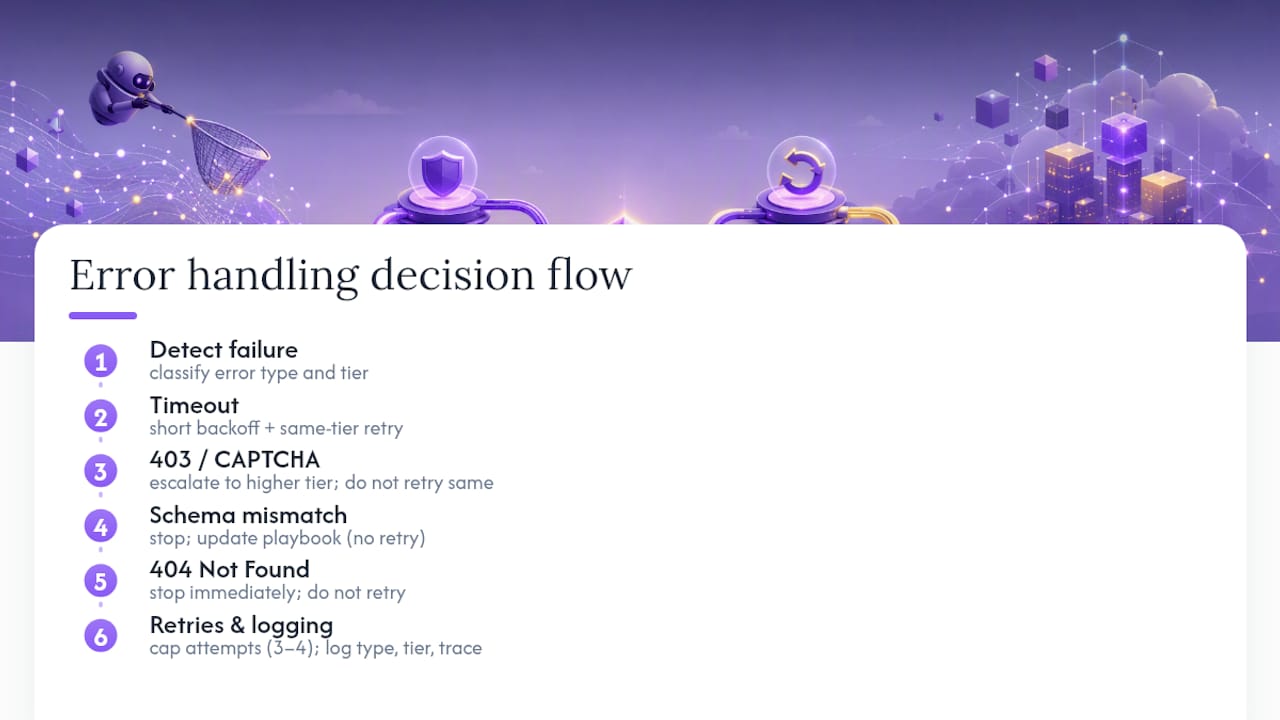
Exponential backoff with jitter is the standard pattern for transient failures: wait a bit longer each time you retry, and randomize that wait slightly so you're not hammering a rate-limited endpoint in lockstep with every other job in your queue. Cap the retry count, three or four attempts is usually enough, because a page that fails four times in a row at increasing tiers has a structural problem a fifth retry won't fix.
Distinguish between recoverable and unrecoverable errors early in your pipeline design. A missing field in a schema match might mean the page structure changed and needs a playbook update, not a retry at all. A hard 404 means the URL is gone, and retrying is pointless. Logging the specific failure type alongside the tier and action trace at the point of failure turns a "why did this job fail" investigation from a guessing game into a five-minute lookup.
Set a maximum escalation path per job so a single stubborn page can't silently consume your entire max_llm_calls budget while everything else in the queue waits. A failed job should fail fast, get logged with enough context to debug later, and let the queue move on.
What Security Risks Come with Automated Scraping?
Running an agent that browses arbitrary URLs and executes actions on your behalf introduces risks that a simple fetch() call doesn't carry. Server-side request forgery is the big one: if your agent follows redirects or accepts user-supplied URLs without validation, it can end up making requests to internal infrastructure that was never meant to be reachable from outside. That's exactly what a policy gate is for, screening every outbound request against an allowlist or denylist before the agent ever touches it.
Credential handling is the second major exposure. Agents that log into sites need to store session tokens and sometimes passwords somewhere, and that storage needs encryption at rest, not a plaintext config file sitting in a repository. Rotate credentials regularly and scope them to the minimum access the scraping task actually requires.
Data handling matters just as much as access control. Any pipeline that might encounter personal information, names, emails, addresses, needs a policy for detecting and either redacting or excluding that data before it's stored or passed downstream. Building that check into the policy gate rather than bolting it on after storage is cheaper and far less error-prone.
Finally, treat the LLM driving your agent as a potential attack surface, not just a reasoning engine. Prompt injection through scraped content, where a malicious page embeds instructions meant to manipulate the agent's next action, is a documented risk category for any system that feeds untrusted web content into a model's context window. Sanitizing extracted text before it reaches a prompt, and never letting the agent execute actions based on instructions found inside scraped content, closes off the most common version of that attack.
Best Practices Most Teams Learn the Hard Way
Most teams start with an open-source agent library because it's free and gives full visibility into what's happening. That's the right call for prototyping, you learn fast what your target sites actually need, whether that's simple HTTP or full agent-tier reasoning. The switch to managed hosting usually happens once uptime and maintenance start costing more engineering time than the subscription would.
Set conservative defaults during testing. Capping max_tier at T2 and max_llm_calls at something small forces failures to surface early instead of silently escalating to expensive agent-driven browsing every time a selector doesn't match. You'll thank yourself the first time a schema typo would otherwise have burned through a day's LLM budget overnight.
Investing early in replay and provenance tooling looks like overhead until the first time a client asks why a number in your dataset doesn't match the live site. Being able to pull the exact HTML snapshot, the action trace, and the timestamp from a replay store turns that from a stressful debugging session into a two-minute lookup.
If you're weighing whether to run this infrastructure yourself or hand off the hosting piece, ClawBase's tutorial library walks through setting up an OpenClaw agent for automation tasks that extend well beyond scraping, worth a look before you commit engineering time to infrastructure you might not need to own.
> *— Iosif Peterfi*
ClawBase: Skip the Infrastructure, Keep the Agent
Building and maintaining the tier router, proxy pool, and replay store behind a production scraping agent is real infrastructure work, and it's not the only place that effort pays off. ClawBase provides managed hosting for OpenClaw with one-click deployment on dedicated encrypted servers, requiring no sysadmin work to maintain.

That matters for the same reason self-healing and replay stores matter in a scraping pipeline: less time babysitting infrastructure, more time on the actual task. ClawBase offers persistent memory management, access to various AI models with multi-model routing, and connects to popular messaging platforms to integrate with your workflow. It's built for teams and developers who want a capable, private AI agent without owning the server maintenance that usually comes with it.
If your use case leans toward broader automation, file management, or workflow orchestration alongside data extraction, check the use cases page to see how a persistent agent handles tasks beyond a single scraping job. Evaluating fit comes down to a few questions: do you need 99.9% uptime, which model do you want routing your requests, and which integrations does your team already rely on. The LITE plan starts at $16 per month with a 7-day free trial, PRO runs $33 per month, and MAX is $66 per month for heavier workloads, all billed monthly or at a discount annually. Visit the pricing page to compare plans and start your trial.
Where to Go Deeper on AI Web Scraping Agents
For hands-on implementation, the Scrapo documentation on PyPI walks through the tiered execution model and deterministic replay in detail, useful groundwork before writing your own router logic. The torch self-healing agent repo on GitHub shows how playbook persistence works in practice, including the file structure for per-site skills. If you're building around MCP, the agentic-rag-sdk repository demonstrates typed output patterns for RAG pipelines. For managed platform documentation covering schema-driven extraction flows, Firecrawl's context API and Scrapio's agent-focused API both publish sample requests and response shapes worth reviewing before you commit to an architecture.
Sources
- scrapo-ai (PyPI) — Scrapo description
- Firecrawl — The context API to search, scrape, and interact with the web
- Scrapio — Web Scraping API for AI Agents and Automation
FAQ
What Is an AI Web Scraping Agent?
It's an LLM-driven system that plans, executes, and observes actions on a web page to extract data, adapting automatically when the page's structure changes rather than breaking like a fixed-selector scraper would.
How Is an AI Web Scraping Agent Different From a Regular Scraper?
A regular scraper follows hardcoded selectors and breaks when a site changes; an agent reasons about the page in real time and can self-heal by trying alternative strategies, often persisting what worked as a reusable playbook.
When Should I Escalate to a Full Agent Tier Instead of a Simple Browser?
Escalate to agent-tier (T4) only when lower tiers fail, typically when a page requires multi-step interaction, judgment calls about ambiguous UI, or when the DOM structure is too unpredictable for a fixed script.
Does ClawBase Offer Web Scraping Agents?
ClawBase provides managed hosting for OpenClaw, a general-purpose AI assistant that can automate workflows including data extraction tasks, rather than a dedicated scraping-only product; plans start at $16 per month with a 7-day free trial listed on the pricing page.
Is Web Scraping With an AI Agent Legal?
Legality depends on what you scrape and how: publicly accessible data collected while respecting a site's robots.txt and terms of service is generally lower risk, but scraping personal data or bypassing access controls raises separate legal questions you should evaluate against your jurisdiction's rules.
What Output Formats Do These Agents Typically Return?
Most return typed JSON validated against a schema, clean Markdown for RAG pipelines, raw HTML for archival, and screenshots for visual verification, often alongside provenance metadata documenting how the result was produced.