AI Assistant Exam Prep Workflow for Faster Recall
2026-08-15

The most effective AI assistant exam preparation workflow runs in five stages: source ingestion, closed-book diagnostic, targeted repair, mock exam, and spaced review. Start in the next 30 minutes by uploading your lecture notes to an AI learning assistant like ChatGPT's study mode, asking it to generate a topic map, and running a 10-question closed-book quiz on your weakest unit.
Quick-start checklist (first 30 minutes):
- Step 1 — Source ingestion (5 min): Upload or paste your notes, slides, or syllabus into your AI assistant.
- Step 2 — Topic map (5 min): Ask the AI to list every testable concept and rank them by complexity.
- Step 3 — Closed-book diagnostic (10 min): Run a 10-question quiz. Tell the AI to wait for your answer before explaining anything.
- Step 4 — Gap analysis (5 min): Ask the AI to score your responses and flag every topic where you scored below 70%.
- Step 5 — Schedule first repair session (5 min): Use a personalized study plan generator to schedule repair sessions for flagged topics over the next three days.
Pro Tip: *Treat the AI as a practice partner, not a search engine. The moment you ask it to "just explain" instead of testing yourself first, you trade active recall for passive reading — and passive reading rarely survives exam conditions.*
***
Key Takeaways
A structured AI exam-prep workflow built on active recall, targeted repair, and spaced repetition consistently outperforms passive review — and the diagnostic is the step that makes everything else work.
| Point | Details |
|---|---|
| Start with a diagnostic | Run a closed-book quiz before reading anything; score below 70% flags your real gaps. |
| Use active recall, not passive reading | Tell the AI to wait for your answer before explaining — this is the core mechanism. |
| Convert mistakes into Anki cards | Export every wrong answer as a CSV flashcard and let spaced repetition handle the schedule. |
| Simulate exam conditions | Run at least one timed mock exam before the real test and score it by topic. |
| Reflow the plan when you miss sessions | Ask the AI to redistribute missed material rather than cramming it into the next day. |
Next step: Open ChatGPT or your AI assistant right now, paste your syllabus or lecture notes, and run the closed-book diagnostic prompt from the prompts section above. That first score is your study plan.
***
Table of Contents
- Why does AI work better as a practice partner than an answer machine?
- How to run the full AI exam-prep workflow step by step
- Which tools should you use for each part of the workflow?
- Academic integrity: how do you use AI ethically for exam prep?
- Copyable prompts and session templates you can use right now
- What does the evidence say about this workflow?
- An honest take on adopting this workflow
- Sources
Why does AI work better as a practice partner than an answer machine?
The short answer: retrieval practice beats re-reading, and an AI that prompts you to produce answers before explaining them forces retrieval at scale.
Three pedagogical principles underpin this. Active recall — pulling information from memory under pressure — consistently outperforms passive review in retention studies. Adaptive feedback closes the loop by targeting only the gaps that remain after each attempt, rather than re-teaching what you already know. Spaced repetition then schedules those gaps at increasing intervals, preventing the forgetting curve from erasing hard-won progress.
Khanmigo (Khan Academy) is built around exactly this model: it challenges students to reason through problems the way an experienced human tutor would, rather than delivering polished summaries on demand. The design choice is deliberate. When the AI hands you the answer, you feel like you've learned something. When it makes you produce the answer first, you actually have.
Consider a concrete loop: a student uploads biochemistry lecture notes, asks for a 15-question diagnostic, and scores 4/15 on enzyme kinetics. The AI flags that topic, runs three targeted explanation-and-retry cycles, then generates five new questions on the same concept. On the second pass, the student scores 4/5. That repair loop — diagnostic, identify gap, targeted practice, retest — is the core mechanism. Everything else in the workflow is scaffolding around it.
Adaptive learning systems that track mastery across a full curriculum path and reflow plans based on weak-point detection produce more targeted practice and reduce wasted study time.
***
How to run the full AI exam-prep workflow step by step
Start this workflow several weeks before a major exam to gain full benefit. Each step below includes a purpose, the inputs you need, example prompts, and a brief success check.
Step 1: Source inspection and ingestion
Purpose: Give the AI a complete, accurate picture of what the exam covers before asking it to do anything else.
Upload your syllabus, lecture slides, and any past-paper PDFs. For STEM subjects with heavy formulas or diagrams, be aware that raw text extraction often loses mathematical notation. Tools like Docling or MarkItDown handle formula-heavy PDFs more reliably than copy-paste; alternatively, flag those pages manually for human verification after the AI generates questions.
*Example prompt:*
"Here are my lecture notes for [subject]. List every distinct testable concept, group them by topic, and flag any section that appears formula-heavy or diagram-dependent."Success check: You have a complete topic list with at least one flagged section reviewed by you.
Step 2: Generate a topic map and priority ranking
Purpose: Turn a raw list of concepts into a ranked study target.
Ask the AI to weight topics by exam frequency (if past papers are available) or by complexity. This becomes the backbone of your study schedule.
*Example prompt:*
"Based on the topic list above and these two past-paper PDFs, rank each topic by how often it appears in exam questions. Mark topics I should study first."Success check: A ranked list of 10–20 topics with a clear top-five priority group.
Step 3: Closed-book diagnostic
Purpose: Measure your actual starting point, not your confidence level.
This is the most important step in the entire workflow. Tell the AI explicitly to ask one question at a time, wait for your full answer, and not reveal the correct answer or any hints until you respond. This enforces active recall rather than recognition.
*Example prompt:*
"Quiz me on [topic]. Ask one question at a time. Do not give hints, explanations, or the correct answer until I have submitted my full response. After I answer, score it and explain what I got wrong."Success check: A scored result per topic.
Step 4: Targeted repair sessions
Purpose: Close specific gaps identified in the diagnostic, not re-read everything.
For each flagged topic, ask the AI to explain the concept from first principles, then immediately quiz you again.
*Example prompt:*
"I scored poorly on [specific topic]. Explain it from first principles in plain language, then give me three progressively harder questions on it. Wait for my answer before explaining each one."Success check: Three consecutive correct answers on the repaired topic.
Step 5: Generate practice questions and Anki-ready flashcards
Purpose: Convert understanding into retrievable memory using spaced repetition.
Ask the AI to export your mistake list as a CSV formatted for Anki import. Every question you got wrong in the diagnostic becomes a card back; the concept or question stem becomes the card front.
*Example prompt:*
"Convert my incorrect answers from today's session into Anki flashcard format. Output as CSV: front (question/concept), back (correct answer). Include a 'hint' field where relevant."Anki's spaced repetition system (SRS) then schedules those cards at expanding intervals, which is the mechanism behind long-term retention. Quizlet offers a similar export path if you prefer its interface.
Success check: A CSV file imported into Anki or Quizlet with at least one card per missed concept.
Step 6: Timed mock exam
Purpose: Simulate real exam conditions before the actual test.
Ask the AI to generate a full-length mock exam that mirrors the format and weighting of your actual test. Set a timer. Do not use notes. Submit answers in one block, then ask for a full score breakdown.
*Example prompt:*
"Generate a [X]-question mock exam on [subject] that matches the format of [exam name]. Include multiple-choice, short-answer, and one essay question. I will answer all questions before you score anything."Success check: A percentage score and a breakdown by topic, which feeds directly back into your repair list.
Step 7: Error taxonomy and SRS card creation
Purpose: Turn mock-exam mistakes into a second round of targeted cards.
After scoring, ask the AI to categorize your errors: conceptual misunderstanding, formula error, reading comprehension, or time pressure. Each category gets a different repair strategy.
Success check: Every mock-exam error has a category and a corresponding Anki card.
Step 8: Spaced review and plan reflow
Purpose: Prevent forgetting between now and exam day.
Notiq's study-plan approach enforces three rules that matter here: spacing (review sessions spread across days, not crammed), a non-linear difficulty curve (easy concepts revisited briefly, hard ones revisited more often), and an activity mix (reading, practice, flashcards, and quizzes in rotation). If you miss a session, ask the AI to reflow your schedule rather than trying to cram the missed material into the next day.
*Example prompt:*
"I missed my Tuesday session on [topic]. Redistribute that material across my remaining sessions before [exam date] without overloading any single day."Success check: An updated schedule that still covers all flagged topics before exam day.
***
Activity comparison across workflow stages:
| Activity | Typical time | Best for | Output artifacts |
|---|---|---|---|
| Closed-book diagnostic | 15–30 min | All subjects | Scored gap list |
| Targeted repair drills | 20 min per topic | Conceptual subjects | Explanation notes, retry scores |
| Mock exam simulation | Full exam length | All subjects | Percentage score, error taxonomy |
| Spaced repetition review | 10–20 min daily | Memorization-heavy subjects | Reviewed card deck, retention rate |
***
Which tools should you use for each part of the workflow?
The right tool depends on the workflow phase. Here is a practical breakdown by function.
File ingestion and agent-capable assistants

ChatGPT (GPT-4o) handles PDF uploads, long context windows, and multi-turn study sessions natively. Its study mode structures interactions around active practice rather than passive Q&A. Google's Gemini offers similar file-handling with built-in study mode features and safety controls for interactive learning. For a broader look at how these categories of tools differ, the types of AI learning tools guide breaks down tutors, agents, and SRS exporters side by side.
Dedicated AI tutors
Khanmigo (Khan Academy) is purpose-built for the tutor-style approach described in this workflow. StudentAI offers a similar conversational tutoring experience with exam-prep focus. Both are available in the US and free or low-cost for students.
SRS and flashcard tools
Anki remains the gold standard for spaced repetition. Its open CSV import means any AI-generated card set drops straight in. Quizlet provides a more visual interface and collaborative deck sharing, which suits group study.
Study schedule generators
Notiq's AI study plan generator applies spacing and difficulty-curve rules automatically. It is a practical starting point if you want a structured schedule without building one manually.
Private, always-on deployment
For students who want persistent memory across sessions — so the AI remembers your weak topics from last Tuesday without you re-pasting everything — a managed private assistant is worth considering. Clawbase hosts OpenClaw on a dedicated encrypted server with one-click deployment, 99.9% uptime, and no sysadmin skills required. That persistent memory layer is what separates a stateless chat session from a genuine personal AI tutor that tracks your progress over weeks.
Privacy note: If your study materials include professor-provided PDFs or anything covered by FERPA, review your institution's data-handling policy before uploading files to a third-party cloud service. A private deployment option like Clawbase keeps your data on a dedicated server rather than a shared cloud environment.
***
Academic integrity: how do you use AI ethically for exam prep?
Using AI to generate practice questions, explain concepts, and build flashcards is allowed in most academic settings. Using AI to answer questions during a closed, proctored exam without explicit instructor permission is not.
The distinction is straightforward: AI as a study tool is preparation. AI as a test-taking tool is a policy violation in virtually every US institution.
What you can do:
- Generate practice questions from your own lecture notes and textbooks.
- Ask the AI to explain concepts you don't understand after attempting them yourself.
- Use AI to build Anki decks from your own mistake logs.
- Ask for worked examples on problem types you've already attempted.
- Use AI to check your essay outlines or argument structure before writing.
What you should not do:
- Submit AI-generated text as your own written work without disclosure.
- Use an AI assistant during a closed exam, even for "just one question."
- Ask the AI to solve take-home exam problems you are expected to complete independently.
- Use AI to paraphrase sources in a way that obscures the original attribution.
Scenario A (allowed): You upload your organic chemistry lecture slides and ask the AI to generate 20 practice questions on reaction mechanisms. You answer them closed-book, review your mistakes, and build Anki cards from the errors. This is standard active-recall study practice.
Scenario B (not allowed): During a timed online exam, you paste the exam question into ChatGPT and submit its answer as your own. This violates academic integrity policies at every accredited US institution, regardless of whether the exam is proctored.
If you are unsure whether a specific use is permitted, check your institution's academic integrity policy directly — most US universities publish these on their registrar or dean of students page. When in doubt, ask your instructor before the assignment is due, not after.
***
Copyable prompts and session templates you can use right now
Each prompt below has a single purpose. Copy, adjust the bracketed fields, and paste.
Source inspection prompt
"I'm preparing for [exam name] on [date]. Here are my materials: [paste or attach].
List every testable concept, group by topic, and flag any section that is formula-heavy
or diagram-dependent. Do not summarize — list concepts only."
Closed-book diagnostic prompt
"Quiz me on [topic]. Rules: ask one question at a time, wait for my full answer,
do not give hints or reveal the correct answer until I respond. After each answer,
score it (correct / partially correct / incorrect) and explain what I missed."
Targeted repair prompt
"I got [concept] wrong in my last quiz. Explain it from first principles in plain language.
Then give me three questions on it, increasing in difficulty. Wait for my answer each time
before explaining."
Mock exam generation prompt
"Generate a [N]-question mock exam for [subject / exam name]. Match the format:
[multiple choice / short answer / essay]. Do not score or explain anything until
I submit all answers. Then give me a full breakdown by topic."
Anki CSV exporter prompt
"Here are the questions I got wrong today: [paste list].
Convert each into an Anki flashcard. Output as CSV with three columns:
Front (question or concept), Back (correct answer), Hint (one-word clue).
No extra formatting."
Timed session script (run verbatim)
Session start: [time]
Subject: [subject]

Step 1 — Warm-up (5 min): Ask AI for 3 easy recall questions on [topic].
Step 2 — Diagnostic (15 min): Run 10-question closed-book quiz. No hints.
Step 3 — Repair (15 min): For every wrong answer, run targeted repair prompt.
Step 4 — Retest (10 min): Re-quiz on missed concepts only.
Step 5 — Card export (5 min): Run Anki CSV exporter prompt on today's errors.
Session end: [time] — log score and topics for next session.
Anki card template (CSV format)
Front,Back,Hint
"What is the Michaelis constant (Km)?","The substrate concentration at which reaction velocity is half of Vmax.","enzyme kinetics"
"Define active recall.","Retrieving information from memory without cues — the act of testing yourself.","study method"
For formula-heavy subjects, note that AI text extraction can drop or misread mathematical notation from PDFs. Run a quick visual check on any generated question that involves equations, and correct the notation before importing into Anki.
***
What does the evidence say about this workflow?
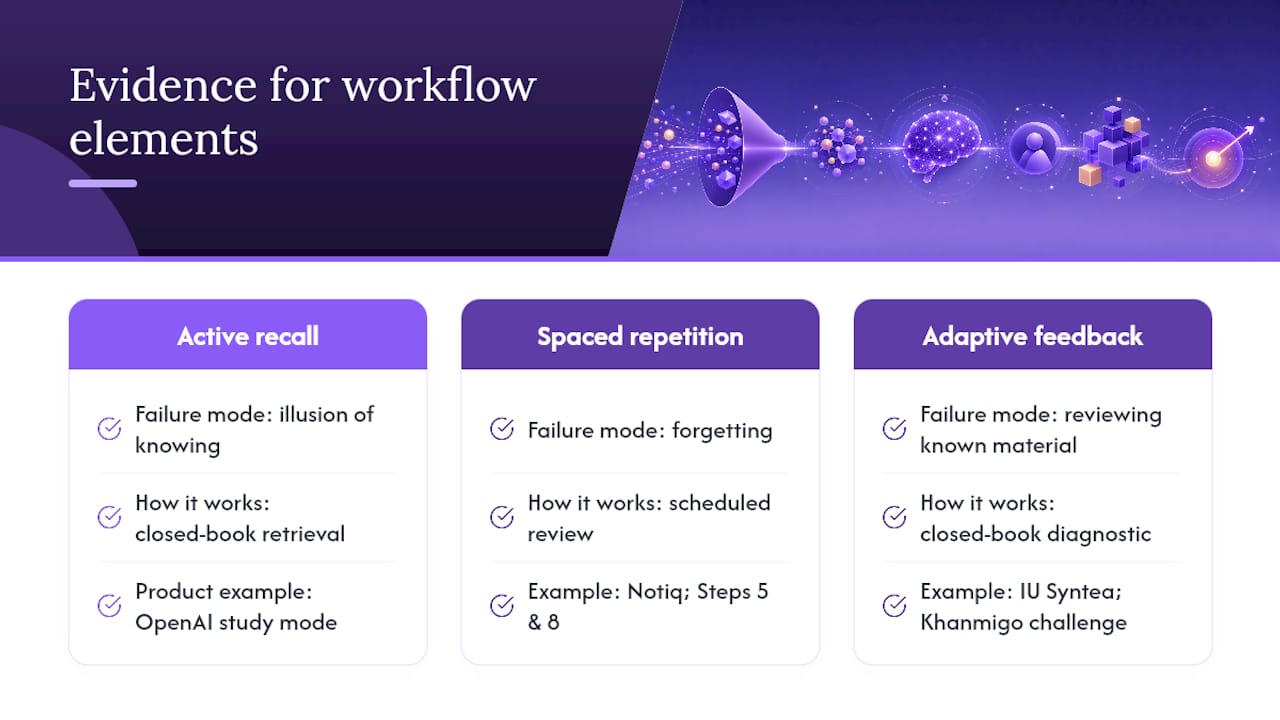
The three workflow elements with the strongest research backing are active recall, spaced repetition, and adaptive targeted feedback. These are not interchangeable — each addresses a different failure mode in traditional studying.
Active recall addresses the illusion of knowing. Re-reading notes feels productive but produces weak memory traces. Forcing retrieval under closed-book conditions builds the kind of durable encoding that holds up under exam pressure. IU Syntea's adaptive learning assistant tracks progress across curriculum paths and adapts guidance to where understanding is lacking — exactly the mechanism the diagnostic-and-repair loop in this workflow replicates.
Spaced repetition addresses forgetting. Without scheduled review, most new information is gone within a week. Notiq's study-plan generator enforces spacing, a non-linear difficulty curve, and an activity mix to avoid the most common study-plan failures. That maps directly to Steps 5 and 8 of this workflow: Anki card creation and plan reflow.
Adaptive feedback addresses wasted time. Reviewing material you already know is the single biggest inefficiency in most students' study habits. The closed-book diagnostic in Step 3 eliminates that waste by identifying only the gaps that need repair. Khanmigo's design philosophy — challenging students to reason through problems rather than supplying answers — reflects the same principle at the product level.
> Evidence signal: OpenAI's study mode documentation describes session patterns built around active practice and structured interaction, not passive Q&A. That design choice aligns with the "answer-first, then explain" agent pattern that practitioners describe as the most effective configuration for AI-assisted learning.
The agent pipeline pattern — inspect sources, run closed-book diagnostics, grade strictly, repair weak points, convert mistakes to SRS cards — is documented in open-source study-workflow projects and mirrors what dedicated platforms like Akono and Scholarly implement as their core session structure. Scholarly recommends starting this kind of structured workflow three to four weeks before a major exam to capture the full benefit of spaced review cycles.
***
An honest take on adopting this workflow
The diagnostic-first approach is the right place to start, and the most important thing you can do in the first session is resist the urge to skip it.
Most students open an AI assistant and immediately ask it to explain the hardest topic on the syllabus. That feels efficient. It is not. The diagnostic tells you. Without it, you are studying by intuition rather than evidence, and intuition is almost always wrong about where the real gaps are.
The second pitfall is treating the AI as a tutor-on-demand rather than building a persistent workflow. A single chat session with no memory of last week's mistakes is useful but limited. A private assistant with persistent memory — one that remembers your weak topics, your card deck, and your score history across multiple sessions — is a qualitatively different tool. That is the gap Clawbase addresses: managed OpenClaw hosting with persistent memory management, so your AI study partner actually accumulates context about your learning over time rather than starting from zero each session.
Pro Tip: *Run your first diagnostic session before you read a single page of review material. The score tells you exactly where to spend your time. Students who skip this step almost always over-study their strong topics and under-study the ones that will cost them points.*
***
Sources
- Khanmigo (Khan Academy)
- IU Syntea — adaptive learning assistant overview
- OpenAI Help — using study mode in ChatGPT
- Notiq — Free AI Study Plan Generator