How to Use AI to Learn a New Subject Fast
2026-07-03

AI-assisted learning is defined as using intelligent software to tailor educational content, track your progress, and prompt active engagement so you build real understanding. When you use AI to learn a new subject, you move beyond passive reading into a feedback loop that adapts to what you already know. Tools like Google's Gemini study notebooks, the Claw-STU adaptive agent, and SM-2 spaced repetition algorithms represent the current state of the art. This guide walks you through the tools, setup, and workflows that actually produce mastery.
What AI tools do you need to learn a new subject?
The most effective AI tools for subject learning do three things: diagnose what you know, generate personalized content, and force you to actively recall information. Passive reading apps do not qualify. You need tools that respond to your performance and change course accordingly.
Here are the core features to look for:
- Diagnostic assessment. The tool should quiz you before teaching, not after. Google's Gemini study notebooks track over 100 specific learning objectives with real-time progress visualization. That level of granularity tells you exactly where your gaps are.
- Personalized lesson generation. AI tools like Mnemo generate structured lesson plans from textbook images in as little as 10 seconds using Gemini Flash. That speed matters when you want to start studying immediately.
- Active recall and teach-back. Effective AI study platforms force you to explain concepts back to the AI rather than just answer multiple-choice questions. This technique mirrors the Feynman method, where teach-back evaluation simulates deep comprehension assessment.
- Spaced repetition scheduling. Superior AI learning agents use the SM-2 algorithm and concept dependency graphs to schedule reviews at the exact moment your memory is about to fade.
- Multimodal input. The best tools accept text, diagrams, and past exams. Grounding AI responses in your own materials produces better outcomes than relying on generic explanations.
| Feature | What it does | Why it matters |
|---|---|---|
| Diagnostic quiz | Identifies your baseline knowledge | Prevents wasted time on concepts you already know |
| Lesson generation | Builds a custom study plan | Keeps content relevant to your actual materials |
| Teach-back evaluation | Forces you to articulate understanding | Builds long-term retention, not surface recall |
| Spaced repetition | Schedules reviews algorithmically | Maximizes memory consolidation over time |
| Progress dashboard | Visualizes mastery per topic | Keeps you accountable and shows real progress |
Pro Tip: *Before committing to any AI learning tool, test its diagnostic feature first. If it cannot tell you specifically what you do not know within the first session, it is not adaptive enough to accelerate your learning.*
How to prepare your materials for AI-assisted study
The quality of your AI-generated study plan depends directly on the quality of the materials you feed it. Generic prompts produce generic lessons. Your own notes, textbooks, and past exams produce a course built around your actual learning goals.
Follow these steps to set up your materials correctly:
- Gather everything relevant. Collect your textbook chapters, lecture notes, diagrams, and any past exams or practice tests. The more context you give the AI, the more specific its output will be.
- Prioritize multimodal inputs. Multimodal AI tools that process both images and text generate context-specific study plans that generic text-only tools cannot match. Photograph diagrams and upload them alongside written notes.
- Define your learning scope. Write out the key concepts and skills you need to master. This becomes your syllabus. Give it to the AI as a reference point so it can map lessons to your actual goals.
- Organize by dependency. Some concepts require others as prerequisites. Group your materials so foundational topics come first. AI tools with concept dependency graphs will do this automatically, but pre-organizing saves time.
- Check material quality. AI output is only as accurate as your inputs. If your notes contain errors, the AI will build on those errors. Cross-check key facts against a trusted source before uploading.
Pro Tip: *Upload past exams alongside your notes. AI tools that support multimodal input will use exam questions to calibrate the difficulty of your practice sessions, which is far more effective than AI-generated questions alone.*
Step-by-step workflow for using AI to master a new subject
A structured workflow separates students who retain information from those who just feel busy. The following process applies whether you are studying biology, contract law, or machine learning fundamentals.
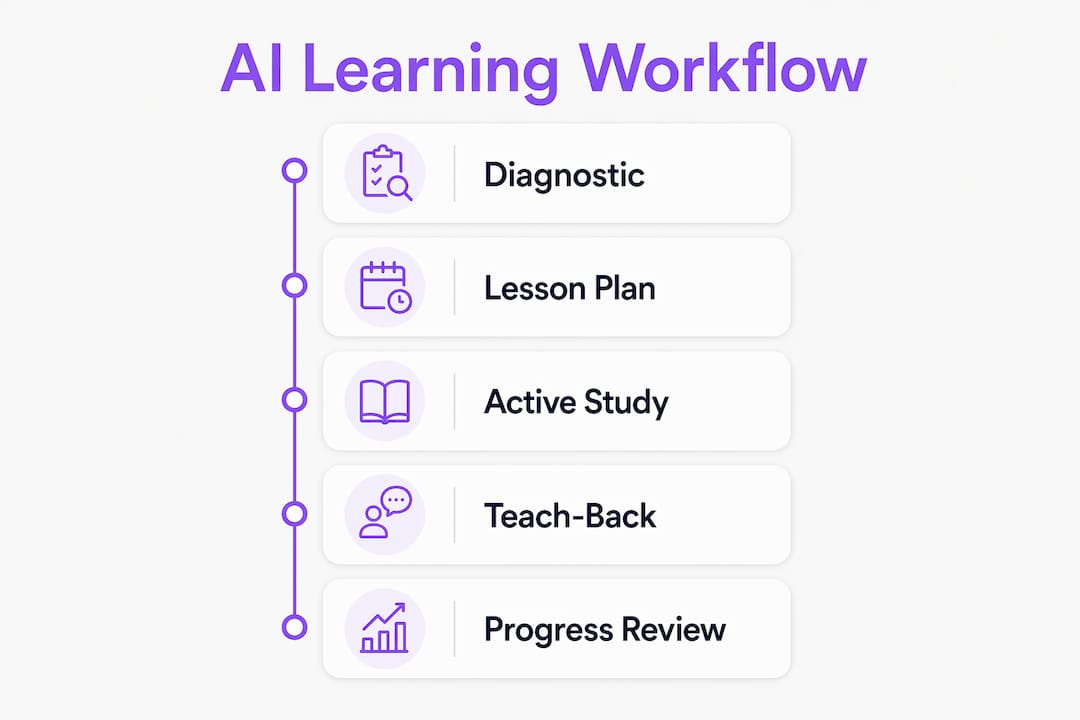
Step 1: Run a diagnostic assessment
Start every new subject with a diagnostic quiz, not a lecture. This establishes your baseline and tells the AI where to begin. Claw-STU, an adaptive learning agent, focuses specifically on your Zone of Proximal Development, the gap between what you know and what you can learn next with guidance. It then rotates through seven instructional modalities and three complexity tiers to find the approach that works for you.

Step 2: Generate a personalized lesson plan
Feed your materials to the AI and request a structured course. A good AI tool will sequence topics by dependency, not alphabetically or by chapter order. Ask it to flag which concepts are prerequisites for others. This dependency mapping is the difference between a reading list and an actual learning path.
Step 3: Study in short, active blocks
Active learning agents like Claw-STU structure sessions into short 10-minute blocks that require constructed responses, not passive reading. Each block should alternate between an informational briefing and a diagnostic question. This rhythm of high cognitive load activities followed by consolidation maximizes retention per hour of study.
Here is what each study block should include:
- A brief AI explanation of one concept (3–5 minutes)
- A teach-back prompt where you explain the concept back in your own words
- An AI evaluation of your explanation with specific corrections
- A spaced repetition flag if the concept needs review
Step 4: Use teach-back to test real understanding
Teach-back is the single most underused technique in AI-assisted study. Instead of asking "what is photosynthesis," ask the AI to evaluate your explanation of photosynthesis. Effective AI tutors function as active recall engines, not answer machines. The difference in retention is significant.
Step 5: Track progress and schedule reviews
Use your AI tool's progress dashboard to identify which concepts you have mastered and which need more work. Persistent learner modeling with concept dependency tracking and spaced repetition yields superior retention compared to one-off study sessions. Schedule your next review before you close the app.
Pro Tip: *Set a weekly review session where you ask the AI to quiz you only on concepts you last studied more than five days ago. This forces spaced repetition even if your tool does not schedule it automatically.*
What are the most common pitfalls when learning with AI?
AI tools for learning can produce shallow results if you use them passively. The technology is only as effective as the habits you build around it.
> Effective AI learning forces students to articulate their understanding, not just consume information. The act of constructing an explanation is what builds long-term retention. Passive consumption, regardless of how well the AI presents content, does not produce mastery.
Watch out for these specific traps:
- Generic prompts. Asking "explain quantum mechanics" produces a Wikipedia-level summary. Ask instead: "Quiz me on wave-particle duality based on these notes and tell me what I got wrong."
- Content overload. More material does not mean more learning. Meeting learners at their Zone of Proximal Development with adaptive modality shifts reduces frustration and accelerates mastery. Stick to one concept cluster per session.
- Unvalidated AI explanations. AI tools can generate confident but incorrect explanations. Always cross-check AI output against your source materials, especially for technical or scientific subjects.
- Passive consumption. Reading AI summaries feels productive but builds little retention. Every session must include at least one teach-back or constructed response activity.
- Skipping spaced repetition. Reviewing material once and moving on is the fastest path to forgetting. Build review sessions into your weekly schedule, not just your daily one.
Pro Tip: *If you find yourself just reading AI output without writing or speaking anything back, stop. Switch to a teach-back prompt immediately. The discomfort of constructing an answer is the signal that real learning is happening.*
Key takeaways
AI-assisted learning produces real mastery only when you combine adaptive diagnostics, teach-back evaluation, and spaced repetition into a consistent, active study workflow.
| Point | Details |
|---|---|
| Start with diagnostics | Run a baseline quiz before any lessons to focus study time on actual gaps. |
| Use your own materials | Upload your notes and exams so AI generates context-specific, not generic, lessons. |
| Practice teach-back every session | Explaining concepts back to the AI builds retention that passive reading cannot match. |
| Apply spaced repetition | Schedule reviews using SM-2 or a dependency graph to consolidate memory over time. |
| Avoid passive consumption | Every study block must include at least one constructed response, not just reading. |
Why I think most students use AI for learning completely wrong
I have spent a lot of time testing AI study tools, and the pattern I see most often is students using them as fancy search engines. They ask a question, read the answer, and feel like they learned something. They did not. They consumed information, which is not the same thing.
The tools that actually changed how fast I could learn a subject were the ones that refused to just answer my questions. They pushed back. They asked me to explain things. They told me I was wrong and made me try again. That friction is not a bug. It is the entire mechanism.
What surprised me most was how much the Zone of Proximal Development concept matters in practice. When an AI pitches content too far above your current level, you disengage. When it pitches too low, you get bored. The adaptive modality rotation in tools like Claw-STU, where it shifts between analogy, diagram, and worked example depending on your response, is the closest thing to a skilled human tutor I have seen in software.
My honest prediction is that the students who build the habit of using personal AI tutors for active recall now will have a compounding advantage over the next decade. The technology is already good enough. The bottleneck is learner behavior, not tool capability. If you treat AI as a study partner that challenges you rather than a resource that informs you, the results are genuinely different.
> *— Iosif Peterfi*
Clawbase makes AI-powered learning accessible without the setup
Clawbase gives you one-click access to OpenClaw, the open-source AI agent that powers tools like Claw-STU, without any server configuration or technical knowledge required. You get a private, always-on AI assistant with persistent memory, access to over 50 AI models, and 99.9% uptime from day one.

For students who want to apply the workflows in this article, Clawbase removes the only real barrier left: setup complexity. You can explore AI learning use cases on the Clawbase platform and see exactly how adaptive study agents work in practice. If you are ready to run your own personalized AI tutor without touching a command line, Clawbase managed hosting starts at $16/mo.
FAQ
What does it mean to use AI to learn a new subject?
AI-assisted learning means using intelligent tools that diagnose your knowledge gaps, generate personalized lessons, and prompt active recall rather than passive reading. The goal is adaptive, feedback-driven study, not automated summarization.
How is AI learning different from just searching online?
AI learning tools respond to your performance and adjust content difficulty, modality, and pacing in real time. Search engines return static results. AI tutors evaluate your understanding and change what they teach based on what you get wrong.
What is the teach-back method in AI study tools?
Teach-back requires you to explain a concept back to the AI in your own words, after which the AI evaluates your explanation and corrects errors. This technique mirrors the Feynman method and produces significantly stronger retention than question-and-answer formats.
How do I avoid information overload when learning with AI?
Focus each session on your Zone of Proximal Development, the concepts just beyond your current knowledge level. Adaptive agents like Claw-STU rotate through instructional modalities and complexity tiers to keep difficulty calibrated, which prevents both overload and boredom.
Do I need technical skills to use AI tools for learning?
Most modern AI learning platforms require no coding or server knowledge. Clawbase, for example, deploys OpenClaw with one-click setup on a managed server, making advanced AI agents accessible to any student regardless of technical background.