What Is Intelligent Notification Filtering? A Practical Guide
2026-08-19
Intelligent notification filtering is the automated process of deciding when, whether, and how to deliver an alert based on its content, your context, and your past behavior, rather than showing every notification the instant it arrives. The goal is simple: maximize the odds you actually see and act on what matters while cutting the noise you'd dismiss anyway. Under the hood, you'll find a mix of rule-based logic (interruption filters, whitelists), machine learning (semantic scoring, priority ranking), and a growing preference for on-device inference that keeps your message content off someone else's server. The practical payoff is fewer buzzes for coupon codes and app updates, and faster visibility for the messages that actually need your attention.
Key Takeaways
Intelligent notification filtering works because it combines context signals, content analysis, and behavioral history to decide whether an alert deserves your immediate attention, a delay, or silence.
| Point | Details |
|---|---|
| Core mechanism | Filtering scores notifications using content, context, and behavior, then shows, batches, summarizes, or suppresses them. |
| Hybrid beats pure rules | A tested hybrid model outperformed a rule-based baseline by [29.1 percentage points](https://doi.org/10.5281/zenodo.19655610) in one study. |
| Platform examples vary | Apple summarizes and reduces interruptions, Android categorizes via Notification Organizer, and Ring flags unusual events only. |
| Tune with caution | Keep manual overrides and never let filters silently suppress calls, alarms, or safety alerts. |
| Managed option available | Clawbase hosts an OpenClaw agent that can learn and apply custom filtering rules across your messaging apps without server setup. |
Table of Contents
- What Is Intelligent Notification Filtering and How Does It Decide What You See?
- How Do Apple, Android, and Ring Handle Smart Notification Sorting?
- What Are the Benefits and Risks of Notification Filtering?
- How Do You Control and Tune Notification Filtering on Your Phone?
- How Do Rule-Based, ML, and Hybrid Filtering Systems Actually Work?
- What Do Research Findings Suggest for Tuning a Filter?
- What Does It Look Like to Actually Tune One of These Filters?
- Want a Custom Notification Filter Without Building One Yourself?
- Frequently Asked Questions
- Sources
What Is Intelligent Notification Filtering and How Does It Decide What You See?
At its core, this technology answers one question over and over: is this notification worth interrupting you right now? Research on notification systems frames the entire field around that single tension. People dismiss notifications they find irrelevant far more often than they engage with them, so a filtering layer that can't tell the difference is worse than no filtering at all.
The system pulls from several signal categories every time something tries to reach your lock screen:
- Content and metadata: the notification's title, body text, sender, and app category.
- Device context: your location, whether you're driving, whether Do Not Disturb is active, and time of day.
- Behavioral history: which senders you open promptly, which you swipe away unread, and how you've responded to similar alerts before.
- Timing and recency: whether a burst of related notifications just arrived, which matters for deciding whether to bundle them.
From there, the system has more options than "show it" or "hide it." It can show immediately (an incoming call, a security alert), prioritize (bump a message above lower-value clutter), summarize (condense ten app notifications into one line), batch and delay (hold non-urgent items for a scheduled check-in), or suppress outright (silence a promotional push you've never opened).
The processing flow generally runs in four steps: the system ingests the incoming notification, extracts features from it (both structural metadata and a semantic read of the content, often via lightweight embeddings), scores it against a rule set or trained model, and then acts, feeding the outcome back into the model so future decisions improve.
Pro Tip: *If your phone feels too aggressive about hiding things, look for a batch or delay setting before you disable filtering entirely. Delaying non-urgent notifications by an hour keeps them out of your way without risking the silent-suppression problem, where something important never surfaces at all.*
How Do Apple, Android, and Ring Handle Smart Notification Sorting?
The clearest way to understand notification filtering techniques is to look at how three very different products already ship them.
Apple builds this into two connected features. Apple Intelligence's notification summaries use language understanding to condense a pile of messages from one app or thread into a single readable line, so a group chat with 40 unread texts shows up as one sentence instead of 40 banners. The companion Reduce Interruptions focus mode goes further: it evaluates incoming notifications and shows only the ones judged likely to need immediate attention, quietly holding the rest for later.

Android, specifically on Pixel, takes a categorization-first approach. Notification Organizer automatically sorts incoming alerts into buckets like Promotions, Social, and Messages, and layers AI summaries on top that condense unread threads in supported apps and languages. Under the hood, this relies on the platform's NotificationListenerService and interruption filter constants (ALARMS, PRIORITY, NONE) that developers and OEMs use to build these behaviors on top of the base operating system.
Ring shows what smart filtering looks like outside the smartphone entirely. Its intelligent features analyze camera events and only push a notification for something unusual, rather than every motion trigger a raccoon or a passing car sets off. That single design choice is the difference between a device you trust and one you mute out of exhaustion.
Across all three, the user-facing pattern repeats: summarized cards instead of a wall of banners, priority items surfaced at the top, and clear categories replacing an undifferentiated feed.
What Are the Benefits and Risks of Notification Filtering?
Done well, intelligent filtering earns its keep fast. You get fewer interruptions during focused work, higher receptivity when something genuinely matters (because your phone hasn't cried wolf all day), and consolidated summaries that turn a chaotic notification tray into something scannable in five seconds.
The downsides are real, and they cluster around a handful of failure modes:
- Missed critical alerts: a filter tuned for "you rarely respond to this sender" can suppress the one time that sender has urgent news.
- False positives and negatives: aggressive suppression cuts noise but risks silencing something legitimate; loose filtering barely helps at all.
- Overfitting to current behavior: a model trained only on your recent habits can lag behind real changes, like a new job that suddenly makes work emails urgent.
- Privacy trade-offs: filtering that runs in the cloud means message content and metadata leave your device, versus on-device inference that keeps it local.
The Instagram engineering team's public writeup on notification models flags a subtler risk too: sophisticated ranking can simply reinforce engagement with people already using an app heavily, adding little real value while looking statistically impressive.
> Notifications delivered at the wrong moment don't just annoy people, they actively disrupt whatever task they were doing, which is exactly why interruptibility research treats timing as its own design problem separate from content relevance.
Be cautious with anything safety-adjacent. Emergency alerts, family check-ins, and medical device notifications deserve manual allowlisting rather than trust in a general-purpose filter, no matter how well-tuned it seems.
How Do You Control and Tune Notification Filtering on Your Phone?
You don't need to accept your phone's default filtering behavior. Every major platform gives you levers, and tuning them takes about ten minutes.
- Open your notification settings and review per-app categories, most phones let you separate Promotions, Social, and Messages, and mute entire categories at once.
- Enable or disable AI summaries depending on whether you'd rather read a condensed line or the raw message; on Pixel this lives inside Notification Organizer, on iPhone inside the Apple Intelligence summary settings.
- Set priority contacts or apps so messages from specific people bypass filtering entirely, useful for family members or your manager.
- Whitelist or blacklist specific apps rather than relying on category defaults; a banking app and a game shouldn't share a bucket.
- Test the setup by having someone send you a sample message while filtering is active, then check whether it arrived, was delayed, or got summarized.
If something important goes missing, don't abandon filtering altogether. Temporarily disable the filter for that one app, confirm notification permissions haven't been revoked at the system level, and re-add the sender to your priority list.
Pro Tip: *Use a temporary focus mode for deep work sessions instead of permanently silencing categories. Permanent suppression tends to create blind spots you forget about; a two-hour focus window resets automatically and costs you nothing.*
How Do Rule-Based, ML, and Hybrid Filtering Systems Actually Work?
If you're building this rather than just using it, the architecture choices matter more than the marketing language around them.
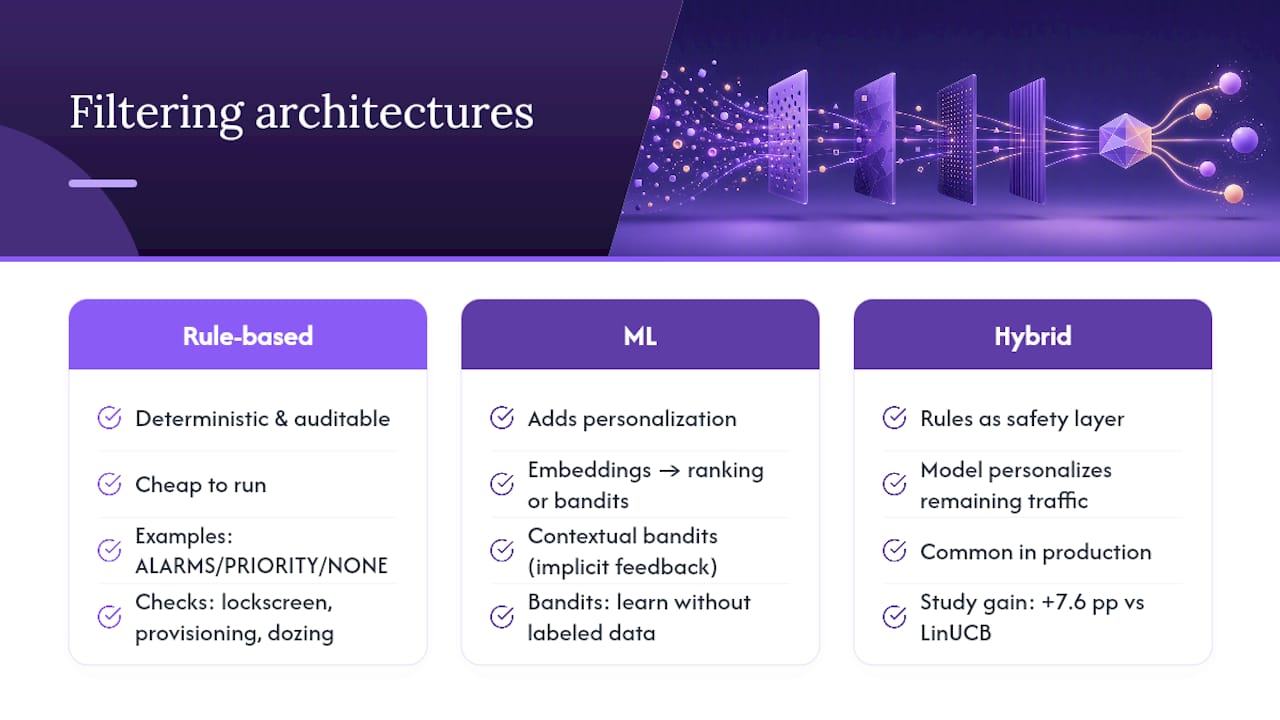
Rule-based systems are the simplest layer: static whitelists, blacklists, and interruption filters like Android's ALARMS, PRIORITY, and NONE modes defined in the NotificationListenerService API. They're predictable, auditable, and cheap to run, which makes them the right foundation for anything safety-critical. Android's open-source NotificationFilter component illustrates this well: it runs concrete checks like lockscreen visibility, device provisioning state, and dozing status before anything reaches the user, all deterministic, no model involved.
ML approaches add personalization on top. A typical pipeline extracts semantic embeddings from notification content, then uses supervised ranking or contextual bandit algorithms to score relevance per user. Contextual bandits are particularly well-suited here because they update from a stream of implicit feedback (opened, dismissed, ignored) without needing labeled training data upfront.
Hybrid architectures are where most production systems land: rules act as a safety layer that always fires for critical categories (calls, alarms, security codes), while a model handles everything else and personalizes over time. A 2026 study on personalized notification routing tested exactly this combination, pairing a LinUCB bandit with semantic embeddings and a lightweight on-device pipeline.
The result was notable: the hybrid LinUCB-Semantic agent beat a standard LinUCB bandit by 7.6 percentage points and beat a pure rule-based baseline by 29.1 percentage points in the study's evaluation.
For implementers working server-side, filter expression systems like the Amazon SP API's notification subscriptions show a different but related pattern: CEL-based filter expressions evaluate payload fields at runtime, and documentation explicitly warns to run filtered subscriptions in parallel during migration since a missing optional field can silently drop events you expected to keep.
A workable architecture sketch looks like this: ingestion, feature extraction (embeddings plus metadata), scoring against rules and/or a model, a decision engine that picks show, batch, summarize, or suppress, and a feedback loop that logs outcomes for retraining.
What Do Research Findings Suggest for Tuning a Filter?
Academic and engineering literature converges on a few practices that separate a filter people trust from one they eventually disable.
Start conservative. Ship a rule-based safety layer first (never suppress calls, alarms, or verified security alerts), then layer personalization gradually as you gather real usage signals. Always keep an easy manual override, because the moment users feel like they've lost control, they turn the whole system off.
Track metrics that actually reflect harm and value, not just engagement:
- Precision and recall for what counts as a "relevant" alert.
- User acceptance rate, how often people leave a filtered decision unchanged versus manually overriding it.
- Missed-critical-alert rate, ideally near zero, tracked separately from general accuracy.
- Engagement lift versus an unfiltered baseline, to confirm the system adds value rather than just reshuffling attention.
On tuning, use asymmetric reward functions: penalize a missed critical alert far more heavily than an unnecessary one shown. This mirrors how people actually feel about the two error types, being mildly annoyed by an extra notification is nothing compared to missing something that mattered.
The Instagram engineering case study offers a useful caution here: notification management is fundamentally a user-selection problem. A model that gets very good at predicting who's already engaged can look successful on paper while adding almost no real value, since those users would have opened the app anyway.
For deployment, run A/B tests with a genuine control group, roll out changes in parallel rather than as a hard cutover, and build a feedback channel so users can flag bad decisions. When a filter encounters an unfamiliar payload type it hasn't been trained on, the safe default is to show it, not suppress it. Unknown categories should never silently fail closed.
What Does It Look Like to Actually Tune One of These Filters?
Most people who go deep on this start the same way I did: too conservative at first, then slowly loosening restrictions as trust builds. The first setup usually mutes everything except calls and messages from a short list of people, which feels safe but also buries useful information for weeks.
The real tuning happens in the small trade-offs. Muting promotional pushes from shopping apps is an easy call; nobody misses those. Deciding whether to batch a group chat with extended family is harder, because the messages are low-urgency individually but matter collectively, and a delay that feels reasonable to you might mean someone waits three hours to hear about a plan change. The lesson that sticks: filter by category confidently, but treat anything touching people (not apps) with far more caution than the default settings assume.
Want a Custom Notification Filter Without Building One Yourself?
Everything above assumes you're either tuning built-in phone settings or writing filtering logic from scratch, both of which take real time to get right. If you want rules that route messages across Telegram, Discord, and Slack, summarize what matters, and learn your preferences over weeks instead of guessing on day one, a managed AI agent handles that without you touching a server.

Clawbase runs OpenClaw, an open-source personal AI assistant, on a dedicated, encrypted server with one-click deployment and no sysadmin work on your end. It connects to over 50 AI models, keeps persistent memory of your preferences so its filtering logic actually improves over time, and links to the communication platforms you already use. If you want a private assistant that triages and routes your notifications the way you would, rather than the way a phone manufacturer assumes you would, you can explore what an OpenClaw agent can automate or start a hosted setup on Clawbase directly.
Frequently Asked Questions
What is intelligent notification filtering, in one sentence?
It's an automated system that decides whether an alert should be shown immediately, delayed, summarized, or suppressed based on its content, your context, and how you've responded to similar alerts before.
How does notification filtering work without reading my private messages in the cloud?
Many systems now run lightweight semantic models directly on your device, extracting just enough meaning from a notification to score its relevance without sending the full content to a server, a trade-off between privacy and processing power.
Is AI-based filtering better than simple rule-based filtering?
Rules are more predictable and safer for critical categories, while machine learning personalizes better over time. Most well-built systems use both together, rules as a safety net, models for everything else.
Can intelligent filtering cause me to miss something important?
Yes, false negatives are the biggest risk with aggressive filtering. That's why critical categories like calls, alarms, and safety alerts should stay on allowlists rather than relying on a model's judgment.
What is smart notification sorting on Android specifically called?
On Pixel devices, it's called Notification Organizer, which categorizes alerts into groups like Promotions, Social, and Messages and layers AI summaries on top for supported apps.
Sources
- Intelligent Notification Systems: A Survey of the State of the Art and Research Challenges
- Summarize notifications and reduce interruptions with Apple Intelligence on iPhone - Apple Support
- Use Notification Organizer and AI summaries - Google Support (Pixel)