Enterprise AI Integration: A Practical Guide for 2026
2026-08-13

Enterprise AI integration is the practice of embedding AI capabilities directly into core business systems and workflows so AI can act on enterprise data and trigger operational outcomes. Done well, it automates repetitive tasks and frees staff for higher-value work, compresses decision cycles, and reduces error rates across operations. The NIST AI Risk Management Framework and IBM's enterprise AI guidance both treat this as a systems discipline, not a model-selection exercise. The core elements are a unified data layer, model access, APIs and connectors, workflow orchestration, and governance controls — each covered in depth below.
Key Takeaways
Enterprise AI integration succeeds when it is treated as a data and workflow problem first, and a model problem second — governance, integration patterns, and adoption metrics are as critical as model accuracy.
| Point | Details |
|---|---|
| Definition and scope | Enterprise AI integration embeds AI into core systems like CRM and ERP so outputs trigger operational actions, not just reports. |
| Data readiness is the prerequisite | Data quality, lineage, and canonical identifiers must be validated before any pilot begins — poor data produces poor AI outputs regardless of model quality. |
| Architecture requires five layers | A working enterprise AI stack needs a data layer, model layer, API/integration layer, orchestration engine, and observability/MLOps layer. |
| Governance from day one | Apply the NIST AI Risk Management Framework early; retrofitting governance after deployment is significantly more expensive and disruptive. |
| Measure both technical and business KPIs | Track inference latency, error rate, and drift alongside business metrics like average handle time reduction and forecast accuracy improvement. |
Table of Contents
- What is enterprise AI integration, exactly?
- How are enterprise AI systems actually architected?
- Where does enterprise AI deliver the most measurable impact?
- What business outcomes can you realistically expect?
- What causes most enterprise AI integration projects to fail?
- How do you actually integrate AI into enterprise workflows, step by step?
- Which technical integration patterns should you choose?
- Why data strategy determines whether AI integration succeeds
- Which enterprise AI platforms fit which scenarios?
- What does enterprise AI integration actually cost?
- How do you measure whether AI integration is working?
- Try a managed AI integration path with Clawbase
- What the author has seen in practice
- Sources
What is enterprise AI integration, exactly?
Enterprise AI integration connects AI models to the systems, data, and workflows that run a business. That scope is broader than deploying a chatbot or adding an AI feature to a single app. According to NiCE's enterprise AI guide, true integration means AI outputs trigger actions inside CRM, ERP, and contact-center platforms, reducing handoffs between systems and between people.
The clearest way to see the difference is to compare it with consumer or narrow AI:
- Scope: Consumer AI operates on a single task or app. Enterprise AI spans multiple systems, business units, and data domains simultaneously.
- Data access: Consumer tools use generic or user-supplied data. Enterprise AI connects to internal structured databases, unstructured document stores, and real-time event streams.
- Security: Enterprise deployments require role-based access controls, audit trails, encrypted data in transit and at rest, and compliance with regulations such as SOC 2, HIPAA, or FedRAMP.
- Integration requirements: Consumer AI is self-contained. Enterprise AI must publish APIs, consume webhooks, and synchronize state with ERP and CRM systems.
Concrete examples clarify the scope further. A sales team's CRM that surfaces AI-generated next-best-action recommendations, triggered by deal-stage changes, is enterprise AI integration. An ERP system that runs AI-driven demand forecasting and automatically adjusts purchase orders is enterprise AI integration. A contact-center agent that uses retrieval-augmented generation (RAG) to pull answers from an internal knowledge base before responding to a customer is enterprise AI integration.
What does *not* count: a standalone chatbot with no connection to internal data, or a personal productivity tool like a browser-based writing assistant. Those are consumer AI. The distinction matters because the failure modes, the architecture, and the governance requirements are entirely different.
How are enterprise AI systems actually architected?
Enterprise AI integration requires layered architecture. Think of it as a stack where each layer has a distinct job, and a failure at any layer propagates upward.
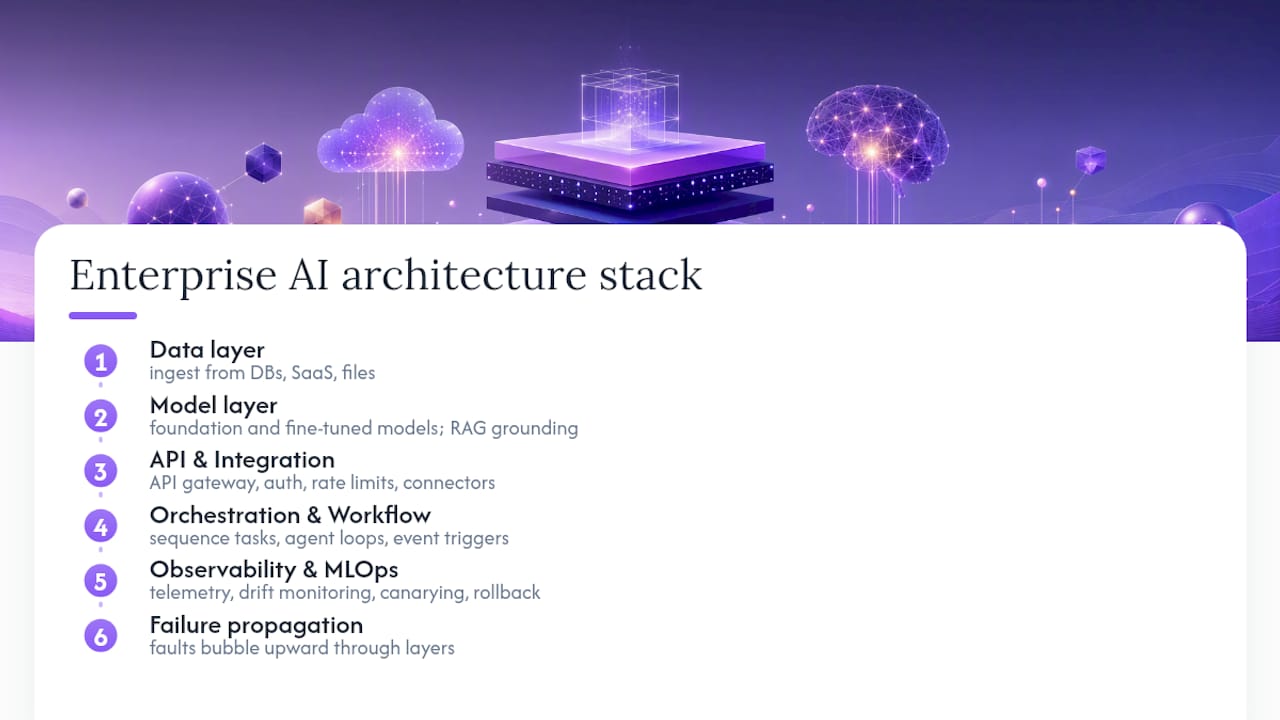
IBM's enterprise AI documentation describes the dependency clearly: AI implementations need data integration across structured, semi-structured, and unstructured sources, and generative outputs typically require RAG grounding to stay accurate and relevant.
Data layer. Source systems — databases, SaaS apps, data warehouses, file stores — feed an ingestion pipeline. A data fabric or data mesh architecture unifies access across on-premises, cloud, and SaaS sources. Feature stores cache pre-computed signals (customer churn probability, inventory velocity) so models don't recompute them on every request.
Model layer. Foundation models, fine-tuned domain models, and task-specific classifiers live in a model registry with versioning, model cards, and performance metadata. RAG connectors link generative models to vector databases and knowledge graphs so outputs are grounded in current enterprise information rather than stale training data.
Integration and API layer. An API gateway manages authentication, rate limiting, and routing between models and consuming applications. API-first integration patterns, combined with prebuilt connectors for CRM, ERP, and data warehouses, dramatically reduce the custom integration effort. MuleSoft case studies consistently show that prebuilt connectors and API-first approaches shorten time-to-value by simplifying data access and orchestration.
Orchestration and workflow engine. This layer sequences multi-step AI tasks, manages agent loops, handles retries, and routes outputs to the right downstream system or human reviewer. Event-driven orchestration (triggered by a CRM record update or an IoT sensor reading) is common here.
Observability and MLOps. Telemetry, model drift monitoring, canarying, and automated rollback belong in the deployment pipeline from day one, not as afterthoughts. Secure enclaves and token-handling logic sit at this layer too, protecting sensitive inference requests.
Data flows from source systems through ingestion into the model access layer, out through the API gateway into workflow actions, and back through telemetry into the feedback loop that drives retraining and drift detection. Every touchpoint with a CRM, ERP, contact center, or data warehouse is a connector or webhook in the integration layer.
Where does enterprise AI deliver the most measurable impact?
Well-integrated AI matters most where it can act inside workflows rather than sit beside them. The use cases below consistently show up in enterprise pilots that reach production.
- Customer service automation with RAG agents. AI agents grounded in internal knowledge bases handle tier-1 inquiries end-to-end. Key KPIs: average handle time (AHT) reduction and first-contact resolution rate. Baseline: measure AHT and escalation rate before deployment.
- Predictive maintenance. Sensor data feeds models that flag equipment failure risk before downtime occurs. KPIs: mean time to repair (MTTR) and unplanned downtime hours. Baseline: historical failure logs and maintenance schedules.
- Fraud detection. Real-time transaction scoring with low-latency inference flags anomalies before settlement. KPIs: false positive rate and fraud loss rate. Baseline: current rule-based detection accuracy.
- Document processing and contract extraction. Models extract clauses, dates, and obligations from unstructured documents at scale. KPIs: processing time per document and extraction accuracy. Baseline: manual review hours per contract.
- Finance close automation. AI reconciles accounts, flags discrepancies, and drafts journal entries. KPIs: days to close and reconciliation error rate. Baseline: current close cycle duration.
- HR onboarding automation. Agents handle document collection, policy Q&A, and task routing for new hires. KPIs: time-to-productivity and onboarding completion rate. Baseline: HR team hours per new hire.
- AIOps. Models correlate alerts, predict incidents, and recommend remediation steps. KPIs: mean time to detect (MTTD) and alert noise reduction. Baseline: current alert volume and false-alarm rate.
- Sales forecasting and lead scoring. CRM-integrated models rank leads and project pipeline with higher accuracy than rule-based scoring. KPIs: forecast accuracy and conversion rate uplift. Baseline: current CRM forecast variance.
AI agents that automate routine work across these categories share a common trait: they are embedded in the tool the user already works in, not in a separate AI portal the user has to remember to visit.
What business outcomes can you realistically expect?
The business case for enterprise AI integration organizes into five categories: efficiency and productivity, revenue enablement, cost reduction, risk reduction, and speed-to-decision.
Efficiency and productivity gains come from automating high-volume, low-judgment tasks. Document processing, data entry, and tier-1 support are the clearest examples. HBS research on AI in business frames this as freeing employee capacity for higher-value work, a shift that compounds over time as AI handles growing volumes without proportional headcount increases.
Revenue enablement shows up in sales and marketing: better lead scoring, personalized outreach at scale, and faster quote generation. Organizations that integrate AI into their CRM and sales workflows typically see pipeline coverage and conversion metrics improve, though the magnitude depends heavily on data quality and adoption.
Cost reduction is most visible in operations. Contact centers that deploy RAG-grounded agents reduce agent-handled volume. Finance teams that automate reconciliation reduce close-cycle labor. The cost savings are real but often require 6–18 months to fully materialize after integration.

Risk reduction comes from fraud detection, compliance monitoring, and anomaly detection running continuously rather than in periodic audits. The value here is asymmetric: catching one major fraud event or compliance breach can justify an entire AI program.
Speed-to-decision is the benefit executives feel most immediately. When AI surfaces the right data at the right moment inside the workflow, decision latency drops. A supply chain manager who gets an AI-generated reorder recommendation inside the ERP, rather than waiting for a weekly report, acts faster and with better information.
The critical point: these outcomes require integration, not isolated models. A model that produces accurate predictions but whose outputs sit in a separate dashboard, disconnected from the system where decisions are made, captures only a fraction of the available value.
What causes most enterprise AI integration projects to fail?
Most failures trace back to data, governance, and change management — not model accuracy. A model that performs well in a notebook but is fed poor production data, deployed without access controls, or ignored by the team it was built for will not deliver value.
- Data quality and silos. Fragmented, inconsistent, or unlabeled data produces unreliable outputs. *Mitigation:* run a data readiness sprint before committing to a use case.
- Unclear use-case definition. Vague goals ("use AI to improve operations") produce pilots with no measurable success criteria. *Mitigation:* define the specific workflow, the baseline metric, and the target improvement before writing a line of code.
- Lack of workflow integration. Pilots that produce outputs in a standalone tool rarely change behavior. *Mitigation:* require that every pilot embeds its output in the system users already work in.
- Weak governance and security. Uncontrolled model access, missing audit trails, and undefined incident response create compliance exposure. *Mitigation:* apply the NIST AI Risk Management Framework from the start, not after the pilot.
- Scale and cost blowouts. Inference costs and data engineering costs can grow faster than expected when moving from pilot to production. *Mitigation:* model cost at 10x pilot volume before committing to scale.
- Poor user adoption. Teams that weren't involved in design often don't trust or use the output. *Mitigation:* involve domain SMEs in use-case definition and embed AI guidance in existing UI rather than building a separate tool.
Red flags that an initiative is in trouble: no baseline metrics were captured before deployment; the organization has many proofs of concept but few production deployments; ownership of the AI system is unclear between IT and the business unit. Research published in MDPI's systems journal confirms that governance discussions often lag adoption, with organizations prioritizing operationally visible benefits and deferring infrastructure and governance investment until later.
Align security, compliance, and incident response early. Retrofitting governance onto a production AI system is significantly more expensive and disruptive than building it in from the start.
Common AI automation mistakes follow predictable patterns — and most of them are avoidable with upfront planning.
How do you actually integrate AI into enterprise workflows, step by step?
A repeatable sequence works for most organizations: identify and prioritize a use case, validate data readiness, prototype, pilot in a production workflow, measure and iterate, then scale and govern. Each phase has distinct artifacts and ownership.
Phase 1: Identify and prioritize (weeks 1–3)
Map candidate workflows against two axes: business value (revenue impact, cost, risk) and data readiness (availability, quality, access). Pick the use case that scores highest on both. Artifacts: a one-page use-case brief with baseline metrics, target KPIs, and a named business owner.
Roles: product owner, domain SME, data engineer (to assess data availability).
Phase 2: Validate data readiness (weeks 2–4, overlapping)
Before building anything, confirm that the data the model needs exists, is accessible, and is clean enough to be useful. This phase often reveals the real scope of the project. Artifacts: a data inventory, a lineage map, and a gap list.
Roles: data engineer, security lead (to confirm access controls), domain SME.
Phase 3: Prototype (weeks 4–10)
Build a minimal working version — often a RAG pipeline, an agent, or a classification model — against a narrow slice of the data. The goal is to validate the technical approach, not to build production-grade infrastructure. Artifacts: a working prototype, an evaluation report against the baseline metric, and a go/no-go recommendation.
Roles: ML engineer, data engineer, domain SME.
Phase 4: Pilot in production workflow (weeks 8–16, indicative)
Deploy the prototype into the actual workflow, with real users and real data, but with a rollback plan and limited blast radius. This is where workflow embedding matters most. Research from digital adoption practitioners is clear: pilots that do not embed into workflows rarely deliver business value. Artifacts: adoption metrics, user feedback, and updated KPI measurements.
Roles: full cross-functional team (product owner, ML engineer, platform SRE, security lead, domain SME).
Phase 5: Measure, iterate, and scale (months 4–18, indicative)
Use telemetry and business KPIs to drive iteration. Scale infrastructure only after the pilot demonstrates consistent value. Governance, model versioning, and observability become critical here. Artifacts: a production runbook, a governance policy, and a quarterly review cadence.
The largest cost drivers at scale are data engineering, inference infrastructure, and integration complexity — not model licensing. Budget accordingly.
On managed hosting: teams with limited ops staff can compress phases 3 and 4 significantly by using a managed AI hosting path. Clawbase, for example, provides one-click deployment of an OpenClaw AI assistant on a dedicated encrypted server with 99.9% uptime, persistent memory, and connections to over 50 AI models — removing the infrastructure overhead that typically consumes the first several weeks of a pilot. Managed AI services are increasingly the pragmatic choice for teams that want to validate a use case before committing to full infrastructure build-out.

Change management runs through every phase. Train users before go-live, embed AI guidance in the existing UI rather than a separate tool, and establish a feedback loop so users can flag bad outputs. Track adoption as a first-class metric alongside technical KPIs.
Which technical integration patterns should you choose?
Pattern choice should be use-case driven and data-aware. The wrong pattern for a use case creates latency, cost, or reliability problems that are expensive to fix after deployment.
RAG (retrieval-augmented generation)
RAG grounds generative model outputs in enterprise documents, knowledge bases, or structured data retrieved at inference time. It's the right pattern when answers must be current, source-attributable, and specific to internal information. Pros: reduces hallucination, keeps knowledge current without retraining. Cons: adds retrieval latency and requires a well-maintained vector store or search index.
API-first integration
Every AI capability is exposed as a versioned API endpoint consumed by downstream systems. This is the default pattern for CRM and ERP integrations. Pros: clean separation of concerns, easy to version and roll back, composable. Cons: synchronous by default, which creates latency risk for high-throughput use cases.
Event-driven orchestration
AI inference is triggered by events — a new record in a CRM, a sensor reading crossing a threshold, a document uploaded to a file store. Pros: decoupled, scales well, natural fit for real-time monitoring and alerting use cases. Cons: harder to debug, requires a reliable event bus (Kafka, AWS EventBridge, Google Pub/Sub).
Agentic patterns
Multi-step AI agents plan, call tools, retrieve data, and take actions across multiple systems in a loop. Right for complex workflows like contract review or IT incident triage. Pros: handles multi-step reasoning. Cons: harder to govern, output variance is higher, requires careful tool-permission scoping.
Streaming real-time vs. batch
Real-time inference (sub-second latency) suits fraud detection and customer-facing interactions. Batch inference suits document processing, overnight forecasting, and report generation. Mixing them in one architecture adds complexity; separate the pipelines where possible.
Hybrid cloud and on-premises
Sensitive data (PII, PHI, financial records) often must stay on-premises or in a private cloud. Models can run in a secure enclave on-prem while orchestration and observability run in the cloud. Encryption at the data layer and strict token-handling policies are non-negotiable in this pattern.
Security boundaries apply to every pattern: encrypt data in transit and at rest, scope API tokens to the minimum required permissions, and insert audit logging at every system boundary. For AI compliance in enterprise environments, audit trails are not optional — they are the evidence layer that satisfies both internal governance and external regulators.
Why data strategy determines whether AI integration succeeds
Data readiness is the primary determinant of integration success. Model selection is secondary. As IBM's Ann Funai put it plainly: "AI on top of crap is just AI-powered crap."
The Stanford HAI AI Index tracks enterprise AI adoption trends and consistently shows that organizations with mature data infrastructure deploy AI faster and achieve better outcomes. The MDPI systems research on enterprise AI governance adds a cautionary note: governance and data infrastructure investments tend to lag adoption, which means organizations often discover data quality problems after they've committed to a use case.
A practical data-readiness checklist before any pilot:
- Data discovery and inventory. Do you know what data exists, where it lives, and who owns it? A data catalog (Apache Atlas, Alation, or Collibra) is the starting point.
- Lineage and metadata. Can you trace a data point from its source system to the model input? Lineage is essential for debugging bad model outputs and for regulatory audits.
- Quality and labeling. Is the data accurate, complete, and consistently formatted? For supervised models, is labeled training data available in sufficient volume?
- Access controls and secure enclaves. Is access to sensitive data governed by role-based policies? Can the AI system access only what it needs for a specific task?
- Integration connectors and canonical schema. Do you have a consistent identifier (a customer ID, a product SKU) that links records across systems? Without a canonical key, joining data from CRM, ERP, and support systems is fragile.
- Feedback loops and telemetry. Is there a mechanism to capture model outputs, user corrections, and downstream outcomes so the model can be evaluated and retrained?
Pro Tip: *Start with a single canonical identifier and a narrow, well-labeled document corpus when building your first RAG pilot. A small, clean dataset with consistent IDs will outperform a large, messy one every time. The fastest path to a credible demo is a tight data scope, not a broad one.*
Which enterprise AI platforms fit which scenarios?
Platform choice depends on deployment model, governance needs, and integration surface with existing enterprise applications. No single platform is the right answer for every organization.
- IBM watsonx is best for enterprises that need a governed, auditable AI lifecycle with strong support for regulated industries. The watsonx.ai platform combines foundation models, fine-tuning, RAG tooling, and deployment runtimes in a single governed environment, which reduces the integration effort between experimentation and production. Well-suited for financial services, healthcare, and government.
- Google Cloud AI / Vertex AI fits organizations already invested in Google Cloud infrastructure and BigQuery. Vertex AI's Generative AI Studio and its managed model garden make it straightforward to experiment with and deploy foundation models alongside existing data pipelines. Strong for teams that need tight integration between AI and analytics workloads.
- AWS SageMaker / AWS AI services is the natural choice for AWS-native organizations. SageMaker covers the full ML lifecycle from data preparation through model deployment, with deep integration into AWS data services (S3, Redshift, Glue) and event infrastructure (EventBridge, Lambda). Prebuilt AI services (Comprehend, Rekognition, Forecast) let teams add AI capabilities without building custom models.
Deployment model matters as much as feature set. Managed cloud deployments minimize ops overhead and accelerate early pilots. Self-hosted or hybrid deployments are necessary when data sovereignty, latency, or regulatory requirements prevent sending data to a third-party cloud. Hybrid architectures, where sensitive data stays on-premises and orchestration runs in the cloud, are increasingly common in financial services and healthcare.
| Category | Use-case fit | Deployment model | Governance & compliance | Scalability & enterprise features | Integration patterns |
|---|---|---|---|---|---|
| Entry-level managed AI stacks | Narrow, well-defined tasks; small teams; fast pilots | Managed cloud | Basic access controls; limited audit logging | Single-tenant; limited multi-model routing | REST APIs; webhook triggers |
| Hyperscaler AI platforms | Broad use cases; data-intensive workloads; regulated industries | Managed cloud, hybrid | Enterprise IAM; audit trails; compliance certifications | Multi-tenant; auto-scaling; observability built in | Native CRM/ERP connectors; event bus integration; data warehouse connectors |
| Self-hosted AI stacks | Data-sovereign use cases; custom model requirements; cost-sensitive at scale | On-premises, private cloud | Full control; requires internal governance tooling | Scales with infrastructure investment; ops-intensive | Custom APIs; internal connectors; requires integration engineering |
What does enterprise AI integration actually cost?
The largest cost drivers are data engineering, runtime inference infrastructure, and integration complexity — not model licensing. Organizations that budget primarily for model access often underestimate the total cost of ownership by a significant margin.
Data integration is frequently the most expensive line item in the first year. Connecting source systems, building ingestion pipelines, cleaning and labeling data, and maintaining those pipelines as source systems change requires sustained data engineering effort. Costs here scale with the number of source systems and the heterogeneity of data formats.
Model hosting and inference costs scale with request volume and model size. Smaller, fine-tuned models cost less per inference than large foundation models. Batch inference is cheaper than real-time inference. At enterprise scale, inference costs can become the dominant ongoing expense, which is why right-sizing models to the task is a financial decision, not just a technical one.
Observability and monitoring add fixed infrastructure costs (logging, tracing, alerting) plus the engineering time to build and maintain dashboards and alerting rules.
Security and compliance controls — encryption, access management, audit logging, penetration testing — are non-negotiable costs that are often underestimated in early budgets.
Personnel is the largest variable. A credible pilot requires at minimum: a product owner, a data engineer, an ML engineer, a platform SRE, a security lead, and a domain SME. Scaling to production adds model ops engineers, additional data engineers, and a dedicated governance role.
No-code and managed AI approaches reduce the personnel cost for early pilots by eliminating infrastructure setup and maintenance. For teams evaluating a use case before committing to a full build, managed hosting is often the faster and cheaper path to a working prototype.
How do you measure whether AI integration is working?
Measure technical health and business outcomes separately, then tie them together through adoption metrics. A model that performs well technically but isn't used doesn't deliver value. A model that's heavily used but produces poor outputs creates risk.
Technical KPIs:
- Inference latency (p50, p95, p99)
- Error rate and model drift events per week
- Uptime and availability
- Inference cost per 1,000 requests
- Data pipeline freshness (lag between source update and model input)
Business KPIs:
- Task completion rate (did the AI-assisted workflow complete successfully?)
- Average handle time reduction (contact center)
- Onboarding time reduction (HR)
- Revenue uplift or cost savings attributed to AI-assisted decisions
- Forecast accuracy improvement (sales, supply chain)
Reporting cadence: ops dashboards run in near-real time for the platform SRE team. Product owners review weekly adoption and error trends. Executive sponsors see monthly business KPI summaries. Strategic governance reviews happen quarterly, covering model performance, cost trends, and alignment with business priorities.
Maintain a single source of truth for metric comparisons — a baseline snapshot captured before deployment, stored alongside post-deployment measurements. Without a documented baseline, it's impossible to attribute improvement to the AI integration rather than to other changes happening simultaneously.
AI collaboration and adoption metrics deserve the same rigor as technical metrics. Adoption rate, feature usage depth, and user-reported confidence in AI outputs are leading indicators of long-term value.
***

Try a managed AI integration path with Clawbase
For teams that want to move from understanding to action without a months-long infrastructure project, Clawbase offers a direct path. Clawbase provides managed hosting for OpenClaw, an open-source AI assistant, with one-click deployment on a dedicated encrypted server. You get 99.9% uptime, persistent memory management, access to over 50 AI models with multi-model routing, and native integrations with Telegram, Discord, Slack, and WhatsApp — no sysadmin skills required.
It's a practical starting point for validating an AI integration use case before committing to a full enterprise build. Explore OpenClaw use cases and integration scenarios or go directly to Clawbase managed hosting to start a 7-day free trial.
What the author has seen in practice
The most common pattern I've observed in enterprise AI projects that stall: the team spends months selecting a model and building a demo, then discovers that the data needed to run it in production doesn't exist in a usable form. The model is fine. The data is the problem.
The approach that works is to flip the sequence. Start with data. Pick one workflow, identify the data it requires, and assess whether that data is accessible, clean, and consistently keyed. If it is, a RAG pilot can be running in weeks. If it isn't, you've just saved yourself from a failed six-month project.
One practical action you can take this week: identify a single canonical identifier in your organization (a customer ID, an order number, a product SKU) and map which systems use it consistently. That mapping exercise will tell you more about your AI readiness than any model benchmark. When you're ready to move into the implementation phases, the roadmap above gives you the sequenced plan.
Sources
The sources below are selected for standards bodies, peer-reviewed research, and vendor documentation that underpin the guidance in this guide. Governance leads should start with NIST and MDPI; architects should go to IBM and MuleSoft; procurement and strategy teams will find HAI and HBS most relevant.
- Benefits of AI in business | HBS Online
- What Is Enterprise AI? | IBM
- AI Risk Management Framework | NIST
- Systems research paper (MDPI) on enterprise AI governance and adoption
- AI Index 2025 Report | Stanford HAI