Stop Rebriefing: AI Assistants With Memory and Private Deployments for Professionals
2026-09-07

For most professionals, the practical answer is a managed, private OpenClaw deployment through a service like Clawbase: it gives you persistent memory, full control over what the assistant remembers, and integrations with the apps you already use, without asking you to run your own server infrastructure. That balance of memory, privacy, and low maintenance beats both bare consumer chat apps and fully self-hosted setups for anyone who wants to actually use the thing daily.
***
> TL;DR:
>
> - Managed private deployment like Clawbase offers persistent memory, full control, and integrations with popular messaging platforms without requiring server management skills.
> - Memory-enabled assistants improve productivity by enabling continuity, personalization, and automation, with a distinction between session and persistent memories.
> - A reliable memory system should allow action triggers, visible logs, editing, exporting, and clear retention policies, with on-device or encrypted options for sensitive data.
> - Evaluating vendors requires asking about data control, privacy, integration, proactive features, backup frequency, and actual memory export capabilities.
> - Future AI assistants will rely on persistent memory as a foundational feature, making standalone context windows insufficient for long-term usefulness.
***
Table of Contents
- What Are the Best AI Assistants With Memory Right Now?
- What Does "Persistent Memory" Actually Mean?
- Why Does Memory Actually Matter for Productivity?
- Memory Models and the Features That Actually Matter
- Who Actually Needs Which Type of Memory?
- How Do You Choose an AI Assistant With Reliable Memory?
- Why a Managed Private Deployment Solves Most of This
- Who's Behind This Guide and What Backs These Claims
- Where Memory-Enabled Assistants Go From Here
- Get a Private Assistant That Actually Remembers
- Sources
What Are the Best AI Assistants With Memory Right Now?
Ask ten people what "memory" means in an AI assistant and you'll get ten different answers. Some mean the chatbot remembers your name between sessions. Others mean it tracks a six-month project, recalls a client's preferences without being told twice, and quietly follows up on a task you mentioned three weeks ago. Those are wildly different engineering problems, and the gap between them is exactly why so many people feel let down by tools marketed as "smart assistants with memory."
Most mainstream tools still run on stateless sessions: close the tab, and the assistant forgets you existed. Persistent memory changes the equation. It lets an assistant carry facts, preferences, and unfinished business across days, weeks, and different conversations, which is the difference between a tool you have to re-brief constantly and one that actually gets more useful over time.
Here's what memory-enabled assistants change in practice:
- Continuity: no more re-explaining your job, your projects, or your preferences every session.
- Personalization: responses adjust based on what the assistant has already learned about how you work.
- Automation: the assistant can act on stored context, triggering reminders or workflows without a fresh prompt each time.
This article walks through what persistent memory actually is, why it matters for productivity, the architectures behind it, and a practical checklist for evaluating any assistant that claims to "remember." By the end, you'll have a framework you can use in an actual vendor conversation or trial, not just a list of features to take on faith.
What Does "Persistent Memory" Actually Mean?
Persistent memory refers to information an assistant stores and can retrieve across sessions, as opposed to context that only exists within a single conversation. That distinction matters more than most marketing copy admits.
Session context is what most people first experience with AI chat tools. It's the running conversation history the model uses to generate its next reply. Once you close the session, that context typically evaporates.
Long-context windows are a related but separate idea. A model with a huge context window (some now handle hundreds of thousands of tokens) can hold an enormous amount of text in a single conversation. That's not memory. It's a bigger scratchpad. Feed it a 300-page document and it can reference all of it, but start a new conversation tomorrow and none of that carries over unless the system explicitly saves it somewhere.
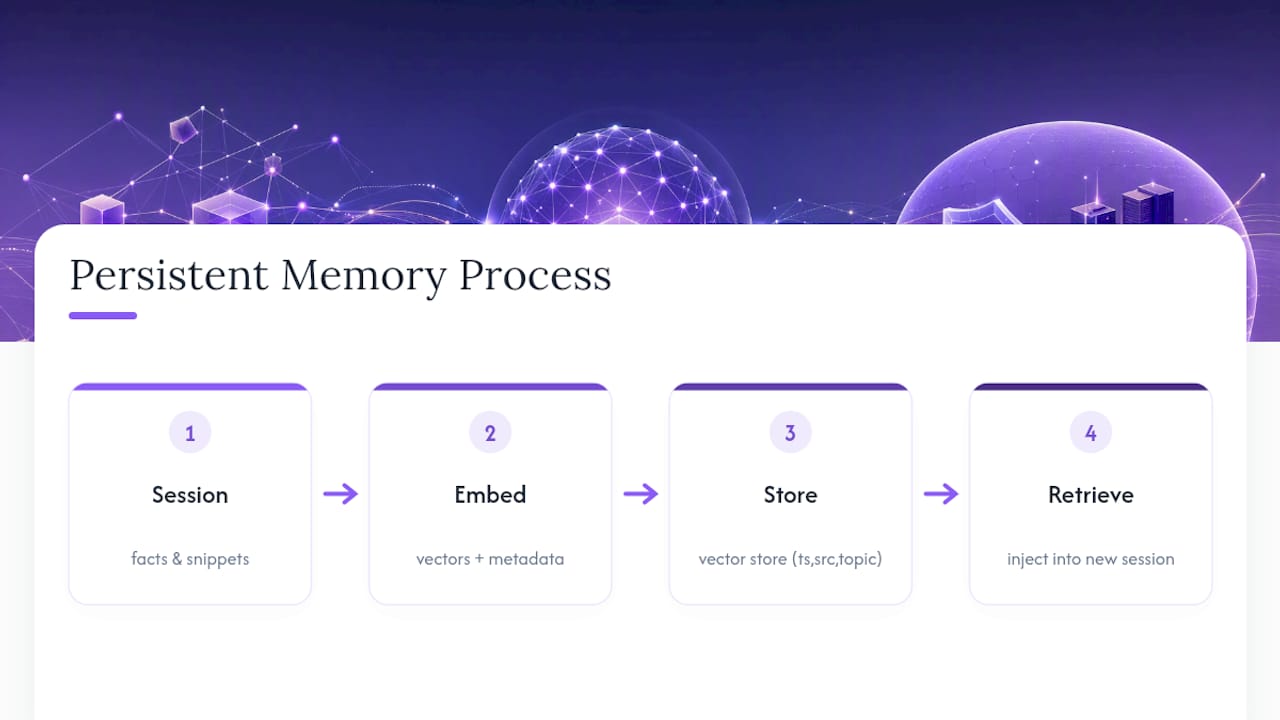
Persistent memory is the actual save-and-retrieve layer sitting outside the conversation. Technically, most systems build this with a vector store that turns facts and conversation snippets into embeddings, tagged with metadata like timestamps, source, and topic. When you start a new session, a retrieval step scans that store for anything relevant to your current query and injects it back into context. Microsoft's Copilot memory works roughly this way, pulling personalized context across Microsoft 365 apps rather than confining it to a single chat thread.
There's also a distinction between whose memory it is. User memory stores facts about you personally: your preferences, your role, your recurring tasks. Agent memory stores what the assistant has learned about how to do a job well, useful in automation contexts. Shared or agent-scoped memory applies when a team or organization needs a common memory pool multiple people or bots can draw from. Products that expose these layers separately, rather than mashing everything into one undifferentiated blob, tend to be far easier to trust and audit.
Why Does Memory Actually Matter for Productivity?
The honest case for memory isn't novelty. It's time. Every re-explanation of context is a small tax, and those small taxes compound fast across a workday full of AI interactions.
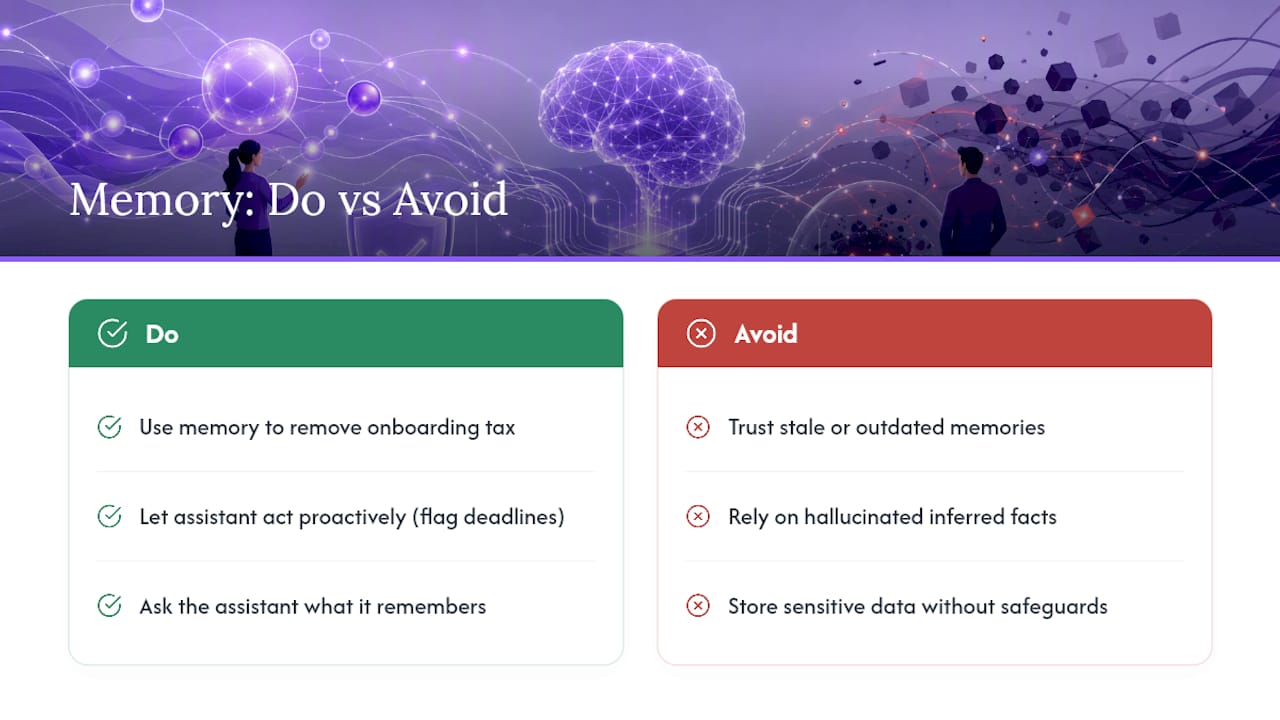
Memory removes the onboarding tax that stateless tools impose on every single session. Instead of restating your writing style, your project's constraints, or your calendar preferences each time, a memory-enabled assistant already knows. That frees it up to do something more interesting: act proactively. An assistant with persistent memory can flag that a deadline you mentioned last week is approaching, or suggest a follow-up based on a pattern it noticed in your requests, without you prompting it to look.
Adoption data backs up how quickly this shift is happening. Analysis from the Federal Reserve Bank of St. Louis shows generative AI adoption inside organizations climbing steadily, with memory and personalization features cited as key drivers of continued use rather than one-time experimentation. Tools that only handle a single session tend to get abandoned once the novelty fades. Tools that build a working model of the user tend to stick.
Pro Tip: *Before trusting an assistant with anything sensitive, ask it directly what it remembers about you and watch how it answers. A well-built memory system will show you specifics; a vague or evasive answer is a sign the memory layer is thinner than the marketing suggests.*
There are real risks baked into this, though. Memory that goes stale is worse than no memory at all: an assistant confidently referencing a job you left six months ago, or a preference you changed, creates friction instead of removing it. Hallucinated "memories" are another failure mode, where the system infers something about you that was never actually true and then treats it as established fact. And every stored fact is a piece of data sitting somewhere, which raises the privacy stakes considerably compared to a conversation that simply disappears.
Memory Models and the Features That Actually Matter
Not all memory is built the same way, and the differences show up fast once you start relying on an assistant daily. The first fork in the road is where memory physically lives.
On-device memory keeps stored facts on your own hardware, which minimizes exposure but limits access to a single device and complicates syncing across phone, laptop, and browser. Cloud memory syncs everywhere but depends entirely on the provider's security practices and terms of service. Some newer products, like the belief-graph approach described in Nourva's memory architecture, attempt a middle path by structuring memory around explicit provenance, tracking where each fact came from and how confident the system is in it. That kind of transparency is rare and worth looking for.
The second fork is explicit versus implicit memory. Explicit saved memories are facts you or the assistant deliberately stored, like "I prefer bullet points over paragraphs." Implicit inferred memories are patterns the system picked up from behavior without being told directly. Explicit memory is easier to audit and correct. Implicit memory feels more magical when it works, but it's also where hallucinated assumptions creep in.
Here's what separates a genuinely useful memory system from a gimmick:
- Actionability: can the assistant trigger a reminder, automation, or background task based on stored memory, or does it just recall facts passively?
- Inspection: is there a visible memory page or log you can actually read?
- Editing and deletion: can you correct a wrong memory or delete one outright?
- Export: can you pull your data out if you switch tools?
- Retention policy: does the vendor state how long memories persist and under what conditions they expire?
- Integrations: does memory extend usefully into email, calendar, documents, and chat platforms like Telegram, Discord, or Slack, or is it siloed inside one app?
Some vendors already build this level of control directly into their tooling. Kindo's documentation describes discrete memory operations, including storing, searching, and forgetting specific entries, plus admin-level gating over what gets remembered organization-wide. That granularity is a good benchmark to hold other tools against, whether or not you ever use that specific product.
Integrations deserve special weight here because memory without reach is just a diary. A practical breakdown from Zapier makes the point plainly: the assistants people actually stick with are the ones wired into the tools they already use for scheduling, research, and communication, not the ones confined to their own chat window.
Who Actually Needs Which Type of Memory?
Different jobs need different memory architectures, and mismatching the two is the most common reason people give up on these tools within a month.
- Builders and technical teams need deep, inspectable agent memory with API access, ideally exposing memory as a queryable store rather than a black box. If you're building automations on top of an assistant, you need to see exactly what it stored and why, not just trust that it worked.
- Knowledge workers mostly want conversational continuity: the assistant should remember a project's history, summarize a long email thread, and pick up where the last conversation left off without a manual recap.
- Privacy-first users should prioritize on-device or encrypted memory with clear retention limits, even if it means slightly less cross-device convenience. For anyone handling sensitive client or health information, this isn't optional.
- Automation-first users care most about memory that triggers action: reminders, scheduled follow-ups, and cross-app workflows that fire without a manual prompt each time.
Most people are actually a blend of the second and fourth categories: they want an assistant that remembers context and nudges them proactively, without needing to write custom integrations themselves.
How Do You Choose an AI Assistant With Reliable Memory?
The fastest way to separate a real memory system from a marketing claim is to bring a short list of questions into any trial or vendor call and refuse to accept vague answers.
Run through this checklist before committing to anything:
- Privacy and storage: where is memory stored, is it encrypted at rest, and does the vendor's policy say anything specific about retention windows?
- Control and transparency: can you view every stored memory, edit it, and delete it, or is memory an opaque process you have to trust blindly?
- Integrations: does it connect to your actual calendar, email, documents, and chat platforms, or only work inside its own app?
- Proactive features: can it initiate a reminder or automation based on memory, or does it only recall facts when asked?
- Backups: are your conversations and memory backed up automatically, and how often?
- Pricing model: is memory a gated premium feature, and does the pricing tier match how much memory capacity or history you actually need?
Ask vendors directly whether they support memory export, and time how long it takes them to answer. A vendor who can show you a memory export function in thirty seconds has clearly built for user control. One who hedges or redirects to "we're working on that" is telling you memory portability wasn't part of the original design.
Pro Tip: *During any trial, deliberately feed the assistant a fact, close the session, wait 24 hours, and ask an indirect question that requires recalling it. If it fails that basic test, no amount of feature marketing should change your evaluation.*
Watch for red flags: no export option, retention policies that are vague about how long data persists, and no audit log showing what the assistant has stored about you. Also factor in vendor stability. Meta's acquisition of the personal recall startup Limitless in late 2025 is a useful reminder that a product's memory and privacy posture can shift overnight once ownership changes hands. If you're building workflows around a tool's memory promises, ask how the company is funded and whether it has a track record of honoring its own retention policies through a change in leadership. If recall accuracy matters to your use case, ask whether the vendor has benchmarked against recognized evaluation frameworks like LongMemEval, which measures how well systems hold up on long-horizon recall tasks rather than single-turn tricks.
Why a Managed Private Deployment Solves Most of This
Most of the friction in this guide traces back to one tension: the memory features people want (deep recall, full control, wide integrations) usually live in either consumer apps with limited transparency or open-source projects that demand real sysadmin skill to run properly. OpenClaw sits in that second category: a genuinely capable open-source AI assistant with persistent memory management, but one that typically requires configuring servers, dependencies, and security yourself.
Clawbase closes that gap with one-click managed hosting for OpenClaw on a dedicated, encrypted server, backed by 99.9% uptime. You get a private, always-on agent without touching a terminal.
This setup can include features such as persistent memory management on a dedicated instance, access to multiple AI models with multi-model routing, connections to popular messaging platforms, daily encrypted backups, automated updates, and marketplaces for skillsets to extend assistant capabilities without custom engineering.
| Reader profile | Best fit | Why |
|---|---|---|
| Professional wanting private memory, no ops work | Managed deployment | One-click setup, encrypted backups, no sysadmin skills needed |
| Developer wanting full inspectable control | Self-hosted OpenClaw | Direct access to configuration, at the cost of setup time |
| Casual user testing basic memory features | Consumer chat app with memory | Lower commitment, but limited privacy and integration depth |
If your priority is deep custom engineering and you already run infrastructure, self-hosting OpenClaw directly remains a valid path. For nearly everyone else weighing productivity against setup time, a managed deployment removes the tradeoff entirely.
Who's Behind This Guide and What Backs These Claims
This guide was written from a memory-first evaluation lens: judging assistants by how they store, expose, and act on what they remember, rather than by surface-level chat quality.
The technical claims about persistent memory, retrieval mechanics, and evaluation criteria draw on public product documentation and independent research rather than vendor marketing alone, including Microsoft's own description of Copilot memory and benchmark work on long-task recall performance.
On the Clawbase side, the relevant proof points are straightforward: 99.9% uptime, one-click managed deployment of OpenClaw, persistent memory management on a dedicated encrypted server, and access to more than 50 AI models with multi-model routing.
If you want to see how persistent memory plays out in specific daily workflows, Clawbase's own breakdown of always-on assistant use cases walks through concrete scenarios rather than abstract feature lists.
Where Memory-Enabled Assistants Go From Here
The direction is obvious once you look past the current wave of chatbot demos: memory is moving from a bolt-on feature to the foundation the entire assistant is built on. Market reviews already describe a split between conversational tools and more autonomous agents that act on stored context without constant prompting, and that split will only sharpen as integration into daily workflows becomes the real competitive battleground, not raw model quality.
I'd push back on one assumption baked into most coverage of this space: that bigger context windows will eventually make explicit memory systems unnecessary. They won't. A model that can hold a million tokens in one conversation still starts from zero the next time you open it, unless something outside that conversation deliberately saved what mattered. Context and memory solve different problems, and conflating them is exactly how people end up disappointed by tools that felt smart for one session and useless the next.
If you're evaluating options now, don't take memory claims at face value. Run the 24-hour recall test from the checklist above. Ask about export and retention in plain terms. And if privacy and control matter as much as convenience, a private managed deployment is worth trying before you commit to anything that keeps your data in someone else's black box by default.
> *— Iosif Peterfi*
Get a Private Assistant That Actually Remembers
Everything in this guide points to the same tradeoff: consumer tools hand you convenience but keep your memory in their cloud, and raw self-hosted OpenClaw hands you full control but demands the kind of server work most professionals don't have time for. Clawbase is the middle path built specifically to remove that tradeoff, giving you one-click access to your own private, encrypted OpenClaw server with persistent memory that stays yours.

You get the technical depth this guide walked through, inspectable memory, integrations with Telegram, Discord, Slack, and WhatsApp, over 50 AI models with multi-model routing, and 99.9% uptime, without configuring a single dependency yourself. Daily encrypted backups and automated updates mean the maintenance burden that usually kills self-hosted projects simply isn't your problem anymore.
If the checklist in this article made you realize your current assistant can't answer basic questions about its own memory, that's the clearest signal it's time to switch. Head to Clawbase and spin up your own managed OpenClaw instance to see how a persistent, private memory layer actually feels once it's running under your own control.
Sources
A handful of sources are worth reading directly if you want to go deeper than any single article can take you.
- Introducing Copilot memory — a more productive and personalized AI for the way you work
- Meta acquires AI device startup Limitless
- State of generative AI adoption, 2025
- Measuring AI ability to complete long tasks
- Best AI personal assistant apps at a glance