AI Server Cost for Teams: Realistic Ranges and Breakeven
2026-08-11
Running AI infrastructure in the U.S. ranges from roughly $6 per month for a personal managed setup to well over $50,000 upfront for an enterprise GPU cluster, with cloud GPU instances sitting between those extremes at $0.50–$30+ per hour depending on the hardware tier.
Here is a quick orientation before you read further:
- Hobby / personal use: generally in the low tens of dollars per month (managed or lightweight cloud)
- SMB inference workloads: typically in the hundreds to low thousands of dollars per month range (cloud GPU instances or dedicated hosted servers)
- Enterprise training and large inference: often runs into the thousands to tens of thousands of dollars per month (multi-GPU cloud or significant on-prem CAPEX)
- On-prem upfront CAPEX: can range from mid five figures for a single A100 server to several hundred thousand dollars for a DGX H100 cluster
- Managed OpenClaw hosting: starting at a cost level generally in the mid-teens of dollars per month, with no sysadmin overhead see more
The right path depends on three variables: utilization rate, data egress volume, and whether your team has the DevOps capacity to run infrastructure. Most teams do not have all three in the right configuration for on-prem to win on day one.
***
Key Takeaways
| Point | Details |
|---|---|
| Cost bands by tier | Hobby: $6–$50/month managed; SMB cloud: $200–$2,000/month; enterprise on-prem: $5,000–$50,000+/month. |
| On-prem break-even trigger | Evaluate on-prem when monthly cloud spend reaches 60–70% of fully loaded amortized hardware cost. |
| Staff cost dominates | DevOps at $100/hr fully loaded often exceeds hardware amortization for single-node clusters. |
| Hidden costs double estimates | Backups, monitoring, incident response, and security add 15–20% to naive OPEX projections. |
| Clawbase for OpenClaw teams | Managed hosting from $16/month eliminates setup, maintenance, and uptime risk for OpenClaw workloads. |
***
Table of Contents
- What actually drives AI server cost?
- Example hardware configurations from hobby to enterprise
- What cloud GPU instances actually cost per hour
- On-prem vs cloud TCO: a simple break-even framework
- Hidden costs that commonly double your estimate
- Sizing mistakes that inflate TCO and how to avoid them
- How these estimates were calculated
- The buyer mistakes most teams repeat
- Clawbase cuts the cost and complexity of running OpenClaw
- Sources
What actually drives AI server cost?
Understanding where money goes is the prerequisite for any credible budget. GPU selection and VRAM are the dominant cost drivers, but they are far from the only ones. A server that looks affordable on a hardware quote can easily double in total cost once power, colocation, storage, and staff time are added.
The primary line items to budget for:
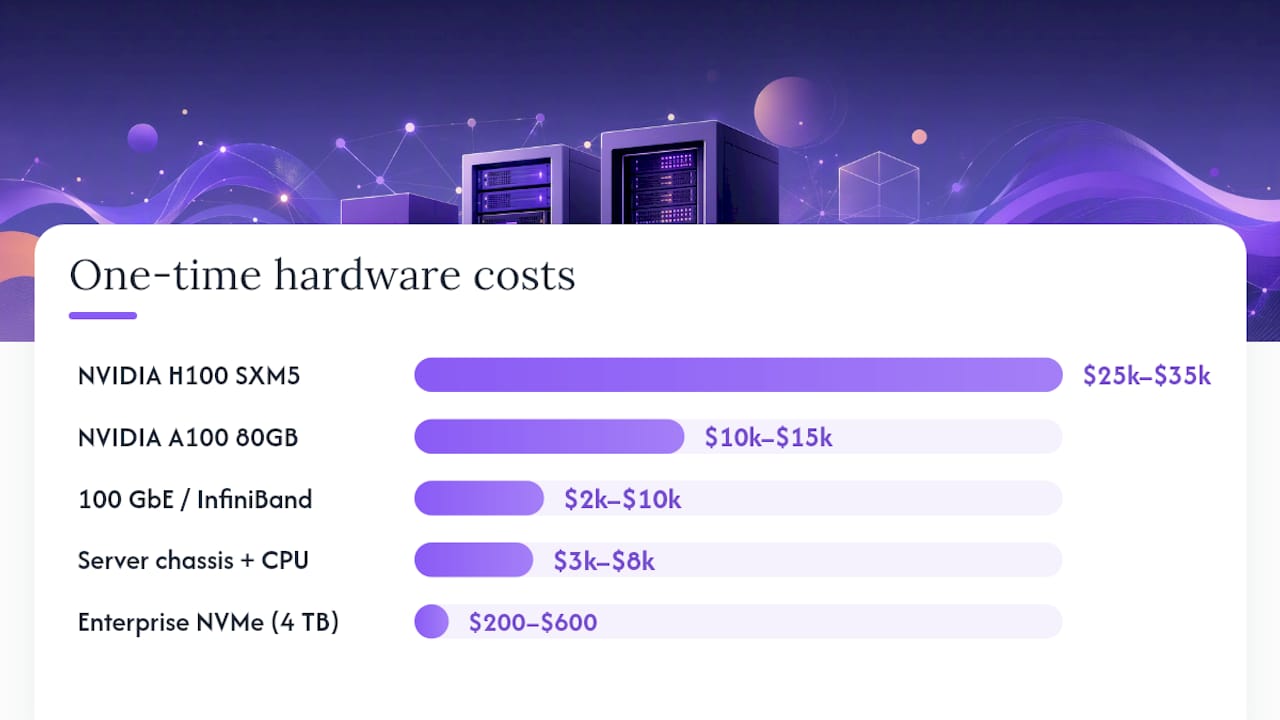
- GPU model and VRAM: The single largest cost variable. An NVIDIA A100 80GB PCIe card runs $10,000–$15,000 per unit; an H100 SXM5 runs $25,000–$35,000. VRAM determines which models you can run without quantization.
- GPU count: Scales linearly in hardware cost but introduces non-linear complexity in networking and cooling.
- CPU and system RAM: A dual-socket Xeon or EPYC platform with 512 GB RAM adds $3,000–$8,000 to a build.
- NVMe storage and IOPS: Model weights and KV-cache demand fast local storage. Enterprise NVMe (e.g., Samsung PM9A3) runs $200–$600 per 4 TB drive; IOPS bottlenecks are a common hidden performance tax.
- Network bandwidth: 25 GbE is table stakes for multi-GPU inference; 100 GbE or InfiniBand adds $2,000–$10,000 in switching costs.
- Power and cooling: A single H100 draws ~700W under load. At $0.12/kWh (U.S. commercial average), one GPU costs roughly $60/month in electricity alone, before PUE overhead.
- Rack and colocation: U.S. colocation runs $100–$500/month per rack unit for power-dense GPU workloads.
- Backups and monitoring: Block storage runs approximately $0.10/GB/month; monitoring tooling adds $0–$15/host/month at modest scale.
- Software licenses and agent integrations: Orchestration layers, security tooling, and model licenses vary widely but commonly add $200–$2,000/month at SMB scale.
- IT and DevOps staff time: On-prem clusters typically require 0.5–1.5 FTE for maintenance, patching, and incident response.
| Cost Item | Typical U.S. Range |
|---|---|
| NVIDIA A100 80GB (per GPU) | $10,000–$15,000 |
| NVIDIA H100 SXM5 (per GPU) | $25,000–$35,000 |
| Server chassis + CPU + RAM | $3,000–$8,000 |
| Enterprise NVMe (4 TB) | $200–$600 per drive |
| 25 GbE networking | $500–$2,000 |
| 100 GbE / InfiniBand switching | $2,000–$10,000 |
| Colocation (per rack unit/month) | $100–$500 |
| Power per H100 GPU (per month) | ~$60 at $0.12/kWh |
| Block storage (per GB/month) | ~$0.10 |
| Monitoring tooling (per host/month) | $0–$15 |
| DevOps staff (fully loaded, per month) | $8,000 per FTE |
Pro Tip: *The most common mis-specification is buying GPU VRAM for peak model size rather than for sustained batch throughput. A 40 GB A100 often outperforms an 80 GB card for inference-heavy workloads when batching is tuned correctly, at roughly half the hardware cost. Match VRAM to your p95 batch size, not your largest possible model.*
***
Example hardware configurations from hobby to enterprise
These four configurations give you procurement-ready reference points. Colocation rates. A dedicated AI server guide covers hardware selection in more depth.
For context on where named hardware fits: the Apple Mac Studio (M3 Ultra, 192 GB unified memory) costs roughly $5,000–$8,000 and handles 7B–70B parameter inference locally at low power draw, making it a credible hobby-to-small-team option when latency requirements are relaxed and GPU parallelism is not needed. The NVIDIA DGX line represents the other end of the spectrum: a fully integrated training appliance with NVLink fabric, NVMe RAID, and InfiniBand, priced as a turnkey system rather than a component build.
Monthly power = 2 GPUs × 400W × 730 hrs × $0.12/kWh ≈ $70. The $1,500–$2,500 range in the table reflects lower-utilization scenarios where staff allocation is shared more broadly.
***
What cloud GPU instances actually cost per hour
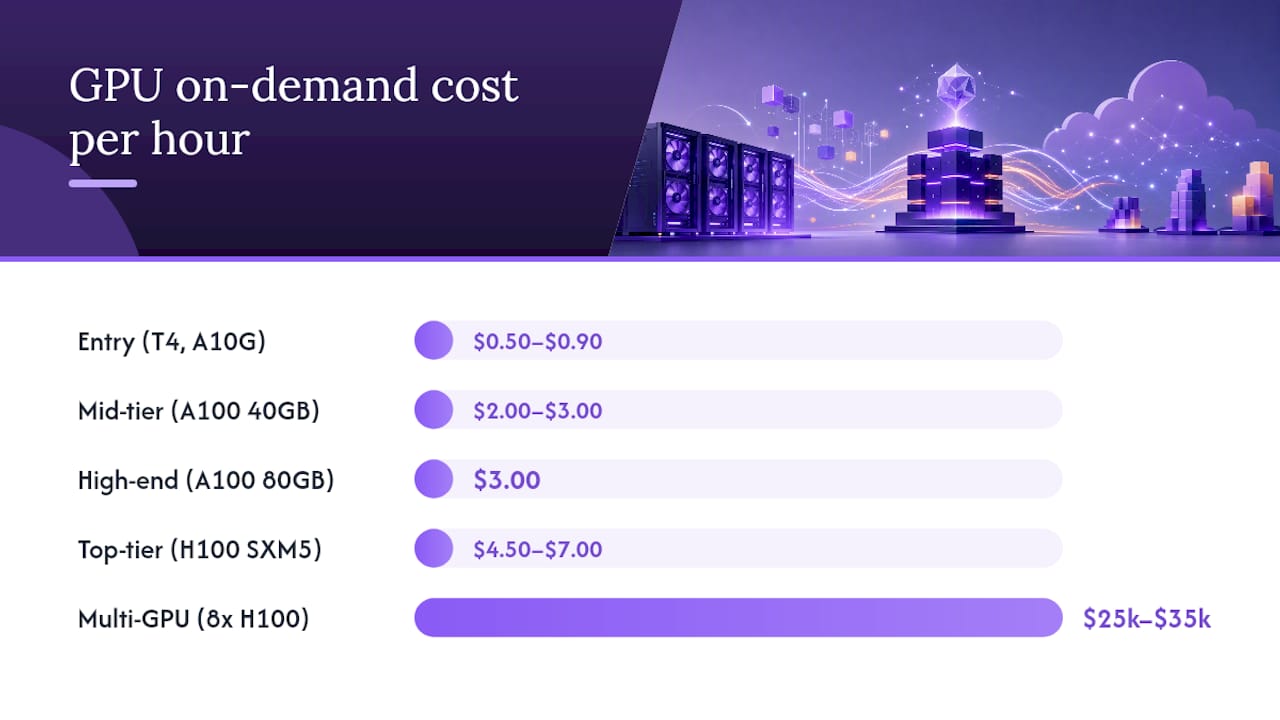
Cloud pricing for GPU compute in the U.S. market spans a wide range depending on GPU generation, instance size, and commitment type. Per-model and per-token API pricing adds a second layer of variable cost on top of raw compute, and it often dominates monthly bills for API-driven workloads.
| GPU Class | On-Demand $/hr (approx.) | Reserved / Committed $/hr | Notes |
|---|---|---|---|
| Entry (T4, A10G) | $0.50–$0.90 | $0.10 per GB/month | Good for small inference, prototyping |
| Mid-tier (A100 40GB) | $2.00–$3.00 | $1.50–$2.00 | SMB inference, fine-tuning |
| High-end (A100 80GB) | $3.00 | $1.80–$3.00 | Production inference, mid-scale training |
| Top-tier (H100 SXM5) | $4.50–$7.00 | $2.80–$5.00 | Large model training, high-throughput inference |
| Multi-GPU instance (8x H100) | $25,000–$35,000 | $15–$22 | Enterprise training runs |
Conversion examples:
- *Always-on 24/7 (single A100 80GB):* $4.00/hr × 730 hrs = $2,920/month on-demand. On a 1-year reserved contract at $2.50/hr, that drops to $1,825/month.
- *Periodic burst (20 hrs/week, A100 40GB):* $3.00/hr × 80 hrs/month = $240/month, which is where cloud wins decisively for low-utilization workloads.
Hidden cloud fees that materially change your bill:
- Egress / data transfer: Major cloud providers charge $0.08–$0.09/GB for outbound data. A workload pushing 500 GB/day adds roughly $1,200–$1,350/month in egress alone.
- Persistent storage: Attached block storage on cloud runs $0.08–$0.12/GB/month, and model weight storage (50–200 GB per model) accumulates quickly.
- Premium GPU uplift: Spot pricing can cut costs 60–70%, but availability is not guaranteed for H100 instances, and interruptions require checkpoint-restart logic.
Anthropic's per-token billing mechanics illustrate how model choice alone can shift monthly API costs by an order of magnitude, which is why token cost sensitivity analysis belongs in every cloud budget.
***
On-prem vs cloud TCO: a simple break-even framework
The core question is not "which is cheaper?" but "at what utilization does on-prem become cheaper?" Industry analysis for 2026 identifies 60–70% sustained cloud utilization as the practical trigger for a serious on-prem evaluation.
Break-even formula:
Monthly on-prem cost = (CAPEX ÷ depreciation months) + power + colocation + staff + storage + software
Break-even utilization = Monthly on-prem cost ÷ (cloud on-demand $/hr × 730)
Worked example (single A100 80GB node vs cloud):
- On-prem monthly (fully loaded): $1,320 amortized CAPEX + $70 power + $300 colo + $1,500 staff + $65 storage/software = $3,255/month
- Cloud on-demand equivalent: $4.00/hr × 730 hrs = $2,920/month
- Cloud reserved (1-year): $2.50/hr × 730 hrs = $1,825/month
At full utilization, on-prem is more expensive than reserved cloud in year one because staff costs dominate. The math flips when you run multiple GPUs under the same staff allocation: four A100 nodes share the same $1,500 staff cost, dropping per-GPU monthly overhead significantly.
Decision checklist:
- Is sustained GPU utilization above 60% for at least 8 months per year?
- Is monthly data egress below 100 GB/day (to avoid cloud egress fees eroding savings)?
- Does the team have 0.5+ FTE available for infrastructure management?
- Are there compliance or data-residency requirements that rule out public cloud?
- Is the workload steady-state rather than bursty or experimental?
Pro Tip: *Egress and utilization interact multiplicatively. Model both variables together before committing to hardware.*
***
Hidden costs that commonly double your estimate
The line items below rarely appear in vendor quotes but consistently show up in post-deployment audits. Scaling open-source AI deployments surfaces many of these the hard way.
- Software and agent integration licenses: Orchestration frameworks, vector databases, and security tooling add $200–$2,000/month depending on scale.
- Backup infrastructure: Automated daily backups for a 10 TB model-and-data store at $0.10/GB/month add roughly $30–$100/month in storage, plus engineering time to test restores.
- Monitoring and observability: Free tiers cover basic metrics; production-grade observability (GPU MFU, p95 latency, egress tracking) runs $0–$15/host/month at low scale but scales with cardinality.
- Security hardening: Firewall rules, secrets management, vulnerability scanning, and SOC 2 prep are often scoped at zero in initial budgets and then billed as a project later.
- SLA-driven redundancy: A 99.9% uptime SLA typically requires a warm standby node, doubling hardware CAPEX for that tier.
- Model license fees: Some commercial model weights carry per-seat or per-deployment license costs that are separate from API pricing.
- On-call and incident response: Even a single P1 incident requiring 4 hours of senior engineer time at $150/hr adds $600 to a month's bill.
> The backup and incident response trap: A team running a single on-prem inference node without automated backups or a runbook discovered this the hard way. A failed NVMe drive took the node offline for 18 hours. Recovery required purchasing an emergency replacement drive ($800 expedited), 6 hours of senior DevOps time ($900), and a manual restore from a week-old snapshot. Total unplanned cost: approximately $1,700 for one incident, equivalent to three months of a managed hosting subscription. Backup and incident response costs are not edge cases; they are recurring budget items.
***
Sizing mistakes that inflate TCO and how to avoid them
Most TCO overruns trace back to a handful of repeatable errors made at the specification stage. Right-sizing AI infrastructure is as much a financial discipline as a technical one.
Common sizing mistakes:
- Overprovisioning GPU VRAM for model size rather than batch throughput: Buying 80 GB cards to run a 70B model at batch size 1 wastes 40+ GB of VRAM and doubles hardware cost unnecessarily.
- Underestimating NVMe IOPS requirements: KV-cache and model-weight loading are IOPS-intensive. Under-specifying storage creates a throughput bottleneck that no GPU upgrade can fix.
- Ignoring network bandwidth between nodes: Multi-GPU inference over 1 GbE instead of 25 GbE can cut effective throughput by 60–80%.
- Missing monitoring from day one: Without GPU MFU tracking, teams routinely run at 20–30% utilization while paying for 100%, never knowing until a cost audit.
- Skipping hardware refresh reserves: A 3-year depreciation schedule with no refresh budget means year 4 brings a full CAPEX event with no financial preparation.
Key metrics to track for cost control:
| Metric | What It Tells You | Cost Control Role |
|---|---|---|
| GPU MFU (Model FLOP Utilization) | Actual compute efficiency vs theoretical peak | Identifies underutilized hardware |
| NVMe IOPS (read/write) | Storage throughput vs demand | Catches bottlenecks before they cause latency |
| p95 inference latency | Tail latency under load | Signals over/under-provisioning |
| Egress GB/day | Daily outbound data volume | Directly maps to cloud egress cost |
| GPU memory utilization % | VRAM headroom vs batch size | Guides right-sizing decisions |
Implement all three before deciding that a workload requires more GPUs.*
***
How these estimates were calculated
Every number in this article rests on a consistent set of assumptions. Swap in your own values to get a tailored estimate.
Default assumptions:
- Power cost: $0.12/kWh (U.S. commercial average)
- Depreciation period: 36 months (3 years)
- Average GPU utilization: 50% (conservative for most teams)
- DevOps staff fully loaded hourly rate: $100/hr
- Monthly staff allocation: 15 hrs/month for a single-node cluster; 30 hrs/month for a 4-GPU cluster
- Colocation: $300/month per rack unit (mid-tier U.S. data center)
- Cloud on-demand rate: $4.00/hr for A100 80GB (representative U.S. market rate)
- Cloud reserved discount: 35% off on-demand for 1-year commitment
Key formulas:
| Formula | Expression |
|---|---|
| Monthly amortized CAPEX | Total hardware cost ÷ depreciation months |
| Monthly power cost | GPU TDP (kW) × GPU count × 730 hrs × $/kWh × PUE (1.2) |
| Monthly cloud equivalent | On-demand $/hr × utilization % × 730 hrs |
| Break-even utilization | Monthly on-prem fully loaded ÷ (on-demand $/hr × 730) |
Worked example (swap in your numbers):
A team considering two A100 80GB GPUs at $47,500 total hardware cost:
- Amortized CAPEX: $47,500 ÷ 36 = $1,319/month
- Power: 2 × 0.4 kW × 730 × $0.12 × 1.2 PUE = $84/month
- Colocation: $300/month
- Staff (20 hrs × $100): $2,000/month
- Storage + software: $115/month
- Total: $3,818/month
On-prem wins only when staff costs drop (shared across more nodes) and utilization stays consistently high.
***
The buyer mistakes most teams repeat
Most procurement errors I see are not technical. They are behavioral.
The first is chasing peak specifications. A team reads that H100s are the fastest available GPU and budgets for them before profiling their actual workload. In practice, their inference jobs run at batch size 4 with 30-second inter-request gaps, a workload an A100 40GB handles at a third of the cost. Spec sheets describe ceilings; your workload determines what you actually need.
The second mistake is treating staff cost as a rounding error. A $25,000 GPU server looks affordable until you add 12 months of shared DevOps time. At $100/hr fully loaded, even 10 hours per month adds $12,000 to the annual cost, which is nearly half the hardware price again. Why developers choose managed services comes down to this arithmetic more often than any technical preference.
The third is misjudging utilization. The pragmatic default for most teams: start on cloud or managed hosting, run real workloads, measure actual utilization and egress, and migrate steady-state high-volume jobs to on-prem only when the data supports it.
***
Clawbase cuts the cost and complexity of running OpenClaw
For teams running OpenClaw workloads, the fully loaded on-prem cost picture above makes one thing clear: the hardware is rarely the expensive part. Setup time, maintenance, updates, and incident response are. Hostinger's analysis of real OpenClaw deployments puts personal setups at $6–$13/month and small teams at $25–$50/month on managed plans, while self-hosted configurations shift all operational overhead to internal staff.

Clawbase is the managed hosting path that removes that overhead entirely. Browser relay, Telegram, Discord, Slack, and WhatsApp integrations are included. For teams that have read the TCO math above and concluded that their utilization does not justify on-prem hardware, and that cloud GPU instances are more than their workload needs, Clawbase's predictable monthly pricing starting at $16/month is the operationally sound middle path. See what OpenClaw can do for your team and start a 7-day free trial to validate the fit before committing.
***
Sources
The figures and assumptions in this article draw from the following primary sources. Each is worth bookmarking for ongoing cost validation.
- OpenClaw costs: What running OpenClaw actually costs
- AI Infrastructure Cost Comparison 2026: Cloud, On-Premises, and Hybrid - Sesame Disk
- OpenAI API pricing