Developers: 6 Step OpenClaw Persistent Memory Setup
2026-09-19

OpenClaw memory persistence works by writing durable context to plain Markdown files (MEMORY.md, USER.md, dated daily notes) inside your agent workspace, then indexing them locally with sqlite-vec for hybrid search. Nothing is remembered unless it hits disk. To verify it's active, confirm your workspace path is set, check that the memory plugin is enabled, and run openclaw memory status.
***
> TL;DR:
>
> - OpenClaw's memory persistence relies on editable Markdown files stored locally, with MEMORY.md holding long-term facts and DREAMS.md serving as an audit trail of consolidation decisions.
> - Retrieval combines vector embeddings and keyword matching over a dynamically rebuilt SQLite index, with chunk size and decay settings influencing recall quality.
> - Dreaming phases rank and gate content before promotion, with rejected items logged in DREAMS.md, and promotion depends on provenance and weighted signals.
> - Ensuring persistence requires writable workspace permissions, enabling plugins, and reindexing after provider or chunking changes, with diagnostics available via memory status.
> - Managed hosting options offer automated setup, daily backups, and maintenance, removing operational burdens for users who prefer a hands-off approach.
***
Table of Contents
- How OpenClaw Implements Persistent Memory
- How Does Retrieval and Indexing Work?
- What Is Dreaming and Why Does It Matter?
- How Do I Enable and Verify Persistent Memory?
- Tuning and Scaling Beyond the Default Setup
- Is OpenClaw Memory Safe From Poisoning?
- Troubleshooting Common Memory Persistence Issues
- What Actually Works vs. What Sounds Good on Paper
- Skip the Server Management and Just Run OpenClaw
- Sources
- FAQ
How OpenClaw Implements Persistent Memory
Persistence in OpenClaw isn't a hidden database or a black box embedding store you can't inspect. It's a stack of Markdown files sitting in your agent's workspace (~/.openclaw/workspace by default), and the model only knows what's actually been written there. That single design decision explains almost everything else in this article.
Four files carry the weight:
MEMORY.mdholds curated, long-term facts. Think of it as the agent's stable knowledge base.USER.mdstores preferences and identity details about the person the agent works with.memory/YYYY-MM-DD.mdcaptures daily notes. OpenClaw reads today's and yesterday's files automatically.DREAMS.mdlogs consolidation activity from the background process that promotes short-term notes into long-term memory.
The memory overview docs put it plainly: these files are the source of truth, and they're fully editable. That's a deliberate trade against the opacity of pure vector stores, since a human-readable file makes inspection, correction, and deletion trivial.
How Does Retrieval and Indexing Work?
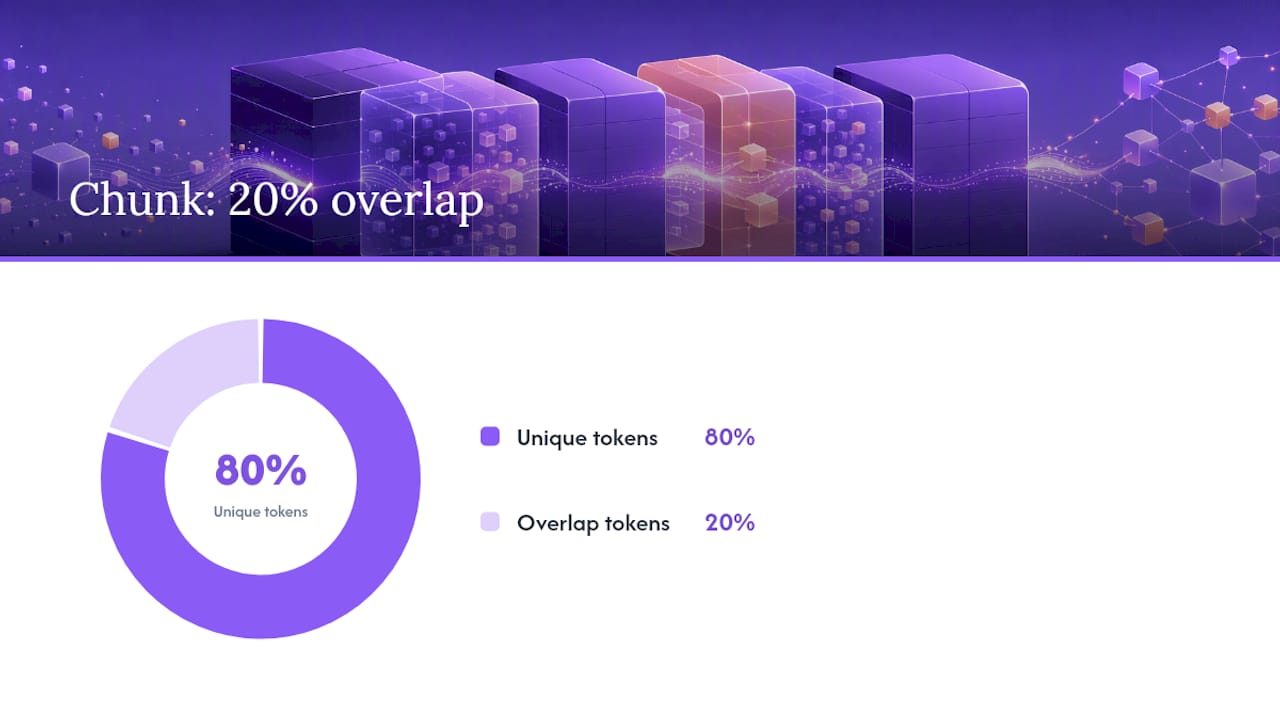
Recall runs on hybrid search, combining vector embeddings with keyword matching (BM25 style) over a local SQLite index built with sqlite-vec. Neither method alone is reliable. Embeddings catch semantic matches your keywords miss; keyword search catches exact terms embeddings sometimes blur past.
Chunking is where a lot of recall quality gets decided:
- Memory content is split into roughly 400-token chunks with an 80-token overlap, a balance meant to preserve context across chunk boundaries without diluting relevance.
- Dated daily notes apply a 30-day half-life decay, so older daily entries fade in ranking even though they're never deleted.
MEMORY.mdandUSER.mdstay evergreen. No decay applied.
400 tokens, 80-token overlap is the default chunking target OpenClaw ships with, according to the memory overview. If your agent keeps missing recall on facts you know are stored, that chunk size is often the first knob worth touching, not the embedding provider. The index rebuilds automatically when chunking parameters or the embedding provider change, since both alter how content maps into the vector space.
What Is Dreaming and Why Does It Matter?
Dreaming is OpenClaw's background consolidation process, and it's the mechanism that keeps MEMORY.md from turning into an unreadable pile of daily scraps. Rather than dumping everything into long-term memory, it runs on a schedule and works through three phases: light, REM, and deep.
- Light does a quick pass over recent notes, surfacing candidates worth tracking.
- REM ranks those candidates against existing memory using weighted signals.
- Deep is the only phase that actually writes to
MEMORY.md, and it does so under provenance and structural gating so untrusted or low-confidence content can't sneak into long-term memory.
The memory architecture docs describe deep-phase promotion as gated by provenance and weighted signals, meaning a stray note from an unverified source doesn't automatically become a "fact" the agent trusts forever. If a rewrite fails validation, OpenClaw falls back to an append-only write rather than corrupting the existing file, and the rejected version gets logged to DREAMS.md for review. Treat DREAMS.md as your audit trail. It's the one place you can see exactly what Dreaming decided and why.
How Do I Enable and Verify Persistent Memory?
Getting persistence running is mostly a permissions and configuration exercise, not a coding project. Here's the sequence that avoids the usual dead ends.
- Confirm your workspace path is set and writable. If
MEMORY.mddoesn't exist yet, create an empty one; OpenClaw will populate it. - Enable the
memory-coreplugin and check thatdreaming.enabledis set totruein your config. - Run
openclaw memory status --deepto get a full diagnostic, not just a surface check. - Choose your embedding provider. Local GGUF models via
llama.cpporollamakeep memory content off external APIs; remote providers are faster to set up but send content out. - After any provider or chunking change, run
openclaw memory index --forceto rebuild the index from scratch. - Test recall directly with
memory_searchandmemory_getcalls before trusting the agent to use them in a live session.
Run through this checklist before calling the setup done: index status reports OK, memory_flush is enabled, DREAMS.md shows recent consolidation activity, and there are no workspace permission errors in the logs. That last one is the silent killer. A workspace that's read-only to the agent's process will look fine right up until compaction tries to flush context and fails.
Pro Tip: *Don't rely on the agent to infer what's worth remembering. Explicitly telling it to save a fact to memory produces far more reliable long-term recall than hoping Dreaming catches it on its own pass.*
Tuning and Scaling Beyond the Default Setup
The built-in Markdown plus SQLite combination handles most single-user setups without complaint. A few config knobs are worth knowing before you assume you've outgrown it:
max_context_tokenscontrols how much retrieved memory gets injected per turn. Too high, and you're burning context budget on marginal matches.- Chunk size trades precision against recall. Smaller chunks improve precision; larger ones preserve more surrounding context.
dreaming.frequencysets how often consolidation runs. More frequent runs meanMEMORY.mdstays current at the cost of extra compute.- Recency half-life determines how fast daily notes fade in ranking.
Once you need to share memory across multiple agent instances or you're indexing millions of entries, community architecture documentation points toward Postgres with pgvector, Redis with RediSearch, Qdrant, or QMD as backend options. Switching providers or chunking parameters means a full reindex; the old SQLite index becomes structurally incompatible with new embedding dimensions or fingerprints, so budget for that rebuild rather than discovering it mid-migration.
Is OpenClaw Memory Safe From Poisoning?
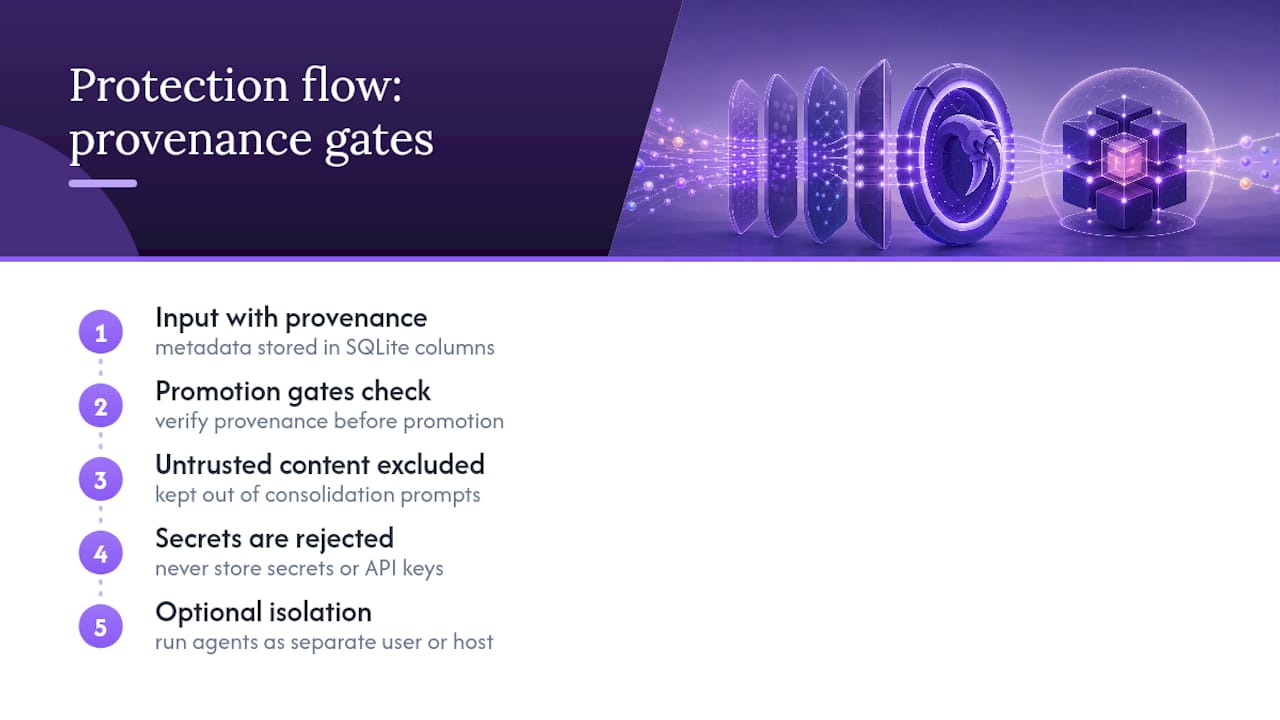
Provenance metadata is stored directly in SQLite columns, and Dreaming's promotion gates check that provenance before anything moves into MEMORY.md. Untrusted-origin content is structurally excluded from consolidation prompts, which limits how much a malicious or low-quality input can influence long-term memory. For stricter isolation, run agents under a separate OS user or dedicated host. And treat this as a hard rule regardless of provider: never store secrets, API keys, or credentials in memory files, since they're plaintext by design.
Pro Tip: *If you're in a regulated or multi-user environment, review rememberAcrossConversations settings before going live. Indexing every session transcript by default can capture more than you intend.*
Troubleshooting Common Memory Persistence Issues
Most persistence failures trace back to one of three causes.
memory_searchreturns empty results. Check your embedding provider configuration first, then runopenclaw memory status --deepfor details. If the index looks stale or the provider changed recently, reindex withopenclaw memory index --force.DREAMS.mdshows aborted rewrites. This usually means concurrent edits collided during a deep-phase write. OpenClaw's append-only fallback protects the existing file, so check for competing processes writing to the same workspace.- Context disappears after compaction. Confirm
memory_flushis enabled in your compaction settings and that the workspace remains writable. A silent permissions failure here is one of the more common causes of "the agent forgot everything" reports.
What Actually Works vs. What Sounds Good on Paper
Most guidance on AI agent memory treats it like a scaling problem to be solved with bigger vector databases from day one. That's backwards for the vast majority of OpenClaw deployments. The built-in Markdown plus sqlite-dev combination is genuinely sufficient for a single user running one agent instance, and reaching for Postgres or Redis before you've hit an actual sharing or scale constraint only adds operational surface area you don't need yet.
Where I'd push back on the "set it and forget it" mentality: Dreaming needs to stay enabled and its output needs occasional human eyes, not blind trust. Pair that with daily backups and routine index health checks, and a self-hosted setup holds up fine. Once you need multi-instance sharing or a team relying on uptime you can't personally guarantee, that's the point to consider managed hosting instead of debugging permission errors at 2 AM. ClawBase's production experience running OpenClaw for hundreds of deployments shapes that recommendation.
> *— Iosif Peterfi*
Skip the Server Management and Just Run OpenClaw
Everything in this guide, from checking workspace permissions to rebuilding a SQLite index after a provider switch, is real operational work that somebody has to own. A managed hosting option can eliminate that setup burden entirely with one-click OpenClaw deployment on a dedicated, encrypted server, so persistent memory management, daily encrypted backups, and automated updates happen without you touching a config file.

That means no manually verifying dreaming.enabled, no watching for aborted DREAMS.md rewrites at midnight, and no separate infrastructure to patch when a new OpenClaw release ships. Clawbase runs it on your behalf with 99.9% uptime, access to more than 50 AI models, and direct connections to Telegram, Discord, Slack, and WhatsApp, so the memory architecture described above just works in the background. If self-hosting has started to feel like a second job, start with the LITE plan at $16 per month and see whether managed persistence solves the problem faster than another weekend of debugging permissions.
Sources
For CLI syntax, config defaults, and deeper architecture detail, these are the sources this guide draws from directly:
FAQ
What Files Does OpenClaw Use for Persistent Memory?
OpenClaw stores long-term facts in MEMORY.md, user preferences in USER.md, daily context in memory/YYYY-MM-DD.md, and consolidation logs in DREAMS.md. These live in the agent's workspace directory and are fully human-readable.
How Does OpenClaw Decide What to Keep Long-Term?
Dreaming's deep phase promotes content into MEMORY.md only after it passes provenance checks and weighted ranking signals from the consolidation process. Rejected rewrites fall back to append-only writes so nothing gets silently lost.
Do I Need a Vector Database for OpenClaw Memory?
Not for most setups. The built-in SQLite index with sqlite-vec handles single-user and single-instance deployments fine; a dedicated backend like Postgres with pgvector or Qdrant only becomes worthwhile once you need to share memory across multiple agent instances.
How Do I Fix Empty Memory Search Results?
Check your embedding provider configuration first, then run openclaw memory status --deep for diagnostics. If the provider or chunking parameters changed recently, reindex with openclaw memory index --force.
Does Clawbase Handle Memory Persistence Automatically?
Yes. Clawbase's managed OpenClaw hosting includes persistent memory management as a core feature, along with daily encrypted backups and automated updates, so the configuration steps in this guide are handled for you. Pricing starts at $16 per month on the LITE plan.