Reduce Memory Footprint 50%: AI Agent Memory for Developers
2026-09-14

Agent memory is a persistent, structured layer that sits alongside the model's context window, storing facts, past interactions, and learned procedures so an agent can act on them across sessions instead of forgetting everything when the conversation ends. The single highest-priority design decision is treating memory as a multi-tier system with explicit rules for what gets captured, what gets committed permanently, and what gets discarded. Start by instrumenting your traces before you write a single line to durable storage.
***
> TL;DR:
>
> - Memory management requires active policies, including capture, analysis, validation, and pruning, to prevent storage from becoming noisy and inefficient.
> - Budget-tier routing directs queries to different retrieval levels, balancing latency and accuracy while degrading gracefully under high load or tight time constraints.
> - Techniques like event merging and triple extraction can significantly compress memory size, reduce costs, and improve retrieval speed without sacrificing accuracy.
> - Building a memory system in-house involves operational challenges such as uptime, backups, and governance rules, whereas managed services like OpenClaw simplify deployment.
> - Many teams wrongly treat context window extension as long-term memory; effective memory systems depend on governance strategies that actively curate and prune records.
***
Table of Contents
- What Is AI Agent Memory, and What Are Its Core Types?
- How Does the Memory Lifecycle Work in Practice?
- How Do You Balance Memory Cost, Latency, and Accuracy at Runtime?
- What Techniques Compress and Prune Growing Agent Memory?
- What's the Right Developer Stack for Agent Memory?
- How Does Managed OpenClaw Hosting Handle Memory in Production?
- What Do Engineers Consistently Get Wrong About Agent Memory?
- Ready to Run a Memory-Enabled Agent Without Managing the Stack?
- Sources
- FAQ
What Is AI Agent Memory, and What Are Its Core Types?
Most developers conflate "memory" with "a longer context window." That's the first mistake. A context window holds tokens for the duration of one run. Memory persists across runs, sessions, and sometimes across users entirely. The distinction matters because the engineering problems are completely different: context management is about token budgets inside a single request, while memory management is about capture, storage, retrieval, and decay over weeks or months.
Researchers typically break agent memory into three functional categories, and this taxonomy is worth internalizing before you write any storage code:
- Factual (semantic) memory: stable facts about the world, the user, or the domain, e.g., "the user's preferred deploy region is us-east-1."
- Experiential (episodic) memory: records of specific past events, e.g., "on March 3, the agent tried approach A, it failed, the user corrected it."
- Working (procedural/short-term) memory: the active scratchpad for the current task, including intermediate reasoning and tool outputs that rarely need to survive the session.
A useful mental model, borrowed from computer architecture, treats the context window as an L1 cache rather than as memory itself. Cache misses trigger a fetch from a slower, larger store, which in an agent's case means a retrieval call to your memory layer. Skip this framing and you get what that research calls "structural waste": stale, low-value tokens crowding out the context space you actually need for reasoning. Recent surveys of agentic memory systems go further, arguing that memory operations should be exposed to the agent as tool-like actions, letting it decide at runtime whether to store, update, or discard a given piece of information rather than hardcoding that logic externally.
How Does the Memory Lifecycle Work in Practice?
Every durable memory record starts as a noisy trace. The lifecycle that turns that noise into something useful runs in four stages, and skipping any one of them is how teams end up with bloated, unreliable memory stores.
- Capture traces. Log the full run: user inputs, tool calls and their arguments, raw outputs, routing decisions, latency per step, errors, and any explicit or implicit user feedback (a correction, a thumbs-down, a repeated question).
- Analyze for signal. Not every trace deserves to become memory. Run heuristics (keyword flags, repeated-topic detection) and eval-triggered rules (did the task succeed? did the user push back?) to separate noise from candidates worth keeping.
- Decide and commit. Apply a commit rule: does this fact pass a validation eval, does it have a time-to-live, does it conflict with an existing record? Version the record so you can roll back a bad commit.
- Retrieve and integrate. At runtime, pull relevant memory through whichever pathway fits: retrieval-augmented generation for fuzzy semantic matches, direct API or database queries for structured facts, or a hybrid of both.
The LangChain team's own implementation notes describe this read-write cycle well: memory isn't a passive log, it's an active loop where the runtime writes to storage and reads back from it within the same architecture that handles tool calls.
Pro Tip: *Don't commit memory synchronously inside your main agent loop. Run the analyze-and-commit step as an async background job. It keeps your response latency predictable and lets you batch validation evals instead of running them one trace at a time.*

How Do You Balance Memory Cost, Latency, and Accuracy at Runtime?
Every memory lookup costs tokens, time, or both. The naive approach, retrieving everything relevant on every turn, works fine in a demo and falls apart in production once you have thousands of users generating thousands of memory records each.
The pattern gaining traction is budget-tier routing: classify each incoming query by how much memory processing it actually needs, then route it to a matching tier.
- Low tier: simple, cached working memory or a quick keyword match. No vector search, no graph traversal.
- Mid tier: standard vector similarity search against a curated memory index.
- High tier: full retrieval, including knowledge-graph traversal, multi-hop reasoning, or cross-session aggregation, reserved for queries that clearly need historical depth.
A lightweight router sits in front of this decision, classifying the query before any heavy retrieval happens. Research on query-aware budget-tier routing frames this explicitly as a Low/Mid/High structure, where the router's job is balancing task performance against memory construction cost rather than defaulting every query to maximum retrieval.
Fallback behavior matters just as much as the routing logic itself. When your budget is tight (a burst of concurrent users, a latency SLA you're close to breaching), degrade gracefully: fall back to working memory only, skip the knowledge-graph hop, and flag the response as lower-confidence rather than timing out or hallucinating a fact you can't retrieve in time.
The practical implication for teams building at scale is straightforward: budget-tier routing turns a strategy that reads well in a paper into a production lever that directly caps your per-query token spend without a proportional hit to task accuracy.
What Techniques Compress and Prune Growing Agent Memory?
Unbounded memory growth is the quiet failure mode nobody notices until retrieval latency creeps up and answers start pulling stale, irrelevant context. This is sometimes called "context rot," and it's a direct consequence of never pruning.
Two research-backed approaches address this directly:
- Event-centric partitioning with progressive merging. Instead of storing memory as one flat log, group related events into a tree structure, then periodically merge older branches into denser, summarized nodes. MemForest's approach using EventTree partitioning compressed historical memory by roughly 50% while retaining 97.1% of task performance on unimodal benchmarks, with retrieval running up to 1.89 times faster (2.24 times for multimodal setups).
- Semantic triple extraction plus conversation summaries. Convert raw dialogue into compact subject-predicate-object triples linked to a running summary, rather than storing full transcripts. Memori's Advanced Augmentation method reported 81.95% accuracy on the LoCoMo benchmark using around 1,294 tokens per query, roughly 5% of a full-context approach.
Beyond those two techniques, a few operational heuristics keep memory stores healthy:
- Set time-to-live values on episodic records; most conversational context loses relevance within weeks.
- Deduplicate aggressively before commit, not after. Two records saying the same thing in slightly different words waste retrieval slots.
- Track retrieval precision over time. A drop signals your memory store needs pruning, not more storage.
What's the Right Developer Stack for Agent Memory?
The infrastructure decision usually comes down to local-first versus managed, and the trade-off is real rather than a matter of taste. A SQLite-backed vector store paired with pgvector or LanceDB avoids vendor lock-in and, according to benchmarks from local-first persistent memory implementations, can hit p50 retrieval latencies around 70 milliseconds. Managed vector databases trade some of that portability for less operational overhead, which matters once you're running memory for more than a handful of users.
A few practical rules regardless of which path you choose:
- Chunk memory records by semantic unit (one fact, one event) rather than by arbitrary character count.
- Pin your embedding model version. Swapping embedding models without re-indexing silently breaks similarity search.
- Combining vector search with a structured graph layer, an approach used by hybrid memory middleware products, preserves relationship semantics that pure vector similarity misses.
- Orchestration frameworks like LangChain give you the read-write scaffolding, but the commit-eval logic that decides what's worth keeping is still yours to build.
For monitoring, track recall@k against a held-out set of known facts, retrieval latency at p50 and p95, token consumption per query, and regression checks that flag when a new commit degrades an existing memory record instead of improving it.
Pro Tip: *Run a weekly regression eval against a fixed set of "known good" memory queries. It's the cheapest way to catch silent decay before a user notices the agent forgot something it used to know.*
How Does Managed OpenClaw Hosting Handle Memory in Production?
Building the pipeline above from scratch means owning uptime, backups, model routing, and the sysadmin work of keeping a vector store patched and available. A managed OpenClaw deployment through Clawbase handles persistent memory management alongside 99.9% uptime, daily encrypted backups, and routing across more than 50 supported AI models, without requiring you to run your own infrastructure.
For teams that want the architectural detail, Clawbase's own notes on OpenClaw memory management walk through how the agent retains context across sessions, and the step-by-step tutorial covers getting a memory-enabled agent running end to end.
What Do Engineers Consistently Get Wrong About Agent Memory?
The recurring mistake: treating the context window as long-term memory and hoping a bigger window solves recall. The second: persisting every trace instead of gating commits through evals, which floods retrieval with noise. Fix both with budget-tier routing, commit-eval gates, and active token monitoring.
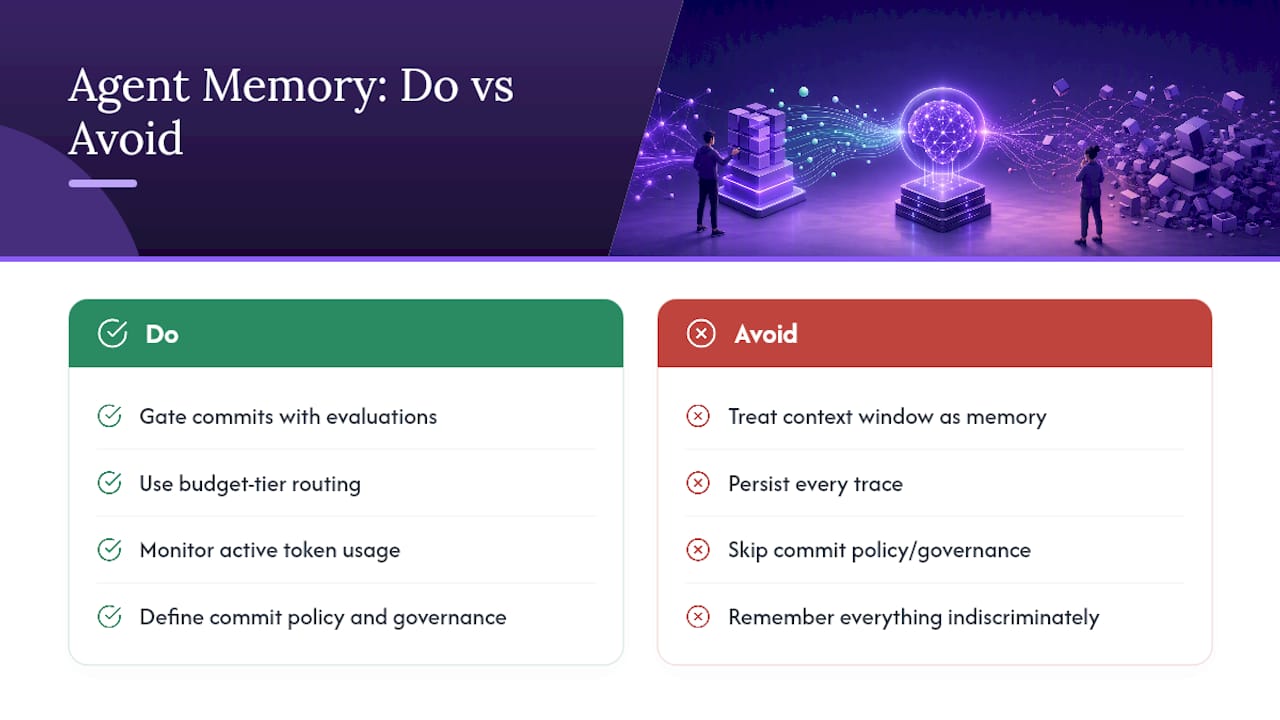
Most teams building their first memory-enabled agent skip straight to picking a vector database, as if the storage layer were the hard part. It isn't. The hard part is the governance layer nobody wants to build: the rules that decide what gets written, how long it lives, and when it gets pruned. I'd argue this is why so many "memory-enabled" agents feel unreliable in practice, not because the underlying retrieval technology is weak, but because nobody defined a commit policy, so the store fills with low-signal noise that actively degrades retrieval quality over time.
The BudgetMem and MemForest research both point at the same underlying truth from different angles: memory that isn't actively managed against a cost or quality budget becomes a liability, not an asset. A system that remembers everything indiscriminately is functionally worse than one with a tight, well-curated memory, because retrieval precision drops as the noise floor rises. If you take one architectural principle from the current research, take this: memory management is a governance problem before it's a storage problem, and the teams that treat it that way ship agents that actually feel like they remember, instead of agents that just have bigger logs.
> *— Iosif Peterfi*
Ready to Run a Memory-Enabled Agent Without Managing the Stack?
Everything covered above, the capture pipeline, the commit gating, the vector store, the pruning jobs, is infrastructure you'd otherwise build and maintain yourself. A managed hosting service can provide a private, always-on OpenClaw agent with persistent memory management built into the hosting, so the commit-and-retrieve loop runs without needing to set up databases, servers, or backup schedules yourself.

The platform connects to Telegram, Discord, Slack, and WhatsApp, routes across more than 50 AI models, and runs on dedicated, encrypted servers with 99.9% uptime and daily backups, all without requiring sysadmin skills. If you're evaluating what a memory-enabled agent can actually do once it's deployed, the OpenClaw use-cases page walks through real workflows people run today. Teams weighing this against building AI workflows in-house should also note the productivity gains documented in industry research on AI adoption, which tracked meaningful ROI from agencies automating repetitive work. Start with the 7-day trial and see how persistent memory behaves under your own workload before committing to a plan.
Sources
- Memory in the Age of AI Agents: A Survey — ACL 2026
- Learning Query-Aware Budget-Tier Routing for Runtime Agent Memory (BudgetMem) — arXiv 2026
FAQ
What Is the Difference Between Context and Memory in AI Agents?
Context is the token window active during a single run; memory is a persistent store that survives across sessions and gets retrieved on demand, functioning more like an L1 cache feeding from a larger, slower backing store.
What Are the Main Types of AI Agent Memory?
The three functional categories are factual (semantic) memory for stable facts, experiential (episodic) memory for specific past events, and working (procedural/short-term) memory for the active task scratchpad.
How Much Can Memory Compression Reduce Storage Costs?
Event-tree partitioning with progressive merging, as shown in MemForest's research, compressed historical memory by roughly 50% while retaining 97.1% of task performance and improving retrieval speed by up to 1.89 times.
Should I Build Persistent Memory Myself or Use a Managed Host?
Building it yourself gives full control over storage and retrieval logic but means owning uptime, backups, and infrastructure maintenance; a managed OpenClaw deployment through Clawbase handles persistent memory, model routing, and backups without requiring sysadmin work.
What Is Budget-Tier Routing in Agent Memory Systems?
It's a runtime pattern that classifies incoming queries into Low, Mid, or High tiers based on how much memory processing they need, letting a lightweight router balance retrieval accuracy against token cost.