Developers: Copy-Paste OpenClaw Model Routing, JSON, CLI & Thresholds
2026-09-22

Route cheap, routine tasks to a low-cost primary model and hold a higher-tier "thinking" model in reserve for anything that requires deeper reasoning. Set agents.defaults.model.primary, add at least one entry to agents.defaults.model.fallbacks, and either configure a thinking model or turn on ModelRouter for automatic escalation. Restart the gateway after any config change. The sections below walk through the exact JSON, the CLI commands, and the debugging steps that make this stick in production.
***
> TL;DR:
>
> - Using a simple two-model chain with a default and fallback typically reduces API costs while handling most routine requests effectively.
> - Enabling ModelRouter with conservative thresholds for retries and tool calls ensures escalation only occurs when genuinely necessary, avoiding unnecessary expenses.
> - Regularly verifying provider configuration, session state, and restart procedures address most zero-token or wrong-model issues quickly.
> - Monitoring signals like fallback frequency, error patterns, and escalation rates helps fine-tune routing tiers over time for optimal cost and response quality.
> - Clawbase's managed hosting simplifies setup, reduces ongoing maintenance, and provides built-in observability to support multi-model routing at scale.
***
Table of Contents
- What Is OpenClaw Model Routing, and How Does It Choose a Model?
- How Do I Configure Model Defaults, Fallbacks, and Aliases?
- Should You Use Two-Tier Routing or Full Escalation?
- How Do I Enable and Test ModelRouter Safely?
- Why Is OpenClaw Sending 0 Tokens or Using the Wrong Model?
- What Should You Monitor to Tune Routing Over Time?
- Security Considerations in Model Routing Configurations
- Integration With External Monitoring and Alerting Systems
- How Does OpenClaw's Routing Algorithm Actually Work?
- How Does OpenClaw Routing Compare to Other Approaches?
- The Rollout Order That Actually Works
- Skip the Sysadmin Work With ClawBase's Managed OpenClaw Hosting
- Sources
- FAQ
What Is OpenClaw Model Routing, and How Does It Choose a Model?
OpenClaw model routing is the logic that decides which AI model handles a given request, and it follows a strict, predictable order rather than picking arbitrarily. When an agent needs to respond, OpenClaw checks agents.defaults.model.primary (or the shorter agents.defaults.model) first. If that model is unreachable or errors out, it walks down the agents.defaults.model.fallbacks list. Auth failover happens *inside* a provider before OpenClaw ever moves to the next model in that list, according to the OpenClaw docs on models. That distinction matters: a rotated API key or a cooling profile gets retried within the same provider first, and only after those options are exhausted does OpenClaw try the next model entirely.
A few primitives make this system flexible instead of rigid:
- Provider/model refs follow a
provider/modelstring format, soopenai/gpt-4o-miniandanthropic/claude-3-5-haikusit side by side in the same fallback chain without ambiguity. - Aliases let you define a friendly name once (say,
fast) and repoint it later without touching every agent config that references it. - Per-agent overrides let one agent run on a thinking model while another runs on a fast, cheap model, even though both live in the same Gateway process.
- Provider allowlists restrict which providers a given agent can reach, which keeps a support bot from accidentally routing to your most expensive frontier model.
Multi-agent routing builds on top of this. OpenClaw can run several isolated agents inside one Gateway process, and bindings map an incoming channel account (a Telegram bot, a Slack workspace, a Discord server) to the specific agent responsible for it, each with its own workspace, state directory, and session store, per the OpenClaw docs on multi-agent routing. Think of it as a routing table for entire conversations, not just individual model calls: the binding decides *which agent* answers, and that agent's own model.primary and model.fallbacks decide *which model* answers within it.
How Do I Configure Model Defaults, Fallbacks, and Aliases?
Most setups start with a two-model chain: a cheap default and one dependable fallback. Here's a minimal openclaw.json snippet that covers it:
{
  "agents": {
    "defaults": {
      "model": {
        "primary": "openai/gpt-4o-mini",
        "fallbacks": ["anthropic/claude-3-5-haiku"]
      }
    }
  }
}
If a task needs deeper reasoning, add a thinking model and reference it explicitly in a session rather than making it the default for every message:
{
  "agents": {
    "defaults": {
      "model": {
        "primary": "openai/gpt-4o-mini",
        "thinking": "anthropic/claude-3-5-sonnet",
        "fallbacks": ["openai/gpt-4o"]
      }
    }
  }
}
To force the thinking model mid-session, use /model use anthropic/claude-3-5-sonnet -s. The -s flag scopes the switch to that session only; drop it and the switch becomes sticky for future sessions using that agent's config, until you change it again.
Provider wildcard entries (provider/*) are worth knowing early. They keep your allowlist short while letting a provider surface newly released models automatically, without a config edit every time a vendor ships a new checkpoint.
A handful of CLI commands cover nearly everything you'll do day to day:
| Command | Purpose |
|---|---|
| `openclaw models list` | Shows every model currently configured across providers |
| `openclaw models status` | Reports health, auth state, and cooling profiles per model |
| `openclaw models set <provider/model>` | Sets a new default model for an agent |
| `openclaw models scan --no-probe` | Pulls model metadata (like from OpenRouter's catalog) without making live calls |
The --no-probe flag matters for OpenRouter specifically. Scanning OpenRouter's free catalog can run metadata-only, with no API key required, but actually probing model capabilities (context length, tool support, pricing tiers) needs a real key, per the OpenClaw docs on models.
Should You Use Two-Tier Routing or Full Escalation?
A two-tier setup, one cheap model plus one fallback, covers most single-agent workloads and is the right starting point for anyone new to routing. It's simple to reason about, easy to debug, and cheap to run. Multi-tier routing earns its complexity when request volume is high enough that manual model selection becomes a bottleneck, or when task difficulty varies wildly within the same agent, think a support bot that fields both "reset my password" and "audit this 400-line config file" in the same conversation thread.
This is where ModelRouter comes in. Introduced in OpenClaw's gateway PR #54562, ModelRouter implements a fast-fail-then-escalate pattern built around three pieces: RouterConfig (your tier definitions), SignalCollector (the telemetry that watches a request in flight), and EscalationPolicy (the rules that decide when to bump a request to a higher tier). Rather than guessing task difficulty up front, ModelRouter lets the cheap model attempt the work first and escalates only when it detects trouble.
The signals currently implemented include:
maxRetries, capping how many times a model can fail before escalation triggersmaxToolCalls, flagging requests that need more tool invocations than expected for a simple taskerrorPatterns, matching known failure signatures (timeout, malformed output, refusal) that suggest the current model is out of its depthmaxContextGrowth, watching conversation size, though this signal needs additional agent-layer instrumentation to work reliably today
Escalation currently works reliably for HTTP non-streaming flows; streaming responses have some event coverage still pending, according to the same PR notes.
Pro Tip: *Start with conservative thresholds, a maxRetries of 1 and maxToolCalls around 3 to 5, and tighten or loosen them after watching a week of real traffic. Aggressive escalation quietly erases the cost savings routing was supposed to deliver in the first place, since every escalated request bills at the expensive tier's rate.*
How Do I Enable and Test ModelRouter Safely?
Rolling out router-based routing is a sequencing problem more than a technical one. Do the steps in order and each one gives you a checkpoint to confirm before moving to the next.
- Add provider entries for every model you intend to use, including auth credentials and any custom
baseUrlorapifields for non-standard endpoints. - Set
agents.defaults.modelwith a primary and at least one fallback, even if you plan to layer ModelRouter on top, since the router falls back to this chain if tier logic doesn't apply. - Configure auth profiles for each provider, and if you're juggling several providers, consider a policy-scoped key setup like ClawRouter, which discovers and routes to multiple upstream providers under one key rather than managing separate auth plugins for each.
- Enable
agents.defaults.routerwith your tier definitions:
{
  "agents": {
    "defaults": {
      "router": {
        "enabled": true,
        "tiers": [
          { "model": "openai/gpt-4o-mini", "signals": { "maxToolCalls": 4, "maxRetries": 1 } },
          { "model": "anthropic/claude-3-5-sonnet" }
        ]
      }
    }
  }
}- Restart the gateway with
openclaw gateway restart. Config changes to routing rarely take effect on a hot process. - Check
openclaw models statusto confirm every tier model shows healthy, then run a deliberately difficult prompt through a test session to confirm escalation actually fires and lands on the second tier.
A practical routing guide covering real workflows found that teams routing simple queries to cheaper models while reserving frontier models for complex reasoning cut API costs substantially, which is the entire economic case for building tiers instead of running everything on your most capable (and most expensive) model by default.
For live scanning versus metadata-only scans, default to --no-probe during initial setup so you're not burning API calls just to populate a model list, then run a full probe once you've narrowed down which models you'll actually use in production.
Why Is OpenClaw Sending 0 Tokens or Using the Wrong Model?
Most routing failures trace back to one of three causes: the gateway wasn't restarted after a config edit, a provider field is misconfigured, or session state is stale. Work through fixes in this order before assuming something is fundamentally broken.
Start with openclaw gateway restart, then run openclaw doctor --fix, which resolves a surprising share of routing issues automatically, according to the OpenClaw docs on the Models FAQ. If the problem persists, open a fresh session; stale session state can pin a conversation to a model that no longer matches your current config.
Zero-token responses almost always point to a provider misconfiguration, especially with local models. Ollama and similar self-hosted endpoints require the correct api field, api: "openai-responses" for example, and a valid baseUrl. Get either wrong and the request round-trips with an empty response instead of a clear error.
- Verify
baseUrlandapifields for every custom provider entry. - Check
openclaw models statusforauth.unusableProfiles, which flags credentials in a cooling period after repeated failures. - If a model seems permanently stuck on a fallback, force a re-probe with
openclaw models scan(without--no-probe) rather than assuming the primary model is actually down.
Pro Tip: *If you explicitly select a model with /model use, OpenClaw treats that choice as strict. It fails visibly rather than silently falling through to your configured fallbacks, per the OpenClaw docs on the Models FAQ. That's useful for forcing an exact provider during testing, but it also means a mistyped model name in a /model use command won't quietly recover, it'll just error.*
What Should You Monitor to Tune Routing Over Time?
Routing decisions are invisible unless you're watching for them, and the signals worth tracking are the same ones ModelRouter uses internally: tool call counts, error patterns, retry counts, context-size growth, and model transition events. Each one tells you something different about whether your tiers are calibrated correctly.
- Tool call counts rising above your
maxToolCallsthreshold suggest tasks are more complex than your tier assumed. - Error patterns clustering on one model often mean a prompt template or provider quirk, not a routing failure.
- Retry counts climbing steadily are an early warning that a model is struggling before it technically fails.
- Context-size growth matters most in long conversations, where a cheap model can start losing coherence well before it throws an error. This signal currently needs additional agent-layer events emitting context size and retry counts to the gateway event bus for reliable measurement, per the router PR's own notes.
- Model transition events are your ground truth for how often escalation actually fires, which tells you whether your thresholds are too loose (expensive) or too tight (frustrating for users stuck on an underpowered model).
| What to track | Why it matters | Where it shows up |
|---|---|---|
| Escalation rate | High rate erodes cost savings | Model transition events |
| Fallback frequency | Frequent fallbacks signal provider instability | `openclaw models status` |
| Retry clustering | Early sign of a struggling tier | Retry counts per model |
| Context growth | Predicts quality drop before errors appear | Agent event bus (once instrumented) |
A basic dashboard correlating tier hits against escalation outcomes gives you the cost/quality tradeoff in one view: how often you're paying for the expensive model, and whether that spend is actually buying better answers or just covering for an undertuned cheap tier.
Security Considerations in Model Routing Configurations
Every additional model in your fallback chain is another credential surface to manage, and routing configs tend to sprawl faster than teams expect. A few practices keep that sprawl from becoming a liability.
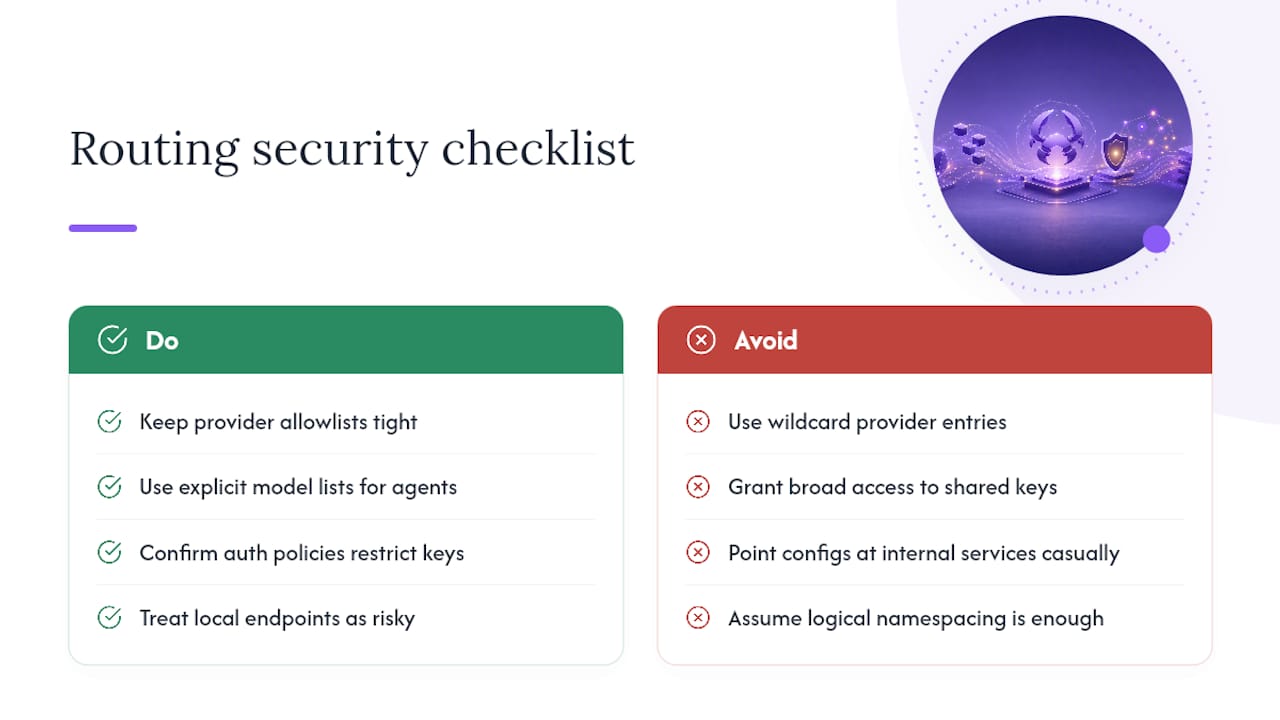
Keep provider allowlists tight. A wildcard entry like provider/* is convenient, but it also means a newly released model from that provider becomes reachable the moment it's discoverable, without a review step. For agents handling sensitive data, an explicit model list beats a wildcard every time, even though it means more config maintenance.
Auth profiles deserve the same scrutiny as any other credential store. If you're using a shared key setup like ClawRouter to manage multiple providers under one policy-scoped key, confirm that policy actually restricts which models and providers that key can reach, rather than granting broad access for convenience. A single leaked key should never translate into unrestricted access across every provider you've configured.
Local model endpoints carry their own risk. A misconfigured baseUrl pointing at an internal service can expose that endpoint to a wider blast radius than intended if the agent handling it has permissive tool access. Treat every baseUrl entry as something worth a second look before deployment, especially for agents that can execute code or touch the file system.
Finally, session and state isolation between agents matters more once you're running multiple bindings in one Gateway process. Confirm that per-agent workspaces and session stores are genuinely separated, not just logically namespaced, so a compromised binding in one channel can't read another agent's conversation history or credentials.
Integration With External Monitoring and Alerting Systems
OpenClaw's own telemetry (model transitions, retry counts, error patterns) tells you what's happening inside the routing layer, but it's only useful once it reaches a system you actually watch. Piping these signals into your existing observability stack, whether that's a metrics platform, a logging pipeline, or an alerting tool, turns routing telemetry from a debugging aid into an early warning system.
The practical approach is to treat model transition events and error patterns as structured log lines or metrics you can ingest with standard tooling, then set alerts on the thresholds that matter for your workload: escalation rate exceeding a set percentage over an hour, a spike in auth.unusableProfiles entries, or a provider suddenly accounting for a disproportionate share of fallback traffic.
Alert fatigue is the real risk here. Routing systems generate a lot of low-stakes noise, an occasional fallback to a backup model is normal, not an incident. Reserve paging-level alerts for patterns that indicate systemic trouble: a provider going fully unreachable, escalation rates climbing well past your baseline, or a model chain collapsing all the way to its final fallback repeatedly within a short window.
If you're using managed hosting services, this correlation work can be handled as part of an observability layer that ships with the platform, which matters if your team would rather watch a dashboard than build one. Teams self-hosting OpenClaw typically wire this up through whatever alerting stack they already run for the rest of their infrastructure, since routing telemetry behaves like any other application metric once it's exported.
How Does OpenClaw's Routing Algorithm Actually Work?
Underneath the config, OpenClaw's routing algorithm is best understood as a priority-ordered decision tree rather than a scoring model or a learned classifier. There's no machine learning model deciding which provider handles a request; it's deterministic logic evaluated in a fixed order.
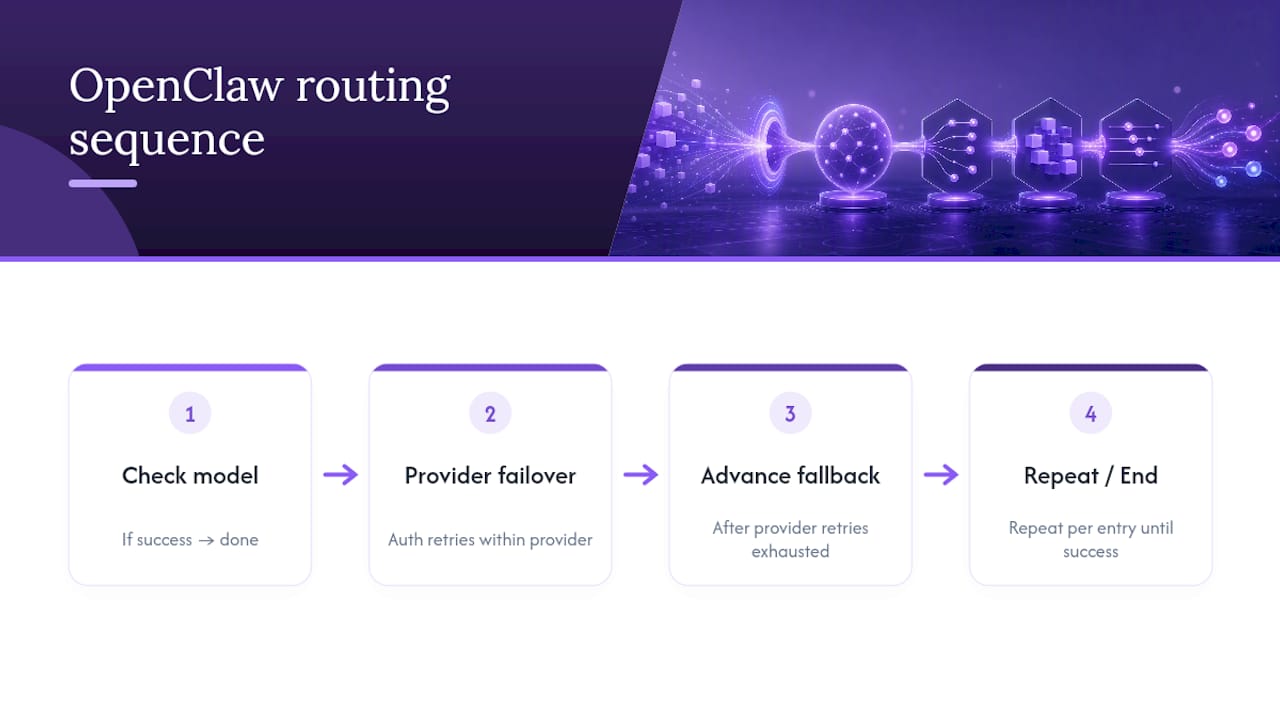
The sequence runs like this: check agents.defaults.model.primary first. If that model responds successfully, routing is done. If it fails, OpenClaw doesn't immediately jump to the next model in the fallback list, it first attempts auth failover *within* that same provider, per the OpenClaw docs on models. Only after provider-level retries are exhausted does the algorithm advance to the next entry in agents.defaults.model.fallbacks, repeating the same internal failover check at each step.
ModelRouter layers a second decision process on top of this base algorithm, one built around observable signals rather than fixed positions in a list. Instead of "try model A, then model B," ModelRouter's EscalationPolicy asks "has this request crossed a threshold, retries, tool calls, error pattern match, that suggests the current tier is insufficient?" If yes, it escalates to the next tier defined in RouterConfig. If no, it lets the current model keep working.
The distinction is worth internalizing: the base fallback algorithm reacts to hard failures (a model is unreachable or errors out), while ModelRouter's escalation logic reacts to soft signals of struggle (a model is technically responding but showing signs it's out of its depth). Both algorithms can run simultaneously, fallback as the safety net, router escalation as the quality/cost tuning layer, without conflicting, because they trigger on different conditions.
How Does OpenClaw Routing Compare to Other Approaches?
Most AI orchestration frameworks handle model routing one of two ways: a static rules engine that maps request types to models based on classifier output, or a broker layer that sits entirely outside the model-serving infrastructure and makes routing decisions before a request ever reaches an agent.
OpenClaw's approach differs by keeping routing close to the agent's actual execution context rather than treating it as a pre-request classification problem. The base fallback chain is deterministic and provider-aware, it understands the difference between "this API key is cooling down" and "this model is fundamentally unreachable," which a purely external broker typically can't distinguish without duplicating a lot of provider-specific logic. ModelRouter's signal-based escalation goes further by watching *during* execution rather than deciding purely up front, catching cases where a task looked simple at submission time but turned out to need more capability partway through.
The tradeoff is that OpenClaw's router is still maturing. A mature external routing broker with years of production hardening may offer more polished dashboards out of the box. What OpenClaw offers instead is routing logic that lives inside the same system running your agents, which means less integration glue and fewer places for provider state to drift out of sync between your routing layer and your actual model calls.
For teams that want the routing benefits without maintaining any of this infrastructure themselves, that's precisely the gap a managed hosting layer is built to close.
The Rollout Order That Actually Works
Start conservative: get a primary plus a thinking model running first, and measure how often you'd have wanted escalation before you build the router logic to do it automatically. Adding tiers before you understand your own traffic pattern just adds complexity you can't yet tune correctly.
Automate your monitoring early, and keep your model allowlist small. Every additional model in a fallback chain is one more thing that can silently misbehave, and a compact list is dramatically easier to reason about during an incident.
Roll router threshold changes out gradually, behind a flag if you can, rather than pushing new escalation rules to every agent simultaneously.
> *— Iosif Peterfi*
Skip the Sysadmin Work With ClawBase's Managed OpenClaw Hosting
Everything in this guide, the openclaw.json edits, the gateway restarts, the auth profile debugging, is real work that someone on your team has to own indefinitely. Clawbase eliminates that ownership burden by running OpenClaw for you on a dedicated, encrypted server with one-click deployment, so multi-model routing across more than 50 supported models comes configured and observable from day one instead of something you build and maintain yourself.

That means no manual openclaw doctor --fix sessions at 2 a.m., no provider auth rotation to babysit, and no gateway restarts you have to remember to schedule. Plans start with LITE at $16 per month, scale through PRO, and top out at MAX for teams running heavier multi-agent workloads, each available monthly or at a discounted annual rate.
If you'd rather see what routed, multi-agent OpenClaw actually does in practice before committing, check the OpenClaw use cases page for real applications, then head to pricing to pick the plan that matches your routing needs.
Sources
For deeper reading beyond this guide, start with the OpenClaw docs on models and multi-agent routing, review the ModelRouter PR directly, and see Clawbase's own multi-model routing walkthrough for a hands-on implementation path.
FAQ
What model should I use with OpenClaw?
There's no single right model. Set a cheap, fast model as agents.defaults.model.primary for routine tasks, and reserve a stronger model as a thinking model or top router tier for complex reasoning. The OpenClaw docs on models cover the exact config fields.
How does model routing work in OpenClaw?
OpenClaw checks agents.defaults.model.primary first, retries within that provider on auth failure, then walks down agents.defaults.model.fallbacks if the model stays unreachable. ModelRouter adds a second layer that escalates to a higher tier based on signals like retries and tool call counts, as detailed in the gateway's ModelRouter PR.
How do I configure models in OpenClaw?
Edit agents.defaults.model in your openclaw.json with a primary model and a fallbacks array, then restart the gateway with openclaw gateway restart. Use /model use to switch models within a single session without changing the config, per the OpenClaw docs on models FAQ.
Can OpenClaw use local models?
Yes, through providers like Ollama, but you need the correct api field (such as api: "openai-responses") and a valid baseUrl, since misconfigured provider fields are a common cause of zero-token responses with local model setups.
What does Clawbase cost for running OpenClaw with routing enabled?
Clawbase's LITE plan starts at $16 per month or $199 per year, with PRO and MAX tiers available for heavier multi-agent or routing workloads. Full details and current pricing are on the Clawbase pricing page.