Cloud-Hosted AI Assistant Explained for Professionals
2026-06-12

A cloud-hosted AI assistant is an autonomous virtual agent that runs continuously on remote cloud infrastructure, executing tasks independently of your local hardware. The industry term for this category is "cloud AI agent," though "cloud-hosted AI assistant" captures the same concept for general audiences. Unlike Google Assistant or Apple Siri, which respond reactively on your device, cloud-hosted agents like Google Gemini Spark and OpenClaw operate on dedicated virtual machines (VMs) that stay active around the clock. They plan, schedule, and complete multi-step workflows whether your laptop is open or not. This article breaks down how they work, what makes them different, and where they deliver real value in daily and professional workflows.
How does a cloud-hosted AI assistant work?
A cloud-hosted AI assistant runs on a dedicated virtual machine in the cloud that persists independently of your device state, enabling proactive, long-horizon task execution and continuous monitoring. This is the architectural fact that separates it from every browser tab or mobile app you have ever used for AI assistance.
The core components of this architecture include:
- Dedicated cloud VM: The agent lives on a server that never sleeps. Google Gemini Spark, for example, runs 24/7 on dedicated Google Cloud VMs, continuously executing tasks even when user devices are off.
- Agent runtime: A harness like Google's Antigravity manages planning, scheduling, tool calls, retries, and persistent state. Think of it as the operating layer between the AI model and the outside world.
- Model Context Protocol (MCP): This open standard lets the assistant securely connect to third-party apps without exposing raw credentials to the AI model itself. MCP is the reason an agent can book a meeting in your calendar or pull data from a project management tool without you handing over your password.
- Persistent memory: Unlike a stateless chatbot that forgets everything when you close the tab, a cloud agent maintains context across sessions. This is what enables multi-day task execution and reliable scheduled reporting.
- Separated inference and execution: The AI model handles reasoning; the runtime handles tool calls and state. This separation keeps the system modular and auditable.
The contrast with browser-based assistants is sharp. A reactive assistant waits for your prompt, generates a response, and stops. A cloud-hosted agent receives a goal, breaks it into steps, executes those steps using connected tools, handles errors autonomously, and delivers results on a schedule you define.
Pro Tip: *When evaluating a cloud AI assistant, ask specifically whether it uses a persistent VM or a serverless function. Serverless functions spin down between calls and cannot maintain the continuous state required for true autonomous operation.*

What are the benefits of cloud AI assistants over local options?
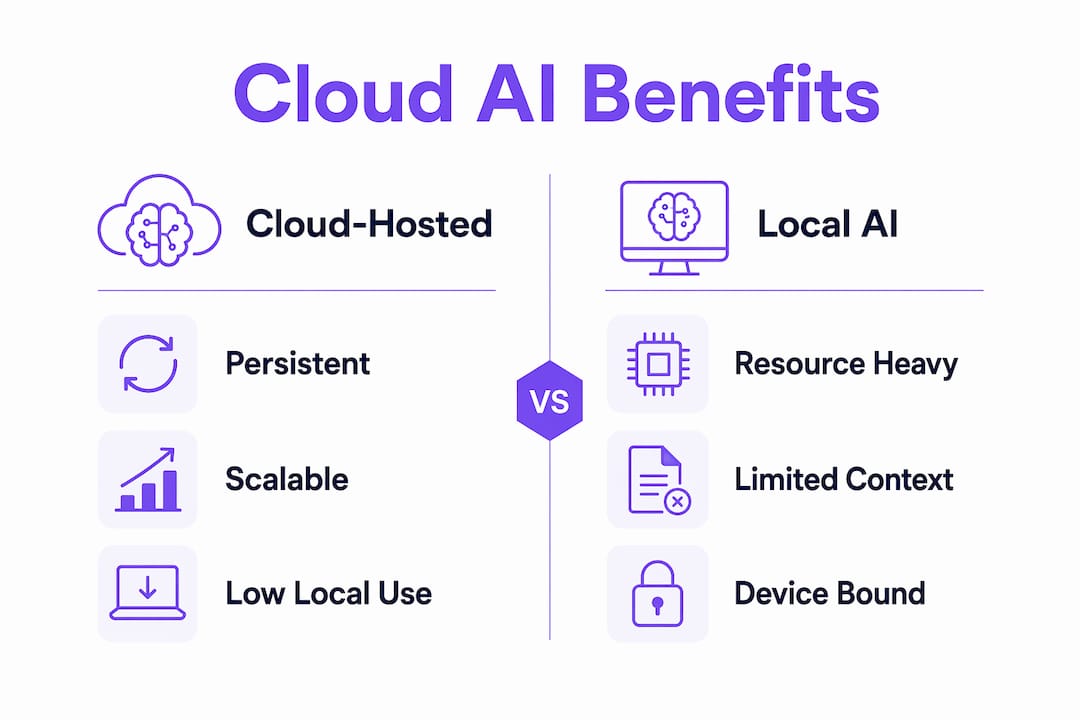
The practical advantages of a cloud-based virtual assistant over a device-bound one come down to four properties: availability, capability, consistency, and resource efficiency.
- Always-on operation. Cloud-hosted agents enable continuous operation even when devices are locked or offline. A local AI assistant stops the moment your laptop sleeps. A cloud agent keeps monitoring your inbox, flagging deadlines, and queuing actions through the night.
- Long-context reasoning at scale. Complex workflows, such as synthesizing a week of emails into a status report or cross-referencing financial data across multiple spreadsheets, require more compute than most consumer devices can sustain. Cloud infrastructure handles this without throttling.
- No local resource drain. Cloud processing offloads compute and memory to remote servers, which means lower battery drain, less CPU load, and a faster device for everything else you are doing. The AI does its heaviest work somewhere else.
- Persistent memory across sessions. The agent remembers what it was doing. You can assign a recurring task on Monday and receive a structured report every Friday without re-explaining the context each time. This is table stakes for any professional workflow.
- Wide app integrations. Through protocols like MCP, cloud agents connect to tools like Google Workspace, Telegram, Discord, Canva, and OpenTable. The assistant becomes a coordination layer across your entire software stack, not just a single-app feature.
- Hybrid flexibility. Hybrid AI setups combining local AI for privacy-sensitive tasks and cloud-hosted agents for complex, long-running workflows represent the most practical architecture in 2026. You keep sensitive data on-device while delegating heavy lifting to the cloud.
The resource efficiency point deserves emphasis. Running a capable AI model locally requires significant GPU memory and sustained CPU cycles. Most professionals are not carrying a workstation. Cloud hosting removes that hardware ceiling entirely.
How do cloud AI assistants differ from chatbots and AI agents?
These three terms get used interchangeably, but they describe meaningfully different systems. Choosing the right AI type is critical to fulfilling actual business needs, and unclear use-case definitions cause most AI assistant deployment failures.
| AI Type | Behavior | Autonomy Level | Example |
|---|---|---|---|
| Scripted chatbot | Follows fixed decision trees | None | Basic FAQ bot |
| Reactive AI assistant | Responds to prompts, no persistent state | Low | Browser-based ChatGPT session |
| Cloud-hosted AI assistant | Executes multi-step tasks, maintains state | Medium to high | Google Gemini Spark |
| Autonomous AI agent (GaaS) | Plans, acts, and adapts independently over time | High | OpenClaw on Clawbase |
A scripted chatbot follows a decision tree. It cannot improvise. A reactive AI assistant, like a standard browser session with a large language model, generates useful responses but loses all context when the session ends. A cloud-hosted AI assistant adds persistence, scheduling, and tool execution on top of that reasoning capability.
The highest tier is what the industry now calls Agentic as a Service (GaaS). GaaS represents a shift from SaaS where users delegate tasks in plain language to agents that handle execution and adapt over time. You are not using a tool. You are delegating an outcome. OpenClaw, when hosted on a managed platform like Clawbase, operates in this tier. You can assign it a goal, and it figures out the steps.
The practical implication: if you need a response, use a chatbot. If you need a workflow completed, you need a cloud-hosted agent.
What are the real-world use cases for cloud-hosted AI assistants?
Concrete applications are where the architecture stops being abstract and starts being useful. Here is where cloud AI assistants deliver measurable value across individual and professional contexts.
Workflow automation and communication:
- Email triage: the agent reads, categorizes, and drafts responses to incoming messages based on rules you define
- Status report generation: it pulls data from project tools and compiles structured updates on a schedule
- Meeting scheduling: it checks calendars, proposes times, and sends invites without your involvement
Third-party app actions:
AI agents can autonomously interact with multiple apps and deliver consistent, scalable results 24/7. In practice, this means booking a restaurant via OpenTable, ordering supplies through Instacart, or generating a design brief in Canva, all triggered by a single instruction.
Monitoring and alerting:
A cloud agent can watch a financial dashboard, a competitor's pricing page, or a regulatory filing system and notify you the moment a threshold is crossed. This kind of continuous monitoring is impossible for a device-bound assistant that requires an active session.
Professional information workflows:
Lawyers, analysts, and researchers use cloud-hosted assistants to extract key clauses from contracts, summarize research papers, and cross-reference data sources. The agent handles the extraction; the professional handles the judgment.
Pro Tip: *The biggest adoption pitfall is the integration gap. An assistant that cannot access your critical apps delivers a fraction of its potential. Before committing to any platform, verify it has native integrations with the tools you actually use daily, not just the tools in its marketing copy.*
Google Gemini Spark is the most prominent consumer example of this architecture in 2026. OpenClaw, hosted through a managed service like Clawbase, brings the same capability to users who want a private, self-directed agent without building the infrastructure themselves. The practical AI agent use cases for this type of system range from personal productivity to business process automation.
Key takeaways
A cloud-hosted AI assistant runs on persistent cloud infrastructure, executes multi-step autonomous tasks, and maintains memory across sessions, making it categorically different from reactive, device-bound AI tools.
| Point | Details |
|---|---|
| Architectural foundation | Cloud agents run on dedicated VMs that stay active regardless of your device state. |
| MCP integration standard | Model Context Protocol enables secure, credential-safe connections to third-party apps. |
| Persistent memory advantage | Session context survives indefinitely, enabling scheduled, multi-day task execution. |
| Hybrid AI is the practical default | Combining local AI for sensitive data with cloud agents for complex tasks is the dominant 2026 approach. |
| Use-case clarity drives success | Deployment failures trace back to unclear task definitions, not technical limitations. |
Why the architecture matters more than the model
I have spent considerable time testing both reactive assistants and cloud-hosted agents, and the gap between them is not subtle. The model quality matters less than most people assume. What actually determines whether an AI assistant is useful in a professional context is whether it can hold state, execute tools reliably, and keep working when you are not watching.
The shift to cloud-hosted architecture is not a marketing upgrade. It is a structural change in what the system can do. When I first started working with OpenClaw on a managed host, the most striking thing was not the quality of its responses. It was the fact that I assigned it a recurring research task on a Tuesday and found a structured summary waiting for me on Thursday morning, with no prompt from me in between. That is a different category of tool.
The MCP standard deserves more attention than it gets in general coverage. It is the piece that makes broad integration safe rather than just possible. Without a sandboxed protocol, connecting an AI agent to your apps means handing it credentials in a way that creates real security exposure. MCP solves that at the architectural level, which is why I consider it a prerequisite for any cloud agent I would recommend to a professional.
My honest concern about the space is the integration gap problem. Platforms that advertise hundreds of integrations often have shallow, read-only connections that cannot actually execute actions. The setup errors that derail deployments almost always trace back to this. Verify write permissions, not just read access, before you build a workflow around any platform.
The hybrid model is where I expect most serious users to land. Local AI for anything sensitive, cloud agents for anything that requires persistence, scale, or cross-app coordination. That split maps cleanly onto how most professional workflows actually divide.
> *— Iosif Peterfi*
Run your own cloud AI agent with Clawbase

Clawbase makes it possible to run OpenClaw, a powerful open-source AI agent, on a dedicated cloud server without touching a single config file. The managed OpenClaw hosting starts at $16 per month and includes one-click deployment, 99.9% uptime, persistent memory management, and access to over 50 AI models. You get a private, always-on agent that connects to Telegram, Discord, and your existing tools through native integrations. No sysadmin skills required. If you want to see what this looks like in practice, the OpenClaw use case library covers everything from automated email workflows to financial monitoring. Getting started takes about five minutes.
FAQ
What is a cloud-hosted AI assistant?
A cloud-hosted AI assistant is an autonomous agent running on a remote cloud server that executes tasks continuously, maintains persistent memory, and integrates with external apps. It operates independently of your local device, unlike reactive assistants that require an active session.
How does a cloud AI assistant differ from ChatGPT?
A standard ChatGPT browser session is stateless and reactive. It responds to prompts and loses context when the session ends. A cloud-hosted AI assistant maintains state across sessions, executes scheduled tasks autonomously, and can take actions in connected apps without waiting for a new prompt.
What is Model Context Protocol (MCP)?
MCP is an open standard that lets cloud AI assistants connect securely to third-party apps without exposing user credentials to the AI model. It enables structured, sandboxed tool interactions that make autonomous app actions both practical and safe.
Can a cloud AI assistant work while my computer is off?
Yes. Cloud-hosted agents run on dedicated virtual machines that operate independently of your device. Google Gemini Spark and OpenClaw on Clawbase both continue executing tasks, monitoring data, and delivering scheduled outputs whether your device is on or off.
What tasks are cloud AI assistants best suited for?
Cloud AI assistants perform best on tasks that are recurring, multi-step, or require cross-app coordination. Email triage, scheduled reporting, calendar management, data monitoring, and third-party bookings are all well within their operational range. For scheduling tasks with an AI assistant, a cloud-hosted agent is the most reliable option available in 2026.